
Unity 发送游戏画面到 Winform
一、首先看一下Unity界面:
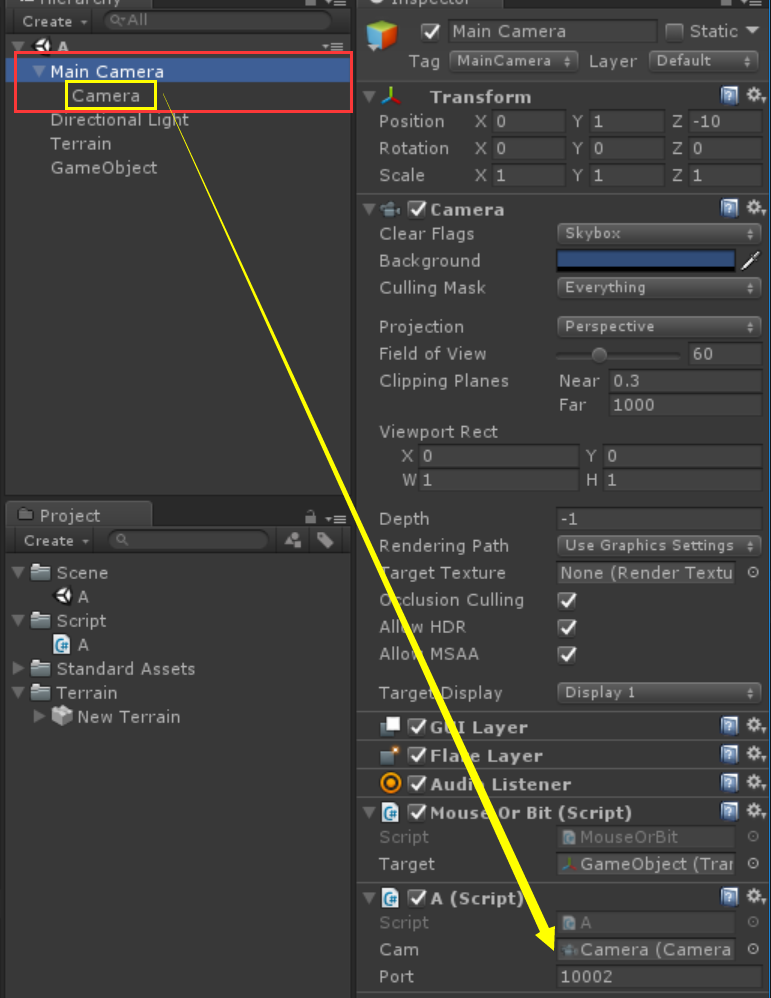
设了2个摄像机,位置重叠,旋转相同,父子关系,在父摄像机上加上脚本A.cs,并将子摄像机复制给A脚本中的变量Cam;
Cam用于为RenderTexture提供画面,Port是Socket监听的端口;
二、A.cs脚本代码(夜太深,改天再补充注释,直接贴代码)
using System;

using System.Collections;

using System.Collections.Generic;

using System.Net;

using System.Net.Sockets;

using System.Threading;

using UnityEngine;

public class A : MonoBehaviour

{

    public Camera cam;

    public int port = ;

    RenderTexture cameraView = null;

    Socket socket = null;

    Thread thread = null;

    bool success = true;

    /// <summary>

    /// 客户端列表

    /// </summary>

    Dictionary<string, Client> clients = new Dictionary<string, Client>();

    Vector3 old_position;//旧位置

    Quaternion old_rotation;//旧旋转

    void Start()

    {

        cameraView = new RenderTexture(Screen.width, Screen.height, );

        cameraView.enableRandomWrite = true;

        cam.targetTexture = cameraView;

        old_position = transform.position;

        old_rotation = transform.rotation;

        socket = new Socket(AddressFamily.InterNetwork, SocketType.Stream, ProtocolType.Tcp);

        socket.Bind(new IPEndPoint(IPAddress.Parse("127.0.0.1"), port));

        socket.Listen();

        thread = new Thread(new ThreadStart(Accept));

        thread.Start();

    }

    int isNewAdd = ;

    void Accept()

    {

        while (thread.ThreadState == ThreadState.Running)

        {

            Socket _socket = socket.Accept();

            if (clients.ContainsKey(_socket.RemoteEndPoint.ToString()))

            {

                try

                {

                    clients[_socket.RemoteEndPoint.ToString()].socket.Shutdown(SocketShutdown.Both);

                }

                catch { }

                clients.Remove(_socket.RemoteEndPoint.ToString());

            }

            Client client = new Client

            {

                socket = _socket

            };

            clients.Add(_socket.RemoteEndPoint.ToString(), client);

            isNewAdd = ;

            Debug.LogError("连接……");

        }

    }

    void Update()

    {

        if (success && clients.Count > )

        {

            success = false;

            SendTexture();

        }

        if (isNewAdd > )

        {

            isNewAdd = ;

            SendTexture();

        }

    }

    void OnGUI()

    {

        GUI.DrawTexture(new Rect(, , , ), cameraView, ScaleMode.StretchToFill);

    }

    void OnApplicationQuit()

    {

        try

        {

            socket.Shutdown(SocketShutdown.Both);

        }

        catch { }

        try

        {

            thread.Abort();

        }

        catch { }

    }

    Texture2D screenShot = null;

    int gc_count = ;

    void SendTexture(int isInit = )

    {

        if ((!old_position.Equals(transform.position) || !old_rotation.Equals(transform.rotation)) || isInit == )

        {

            if (null == screenShot)

                screenShot = new Texture2D(Screen.width, Screen.height, TextureFormat.RGB24, false);

            RenderTexture.active = cameraView;

            screenShot.ReadPixels(new Rect(, , cameraView.width, cameraView.height), , );

            RenderTexture.active = null;

            byte[] bytes = screenShot.EncodeToJPG();

            foreach (var val in clients.Values)

            {

                try

                {

                    val.socket.Send(bytes);

                }

                catch

                {

                    if (!val.socket.Connected)

                        clients.Remove(val.socket.RemoteEndPoint.ToString());

                    break;

                }

            }

            gc_count++;

            if (gc_count > )

            {

                gc_count = ;

                GC.Collect();

            }

            Debug.Log("发送数据:" + (float)bytes.Length / 1024f + "KB");

            old_position = transform.position;

            old_rotation = transform.rotation;

        }

        success = true;

    }

}

class Client

{

    public Socket socket = null;

}
三、Winform端

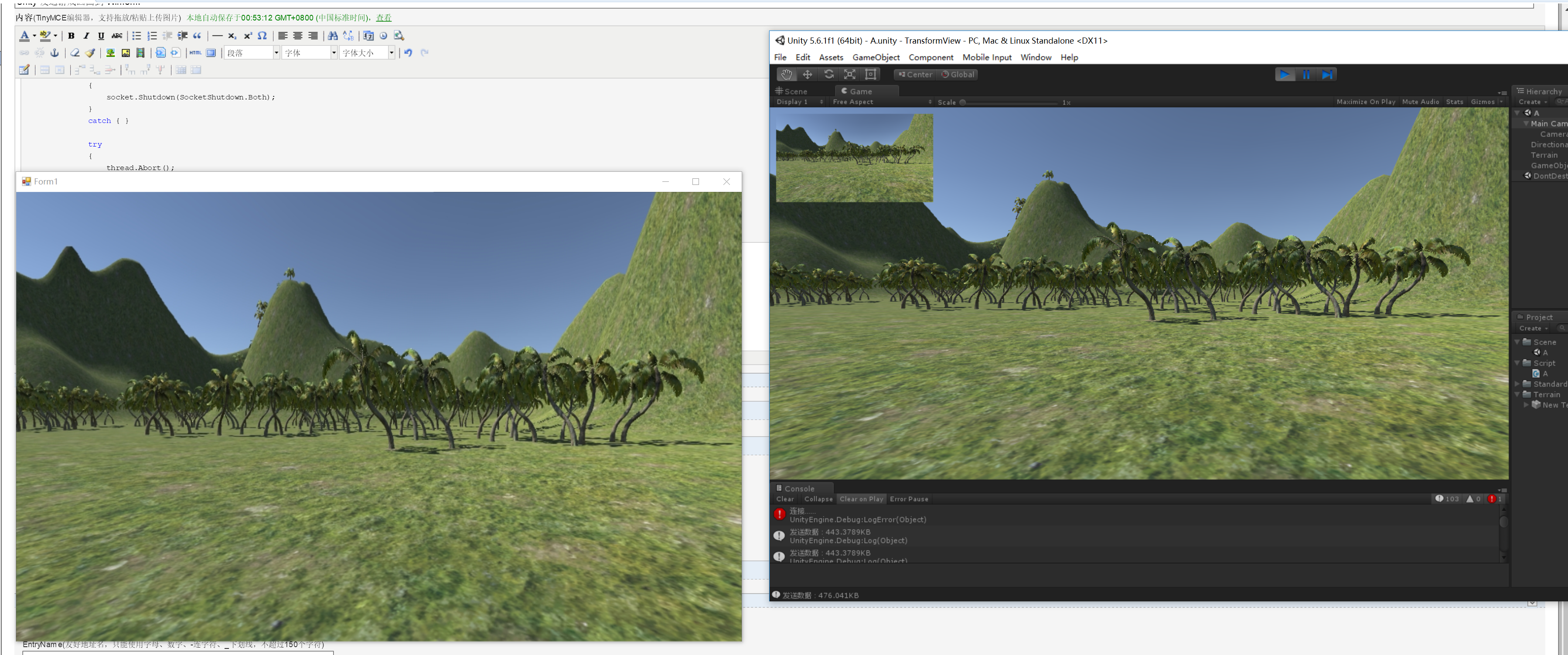
直接拖了个PictureBox放到窗口上,停靠父窗体;
四、Winform代码
using System;

using System.Collections.Generic;

using System.ComponentModel;

using System.Data;

using System.Drawing;

using System.IO;

using System.Linq;

using System.Net;

using System.Net.Sockets;

using System.Text;

using System.Threading;

using System.Threading.Tasks;

using System.Windows.Forms;

namespace TransformViewClient

{

    public partial class Form1 : Form

    {

        bool isOver = false;

        Socket socket = null;

        Thread thread = null;

        byte[] buffer = null;

        bool receState = true;

        int readTimes = ;

        public Form1()

        {

            InitializeComponent();

        }

        private void Form1_Load(object sender, EventArgs e)

        {

            Control.CheckForIllegalCrossThreadCalls = true;

            buffer = new byte[ *  * ];

            socket = new Socket(AddressFamily.InterNetwork, SocketType.Stream, ProtocolType.Tcp);

            socket.Connect(IPAddress.Parse("127.0.0.1"), );

            thread = new Thread(new ThreadStart(Receive));

            thread.Start();

        }

        void Receive()

        {

            while (thread.ThreadState == ThreadState.Running && socket.Connected)

            {

                int count = socket.Receive(buffer);

                if (receState && count > )

                {

                    receState = false;

                    BytesToImage(count, buffer);

                }

            }

        }

        MemoryStream ms = null;

        public void BytesToImage(int count,byte[] bytes)

        {

            try

            {

                ms = new MemoryStream(bytes, , count);

                pictureBox1.Image = Image.FromStream(ms);

                readTimes++;

                if (readTimes > )

                {

                    readTimes = ;

                    GC.Collect();

                }

            }

            catch

            {

            }

            receState = true;

        }

        private void Form1_FormClosing(object sender, FormClosingEventArgs e)

        {

            try

            {

                socket.Shutdown(SocketShutdown.Both);

            }

            catch { }

            try

            {

                thread.Abort();

            }

            catch { }

        }

    }

}
程序里或许有许多bug和缺陷,希望高手指点!
Unity 发送游戏画面到 Winform的更多相关文章
- 关于Unity的游戏的运行模式
游戏有个入口main函数,执行完main函数就返回 main函数中的步骤 1.初始化 2.while(true){ a.检查有没有消息,包括鼠标有没有被点击,键盘有没有被点击,自定义事件等等,有消息就 ...
- 《Unity 3D游戏客户端基础框架》概述
框架概述: 做了那么久的业务开发,也做了一年多的核心战斗开发,最近想着自己倒腾一套游戏框架,当然暂不涉及核心玩法类型和战斗框架,核心战斗的设计要根据具体的游戏类型而定制,这里只是一些通用的基础系统的框 ...
- [生活日记]参与unity非游戏行业开发者大会小结
今天下午花了半天时间公司全体都去人民广场参与了一个unity非游戏行业开发者大会,主要了解到unity这款全球顶尖之一的游戏引擎的一个发展史,从05年三个美国人技术研发开始,一直到12年开始引进中国, ...
- 自制Unity小游戏TankHero-2D(5)声音+爆炸+场景切换+武器弹药
自制Unity小游戏TankHero-2D(5)声音+爆炸+场景切换+武器弹药 我在做这样一个坦克游戏,是仿照(http://game.kid.qq.com/a/20140221/028931.htm ...
- 自制Unity小游戏TankHero-2D(4)关卡+小地图图标+碰撞条件分析
自制Unity小游戏TankHero-2D(4)关卡+小地图图标+碰撞条件分析 我在做这样一个坦克游戏,是仿照(http://game.kid.qq.com/a/20140221/028931.htm ...
- 自制Unity小游戏TankHero-2D(3)开始玩起来
自制Unity小游戏TankHero-2D(3)开始玩起来 我在做这样一个坦克游戏,是仿照(http://game.kid.qq.com/a/20140221/028931.htm)这个游戏制作的.仅 ...
- 自制Unity小游戏TankHero-2D(2)制作敌方坦克
自制Unity小游戏TankHero-2D(2)制作敌方坦克 我在做这样一个坦克游戏,是仿照(http://game.kid.qq.com/a/20140221/028931.htm)这个游戏制作的. ...
- 自制Unity小游戏TankHero-2D(1)制作主角坦克
自制Unity小游戏TankHero-2D(1)制作主角坦克 我在做这样一个坦克游戏,是仿照(http://game.kid.qq.com/a/20140221/028931.htm)这个游戏制作的. ...
- iOS端给unity发送消息,实现两者交互。
上一篇我们简单说了一下unity发消息给iOS端.现在我们就来说一下iOS端给unity发送消息的简单使用. 首先iOS端做得事情其实很简单就一句话,直接上代码 /** * 第一个参数:是unity那 ...
随机推荐
- py3+urllib+bs4+反爬,20+行代码教你爬取豆瓣妹子图
0.准备 所用到的模块: urllib.request,获取源码 beautifulsoup4(bs4),网页抓取数据 安装bs4,python3 -m pip install beautiful ...
- rsync同步官方zabbix仓库搭建本地yum源
1.同步资源 # rsync -vrt rsync://repo.zabbix.com/mirror/zabbix/3.4/rhel/7/x86_64/ /home/mirrors/zabbix/3. ...
- Java -- JDBC 学习--事务
数据库事务 在数据库中,所谓事务是指一组逻辑操作单元,使数据从一种状态变换到另一种状态.为确保数据库中数据的一致性,数据的操纵应当是离散的成组的逻辑单元:当它全部完成时,数据的一致性可以保持,而当这个 ...
- vue实现添加与删除图书
先放大图,当我们点击删除的时候,图书名单就会被我们删掉.当我们重新添加回来或者添加新书的时候,我们只需要在添加新书这里添加即可. 当我点击删除的时候,只需要的就是除却删除的那一个书籍之后剩下的图书. ...
- R语言画棒状图(bar chart)和误差棒(error bar)
假设我们现在有CC,CG,GG三种基因型及三种基因型对应的表型,我们现在想要画出不同的基因型对应表型的棒状图及误差棒.整个命令最重要的就是最后一句了,用arrows函数画误差棒.用到的R语言如下: d ...
- linux command ------ ls
-rw-r--r-- [d]: content [-]: file [l]: link file [b]: interface device for storage in a device file ...
- Arcgis api 离线部署
Arcgis api 离线部署 修改 文件一(init.js)位置:arcgis_js_v317_api\arcgis_js_api\library\3.17\3.17\init.js 将[HOSTN ...
- 在子类中调用父类的方法super
1.没有super之前,在子类里面需要父类里面的逻辑,但是我们是通过派生(自己定义了一个init,增加了一条line) class vehichle:#定义一个交通工具的类 Country=" ...
- golang切片数据结构解释
1. 切片:切片是数组的一个引用,因此切片是引用类型 func main() { var arr = [6]int{1, 2, 3, 4, 5} var slice = arr[1:] fmt.Pri ...
- bzoj千题计划301:bzoj4259: 残缺的字符串
https://www.lydsy.com/JudgeOnline/problem.php?id=4259 令通配符=0 f[i+m-1]=Σ (a[i+j]-b[m-1-j])^2 * a[i+j] ...