
C++使用thread类多线程编程
C++11中引入了一个用于多线程操作的thread类,下面进行简单演示如何使用,以及如果进行多线程同步。
thread简单示例
#include <iostream>

#include <thread>

#include <Windows.h>

using namespace std;

void thread01()

{

    for (int i = ; i < ; i++)

    {

        cout << "Thread 01 is working !" << endl;

        Sleep();

    }

}

void thread02()

{

    for (int i = ; i < ; i++)

    {

        cout << "Thread 02 is working !" << endl;

        Sleep();

    }

}

int main()

{

    thread task01(thread01);

    thread task02(thread02);

    task01.join();

    task02.join();

    for (int i = ; i < ; i++)

    {

        cout << "Main thread is working !" << endl;

        Sleep();

    }

    system("pause");

}
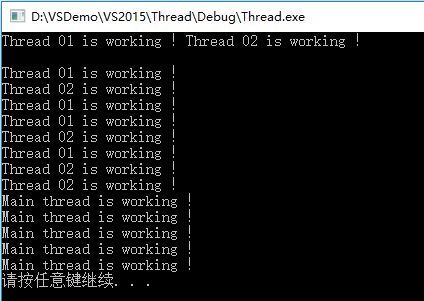
输出:
thread detach不阻塞主线程
两个子线程并行执行,join函数会阻塞主流程,所以子线程都执行完成之后才继续执行主线程。可以使用detach将子线程从主流程中分离,独立运行,不会阻塞主线程:
#include <iostream>

#include <thread>

#include <Windows.h>

using namespace std;

void thread01()

{

    for (int i = ; i < ; i++)

    {

        cout << "Thread 01 is working !" << endl;

        Sleep();

    }

}

void thread02()

{

    for (int i = ; i < ; i++)

    {

        cout << "Thread 02 is working !" << endl;

        Sleep();

    }

}

int main()

{

    thread task01(thread01);

    thread task02(thread02);

    task01.detach();

    task02.detach();

    for (int i = ; i < ; i++)

    {

        cout << "Main thread is working !" << endl;

        Sleep();

    }

    system("pause");

}
输出:
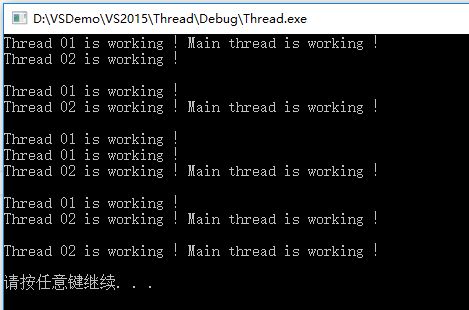
使用detach的主线程和两个子线程并行执行。
thread带参数子线程
在绑定的时候也可以同时给带参数的线程传入参数:
#include <iostream>

#include <thread>

#include <Windows.h>

using namespace std;

//定义带参数子线程

void thread01(int num)

{

    for (int i = ; i < num; i++)

    {

        cout << "Thread 01 is working !" << endl;

        Sleep();

    }

}

void thread02(int num)

{

    for (int i = ; i < num; i++)

    {

        cout << "Thread 02 is working !" << endl;

        Sleep();

    }

}

int main()

{

    thread task01(thread01, );  //带参数子线程

    thread task02(thread02, );

    task01.detach();

    task02.detach();

    for (int i = ; i < ; i++)

    {

        cout << "Main thread is working !" << endl;

        Sleep();

    }

    system("pause");

}
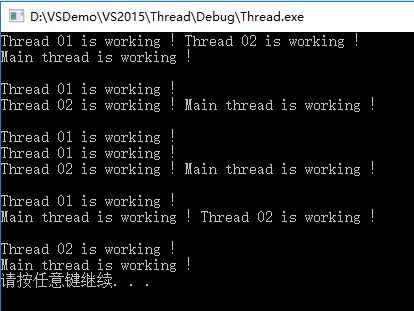
输出:
多线程同步mutex
多个线程同时对同一变量进行操作的时候,如果不对变量做一些保护处理,有可能导致处理结果异常:
#include <iostream>

#include <thread>

#include <Windows.h>

using namespace std;

int totalNum = ;

void thread01()

{

    while (totalNum > )

    {

        cout << totalNum << endl;

        totalNum--;

        Sleep();

    }

}

void thread02()

{

    while (totalNum > )

    {

        cout << totalNum << endl;

        totalNum--;

        Sleep();

    }

}

int main()

{

    thread task01(thread01);

    thread task02(thread02);

    task01.detach();

    task02.detach();

    system("pause");

}
部分输出结果:

有两个问题,一是有很多变量被重复输出了,而有的变量没有被输出;二是正常情况下每个线程输出的数据后应该紧跟一个换行符,但这里大部分却是另一个线程的输出。
这是由于第一个线程对变量操作的过程中,第二个线程也对同一个变量进行各操作,导致第一个线程处理完后的输出有可能是线程二操作的结果。针对这种数据竞争的情况,可以使用线程互斥对象mutex保持数据同步。mutex类的使用需要包含头文件mutex。
#include <iostream>

#include <thread>

#include <Windows.h>

#include <mutex>

using namespace std;

mutex mu;  //线程互斥对象

int totalNum = ;

void thread01()

{

    while (totalNum > )

    {

        mu.lock(); //同步数据锁

        cout << totalNum << endl;

        totalNum--;

        Sleep();

        mu.unlock();  //解除锁定

    }

}

void thread02()

{

    while (totalNum > )

    {

        mu.lock();

        cout << totalNum << endl;

        totalNum--;

        Sleep();

        mu.unlock();

    }

}

int main()

{

    thread task01(thread01);

    thread task02(thread02);

    task01.detach();

    task02.detach();

    system("pause");

}
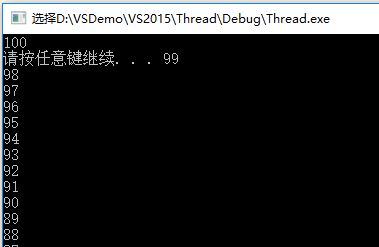
多线程中加入mutex互斥对象之后输出正常:
C++使用thread类多线程编程的更多相关文章
- C++ thread类多线程编程
https://blog.csdn.net/dcrmg/article/details/53912941 多线程操作的thread类,简单多线程示例: #include <iostream> ...
- thread模块—Python多线程编程
Thread 模块 *注:在实际使用过程中不建议使用 thread 进行多线程编程,本文档只为学习(或熟悉)多线程使用. Thread 模块除了派生线程外,还提供了基本的同步数据结构,称为锁对象(lo ...
- C++使用thread类进行多线程编程
C++11中引入了一个用于多线程操作的thread类,简单多线程示例: #include <iostream> #include <thread> #include <W ...
- Java基础-多线程编程-1.随便选择两个城市作为预选旅游目标。实现两个独立的线程分别显示10次城市名,每次显示后休眠一段随机时间(1000ms以内),哪个先显示完毕,就决定去哪个城市。分别用Runnable接口和Thread类实现。
1.随便选择两个城市作为预选旅游目标.实现两个独立的线程分别显示10次城市名,每次显示后休眠一段随机时间(1000ms以内),哪个先显示完毕,就决定去哪个城市.分别用Runnable接口和Thread ...
- 实验六 多线程编程 1.随便选择两个城市作为预选旅游目标。实现两个独立的线程分别显示10次城市名,每次显示后休眠一段随机时间(1000ms以内),哪个先显示完毕,就决定去哪个城市。分别用Runnable接口和Thread类实现。
//继承Thread类 package zuoye; //继承Thread类 public class City extends Thread{ private String name; public ...
- Java并发编程:Thread类的使用
Java并发编程:Thread类的使用 在前面2篇文章分别讲到了线程和进程的由来.以及如何在Java中怎么创建线程和进程.今天我们来学习一下Thread类,在学习Thread类之前,先介绍与线程相关知 ...
- Delphi中线程类TThread实现多线程编程1---构造、析构……
参考:http://www.cnblogs.com/rogee/archive/2010/09/20/1832053.html Delphi中有一个线程类TThread是用来实现多线程编程的,这个绝大 ...
- C#实现异步编程的两个简单机制(异步委托&定时器)及Thread实现多线程
创建线程的常用方法:异步委托.定时器.Thread类 理解程序.进程.线程三者之间的区别:简而言之,一个程序至少有一个进程,一个进程至少有一个线程进程就是在内存中运行的程序(即运行着的程序):一个进程 ...
- Java并发编程:Thread类的使用介绍
在学习Thread类之前,先介绍与线程相关知识:线程的几种状态.上下文切换,然后接着介绍Thread类中的方法的具体使用. 以下是本文的目录大纲: 一.线程的状态 二.上下文切换 三.Thread类中 ...
随机推荐
- 源码编译安装mysql5.5.33
源码编译安装mysql5.5.33 一.安装cmake编译工具 跨平台编译器 # yum install -y gcc* # yum install -y cmake 解决依赖关系 # yum ins ...
- 用命令打开本地tomcat服务器
1.点击开始菜单,搜索cmd,默认第一个结果是cmd.exe, 鼠标右键用管理员权限打开(win7及以上版本系统) 启动命令是net start tomcat8 (我电脑是tomcat8,如果是tom ...
- MySQL数据库排序选择的作用和该如何选择编码格式
前言:在创建数据库的时候,会有这样一个选项->排序规则,平时在创建数据库的时候并没有注意,只是选择了默认,也没感觉有什么问题,今天看到这个突然好奇起来,所以看了一些资料做了以下的一些总结,若有错 ...
- Javascript中类的实现机制(四)
一: 理解类的实现机制 在JavaScript中可以使用function关键字来定义一个“类”,如何为类添加成员.在函数内通过this指针引用的变量或者方法都会成为类的成员,例如:function ...
- 【C++ Primer | 06】 函数
contexpr函数 const用于运行期常量,constexpr用于编译期常量 • [test1.cpp] #include <iostream> using namespace std ...
- 【C++】类前置声明范例
• 在编写C++程序的时候,偶尔需要用到前置声明(Forward declaration).下面的程序中,带注释的那行就是类B的前置说明.这是必须的,因为类A中用到了类B,而类B的声明出现在类A的后面 ...
- JDBC事务,银行转账,货物进出库等等。
1:转账业务 转账必须执行2个sql语句(update更新)都成功的情况下,提交事务,如果有一个失败,则2个都回滚事务2:事务应该具有4个属性:原子性.一致性.隔离性.持久性.这四个属性通常称为ACI ...
- day1作业--登录接口
作业:编写登陆接口 输入用户名密码 认证成功后显示欢迎信息 输错三次后锁定 知识: 1.循环的使用: 2.continue,break在循环中中断的作用: 3.文件的写入,读取: 4.各基础知 ...
- Asp.Net Core 2.0 项目实战(5)Memcached踩坑,基于EnyimMemcachedCore整理MemcachedHelper帮助类。
Asp.Net Core 2.0 项目实战(1) NCMVC开源下载了 Asp.Net Core 2.0 项目实战(2)NCMVC一个基于Net Core2.0搭建的角色权限管理开发框架 Asp.Ne ...
- BZOJ1786 [Ahoi2008]Pair 配对 动态规划 逆序对
欢迎访问~原文出处——博客园-zhouzhendong 去博客园看该题解 题目传送门 - BZOJ1786 题意概括 给出长度为n的数列,只会出现1~k这些正整数.现在有些数写成了-1,这些-1可以变 ...