
SpringBoot+Mybatis_Plus Generator
AutoGenerator 是 MyBatis-Plus 的代码生成器,通过 AutoGenerator 可以快速生成 Entity、Mapper、Mapper XML、Service、Controller 等各个模块的代码,极大的提升了开发效率。
效果如下图:

Generator官方文档 : https://mybatis.plus/guide/generator.html
使用教程
1.使用idea创建SpringBoot项目
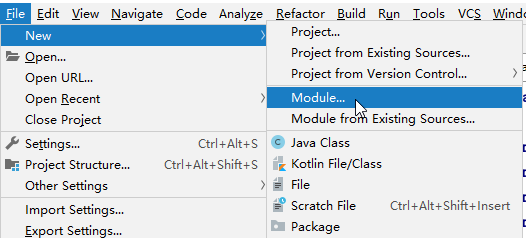
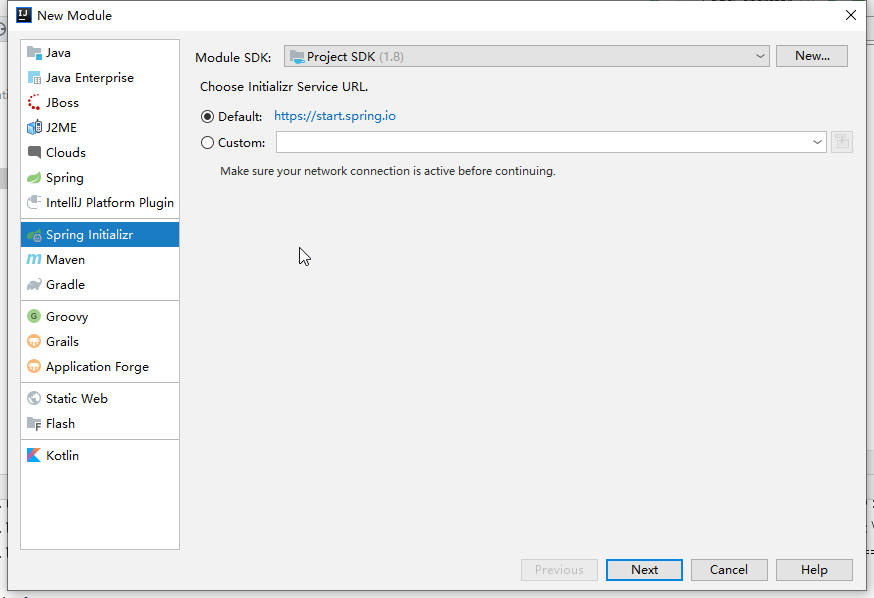
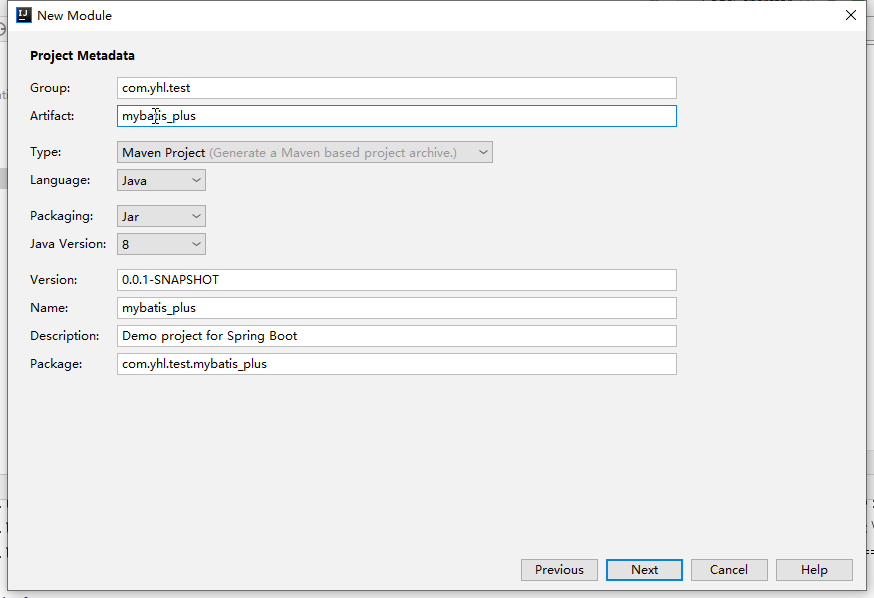
然后一直next.
2. 添加依赖pom.xml
<dependencies>

        <dependency>

            <groupId>org.springframework.boot</groupId>

            <artifactId>spring-boot-starter-web</artifactId>

        </dependency>

        <dependency>

            <groupId>org.springframework.boot</groupId>

            <artifactId>spring-boot-devtools</artifactId>

            <scope>runtime</scope>

            <optional>true</optional>

        </dependency>

        <dependency>

            <groupId>org.projectlombok</groupId>

            <artifactId>lombok</artifactId>

            <optional>true</optional>

        </dependency>

        <dependency>

            <groupId>org.springframework.boot</groupId>

            <artifactId>spring-boot-starter-test</artifactId>

            <scope>test</scope>

            <exclusions>

                <exclusion>

                    <groupId>org.junit.vintage</groupId>

                    <artifactId>junit-vintage-engine</artifactId>

                </exclusion>

            </exclusions>

        </dependency>

        <dependency>

            <groupId>com.baomidou</groupId>

            <artifactId>mybatis-plus-generator</artifactId>

            <version>3.2.0</version>

        </dependency>

        <!-- MySQL连接驱动,注意版本问题 -->

        <dependency>

            <groupId>mysql</groupId>

            <artifactId>mysql-connector-java</artifactId>

            <version>5.1.47</version>

        </dependency>

<!--MyBatis-Plus 支持 Velocity(默认)、Freemarker、Beetl,用户可以选择自己熟悉的模板引擎,如果都不满足您的要求,可以采用自定义模板引擎。-->

        <dependency>

            <groupId>org.apache.velocity</groupId>

            <artifactId>velocity-engine-core</artifactId>

            <version>2.1</version>

        </dependency>

        <dependency>

            <groupId>org.freemarker</groupId>

            <artifactId>freemarker</artifactId>

            <version>2.3.29</version>

        </dependency>

        <dependency>

            <groupId>com.ibeetl</groupId>

            <artifactId>beetl</artifactId>

            <version>3.0.13.RELEASE</version>

        </dependency>

    </dependencies>
3. 创建Java项目CodeGenerator.java
public class CodeGenerator {

    /**

     * <p>

     * 读取控制台内容

     * </p>

     */

    public static String scanner(String tip) {

        Scanner scanner = new Scanner(System.in);

        StringBuilder help = new StringBuilder();

        help.append("请输入" + tip + ":");

        System.out.println(help.toString());

        if (scanner.hasNext()) {

            String ipt = scanner.next();

            if (StringUtils.isNotEmpty(ipt)) {

                return ipt;

            }

        }

        throw new MybatisPlusException("请输入正确的" + tip + "!");

    }

    public static void main(String[] args) {

        // 代码生成器

        AutoGenerator mpg = new AutoGenerator();

        // 全局配置

        GlobalConfig gc = new GlobalConfig();

        String projectPath = System.getProperty("user.dir") +"/"+ scanner("项目名称");

        gc.setOutputDir(projectPath + "/src/main/java");

        gc.setAuthor("YHL");

        gc.setOpen(false);

        // gc.setSwagger2(true); 实体属性 Swagger2 注解

        mpg.setGlobalConfig(gc);

        // 数据源配置

        DataSourceConfig dsc = new DataSourceConfig();

        dsc.setUrl("jdbc:mysql://localhost:3306/test?useUnicode=true&useSSL=false&characterEncoding=utf8");

        // dsc.setSchemaName("public");

        dsc.setDriverName("com.mysql.jdbc.Driver");

        dsc.setUsername("root");

        dsc.setPassword("root");

        mpg.setDataSource(dsc);

        // 包配置

        PackageConfig pc = new PackageConfig();

        pc.setParent(scanner("包名"));

        pc.setModuleName(scanner("模块名"));

        mpg.setPackageInfo(pc);

        // 自定义配置

        InjectionConfig cfg = new InjectionConfig() {

            @Override

            public void initMap() {

                // to do nothing

            }

        };

        // 如果模板引擎是 freemarker

        String templatePath = "/templates/mapper.xml.ftl";

        // 如果模板引擎是 velocity

        // String templatePath = "/templates/mapper.xml.vm";

        // 自定义输出配置

        List<FileOutConfig> focList = new ArrayList<>();

        // 自定义配置会被优先输出

        focList.add(new FileOutConfig(templatePath) {

            @Override

            public String outputFile(TableInfo tableInfo) {

                // 自定义输出文件名 , 如果你 Entity 设置了前后缀、此处注意 xml 的名称会跟着发生变化!!

System.out.println(projectPath+"================================");

                return projectPath + "/src/main/resources/mapper/" + tableInfo.getEntityName() + "Mapper" + StringPool.DOT_XML;

            }

        });

        /*

        cfg.setFileCreate(new IFileCreate() {

            @Override

            public boolean isCreate(ConfigBuilder configBuilder, FileType fileType, String filePath) {

                // 判断自定义文件夹是否需要创建

                checkDir("调用默认方法创建的目录");

                return false;

            }

        });

        */

        cfg.setFileOutConfigList(focList);

        mpg.setCfg(cfg);

        // 配置模板

        TemplateConfig templateConfig = new TemplateConfig();

        // 配置自定义输出模板

        //指定自定义模板路径,注意不要带上.ftl/.vm, 会根据使用的模板引擎自动识别

        // templateConfig.setEntity("templates/entity2.java");

        // templateConfig.setService();

        // templateConfig.setController();

        templateConfig.setXml(null);

        mpg.setTemplate(templateConfig);

        // 策略配置

        StrategyConfig strategy = new StrategyConfig();

        strategy.setNaming(NamingStrategy.underline_to_camel);

        strategy.setColumnNaming(NamingStrategy.underline_to_camel);

        strategy.setSuperEntityClass("com.baomidou.ant.common.BaseEntity");

        strategy.setEntityLombokModel(true);

        strategy.setRestControllerStyle(true);

        // 公共父类

        strategy.setSuperControllerClass("com.baomidou.ant.common.BaseController");

        // 写于父类中的公共字段

        strategy.setSuperEntityColumns("id");

        strategy.setInclude(scanner("表名,多个英文逗号分割").split(","));

        strategy.setControllerMappingHyphenStyle(true);

        strategy.setTablePrefix(pc.getModuleName() + "_");

        mpg.setStrategy(strategy);

        mpg.setTemplateEngine(new FreemarkerTemplateEngine());

        mpg.execute();

    }

}
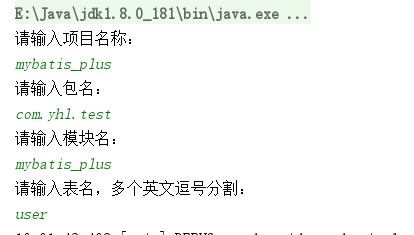
4. 运行CodeGenerator,根据提示输入.
SpringBoot+Mybatis_Plus Generator的更多相关文章
- Java逆向工程SpringBoot + Mybatis Generator + MySQL
Java逆向工程SpringBoot+ Mybatis Generator + MySQL Meven pop.xml文件添加引用: <dependency> <groupId> ...
- SpringBoot+Mybatis+Generator 逆向工程使用(二)
Mybatis-Genarator 逆向工程使用 个人开发环境 java环境:Jdk1.8.0_60 编译器:IntelliJ IDEA 2017.1.4 mysql驱动:mysql-connecto ...
- javaweb各种框架组合案例(五):springboot+mybatis+generator
一.介绍 1.springboot是spring项目的总结+整合 当我们搭smm,ssh,ssjdbc等组合框架时,各种配置不胜其烦,不仅是配置问题,在添加各种依赖时也是让人头疼,关键有些jar包之间 ...
- springboot中generator相关配置文件
generator.properties # jdbc jdbc.driverClass = com.mysql.jdbc.Driver jdbc.url = jdbc:mysql://localho ...
- springboot+mybatisplus进行整合并且使用逆向工程
首先引入maven依赖:这是整合mybatisplus时,进行逆向工程时候需要引入的依赖 <!--mybaitsplus start--> <dependency> <g ...
- java.lang.ClassNotFoundException: com.mysql.cj.jdbc.Driver
java.lang.ClassNotFoundException: com.mysql.cj.jdbc.Driver at java.net.URLClassLoader.findClass(URLC ...
- SpringBoot入门教程(四)MyBatis generator 注解方式和xml方式
MyBatis 是一款优秀的持久层框架,它支持定制化 SQL.存储过程以及高级映射.MyBatis 避免了几乎所有的 JDBC 代码和手动设置参数以及获取结果集.MyBatis 可以使用简单的 XML ...
- springboot整合mybatis(使用MyBatis Generator)
引入依赖 <dependencies> <dependency> <groupId>org.springframework.boot</groupId> ...
- springboot学习随笔(四):Springboot整合mybatis(含generator自动生成代码)
这章我们将通过springboot整合mybatis来操作数据库 以下内容分为两部分,一部分主要介绍generator自动生成代码,生成model.dao层接口.dao接口对应的sql配置文件 第一部 ...
随机推荐
- 刷题[GKCTF2020]
[GKCTF2020]CheckIN 解题思路 打开直接是源码: <title>Check_In</title> <?php highlight_file(__FILE_ ...
- BUUCTF[归纳]sql注入相关题目
这是我自己对于sql注入的部分ctf题型的归纳,均来自buuctf的平台环境. [0CTF 2016]piapiapia 我尝试了几种payload,发现有两种情况. 第一种:Invalid user ...
- spring:Beanfactory和ApplicationContext、BeanFactory 和 FactoryBean
1.Beanfactory和ApplicationContext有什么区别 ApplicationContext (1)在配置文件加载后创建bean 利用debug方式,在Student类的无参构造方 ...
- Java并发编程之ReentrantLock源码分析
ReentrantLock介绍 从JDK1.5之前,我们都是使用synchronized关键字来对代码块加锁,在JDK1.5引入了ReentrantLock锁.synchronized关键字性能比Re ...
- Spring AOP系列(五)—反射
前言 前面我们进行了代理模式.静态代理.动态代理的学习.而动态代理就是利用Java的反射技术(Java Reflection),在运行时创建一个实现某些给定接口的新类(也称"动态代理类&qu ...
- Harmony OS 开发避坑指南——DevEco Device Tool 安装配置
Harmony OS 开发指南--DevEco Device Tool 安装配置 本文介绍如何在Windows主机上安装DevEco Device Tool工具. 坑点总结: 国内部分网络环境下,安装 ...
- OpeMp【schedule】
- NodeJS二进制合并
Node.js 批量文件合并code cnblogs @ Orcim 本 文主要介绍使用 Node 进行 ACB 序列文件(Atom CueSheet Binary,编译 AtomCueSheet ...
- 032 01 Android 零基础入门 01 Java基础语法 03 Java运算符 12 运算符和if-else条件语句的综合案例——闰年问题
032 01 Android 零基础入门 01 Java基础语法 03 Java运算符 12 运算符和if-else条件语句的综合案例--闰年问题 本文知识点:运算符和if-else条件语句的综合案例 ...
- C++重载>>和<<(输入和输出运算符)详解
转载:http://c.biancheng.net/view/2311.html 在C++中,标准库本身已经对左移运算符<<和右移运算符>>分别进行了重载,使其能够用于不同数据 ...