
[Spring Cloud实战 | 第六篇:Spring Cloud Gateway+Spring Security OAuth2+JWT实现微服务统一认证授权
一. 前言
本篇实战案例基于 youlai-mall 项目。项目使用的是当前主流和最新版本的技术和解决方案,自己不会太多华丽的言辞去描述,只希望能勾起大家对编程的一点喜欢。所以有兴趣的朋友可以进入 github | 码云了解下项目明细 ,有兴趣也可以一起研发和进步。
微服务通过整合 Spirng Cloud Gateway、Spring Security OAuth2、JWT 实现微服务的统一认证授权。其中Spring Cloud Gateway作为OAuth2客户端,其他微服务提供资源服务给网关,交由网关来做统一鉴权,所以这里网关同样也作为资源服务器。
温馨提示:微服务认证授权在整个系列算是比较有难度的,本篇同时从理论和实战两个角度出发,所以篇幅有些长,还需要往期文章搭建的环境基础,所以没有太多时间的小伙伴可以等有时间在研究。
往期系列文章
- Spring Cloud实战 | 第一篇:Windows搭建Nacos服务
- Spring Cloud实战 | 第二篇:Spring Cloud整合Nacos实现注册中心
- Spring Cloud实战 | 第三篇:Spring Cloud整合Nacos实现配置中心
- Spring Cloud实战 | 第四篇:Spring Cloud整合Gateway实现API网关
- Spring Cloud实战 | 第五篇:Spring Cloud整合OpenFeign实现微服务之间的调用
二. OAuth2和JWT概念及关系?
1. 什么是OAuth2?
OAuth 2.0 是目前最流行的授权机制,用来授权第三方应用,获取用户数据。
-- 【阮一峰】OAuth 2.0 的一个简单解释
QQ登录OAuth2.0:对于用户相关的OpenAPI(例如获取用户信息,动态同步,照片,日志,分享等),为了保护用户数据的安全和隐私,第三方网站访问用户数据前都需要显式的向用户征求授权。 -- 【QQ登录】OAuth2.0开发文档
从上面定义可以理解OAuth2是一个授权协议,并且广泛流行的应用。
下面通过“有道云笔记”通过“QQ授权登录”的案例来分析QQ的OAuth2平台的具体实现。
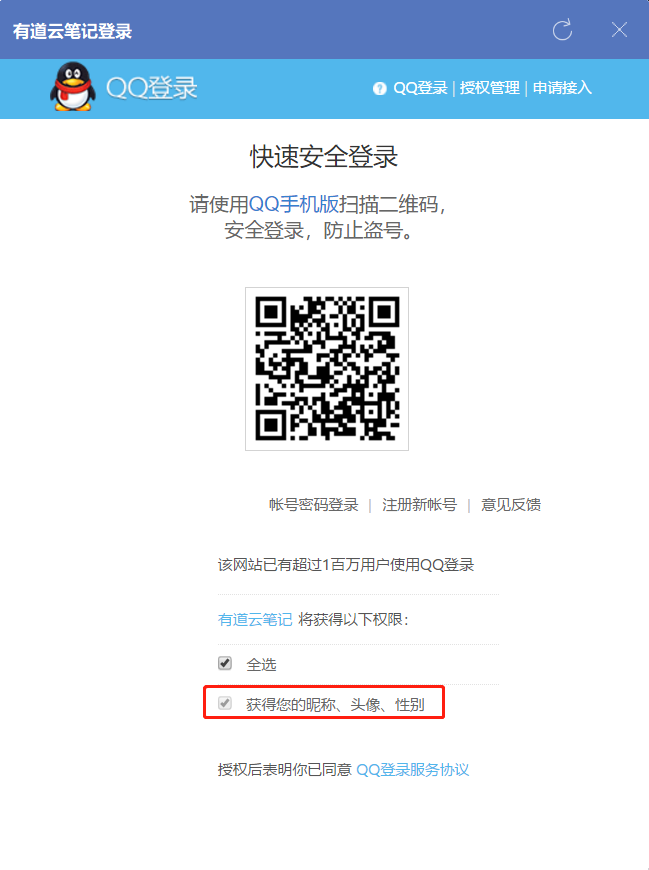
流程分析:
有道云笔记客户端 -> 选择QQ授权登录 -> QQ认证授权成功返回access_token -> 有道云笔记客户端接收到access_token后进入有道云笔记应用
流程关联OAuth2的角色关联如下:
(1)第三方应用程序(Third-party Application):案例中的"有道云笔记"客户端。

(2)HTTP服务提供商(HTTP Service):QQ

(3)资源所有者(Resource Owner):用户

(4)用户代理(User Agent): 比如浏览器,代替用户去访问这些资源。

(5)认证服务器(Authorization Server):服务提供商专门用来处理认证的服务器。案例中QQ提供的认证授权。

(6)资源服务器(Resource server):即服务提供商存放用户生成的资源的服务器。它与认证服务器,可以是同一台服务器,也可以是不同的服务器。

     这里指客户端拿到access_token要去访问资源对象的服务器,比如我们在有道云里的笔记。
2. 什么是JWT?
JWT(JSON Web Token)是令牌token的一个子集,首先在服务器端身份认证通过后生成一个字符串凭证并返回给客户端,客户端请求服务器端时携带该token字符串进行鉴权认证。
JWT是无状态的。 除了包含签名算法、凭据过期时间之外,还可扩展添加额外信息,比如用户信息等,所以无需将JWT存储在服务器端。相较于cookie/session机制中需要将用户信息保存在服务器端的session里节省了内存开销,用户量越多越明显。
JWT的结构如下:
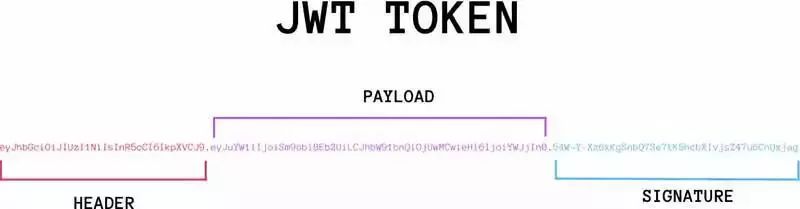
看不明白没关系,我先把youlai-mall认证通过后生成的access token(标准的JWT格式)放到JWT官网进行解析成能看的定的格式。
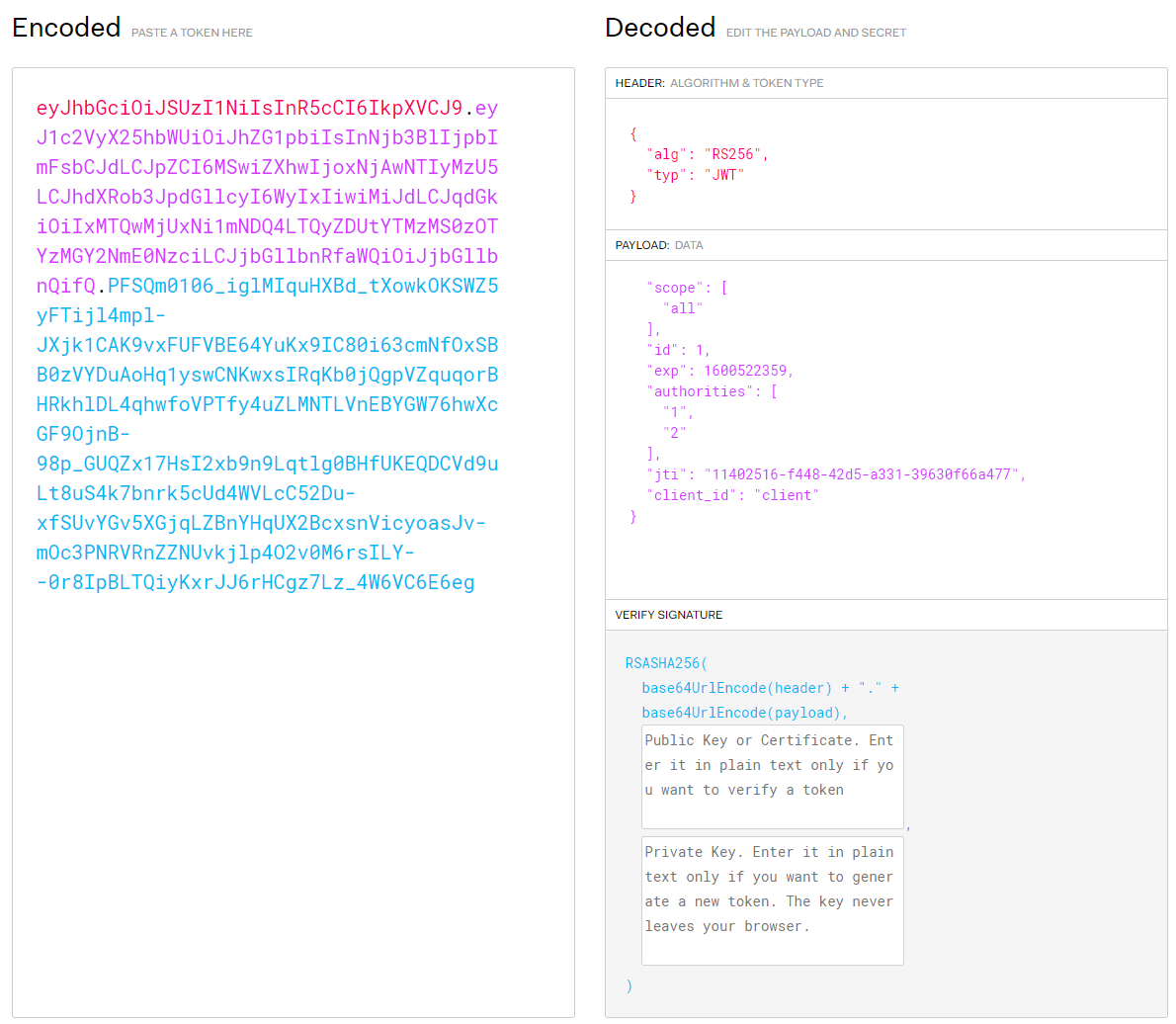
JWT字符串由Header(头部)、Payload(负载)、Signature(签名)三部分组成。
Header: JSON对象,用来描述JWT的元数据,alg属性表示签名的算法,typ标识token的类型

Payload: JSON对象,用来存放实际需要传递的数据, 除了默认字段,还可以在此自定义私有字段

Signature: 对Header、Payload这两部分进行签名,签名需要私钥,为了防止数据被篡改
3. OAuth2和JWT关系?
- OAuth2是一种认证授权的协议规范。
- JWT是基于token的安全认证协议的实现。
至于一定要给这二者沾点亲带点故的话。可以说OAuth2在认证成功生成的令牌access_token可以由JWT实现。
三. 认证服务器
认证服务器落地 youlai-mall 的youlai-auth认证中心模块,完整代码地址: github | 码云
1. pom依赖
    <dependency>

        <groupId>org.springframework.cloud</groupId>

        <artifactId>spring-cloud-starter-oauth2</artifactId>

    </dependency>

    <dependency>

        <groupId>org.springframework.security</groupId>

        <artifactId>spring-security-oauth2-jose</artifactId>

    </dependency>
2. 认证服务配置(AuthorizationServerConfig)
/**

 * 认证服务配置

 */

@Configuration

@EnableAuthorizationServer

@AllArgsConstructor

public class AuthorizationServerConfig extends AuthorizationServerConfigurerAdapter {

    private DataSource dataSource;

    private AuthenticationManager authenticationManager;

    private UserDetailsServiceImpl userDetailsService;

    /**

     * 客户端信息配置

     */

    @Override

    @SneakyThrows

    public void configure(ClientDetailsServiceConfigurer clients) {

        JdbcClientDetailsServiceImpl jdbcClientDetailsService = new JdbcClientDetailsServiceImpl(dataSource);

        jdbcClientDetailsService.setFindClientDetailsSql(AuthConstants.FIND_CLIENT_DETAILS_SQL);

        jdbcClientDetailsService.setSelectClientDetailsSql(AuthConstants.SELECT_CLIENT_DETAILS_SQL);

        clients.withClientDetails(jdbcClientDetailsService);

    }

    /**

     * 配置授权(authorization)以及令牌(token)的访问端点和令牌服务(token services)

     */

    @Override

    public void configure(AuthorizationServerEndpointsConfigurer endpoints) {

        TokenEnhancerChain tokenEnhancerChain = new TokenEnhancerChain();

        List<TokenEnhancer> tokenEnhancers = new ArrayList<>();

        tokenEnhancers.add(tokenEnhancer());

        tokenEnhancers.add(jwtAccessTokenConverter());

        tokenEnhancerChain.setTokenEnhancers(tokenEnhancers);

        endpoints.authenticationManager(authenticationManager)

                .accessTokenConverter(jwtAccessTokenConverter())

                .tokenEnhancer(tokenEnhancerChain)

                .userDetailsService(userDetailsService)

                // refresh_token有两种使用方式:重复使用(true)、非重复使用(false),默认为true

                //      1.重复使用:access_token过期刷新时, refresh token过期时间未改变,仍以初次生成的时间为准

                //      2.非重复使用:access_token过期刷新时, refresh_token过期时间延续,在refresh_token有效期内刷新而无需失效再次登录

                .reuseRefreshTokens(false);

    }

    /**

     * 允许表单认证

     */

    @Override

    public void configure(AuthorizationServerSecurityConfigurer security) {

        security.allowFormAuthenticationForClients();

    }

    /**

     * 使用非对称加密算法对token签名

     */

    @Bean

    public JwtAccessTokenConverter jwtAccessTokenConverter() {

        JwtAccessTokenConverter converter = new JwtAccessTokenConverter();

        converter.setKeyPair(keyPair());

        return converter;

    }

    /**

     * 从classpath下的密钥库中获取密钥对(公钥+私钥)

     */

    @Bean

    public KeyPair keyPair() {

        KeyStoreKeyFactory factory = new KeyStoreKeyFactory(

                new ClassPathResource("youlai.jks"), "123456".toCharArray());

        KeyPair keyPair = factory.getKeyPair(

                "youlai", "123456".toCharArray());

        return keyPair;

    }

    /**

     * JWT内容增强

     */

    @Bean

    public TokenEnhancer tokenEnhancer() {

        return (accessToken, authentication) -> {

            Map<String, Object> map = new HashMap<>(2);

            User user = (User) authentication.getUserAuthentication().getPrincipal();

            map.put(AuthConstants.JWT_USER_ID_KEY, user.getId());

            map.put(AuthConstants.JWT_CLIENT_ID_KEY, user.getClientId());

            ((DefaultOAuth2AccessToken) accessToken).setAdditionalInformation(map);

            return accessToken;

        };

    }

}
AuthorizationServerConfig这个配置类是整个认证服务实现的核心。总结下来就是两个关键点,客户端信息配置和access_token生成配置。
客户端信息配置
配置OAuth2认证允许接入的客户端的信息,因为接入OAuth2认证服务器首先人家得认可你这个客户端吧,就比如上面案例中的QQ的OAuth2认证服务器认可“有道云笔记”客户端。
同理,我们需要把客户端信息配置在认证服务器上来表示认证服务器所认可的客户端。一般可配置在认证服务器的内存中,但是这样很不方便管理扩展。所以实际最好配置在数据库中的,提供可视化界面对其进行管理,方便以后像PC端、APP端、小程序端等多端灵活接入。
Spring Security OAuth2官方提供的客户端信息表oauth_client_details
CREATE TABLE `oauth_client_details`  (

  `client_id` varchar(256) CHARACTER SET utf8 COLLATE utf8_general_ci NOT NULL,

  `resource_ids` varchar(256) CHARACTER SET utf8 COLLATE utf8_general_ci NULL DEFAULT NULL,

  `client_secret` varchar(256) CHARACTER SET utf8 COLLATE utf8_general_ci NULL DEFAULT NULL,

  `scope` varchar(256) CHARACTER SET utf8 COLLATE utf8_general_ci NULL DEFAULT NULL,

  `authorized_grant_types` varchar(256) CHARACTER SET utf8 COLLATE utf8_general_ci NULL DEFAULT NULL,

  `web_server_redirect_uri` varchar(256) CHARACTER SET utf8 COLLATE utf8_general_ci NULL DEFAULT NULL,

  `authorities` varchar(256) CHARACTER SET utf8 COLLATE utf8_general_ci NULL DEFAULT NULL,

  `access_token_validity` int(11) NULL DEFAULT NULL,

  `refresh_token_validity` int(11) NULL DEFAULT NULL,

  `additional_information` varchar(4096) CHARACTER SET utf8 COLLATE utf8_general_ci NULL DEFAULT NULL,

  `autoapprove` varchar(256) CHARACTER SET utf8 COLLATE utf8_general_ci NULL DEFAULT NULL,

  PRIMARY KEY (`client_id`) USING BTREE

) ENGINE = InnoDB CHARACTER SET = utf8 COLLATE = utf8_general_ci ROW_FORMAT = Dynamic;
添加一条客户端信息
INSERT INTO `oauth_client_details` VALUES ('client', NULL, '123456', 'all', 'password,refresh_token', '', NULL, NULL, NULL, NULL, NULL);

token生成配置
项目使用JWT实现access_token,关于access_token生成步骤的配置如下:
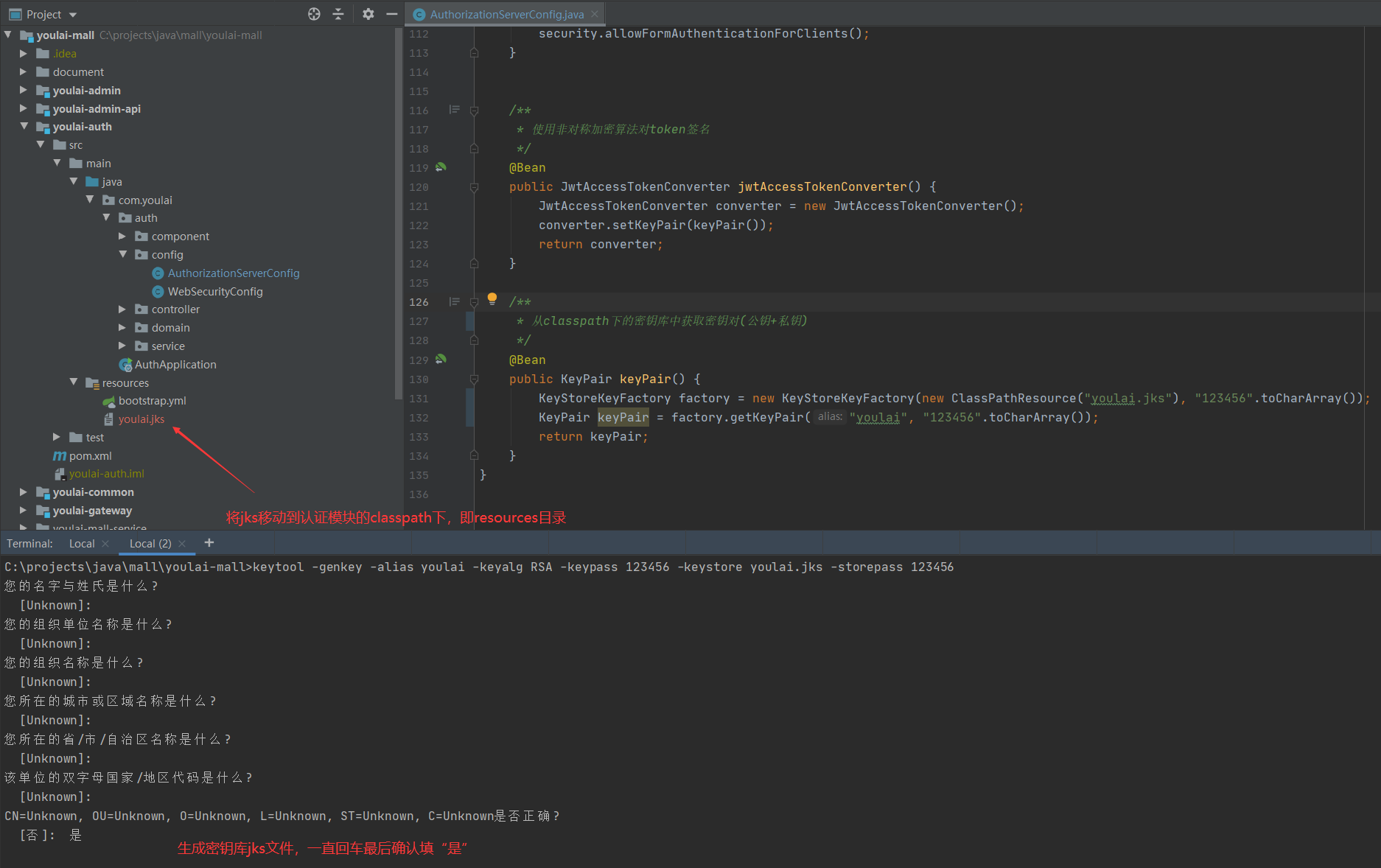
1. 生成密钥库
使用JDK工具的keytool生成JKS密钥库(Java Key Store),并将youlai.jks放到resources目录
keytool -genkey -alias youlai -keyalg RSA -keypass 123456 -keystore youlai.jks -storepass 123456
-genkey 生成密钥

-alias 别名

-keyalg 密钥算法

-keypass 密钥口令

-keystore 生成密钥库的存储路径和名称

-storepass 密钥库口令
2. JWT内容增强
JWT负载信息默认是固定的,如果想自定义添加一些额外信息,需要实现TokenEnhancer的enhance方法将附加信息添加到access_token中。
3. JWT签名
JwtAccessTokenConverter是生成token的转换器,可以实现指定token的生成方式(JWT)和对JWT进行签名。
签名实际上是生成一段标识(JWT的Signature部分)作为接收方验证信息是否被篡改的依据。原理部分请参考这篇的文章:RSA加密、解密、签名、验签的原理及方法
其中对JWT签名有对称和非对称两种方式:
对称方式:认证服务器和资源服务器使用同一个密钥进行加签和验签 ,默认算法HMAC
非对称方式:认证服务器使用私钥加签,资源服务器使用公钥验签,默认算法RSA
非对称方式相较于对称方式更为安全,因为私钥只有认证服务器知道。
项目中使用RSA非对称签名方式,具体实现步骤如下:
(1). 从密钥库获取密钥对(密钥+私钥)

(2). 认证服务器私钥对token签名

(3). 提供公钥获取接口供资源服务器验签使用
公钥获取接口
/**

 * RSA公钥开放接口

 */

@RestController

@AllArgsConstructor

public class PublicKeyController {

    private KeyPair keyPair;

    @GetMapping("/rsa/publicKey")

    public Map<String, Object> getKey() {

        RSAPublicKey publicKey = (RSAPublicKey) keyPair.getPublic();

        RSAKey key = new RSAKey.Builder(publicKey).build();

        return new JWKSet(key).toJSONObject();

    }

}
3. 安全配置(WebSecurityConfig)
@Configuration

@EnableWebSecurity

public class WebSecurityConfig extends WebSecurityConfigurerAdapter {

    @Override

    protected void configure(HttpSecurity http) throws Exception {

         http

            .authorizeRequests().requestMatchers(EndpointRequest.toAnyEndpoint()).permitAll()

        .and()

            .authorizeRequests().antMatchers("/rsa/publicKey").permitAll().anyRequest().authenticated()

        .and()

            .csrf().disable();

    }

    /**

     *  如果不配置SpringBoot会自动配置一个AuthenticationManager,覆盖掉内存中的用户

     */

    @Bean

    public AuthenticationManager authenticationManagerBean() throws Exception {

        return super.authenticationManagerBean();

    }

    @Bean

    public PasswordEncoder passwordEncoder()  {

        return PasswordEncoderFactories.createDelegatingPasswordEncoder();

    }

}
安全配置主要是配置请求访问权限、定义认证管理器、密码加密配置。
四. 资源服务器
资源服务器落地 youlai-mall 的youlai-gateway微服务网关模块,完整代码地址: github | 码云
上文有提到过网关这里是担任资源服务器的角色,因为网关是微服务资源访问的统一入口,所以在这里做资源访问的统一鉴权是再合适不过。
1. pom依赖
    <dependency>

        <groupId>org.springframework.security</groupId>

        <artifactId>spring-security-oauth2-resource-server</artifactId>

    </dependency>

    <dependency>

        <groupId>org.springframework.security</groupId>

        <artifactId>spring-security-oauth2-jose</artifactId>

    </dependency>
2. 配置文件(youlai-gateway.yaml)
spring:

  security:

    oauth2:

      resourceserver:

        jwt:

          # 获取JWT验签公钥请求路径

          jwk-set-uri: 'http://localhost:9999/youlai-auth/rsa/publicKey'

  redis:

    database: 0

    host: localhost

    port: 6379

    password:

  cloud:

    gateway:

      discovery:

        locator:

          enabled: true # 启用服务发现

          lower-case-service-id: true

      routes:

        - id: youlai-auth

          uri: lb://youlai-auth

          predicates:

            - Path=/youlai-auth/**

          filters:

            - StripPrefix=1

        - id: youlai-admin

          uri: lb://youlai-admin

          predicates:

            - Path=/youlai-admin/**

          filters:

            - StripPrefix=1

# 配置白名单路径

white-list:

    urls:

      - "/youlai-auth/oauth/token"

      - "/youlai-auth/rsa/publicKey"
3. 鉴权管理器
鉴权管理器是作为资源服务器验证是否有权访问资源的裁决者,核心部分的功能先已通过注释形式进行说明,后面再对具体形式补充。
/**

 * 鉴权管理器

 */

@Component

@AllArgsConstructor

@Slf4j

public class AuthorizationManager implements ReactiveAuthorizationManager<AuthorizationContext> {

    private RedisTemplate redisTemplate;

    private WhiteListConfig whiteListConfig;

    @Override

    public Mono<AuthorizationDecision> check(Mono<Authentication> mono, AuthorizationContext authorizationContext) {

        ServerHttpRequest request = authorizationContext.getExchange().getRequest();

        String path = request.getURI().getPath();

        PathMatcher pathMatcher = new AntPathMatcher();

        // 白名单路径直接放行

        List<String> whiteList = whiteListConfig.getUrls();

        for (String ignoreUrl : whiteList) {

            if (pathMatcher.match(ignoreUrl, path)) {

                return Mono.just(new AuthorizationDecision(true));

            }

        }

        // 对应跨域的预检请求直接放行

        if (request.getMethod() == HttpMethod.OPTIONS) {

            return Mono.just(new AuthorizationDecision(true));

        }

        // token为空拒绝访问

        String token = request.getHeaders().getFirst(AuthConstants.JWT_TOKEN_HEADER);

        if (StrUtil.isBlank(token)) {

            return Mono.just(new AuthorizationDecision(false));

        }

        // 缓存取资源权限角色关系列表

        Map<Object, Object> resourceRolesMap = redisTemplate.opsForHash().entries(AuthConstants.RESOURCE_ROLES_KEY);

        Iterator<Object> iterator = resourceRolesMap.keySet().iterator();

        // 请求路径匹配到的资源需要的角色权限集合authorities统计

        List<String> authorities = new ArrayList<>();

        while (iterator.hasNext()) {

            String pattern = (String) iterator.next();

            if (pathMatcher.match(pattern, path)) {

                authorities.addAll(Convert.toList(String.class, resourceRolesMap.get(pattern)));

            }

        }

        Mono<AuthorizationDecision> authorizationDecisionMono = mono

                .filter(Authentication::isAuthenticated)

                .flatMapIterable(Authentication::getAuthorities)

                .map(GrantedAuthority::getAuthority)

                .any(roleId -> {

                    // roleId是请求用户的角色(格式:ROLE_{roleId}),authorities是请求资源所需要角色的集合

                    log.info("访问路径:{}", path);

                    log.info("用户角色roleId:{}", roleId);

                    log.info("资源需要权限authorities:{}", authorities);

                    return authorities.contains(roleId);

                })

                .map(AuthorizationDecision::new)

                .defaultIfEmpty(new AuthorizationDecision(false));

        return authorizationDecisionMono;

    }

}
第1、2、3处只是做些基础访问判断,不做过多的说明
第4处从Redis缓存获取资源权限数据。首先我们会关注两个问题:
(1). 资源权限数据是什么样格式数据?

(2). 数据什么时候初始化到缓存中?
以下就带着这两个问题来分析要完成第4步从缓存获取资源权限数据需要提前做哪些工作吧。
(1). 资源权限数据格式
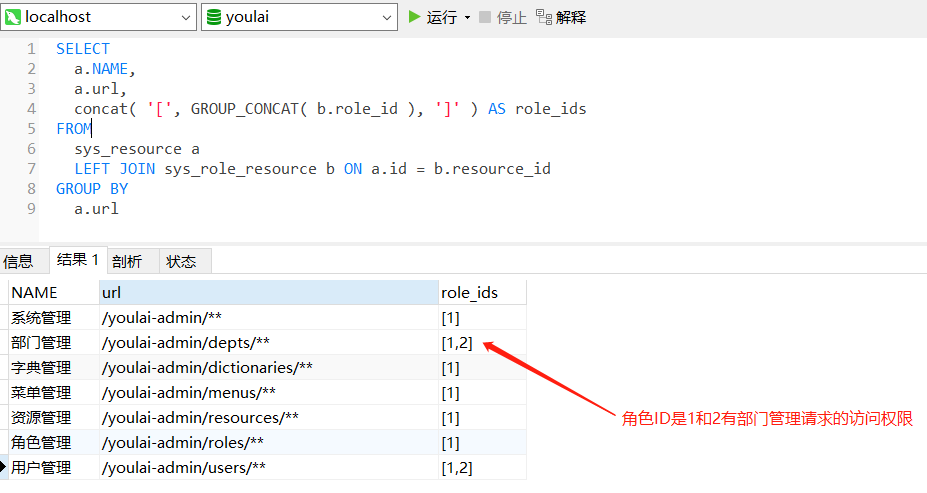
需要把url和role_ids的映射关系缓存到redis,大致意思的意思可以理解拥有url访问权限的角色ID有哪些。
(2). 初始化缓存时机
SpringBoot提供两个接口CommandLineRunner和ApplicationRunner用于容器启动后执行一些业务逻辑,比如数据初始化和预加载、MQ监听启动等。两个接口执行时机无差,唯一区别在于接口的参数不同。有兴趣的朋友可以了解一下这两位朋友,以后会经常再见的哈~
那么这里的业务逻辑是在容器初始化完成之后将从MySQL读取到资源权限数据加载到Redis缓存中,正中下怀,来看下具体实现吧。

Redis缓存中的资源权限数据
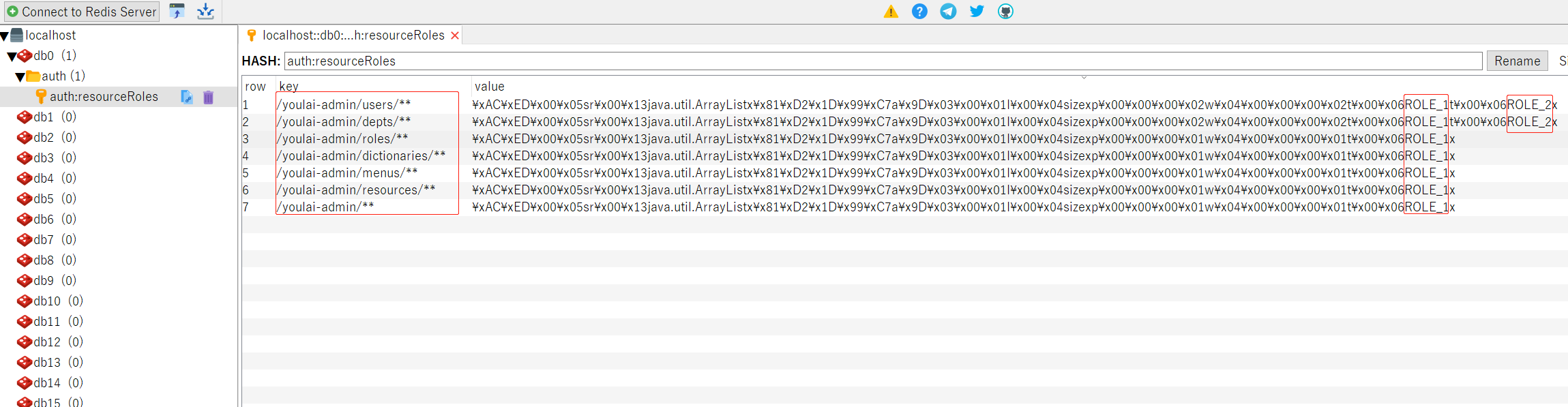
至此从缓存数据可以看到拥有资源url访问权限的角色信息,从缓存获取赋值给resourceRolesMap。
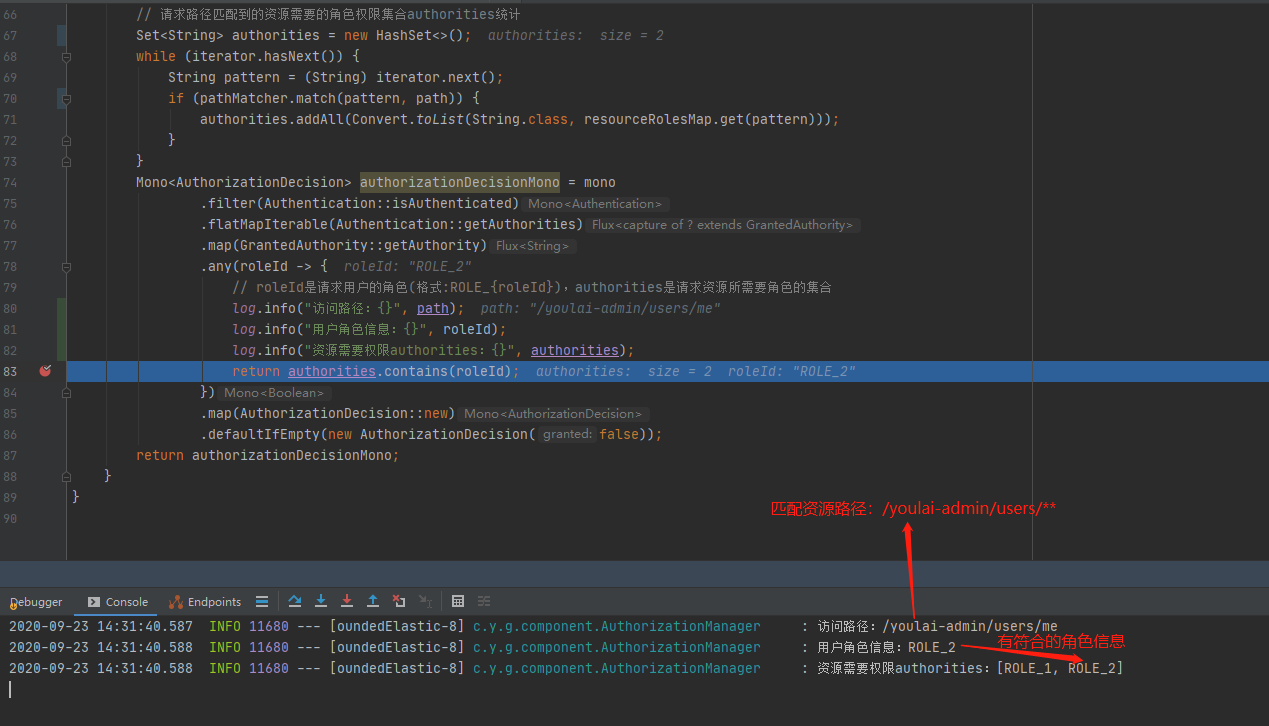
第5处根据请求路径去匹配resourceRolesMap的资url(Ant Path匹配规则),得到对应资源所需角色信息添加到authorities。
第6处就是判断用户是否有权访问资源的最终一步了,只要用户的角色中匹配到authorities中的任何一个,就说明该用户拥有访问权限,允许通过。
4. 资源服务器配置
这里做的工作是将鉴权管理器AuthorizationManager配置到资源服务器、请求白名单放行、无权访问和无效token的自定义异常响应。配置类基本上都是约定俗成那一套,核心功能和注意的细节点通过注释说明。
/**

 * 资源服务器配置

 */

@AllArgsConstructor

@Configuration

// 注解需要使用@EnableWebFluxSecurity而非@EnableWebSecurity,因为SpringCloud Gateway基于WebFlux

@EnableWebFluxSecurity

public class ResourceServerConfig {

    private AuthorizationManager authorizationManager;

    private CustomServerAccessDeniedHandler customServerAccessDeniedHandler;

    private CustomServerAuthenticationEntryPoint customServerAuthenticationEntryPoint;

    private WhiteListConfig whiteListConfig;

    @Bean

    public SecurityWebFilterChain securityWebFilterChain(ServerHttpSecurity http) {

        http.oauth2ResourceServer().jwt()

                .jwtAuthenticationConverter(jwtAuthenticationConverter());

        // 自定义处理JWT请求头过期或签名错误的结果

        http.oauth2ResourceServer().authenticationEntryPoint(customServerAuthenticationEntryPoint);

        http.authorizeExchange()

                .pathMatchers(ArrayUtil.toArray(whiteListConfig.getUrls(),String.class)).permitAll()

                .anyExchange().access(authorizationManager)

                .and()

                .exceptionHandling()

                .accessDeniedHandler(customServerAccessDeniedHandler) // 处理未授权

                .authenticationEntryPoint(customServerAuthenticationEntryPoint) //处理未认证

                .and().csrf().disable();

        return http.build();

    }

    /**

     * @linkhttps://blog.csdn.net/qq_24230139/article/details/105091273

     * ServerHttpSecurity没有将jwt中authorities的负载部分当做Authentication

     * 需要把jwt的Claim中的authorities加入

     * 方案:重新定义ReactiveAuthenticationManager权限管理器,默认转换器JwtGrantedAuthoritiesConverter

     */

    @Bean

    public Converter<Jwt, ? extends Mono<? extends AbstractAuthenticationToken>> jwtAuthenticationConverter() {

        JwtGrantedAuthoritiesConverter jwtGrantedAuthoritiesConverter = new JwtGrantedAuthoritiesConverter();

        jwtGrantedAuthoritiesConverter.setAuthorityPrefix(AuthConstants.AUTHORITY_PREFIX);

        jwtGrantedAuthoritiesConverter.setAuthoritiesClaimName(AuthConstants.AUTHORITY_CLAIM_NAME);

        JwtAuthenticationConverter jwtAuthenticationConverter = new JwtAuthenticationConverter();

        jwtAuthenticationConverter.setJwtGrantedAuthoritiesConverter(jwtGrantedAuthoritiesConverter);

        return new ReactiveJwtAuthenticationConverterAdapter(jwtAuthenticationConverter);

    }

}
/**

 * 无权访问自定义响应

 */

@Component

public class CustomServerAccessDeniedHandler implements ServerAccessDeniedHandler {

    @Override

    public Mono<Void> handle(ServerWebExchange exchange, AccessDeniedException e) {

        ServerHttpResponse response=exchange.getResponse();

        response.setStatusCode(HttpStatus.OK);

        response.getHeaders().set(HttpHeaders.CONTENT_TYPE, MediaType.APPLICATION_JSON_VALUE);

        response.getHeaders().set("Access-Control-Allow-Origin","*");

        response.getHeaders().set("Cache-Control","no-cache");

        String body= JSONUtil.toJsonStr(Result.custom(ResultCodeEnum.USER_ACCESS_UNAUTHORIZED));

        DataBuffer buffer =  response.bufferFactory().wrap(body.getBytes(Charset.forName("UTF-8")));

        return response.writeWith(Mono.just(buffer));

    }

}
/**

 * 无效token/token过期 自定义响应

 */

@Component

public class CustomServerAuthenticationEntryPoint implements ServerAuthenticationEntryPoint {

    @Override

    public Mono<Void> commence(ServerWebExchange exchange, AuthenticationException e) {

        ServerHttpResponse response = exchange.getResponse();

        response.setStatusCode(HttpStatus.OK);

        response.getHeaders().set(HttpHeaders.CONTENT_TYPE, MediaType.APPLICATION_JSON_VALUE);

        response.getHeaders().set("Access-Control-Allow-Origin", "*");

        response.getHeaders().set("Cache-Control", "no-cache");

        String body = JSONUtil.toJsonStr(Result.custom(ResultCodeEnum.USER_ACCOUNT_UNAUTHENTICATED));

        DataBuffer buffer = response.bufferFactory().wrap(body.getBytes(Charset.forName("UTF-8")));

        return response.writeWith(Mono.just(buffer));

    }

}
5. 网关(资源服务器)鉴权测试
| 用户 | 角色ID | 角色名称 |
|---|---|---|
| admin | 2 | 系统管理员 |
| 资源名称 | 资源路径 | 要求角色权限 |
|---|---|---|
| 系统管理 | /youlai-admin/** | [1] |
| 菜单管理 | /youlai-admin/menus/** | [1,2] |
| 用户管理 | /youlai-admin/users/** | [1,2] |
| 部门管理 | /youlai-admin/depts/** | [1,2] |
| 字典管理 | /youlai-admin/dictionaries/** | [1] |
| 角色管理 | /youlai-admin/roles/** | [1] |
| 资源管理 | /youlai-admin/resources/** | [1] |
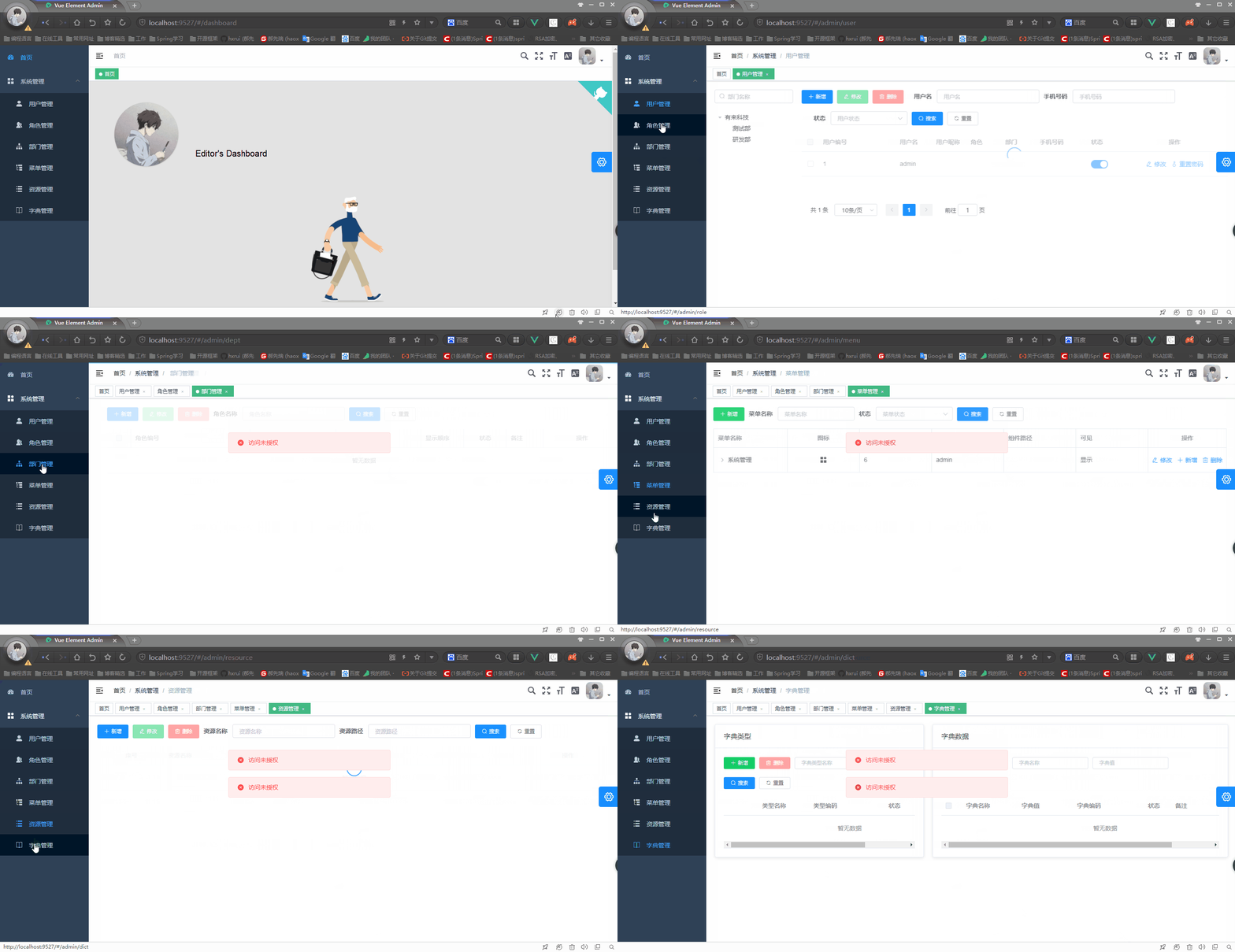
从模拟的数据可以看到admin拥有系统管理员的角色,而系统管理员只有菜单管理、用户管理、部门管理三个请求资源的访问权限,无其他资源的访问权限。
启动管理平台前端工程 youlai-mall-admin-web 完整代码地址: github | 码云
访问除了菜单管理、用户管理、部门管理这三个系统管理员拥有访问权限的资源之外,页面都会提示“访问未授权”,直接的说明了网关服务器实现了请求鉴权的目的。
五. 结语
至此,Spring Cloud的统一认证授权就实现了。其实还有很多可以扩展的点,文章中把客户端信息存储在数据库中,那么可以添加一个管理界面来维护这些客户端信息,这样便可灵活配置客户端接入认证平台、认证有效期等等。同时也还有未完成的事项,我们知道JWT是无状态的,那用户在登出、修改密码、注销的时候怎么能把JWT置为无效呢?因为不可能像cookie/session机制把用户信息从服务器删除。所以这些都是值得思考的东西,我会在下篇文章提供对应的解决方案。
今天博客园的园龄达到6年了,6年的时间自己依然没有折腾啥出来,工作还有生活的压力都挺大的,但也不想就这样放弃了,所以。。。加油吧!!!
完整源码地址
youlai-mall-admin-web github | 码云
[Spring Cloud实战 | 第六篇:Spring Cloud Gateway+Spring Security OAuth2+JWT实现微服务统一认证授权的更多相关文章
- 【Spring Cloud & Alibaba 实战 | 总结篇】Spring Cloud Gateway + Spring Security OAuth2 + JWT 实现微服务统一认证授权和鉴权
一. 前言 hi,大家好~ 好久没更文了,期间主要致力于项目的功能升级和问题修复中,经过一年时间的打磨,[有来]终于迎来v2.0版本,相较于v1.x版本主要完善了OAuth2认证授权.鉴权的逻辑,结合 ...
- (转)spring boot实战(第六篇)加载application资源文件源码分析
原文:http://blog.csdn.net/liaokailin/article/details/48878447
- Spring Cloud实战 | 最终篇:Spring Cloud Gateway+Spring Security OAuth2集成统一认证授权平台下实现注销使JWT失效方案
一. 前言 在上一篇文章介绍 youlai-mall 项目中,通过整合Spring Cloud Gateway.Spring Security OAuth2.JWT等技术实现了微服务下统一认证授权平台 ...
- Spring Cloud实战 | 最八篇:Spring Cloud +Spring Security OAuth2+ Axios前后端分离模式下无感刷新实现JWT续期
一. 前言 记得上一篇Spring Cloud的文章关于如何使JWT失效进行了理论结合代码实践的说明,想当然的以为那篇会是基于Spring Cloud统一认证架构系列的最终篇.但关于JWT另外还有一个 ...
- Spring Cloud实战 | 第十篇 :Spring Cloud + Seata 1.4.1 + Nacos1.4.0 整合实现微服务架构中逃不掉的话题分布式事务
Seata分布式事务在线体验地址:https://www.youlai.store 本篇完整源码地址:https://github.com/hxrui/youlai-mall 有想加入开源项目开发的童 ...
- Spring Cloud实战 | 第十一篇:Spring Cloud Gateway 网关实现对RESTful接口权限控制和按钮权限控制
一. 前言 hi,大家好,这应该是农历年前的关于开源项目 的最后一篇文章了. 有来商城 是基于 Spring Cloud OAuth2 + Spring Cloud Gateway + JWT实现的统 ...
- Spring Security OAuth2 微服务认证中心自定义授权模式扩展以及常见登录认证场景下的应用实战
一. 前言 [APP 移动端]Spring Security OAuth2 手机短信验证码模式 [微信小程序]Spring Security OAuth2 微信授权模式 [管理系统]Spring Se ...
- spring boot实战(第十三篇)自动配置原理分析
前言 spring Boot中引入了自动配置,让开发者利用起来更加的简便.快捷,本篇讲利用RabbitMQ的自动配置为例讲分析下Spring Boot中的自动配置原理. 在上一篇末尾讲述了Spring ...
- 基于Spring Cloud、JWT 的微服务权限系统设计
基于Spring Cloud.JWT 的微服务权限系统设计 https://gitee.com/log4j/pig https://github.com/kioyong/spring-cloud-de ...
随机推荐
- JavaScript学习系列博客_11_JavaScript中的for语句
for循环 - 语法: for(①初始化表达式 ; ②条件表达式 ; ④更新表达式){ ③语句... } - 执行流程: 首先执行①初始化表达式,初始化一个变量,(这里只会执行一次) 然后对②条件表达 ...
- 线程池之Executor框架
线程池之Executor框架 Java的线程既是工作单元,也是执行机制.从JDK5开始,把工作机单元和执行机制分离开来.工作单元包括Runnable和Callable,而执行机制由Executor框架 ...
- python 判断文件和文件夹是否存在、创建文件夹
原文链接:https://www.cnblogs.com/hushaojun/p/4533241.html >>> import os >>> os.path.ex ...
- 基于 abp vNext 微服务开发的敏捷应用构建平台 - 设计构想
许多中小企业的管理模式都是在自身的发展过程中不断摸索,逐步建立起来的,每一家都有其独有的管理模式,而且随着企业的不断发展,管理模式也在不断变化中.企业在发展壮大的过程中离不开信息化系统的支撑,企业在构 ...
- WordCount( Java )
Github项目地址:https://github.com/Sabot1203/WordCount 一. 题目描述 实现一个简单而完整的软件工具(源程序特征统计程序). 进行单元测试.回归测试.效能测 ...
- Solr的原理及使用
1.Solr的简介Solr是一个独立的企业级搜索应用服务器,它对外提供类似于Web-service的API接口.用户可以通过http请求,向搜索引擎服务器提交一定格式的XML文件,生成索引:也可以通过 ...
- 关于Junit4 和 Junit5.4
1. Junit5.4 主要是用于Maven框架 , 对普通类的测试是不可以的. 如这个, junit4可以, junit5.4不可以. 2. Junit不可以使用 static 静态方法. 关 ...
- Java高级特性———Java注解
什么是注解(Annotation)? 注解是放在Java源码的类.方法.字段.参数上的一种标签,在Java SE 5.0版本中开始引入.注解同class和interface一样,也属于一种类型. 如何 ...
- Redis高可用——副本机制
目录 概念 配置 同步方式 起点 主从握手 部分同步 完全同步 执行完全同步判断条件 完全同步代码实现 为实现Redis服务的高可用,Redis官方为我们提供了副本机制(或称主从复制)和哨兵机制.副本 ...
- 沈阳做假证z
沈阳做假证[电/薇:187ヘ1184ヘ0909同号]办各类证件-办毕业证-办离婚证,办学位证书,办硕士毕业证,办理文凭学历,办资格证,办房产证不. 这是一个简单的取最大值程序,可以用于处理 i32 数 ...