
Compile For Cydia Submission Author: BigBoss Updated September 23, 2011
Compile For Cydia Submission
Author: BigBoss
Updated September 23, 2011:
In order to submit your app to Cydia, you will need to do a few things:
Sign your app with ldid, build for iPhone OS, test your app in jailbreak world.
Dont have a MAC?
Before you read on, there is a very easy framework for building applications in iPhone OSwithout xCode created by genius Dustin Howett. With this framework, you can compile on your iPhone, iPod, iPad without the need for owning a MAC.
See this link for more details. If you want quick and easy install instructions for installing theos on your idevice to use via ssh, do this:
1) Fire up cydia, make sure you’re set as user type developer, and search “BigBoss Recommended”. This is a set of command line tools that also has a hidden installs script.
2) In ssh on idevice, type “installtheos3″. This will download over 100mb of data so make sure you have a stable Wi-Fi connection.
3) This will install theos to /var/theos.
4) For further theos help, I recommend irc channel irc.saurik.com #theos or refer to the link above for more details.
If you want to compile for Cydia using xCode, read on.
Compiling on the MAC with xCode
Code signing from xcode will not work. You will need to sign your app with ldid. Here are the steps to test your app in jailbreak world, sign it, and make its icon show up on your iPhone:
1) Build your binary in xcode with iPhone OS 3.0 setting or build your app using iPhone GCC or toolchain. Xcode always defaults to building only for the latest firmware. This seems like Apple’s way to force everyone to always update. It’s silly. Unless you have a technical reason for it, build for iPhone OS 3.0 not 3.1, 3.1.3 etc. If your app requires a specific version of the OS, you must state this clearly in the submission form or your submission will be delayed while I ask you to rebuild your app.
For code signing, you can just use “don’t code sign” in the “info” section of your project. Search for “code signing” to find where to set this. You will use ldid in a step further down instead. Note: this option seems to only exist for the 2.0 SDK or 2.0 SDK build option.
For SDK 3.0, disabling code sign is a bit trickier. It requires editing your /Developer/Platforms/iPhoneOS.platform/Developer/SDKs/iPhoneOS3.0.sdk/SDKSettings.plist and making it look like this:
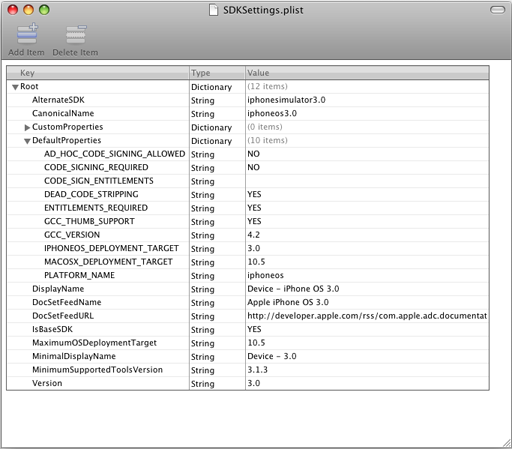
Pay special notice to CODE_SIGNING_REQURIED, CODE_SIGN_ENTITLEMENTS, and AD_HOC_CODE_SIGNING_ALLOWED. You must restart xcode to have changes take effect.
2) SSH your application bundle to /Applications folder on iPhone.
3) chmod 755 your app binary inside your app bundle. If your app name is Test.app and your binary is test, then you would use: chmod 755 /Applications/Test.app/test
4) ldid sign your binary. Using the test example: ldid -S /Applications/Test.app/test. You should run this as user root, not user mobile. If you don’t have ldid installed on your iPhone, ssh in as user root, apt-get install ldid, then you will have it. Note: if you are working in mobile terminal, make sure to su root first. Note #2: ldid requires a unique inode. If you are replacing your binary with another compiled version, you must delete the old one and copy the new one. If you simply overwrite it, ldid will either crash or not work.
Alternatively, you can ldid on OSX in xcode:
ldid for osx is here. You can do this on osx machine or add it as a build step in xcode:
* Under targets, your project, right click and select Add, new build phase, New run script build phase.
* Type in /usr/bin/ldid -S FULLPATH_TO_YOUR_BINARY
5) Respring to show your app icon. You must respring using either my respring app or sbsettings respring function. These will rebuild the cache and your icon will show up. A simple “killall SpringBoard” will not do this.
6) Finally, make sure you leave all code signing authority out of your Info.plist. By default, this will not be present.
How to make 2 apps one for 3.0 and one for 4.0 into one package:
If you have an existing app that is 3.0 and you are updating it for 4.0 and you need two apps to exist, you should instead control this by a launch script. For this we will use Snapture as an example. Snapture 3.0 binary is named Snapture3, snapture 4.0 binary named Snapture4. Then we make a bash script as Snapture. All get 755′d and Info.plist points to Snapture. Inside snapture you have:
!#/bin/bash
Snapture=$(dirname “$0″)
SOMEFRAMEWORKONLYON3=/System/Library/Frameworks/GameKit.framework/GameKit
if [[ -f $SOMEFRAMEWORKONLYON3 ]]; then
exec “/Applications/Snapture.app/Snapture4″
else
exec “/Applications/Snapture.app/Snapture3″
fi
Now your app runs on both 3.0 and 4.0 even though it has 2 separate binaries.
How to make a single app bundle for iPad and iPhone using separate binaries:
Using the example above, we can make a small modification and you can have a single app submission that works for both iPad and iPhone/iPods. I used clockus app as an example. The binary for iphone is clockusiphone and for ipad is clockusipad. Here is your script: (gsc.wildcat.list should only exist on ipads).
#!/bin/bash
Clockus=$(dirname “$0″)
SOMEIPADONLYFILE=/var/lib/dpkg/info/gsc.wildcat.list
if [[ -f $SOMEIPADONLYFILE ]]; then
exec “${Clockus}”/clockusipad
else
exec “${Clockus}”/clockusiphone
fi
Lets say you have a mobile substrate dylib and you need 2 binaries for that. Here is how you can handle it:
Make a new dylib that has *only* this function in it. This will be loaded by mobile substrate and decide which dylib to load at runtime.
init()
{
char* dylibPath = NULL;
// Get the system version and the path to the real mobile substrate dylib
if([[UIDevice currentDevice] systemVersion] hasPrefix:@”2″])
{
dylibPath = “/Applications/myapp.app/mydylib2.dylib”;
}
else
{
dylibPath = “/Applications/myapp.app/mydylib3.dylib”;
}
void* libHandle = dlopen(dylibPath, RTLD_NOW);
if(libHandle != NULL)
{
// This assumes your dylib’s init function is called init, if not change the name in “”
void (*init)() = dlsym(libHandle, “init”);
if(init != NULL)
{
init();
}
dlclose(libHandle);
}
}
There are a couple other minor differences between a jailbroken app and an appstore app:
1) Appstore app runs in a sandbox at /var/mobile/Applications/GUID/folder. Jailbroken app runs in /Applications
2) Appstore app has a Documents folder that is created by the installation process. Jailbroken app does not. It is up to the app to create its own folder. Should you need this type of folder, you must create this with a simple mkdir command in your applicationDidFinishLaunching function. Just add a simple function: mkdir(“/var/mobile/Library/YOURAPPNAME”, 0755); If the folder already exists, no harm done. You want to do this because the install process runs as user root and the app runs as user mobile. If Cydia does this for you then the folder will have the incorrect permissions.
Compile For Cydia Submission Author: BigBoss Updated September 23, 2011的更多相关文章
- Warsaw U Contest Petrozavo dsk Summer 2011 Training Camp, Monday, September 5, 2011
Warsaw U Contest Petrozavo dsk Summer 2011 Training Camp, Monday, September 5, 2011 Problem A.Chocol ...
- Marketplace Client- Download
Marketplace是Java平台被广泛使用的IDE(集成开发环境)Eclipse的软件商店.上面有个有种牛X的插件,可根据自己需要下载. Eclipse Marketplace官网地址:http: ...
- How To Compile Qt with Visual Studio 2010
This post is a step-by-step guide on how to compile Qt 4.x.x with MSVC 2010. Although we use Qt 4.7. ...
- How To Compile Qt with Visual Studio
How To Compile Qt with Visual Studio FEBRUARY 1, 2011 This post is a step-by-step guide on how to co ...
- cross compile vlc 播放器
上一篇文章介绍了如何交叉编译 FFmpeg ,继续介绍 VLC播放器 交叉编译 . 首先下载 vlc 源码 我用的是 2.2.6 地址 : http://mirrors.neusoft.edu ...
- Java性能提示(全)
http://www.onjava.com/pub/a/onjava/2001/05/30/optimization.htmlComparing the performance of LinkedLi ...
- C# 泛型List用法
C# List Examples by Sam Allen - Updated September 6, 2009 Problem. You have questions about the List ...
- (转)The Road to TensorFlow
Stephen Smith's Blog All things Sage 300… The Road to TensorFlow – Part 7: Finally Some Code leave a ...
- Thinking Clearly about Performance
http://queue.acm.org/detail.cfm?id=1854041 The July/August issue of acmqueue is out now acmqueue is ...
随机推荐
- Hbase1.2.4概述
安装Hbase的时候,需要注意版本与Hadoop的版本兼容,具体查看:https://hbase.apache.org/book.html#basic.prerequisites 如下图: 我的Had ...
- GRE/GMAT/LSAT长难句300例精讲精练-思维导图
<GRE/GMAT/LSAT长难句300例精讲精练>是GRE超人气名师陈琦老师团队的又一本新作,也是“再要你命3000”的新成员,从之前的词汇.短语.练习,提升到长难句层面,相信学完本书后 ...
- [Android]android Service后台防杀
网上有很多办法,方法一:在JNI里面fork出子进程service在单独的进程中,在service中调用JNI的代码,然后fork出一个进程,然后让我们的service进程和fork出来的子进程一直运 ...
- 安装 SPRING TOOL SUITE
- 【P3355】骑士共存问题(最大流+黑白染色,洛谷)
这个题刚看上去就让人不禁想到一道叫做方格取数问题的题目,事实上也就是这么做,对棋盘黑白染色,然后黑格子连源点,白的连汇点,点权为1.然后判断一下黑格子能影响到的白格子,边权为inf,跑一遍最大流就可以 ...
- AppWidget源码分析---updateAppWidget过程分析
转[原文] 前面一篇文章,分析了AppWidgetProvider和RemoteView的源码,从中我们可以知道它们的实现原理,AppWidgetProvider是一个BroadcastReceive ...
- MyEclipse 为xml添加本地的dtd文件
在使用Eclipse或MyEclipse编辑XML文件的时候经常会碰到编辑器不提示的现象,这常常是因为其xml文件需要参考的DTD文件找不到,还有因为网络的问题不能及时提示而产生的.Eclipse/M ...
- Ubuntu 1210怎么获得root权限登录
Ubuntu 12.10 怎么用Root 登录?以下是Ubuntu 12.10 启用Root 登录的方法吗,希望对大家有些帮助吧! 方法如下: 1.先设定一个 Root 密码 sudo passwd ...
- c 结构体中存在指针,指针的不同赋值方法
#include<stdio.h>#include<stdlib.h>#include<string.h>struct parameter{ char *fd; i ...
- JQuery小知识点代码
1.链式操作 $(function(){ /*var oDiv = $('#div1'); oDiv.html('hello'); oDiv.css('background','red'); oDiv ...