
Compile For Cydia Submission Author: BigBoss Updated September 23, 2011
Compile For Cydia Submission
Author: BigBoss
Updated September 23, 2011:
In order to submit your app to Cydia, you will need to do a few things:
Sign your app with ldid, build for iPhone OS, test your app in jailbreak world.
Dont have a MAC?
Before you read on, there is a very easy framework for building applications in iPhone OSwithout xCode created by genius Dustin Howett. With this framework, you can compile on your iPhone, iPod, iPad without the need for owning a MAC.
See this link for more details. If you want quick and easy install instructions for installing theos on your idevice to use via ssh, do this:
1) Fire up cydia, make sure you’re set as user type developer, and search “BigBoss Recommended”. This is a set of command line tools that also has a hidden installs script.
2) In ssh on idevice, type “installtheos3″. This will download over 100mb of data so make sure you have a stable Wi-Fi connection.
3) This will install theos to /var/theos.
4) For further theos help, I recommend irc channel irc.saurik.com #theos or refer to the link above for more details.
If you want to compile for Cydia using xCode, read on.
Compiling on the MAC with xCode
Code signing from xcode will not work. You will need to sign your app with ldid. Here are the steps to test your app in jailbreak world, sign it, and make its icon show up on your iPhone:
1) Build your binary in xcode with iPhone OS 3.0 setting or build your app using iPhone GCC or toolchain. Xcode always defaults to building only for the latest firmware. This seems like Apple’s way to force everyone to always update. It’s silly. Unless you have a technical reason for it, build for iPhone OS 3.0 not 3.1, 3.1.3 etc. If your app requires a specific version of the OS, you must state this clearly in the submission form or your submission will be delayed while I ask you to rebuild your app.
For code signing, you can just use “don’t code sign” in the “info” section of your project. Search for “code signing” to find where to set this. You will use ldid in a step further down instead. Note: this option seems to only exist for the 2.0 SDK or 2.0 SDK build option.
For SDK 3.0, disabling code sign is a bit trickier. It requires editing your /Developer/Platforms/iPhoneOS.platform/Developer/SDKs/iPhoneOS3.0.sdk/SDKSettings.plist and making it look like this:
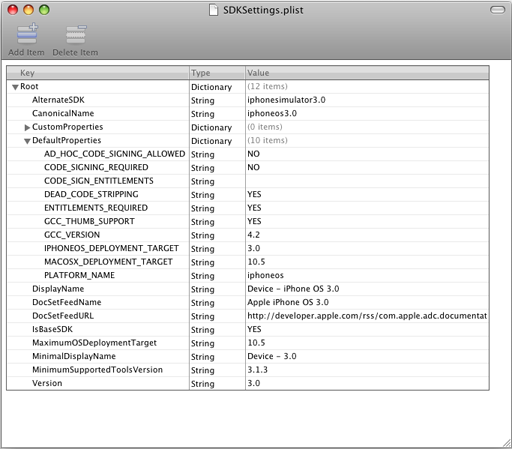
Pay special notice to CODE_SIGNING_REQURIED, CODE_SIGN_ENTITLEMENTS, and AD_HOC_CODE_SIGNING_ALLOWED. You must restart xcode to have changes take effect.
2) SSH your application bundle to /Applications folder on iPhone.
3) chmod 755 your app binary inside your app bundle. If your app name is Test.app and your binary is test, then you would use: chmod 755 /Applications/Test.app/test
4) ldid sign your binary. Using the test example: ldid -S /Applications/Test.app/test. You should run this as user root, not user mobile. If you don’t have ldid installed on your iPhone, ssh in as user root, apt-get install ldid, then you will have it. Note: if you are working in mobile terminal, make sure to su root first. Note #2: ldid requires a unique inode. If you are replacing your binary with another compiled version, you must delete the old one and copy the new one. If you simply overwrite it, ldid will either crash or not work.
Alternatively, you can ldid on OSX in xcode:
ldid for osx is here. You can do this on osx machine or add it as a build step in xcode:
* Under targets, your project, right click and select Add, new build phase, New run script build phase.
* Type in /usr/bin/ldid -S FULLPATH_TO_YOUR_BINARY
5) Respring to show your app icon. You must respring using either my respring app or sbsettings respring function. These will rebuild the cache and your icon will show up. A simple “killall SpringBoard” will not do this.
6) Finally, make sure you leave all code signing authority out of your Info.plist. By default, this will not be present.
How to make 2 apps one for 3.0 and one for 4.0 into one package:
If you have an existing app that is 3.0 and you are updating it for 4.0 and you need two apps to exist, you should instead control this by a launch script. For this we will use Snapture as an example. Snapture 3.0 binary is named Snapture3, snapture 4.0 binary named Snapture4. Then we make a bash script as Snapture. All get 755′d and Info.plist points to Snapture. Inside snapture you have:
!#/bin/bash
Snapture=$(dirname “$0″)
SOMEFRAMEWORKONLYON3=/System/Library/Frameworks/GameKit.framework/GameKit
if [[ -f $SOMEFRAMEWORKONLYON3 ]]; then
exec “/Applications/Snapture.app/Snapture4″
else
exec “/Applications/Snapture.app/Snapture3″
fi
Now your app runs on both 3.0 and 4.0 even though it has 2 separate binaries.
How to make a single app bundle for iPad and iPhone using separate binaries:
Using the example above, we can make a small modification and you can have a single app submission that works for both iPad and iPhone/iPods. I used clockus app as an example. The binary for iphone is clockusiphone and for ipad is clockusipad. Here is your script: (gsc.wildcat.list should only exist on ipads).
#!/bin/bash
Clockus=$(dirname “$0″)
SOMEIPADONLYFILE=/var/lib/dpkg/info/gsc.wildcat.list
if [[ -f $SOMEIPADONLYFILE ]]; then
exec “${Clockus}”/clockusipad
else
exec “${Clockus}”/clockusiphone
fi
Lets say you have a mobile substrate dylib and you need 2 binaries for that. Here is how you can handle it:
Make a new dylib that has *only* this function in it. This will be loaded by mobile substrate and decide which dylib to load at runtime.
init()
{
char* dylibPath = NULL;
// Get the system version and the path to the real mobile substrate dylib
if([[UIDevice currentDevice] systemVersion] hasPrefix:@”2″])
{
dylibPath = “/Applications/myapp.app/mydylib2.dylib”;
}
else
{
dylibPath = “/Applications/myapp.app/mydylib3.dylib”;
}
void* libHandle = dlopen(dylibPath, RTLD_NOW);
if(libHandle != NULL)
{
// This assumes your dylib’s init function is called init, if not change the name in “”
void (*init)() = dlsym(libHandle, “init”);
if(init != NULL)
{
init();
}
dlclose(libHandle);
}
}
There are a couple other minor differences between a jailbroken app and an appstore app:
1) Appstore app runs in a sandbox at /var/mobile/Applications/GUID/folder. Jailbroken app runs in /Applications
2) Appstore app has a Documents folder that is created by the installation process. Jailbroken app does not. It is up to the app to create its own folder. Should you need this type of folder, you must create this with a simple mkdir command in your applicationDidFinishLaunching function. Just add a simple function: mkdir(“/var/mobile/Library/YOURAPPNAME”, 0755); If the folder already exists, no harm done. You want to do this because the install process runs as user root and the app runs as user mobile. If Cydia does this for you then the folder will have the incorrect permissions.
Compile For Cydia Submission Author: BigBoss Updated September 23, 2011的更多相关文章
- Warsaw U Contest Petrozavo dsk Summer 2011 Training Camp, Monday, September 5, 2011
Warsaw U Contest Petrozavo dsk Summer 2011 Training Camp, Monday, September 5, 2011 Problem A.Chocol ...
- Marketplace Client- Download
Marketplace是Java平台被广泛使用的IDE(集成开发环境)Eclipse的软件商店.上面有个有种牛X的插件,可根据自己需要下载. Eclipse Marketplace官网地址:http: ...
- How To Compile Qt with Visual Studio 2010
This post is a step-by-step guide on how to compile Qt 4.x.x with MSVC 2010. Although we use Qt 4.7. ...
- How To Compile Qt with Visual Studio
How To Compile Qt with Visual Studio FEBRUARY 1, 2011 This post is a step-by-step guide on how to co ...
- cross compile vlc 播放器
上一篇文章介绍了如何交叉编译 FFmpeg ,继续介绍 VLC播放器 交叉编译 . 首先下载 vlc 源码 我用的是 2.2.6 地址 : http://mirrors.neusoft.edu ...
- Java性能提示(全)
http://www.onjava.com/pub/a/onjava/2001/05/30/optimization.htmlComparing the performance of LinkedLi ...
- C# 泛型List用法
C# List Examples by Sam Allen - Updated September 6, 2009 Problem. You have questions about the List ...
- (转)The Road to TensorFlow
Stephen Smith's Blog All things Sage 300… The Road to TensorFlow – Part 7: Finally Some Code leave a ...
- Thinking Clearly about Performance
http://queue.acm.org/detail.cfm?id=1854041 The July/August issue of acmqueue is out now acmqueue is ...
随机推荐
- CNN学习笔记:激活函数
CNN学习笔记:激活函数 激活函数 激活函数又称非线性映射,顾名思义,激活函数的引入是为了增加整个网络的表达能力(即非线性).若干线性操作层的堆叠仍然只能起到线性映射的作用,无法形成复杂的函数.常用的 ...
- Android 6.0 Kotlin 蓝牙扫描
package com.arci.myapplication import android.app.Activityimport android.os.Bundleimport android.sup ...
- SQL语句2
1. SELECT * FROM Persons WHERE City NOT LIKE '%lon%' 2. SELECT * FROM Persons WHERE FirstName LIKE ' ...
- 【hihocoder】01背包
描述 且说上一周的故事里,小Hi和小Ho费劲心思终于拿到了茫茫多的奖券!而现在,终于到了小Ho领取奖励的时刻了! 小Ho现在手上有M张奖券,而奖品区有N件奖品,分别标号为1到N,其中第i件奖品需要ne ...
- 优秀 H5 案例收集 vol.3(不定期更新)
上期浏览:Vol.1 Vol.2 爱的不同定义,五笔连成爱http://news.163.com/special/fdh5_valentines/ 世界华语悬疑文学大赛—下一位悬疑大师,就是你!h ...
- CSS 一个完整的例子
My first web page What this is A simple page put together using HTML. I said a simple page put toget ...
- vue2.0过度动画
vue在插入.更新或移除dom时,提供了多种不同方式的应用过度效果. 包括以下工具: 在css过渡和动画中自动应用class. 可以配合使用第三方css动画库,如animate.css 在过渡钩子函数 ...
- HTML5统计图表数据初始动画
在线演示 本地下载
- SpringBoot 加载配置文件
1.application.properties或application.yaml是SpringBoot默认的配置文件. 可以通过@Value注解 配合 ${......}来读取配置在属性文件中的内容 ...
- NO.3 Android SDK 高效更新
一.修改协议 SDK Manager下Tools->Options,选中 “Force https://… sources to be fetched using http://…” 既 ...