
Centos6.5 安装gitlab 并使用自带的nginx
Centos6.5 安装gitlab 并使用自带的nginx
1.安装依赖
yum -y install policycoreutils openssh-server openssh-clients postfix policycoreutils-python
2.设置postfix开机启动
chkconfig postfix on && service postfix start
3.下载安装包
wget https://mirrors.tuna.tsinghua.edu.cn/gitlab-ce/yum/el6/gitlab-ce-11.4.4-ce.0.el6.x86_64.rpm
放入/opt中
4.安装
rpm -i gitlab-ce-11.4.4-ce.0.el6.x86_64.rpm
It looks like GitLab has not been configured yet; skipping the upgrade script.

       *.                  *.

      ***                 ***

     *****               *****

    .******             *******

    ********            ********

   ,,,,,,,,,***********,,,,,,,,,

  ,,,,,,,,,,,*********,,,,,,,,,,,

  .,,,,,,,,,,,*******,,,,,,,,,,,,

      ,,,,,,,,,*****,,,,,,,,,.

         ,,,,,,,****,,,,,,

            .,,,***,,,,

                ,*,.

     _______ __  __          __

    / ____(_) /_/ /   ____ _/ /_

   / / __/ / __/ /   / __ `/ __ \

  / /_/ / / /_/ /___/ /_/ / /_/ /

  \____/_/\__/_____/\__,_/_.___/

Thank you for installing GitLab!
5.修改配置
vim /etc/gitlab/gitlab.rb
关闭自带的nginx
配置地址
external_url 'http://xxx.xxx.xxx.xxx'
禁用自带nginx
nginx['enable'] = false
6.nginx 增加虚拟主机配置
# gitlab socket 文件地址

upstream gitlab {

  server unix:/var/opt/gitlab/gitlab-workhorse/socket;

}

server {

  listen *:80;

  server_name gitlab.demo.com;   # 请修改为你的域名

  server_tokens off;     # don't show the version number, a security best practice

  root /opt/gitlab/embedded/service/gitlab-rails/public;

  # Increase this if you want to upload large attachments

  # Or if you want to accept large git objects over http

  client_max_body_size 250m;

  # individual nginx logs for this gitlab vhost

  access_log  /var/log/gitlab/gitlab_access.log;

  error_log    /var/log/gitlab/gitlab_error.log;

  location / {

    # serve static files from defined root folder;.

    # @gitlab is a named location for the upstream fallback, see below

    try_files $uri $uri/index.html $uri.html @gitlab;

  }

  # if a file, which is not found in the root folder is requested,

  # then the proxy pass the request to the upsteam (gitlab unicorn)

  location @gitlab {

    # If you use https make sure you disable gzip compression

    # to be safe against BREACH attack

    proxy_read_timeout 300; # Some requests take more than 30 seconds.

    proxy_connect_timeout 300; # Some requests take more than 30 seconds.

    proxy_redirect     off;

    proxy_set_header   X-Forwarded-Proto $scheme;

    proxy_set_header   Host              $http_host;

    proxy_set_header   X-Real-IP         $remote_addr;

    proxy_set_header   X-Forwarded-For   $proxy_add_x_forwarded_for;

    proxy_set_header   X-Frame-Options   SAMEORIGIN;

    proxy_pass http://gitlab;

  }

  # Enable gzip compression as per rails guide: http://guides.rubyonrails.org/asset_pipeline.html#gzip-compression

  # WARNING: If you are using relative urls do remove the block below

  # See config/application.rb under "Relative url support" for the list of

  # other files that need to be changed for relative url support

  location ~ ^/(assets)/  {

    root /opt/gitlab/embedded/service/gitlab-rails/public;

    # gzip_static on; # to serve pre-gzipped version

    expires max;

    add_header Cache-Control public;

  }

  error_page 502 /502.html;

}
7.重启是配置生效。
### 重启gitlab使配置生效 ###

gitlab-ctl econfigure

### 重启nginx使配置生效 ###

service nginx restart
查看状态
gitlab-ctl status
其他指令
gitlab-ctl start

gitlab-ctl stop

gitlab-ctl restart

gitlab-ctl help
# ps -ef |grep nginx

root      1905     1  0 14:48 ?        00:00:00 nginx: master process /usr/local/nginx/sbin/nginx -c /usr/local/nginx/conf/nginx.conf

www       1906  1905  0 14:48 ?        00:00:00 nginx: worker process

www       1907  1905  0 14:48 ?        00:00:00 nginx: worker process

root     13734  2883  0 15:13 pts/0    00:00:00 grep nginx
# ps -ef |grep unicorn

root      1018  1008  0 14:48 ?        00:00:00 runsv unicorn

root      1044  1018  0 14:48 ?        00:00:00 svlogd -tt /var/log/gitlab/unicorn

git      13360  1018  0 15:12 ?        00:00:00 /bin/bash /opt/gitlab/embedded/bin/gitlab-unicorn-wrapper

git      13381     1 29 15:12 ?        00:00:17 unicorn master -D -E production -c /var/opt/gitlab/gitlab-rails/etc/unicorn.rb /opt/gitlab/embedded/service/gitlab-rails/config.ru

git      13461 13381  0 15:12 ?        00:00:00 unicorn worker[0] -D -E production -c /var/opt/gitlab/gitlab-rails/etc/unicorn.rb /opt/gitlab/embedded/service/gitlab-rails/config.ru

git      13464 13381  0 15:12 ?        00:00:00 unicorn worker[1] -D -E production -c /var/opt/gitlab/gitlab-rails/etc/unicorn.rb /opt/gitlab/embedded/service/gitlab-rails/config.ru

git      13467 13381  0 15:12 ?        00:00:00 unicorn worker[2] -D -E production -c /var/opt/gitlab/gitlab-rails/etc/unicorn.rb /opt/gitlab/embedded/service/gitlab-rails/config.ru

root     13753  2883  0 15:13 pts/0    00:00:00 grep unicorn
停止gitlab
gitlab-ctl stop

gitlab-ctl reconfigure

gitlab-ctl restart
修改unicorn,给nginx用户权限。
unicorn['port'] = 1024

web_server['external_users'] = ['www','root']
sudo chmod -R o+x /var/opt/gitlab/gitlab-rails

sudo chmod -R o+x /var/opt/gitlab/gitlab-workhorse
sudo usermod -aG git www

sudo usermod -aG gitlab-www www
查看错误日志
tail -n 10 /var/log/gitlab/gitlab_error.log
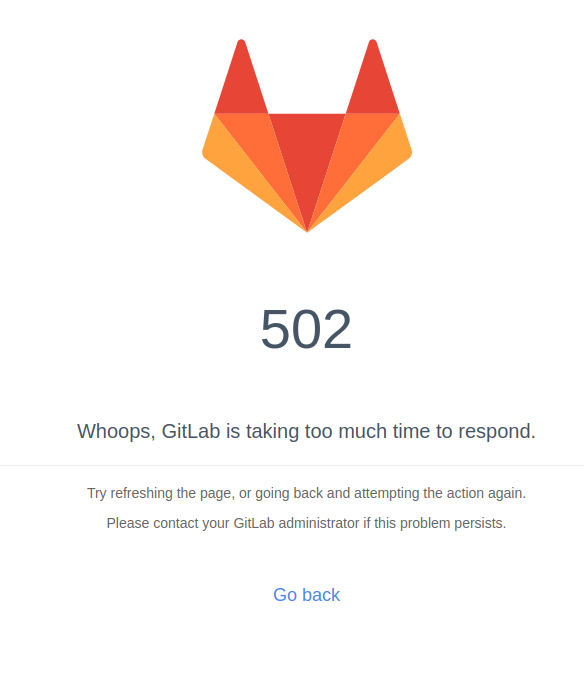
MLGB的502!
我甚至把服务器都重启了!稀里糊涂就可以了,操!
Centos6.5 安装gitlab 并使用自带的nginx的更多相关文章
- CentOS6.5 安装gitlab以及gitolite迁移gitlab
CentOS6.5 安装gitlab以及gitolite迁移gitlab gitlab 的安装使用以及数据结构 安装 环境: CentOS6.5 基于 nignx + unicorn 搭建的应用环境, ...
- centos6/7安装gitlab
CentOS/RHEL 6/7安装gitlab新建 /etc/yum.repos.d/gitlab-ce.repo,内容为你的CentOS/RHEL版本:centos6 [gitlab-ce] nam ...
- centos6.8 安装gitlab记录
sudo yum install -y curl policycoreutils-python openssh-server cronie sudo lokkit -s http -s ssh sud ...
- centos6.4安装GitLab
参考文章: http://www.pickysysadmin.ca/2013/03/25/how-to-install-gitlab-5-0-on-centos-6/ yum安装redis的方法: h ...
- CentOS6.4安装JDK,卸载自带的OpenJDK
1.查看OpenJDK的安装包 $ rpm -qa |grep java java-1.6.0-openjdk-1.6.0.0-1.62.1.11.11.90.el6_4.x86_64 java-1. ...
- git\CentOS6.5中gitlab安装教程
一.Git 起源: Git是一个开源的分布式版本控制系统,用于敏捷高效地处理任何或小或大的项目. Git 是 Linus Torvalds 为了帮助管理 Linux 内核开发而开发的一个开放源码的版本 ...
- ubuntu 安装 gitlab最新版(下载慢问题)
Debian/Ubuntu 用户 首先信任 GitLab 的 GPG 公钥: curl https://packages.gitlab.com/gpg.key 2> /dev/null | su ...
- Gitlab完美安装【CentOS6.5安装gitlab-6.9.2】
摘要: 拆腾了几天,终于在今天找到了快速安装Gitlab的方法.CentOS6.5安装gitlab-6.9.2 参考网址:https://gitlab.com/gitlab-org/omnibus-g ...
- centos6 安装GitLab
环境 Requirements 软件 版本CentOS 6.6Python 2.6Ruby 2.1.5Git 1.7.10+Redis 2.0+MySQL GitLab 7-8-stableGitLa ...
随机推荐
- TCL V7300A-3D升级教程
鄙人的电视型号: 机器软件版本:V8-0MT-3201-LF1V028_000 3201是机芯 v028是版本号 设备型号:cn_mt32-v7300a-3d TCL电视升级有三个:本地.网络.自动 ...
- HttpURLConnection 当作请求调用接口不带返回参数的工具类
package cn.smartercampus.core.util; import java.io.BufferedReader; import java.io.InputStream; impor ...
- datagridview数据导出到excel
/// <summary> /// 导出Excel /// </summary> /// <param name="mydgv">控件 Data ...
- Es 中一个分片一般设置多大
百度Elasticsearch-产品描述-介绍-百度云 https://cloud.baidu.com/doc/BES/FAQ.html#.2C.BB.93.08.C9.7E.2F.A3.E7.35. ...
- 亚马逊 MWS 开发者指南 漏桶算法
流量控制与令牌桶算法|James Pan's Blog https://blog.jamespan.me/2015/10/19/traffic-shaping-with-token-bucket 服 ...
- 如何编译部署 UIKit 离线文档?
如何编译部署 UIKit 离线文档? Whis is UIKit? Note:部署在 Windows 系统会出现路径错误情况,这里采用在 Debian 系统上进行编译和部署. 1. 安装一些前置工具 ...
- mysql按时间查询(年/月/日)
0.创建表sql语句查询 mysql> show create table byzp_personinfo; CREATE TABLE `byzp_personinfo` ( `id` int( ...
- 前端基础-css(2)
一.标准文档流 宏观的将,我们的web页面和ps等设计软件有本质的区别,web网页的制作,是个“流”,从上而下,像 “织毛衣”.而设计软件 ,想往哪里画东西,就去哪里画. 标准文档流下,有一些现象,比 ...
- jQuery Mobile 手动显示ajax加载器
在jquery mobile开发中,经常需要调用ajax方法,异步获取数据,如果异步获取数据方法由于网速等等的原因,会有一个反应时间,如果能在点击按钮后数据处理期间,给一个正在加载的提示,客户体验会更 ...
- Vue.js——框架
一.什么是VUE vue 是一个构建用户界面的javascript框架 特点:轻量,高效 特性:双向数据绑定,数据驱动视图 二.vue的使用 1.引入vue.js <script src=vue ...