
用CIFilter生成QRCode二维码图片
用CIFilter生成QRCode二维码图片
CIFilter不仅仅可以用来做滤镜,它还可以用来生成二维码.
CIFilterEffect.h + CIFilterEffect.m
//

//  CIFilterEffect.h

//  CIFilter

//

//  Created by YouXianMing on 14-5-9.

//  Copyright (c) 2014年 Y.X. All rights reserved.

//

#import <Foundation/Foundation.h>

/*

CILinearToSRGBToneCurve

CIPhotoEffectChrome

CIPhotoEffectFade

CIPhotoEffectInstant

CIPhotoEffectMono

CIPhotoEffectNoir

CIPhotoEffectProcess

CIPhotoEffectTonal

CIPhotoEffectTransfer

CISRGBToneCurveToLinear

CIVignetteEffect

*/

@interface CIFilterEffect : NSObject

@property (nonatomic, strong, readonly) UIImage *filterImage;

- (instancetype)initWithImage:(UIImage *)image filterName:(NSString *)name;

@property (nonatomic, strong, readonly) UIImage *QRCodeImage;

- (instancetype)initWithQRCodeString:(NSString *)string width:(CGFloat)width;

@end
//

//  CIFilterEffect.m

//  CIFilter

//

//  Created by YouXianMing on 14-5-9.

//  Copyright (c) 2014年 Y.X. All rights reserved.

//

#import "CIFilterEffect.h"

@interface CIFilterEffect ()

@property (nonatomic, strong, readwrite) UIImage *filterImage;

@property (nonatomic, strong, readwrite) UIImage *QRCodeImage;

@end

@implementation CIFilterEffect

- (instancetype)initWithImage:(UIImage *)image filterName:(NSString *)name

{

    self = [super init];

    if (self)

    {

        // 将UIImage转换成CIImage

        CIImage *ciImage = [[CIImage alloc] initWithImage:image];

        // 创建滤镜

        CIFilter *filter = [CIFilter filterWithName:name

                                      keysAndValues:kCIInputImageKey, ciImage, nil];

        [filter setDefaults];

        // 获取绘制上下文

        CIContext *context = [CIContext contextWithOptions:nil];

        // 渲染并输出CIImage

        CIImage *outputImage = [filter outputImage];

        // 创建CGImage句柄

        CGImageRef cgImage = [context createCGImage:outputImage

                                           fromRect:[outputImage extent]];

        _filterImage = [UIImage imageWithCGImage:cgImage];

        // 释放CGImage句柄

        CGImageRelease(cgImage);

    }

    return self;

}

- (instancetype)initWithQRCodeString:(NSString *)string width:(CGFloat)width

{

    self = [super init];

    if (self)

    {

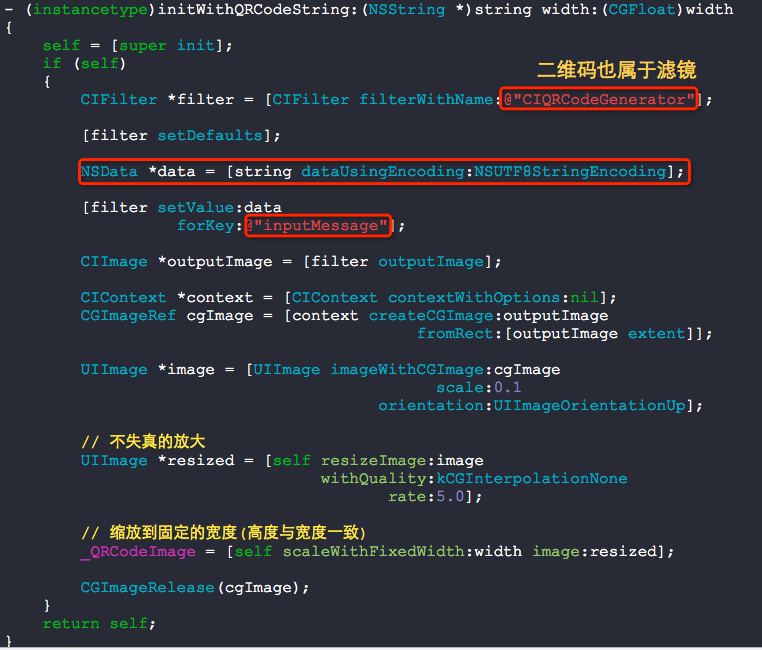
        CIFilter *filter = [CIFilter filterWithName:@"CIQRCodeGenerator"];

        [filter setDefaults];

        NSData *data = [string dataUsingEncoding:NSUTF8StringEncoding];

        [filter setValue:data

                  forKey:@"inputMessage"];

        CIImage *outputImage = [filter outputImage];

        CIContext *context = [CIContext contextWithOptions:nil];

        CGImageRef cgImage = [context createCGImage:outputImage

                                           fromRect:[outputImage extent]];

        UIImage *image = [UIImage imageWithCGImage:cgImage

                                             scale:0.1

                                       orientation:UIImageOrientationUp];

        // 不失真的放大

        UIImage *resized = [self resizeImage:image

                                 withQuality:kCGInterpolationNone

                                        rate:5.0];

        // 缩放到固定的宽度(高度与宽度一致)

        _QRCodeImage = [self scaleWithFixedWidth:width image:resized];

        CGImageRelease(cgImage);

    }

    return self;

}

- (UIImage *)scaleWithFixedWidth:(CGFloat)width image:(UIImage *)image

{

    float newHeight = image.size.height * (width / image.size.width);

    CGSize size = CGSizeMake(width, newHeight);

    UIGraphicsBeginImageContextWithOptions(size, NO, );

    CGContextRef context = UIGraphicsGetCurrentContext();

    CGContextTranslateCTM(context, 0.0, size.height);

    CGContextScaleCTM(context, 1.0, -1.0);

    CGContextSetBlendMode(context, kCGBlendModeCopy);

    CGContextDrawImage(context, CGRectMake(0.0f, 0.0f, size.width, size.height), image.CGImage);

    UIImage *imageOut = UIGraphicsGetImageFromCurrentImageContext();

    UIGraphicsEndImageContext();

    return imageOut;

}

- (UIImage *)resizeImage:(UIImage *)image

             withQuality:(CGInterpolationQuality)quality

                    rate:(CGFloat)rate

{

    UIImage *resized = nil;

    CGFloat width = image.size.width * rate;

    CGFloat height = image.size.height * rate;

    UIGraphicsBeginImageContext(CGSizeMake(width, height));

    CGContextRef context = UIGraphicsGetCurrentContext();

    CGContextSetInterpolationQuality(context, quality);

    [image drawInRect:CGRectMake(, , width, height)];

    resized = UIGraphicsGetImageFromCurrentImageContext();

    UIGraphicsEndImageContext();

    return resized;

}

@end
看看以下使用情况,一行代码搞定!

以下几个二维码,闲得无聊可以扫一扫......


用CIFilter生成QRCode二维码图片的更多相关文章
- PHP生成QRCode二维码
php生成QRCode二维码示例 <?php //引入 phpqrcode 类库 //phpqrcode下载地址:https://github.com/t0k4rt/phpqrcode //或从 ...
- jQuery生成QRcode二维码
jQuery生成QRcode二维码示例 <!DOCTYPE html> <html> <head> <meta charset="utf-8&quo ...
- Java使用ZXing生成/解析二维码图片
ZXing是一种开源的多格式1D/2D条形码图像处理库,在Java中的实现.重点是在手机上使用内置摄像头来扫描和解码设备上的条码,而不与服务器通信.然而,该项目也可以用于对桌面和服务器上的条形码进行编 ...
- 微信支付-无法识别qrcode生成的二维码图片
1.开始使用 table方式,但是还是无法识别二维码 http://www.cnblogs.com/staticed/p/8549316.html var code_url = data.code_ ...
- JAVA生成二维码图片代码
首先需要导入 QRCode.jar 包 下载地址看这里 http://pan.baidu.com/s/1o6qRFqM import java.awt.Color;import java.awt. ...
- java--实现将文字生成二维码图片,并在中间附上logo,下方附上文字
前段时间因为工作需要,要实现将一段文字或者url生成二维码,然后中间附上logo,下方正中间附上文字的功能. 上网找了几篇教程学习了下,由于没有保存借鉴的博文链接,所以就没po上参考文章的链接啦,感谢 ...
- asp.net.web如何简单生成和保存二维码图片的例子
首先,要有生成二维码图片,需要二维码生成的类库,到官网下载thoughtWorks.QRCode.dll 例子的步骤: 1.创建项目QRCodeTest1,选择asp.net.web窗体应用程序
- 使用javascript生成当前博文地址的二维码图片
前面的话 在电脑端发现一篇好的博文,想在手机上访问.这时,就必须打开手机浏览器输入长长的URL地址才行,非常不方便.如果在博客标题的后面跟一张小的图片,点击该图片后,出现一张二维码的大图,然后再通过手 ...
- c# 生成二维码图片
转载自:https://blog.csdn.net/hyunbar/article/details/78271778 1.在C#中直接引用ThoughtWorks.QRCode.dll 类 2.封装方 ...
随机推荐
- C# 获取类名
1.获取C#类中类名 System.Reflection.MethodBase.GetCurrentMethod().DeclaringType.Name; 2.获取C#类中类名(包含命名空间) Sy ...
- Unity 动画 命名
unity标准的动画命名格式是 ?模型名@动画名 如boss1@idle ,这样导入进来之后unity会自动给这个动画命名为idle而不是Take 001.
- xamarin RunOnUiThread
One of the keys to maintaining a responsive GUI is to do long-running tasks on a background thread s ...
- Spark standalone简介与运行wordcount(master、slave1和slave2)
前期博客 Spark standalone模式的安装(spark-1.6.1-bin-hadoop2.6.tgz)(master.slave1和slave2) Spark运行模式概述 1. Stan ...
- axios的兼容性
axios的兼容性处理 一.简介 看看官网的简介: “Promise based HTTP client for the browser and node.js” 译:基于 Promise 的 H ...
- [PY3]——heap模块 和 堆排序
heapify( ) heapify()函数用于将一个序列转化为初始化堆 nums=[16,7,3,20,17,8,-1] print('nums:',nums) show_tree(nums) nu ...
- Centos时间查看修改命令date详解
1.查看.修改Linux时区与时间 一.linux时区的查看与修改 1,查看当前时区date -R 2,修改设置时区方法1:tzselect 方法2:仅限于RedHat Linux 和 CentOSt ...
- Centos 从零开始 (四)
12:nginx架设 rtmp直播 首先在之前 所安装的nginx是用 yum 源安装的.却不能为nginx添加他的模块 所以要用wget来下载源文件 来进行源码配置与安装.开搞 [root@loca ...
- heroku快速部署node应用
试了一下heroku,简直碉堡了,下面介绍如何简单几步实现弄得应用的部署访问: 1.首先https://dashboard.heroku.com/进行账号注册 2.github上push一个最新的no ...
- sun.misc.unsafe
Java中大部分错误都是基于内存管理方面的.如果想破坏,可以使用Unsafe这个类. 实例化Unsafe: 下面两种方式是不行的 private Unsafe() {} //私有构造方法 @Calle ...