
iOS:操作队列实现多线程NSOperation
NSOperation具体使用:直接继承NSObject
NSOperationQueuePriorityVeryLow = -8L,
NSOperationQueuePriorityLow = -4L,
NSOperationQueuePriorityNormal = 0,
NSOperationQueuePriorityHigh = 4,
NSOperationQueuePriorityVeryHigh = 8
};
@property (readonly, getter=isExecuting) BOOL executing; //线程是否在执行
@property (readonly, getter=isFinished) BOOL finished; //线程是否执行完毕
@property (readonly, getter=isConcurrent) BOOL concurrent; //线程是否并发执行
@property (readonly, getter=isAsynchronous) BOOL asynchronous; //是否线程异步,已经被线程同步覆盖
@property (readonly, getter=isReady) BOOL ready; //线程是否处于就绪状态
@property (readonly, copy) NSArray *dependencies; //线程依赖的数组
@property NSOperationQueuePriority queuePriority; //队列优先级
@property (copy) void (^completionBlock)(void); //block函数
@property double threadPriority; //线程优先级
@property NSQualityOfService qualityOfService; //服务质量
@property (copy) NSString *name; //线程名字
- (void)cancel;//取消线程
- (void)addDependency:(NSOperation *)op; //添加线程依赖(只有上一个线程一直执行,依赖的下一个线程才开始执行)
- (void)removeDependency:(NSOperation *)op; //移除线程依赖
- (void)waitUntilFinished //等待抢占资源的线程结束
================================================================================
属性:
@property (readonly, retain) NSInvocation *invocation; //线程的调用
@property (readonly, retain) id result;
方法:
//创建线程的实例方法,可以添加线程事件
- (instancetype)initWithTarget:(id)target selector:(SEL)sel object:(id)arg;
//创建线程的实例方法
- (instancetype)initWithInvocation:(NSInvocation *)inv ;
=================================================================
3、NSBlockOperation的详解:NSBlockOperation : NSOperation
属性:@property (readonly, copy) NSArray *executionBlocks; //执行block的线程队列数组
方法:
※创建线程的类方法,执行block函数
+ (instancetype)blockOperationWithBlock:(void (^)(void))block;
※添加执行线程对列block函数
- (void)addExecutionBlock:(void (^)(void))block;
==========================================================
4、NSOperationQueue队列的详解:NSOperationQueue : NSOperation
@property NSInteger maxConcurrentOperationCount; // 能并发执行的最大线程数量
@property (getter=isSuspended) BOOL suspended; //是否暂时线程
@property (copy) NSString *name ; //线程名字
@property NSQualityOfService qualityOfService; //服务质量
@property (assign /* actually retain */) dispatch_queue_t underlyingQueue;
方法:
※添加线程
- (void)addOperation:(NSOperation *)op;
※等待添加线程数组
- (void)addOperations:(NSArray *)ops waitUntilFinished:(BOOL)wait;
※添加线程并执行block函数的实例方法
- (void)addOperationWithBlock:(void (^)(void))block;
※取消所有的线程
- (void)cancelAllOperations;
※等待所有的线程执行完毕
- (void)waitUntilAllOperationsAreFinished;
※当前队列
+ (NSOperationQueue *)currentQueue;
※主队列
+ (NSOperationQueue *)mainQueue;
@interface ViewController ()

{

    int tickets;

}

@property (weak, nonatomic) IBOutlet UITextView *textView;
2.设置票数和文本视图
    //准备数据

    tickets = ;

    //设置textView

    self.textView.text = @"";

    self.textView.layoutManager.allowsNonContiguousLayout = NO;
3.创建NSOperation实例(线程)
//创建NSOperation并加到队列

    NSInvocationOperation *operation1 = [[NSInvocationOperation alloc]initWithTarget:self selector:@selector(operationSellMethod:) object:@"售票线程-1"];

     NSInvocationOperation *operation2 = [[NSInvocationOperation alloc]initWithTarget:self selector:@selector(operationSellMethod:) object:@"售票线程-2"];
4.将operation加入创建的队列中
    //创建队列

    NSOperationQueue *queue = [[NSOperationQueue alloc]init];

    //为操作之间添加依赖,只有被依赖的线程执行完,依赖的线程才能执行

    //[operation1 addDependency:operation2];

    //将opearion放入队列

    [queue addOperation:operation1];

    [queue addOperation:operation2];
5.更新UI的主线程队列
#pragma mark -更新UI
-(void)appendTextView:(NSString *)text

{

    //1.获取原来的内容

    NSMutableString *content = [[NSMutableString alloc]initWithString:self.textView.text];

    NSRange range = NSMakeRange(content.length, );

    //2.追加新的内容

    [content appendString:[NSString stringWithFormat:@"\n%@",text]];

    [self.textView setText:content];

    //3.滚动视图

    [self.textView scrollRangeToVisible:range];

}
6.执行对共享抢占资源操作的过程
#pragma mark -执行线程过程
-(void)operationSellMethod:(NSString*)name

{

    while (YES)

    {

        //1.判断是否有票

        if (tickets>)

        {

            //没有将共享抢占资源放到主队列中,仍然要关心数据同步的问题

         @synchronized(self)

            {

                NSString *info = [NSString stringWithFormat:@"总的票数:%d,当前的线程:%@",tickets,name];

                [[NSOperationQueue mainQueue]addOperationWithBlock:^{

                    [self appendTextView:info];

                }];

                //2.卖票

                tickets--;

            }

            //3.线程休眠

            if([name isEqualToString:@"售票线程-1"])

            {

                [NSThread sleepForTimeInterval:0.3f];

            }

            else

            {

                [NSThread sleepForTimeInterval:0.2f];

            }

        }

        else

        {

            //更新UI

            NSString *info = [NSString stringWithFormat:@"票已经售完,当前的线程:%@",name];

            [[NSOperationQueue mainQueue] addOperationWithBlock:^{

                [self appendTextView:info];

            }];

            //退出线程

            break;

        }

    }

}
方法二:采用NSOpeartion的子类NSBlockOperation创建多线程:
@interface ViewController ()

{

    int tickets;

}

@property (weak, nonatomic) IBOutlet UITextView *textView;
2.设置票数和文本视图
    //准备数据

    tickets = 20;

    //设置textView

    self.textView.text = @"";

    self.textView.layoutManager.allowsNonContiguousLayout = NO;
3.创建队列和操作block线程
    //创建队列

    NSOperationQueue *queue = [[NSOperationQueue alloc]init];

    //设置并行的线程数量

    //[queue setMaxConcurrentOperationCount:2];

    //在队列中添加block的operation

    [queue addOperationWithBlock:^{

        [self operationSellMethod:@"售票线程-1"];

    }];

    [queue addOperationWithBlock:^{

        [self operationSellMethod:@"售票线程-2"];

    }];

    NSBlockOperation *blockOperation = [NSBlockOperation blockOperationWithBlock:^{

        [self operationSellMethod:@"售票线程-3"];

    }];

    [queue addOperation:blockOperation];
4.更新UI的主线程队列
#pragma mark -更新UI
-(void)appendTextView:(NSString *)text

{

    //1.获取原来的内容

    NSMutableString *content = [[NSMutableString alloc]initWithString:self.textView.text];

    NSRange range = NSMakeRange(content.length, );

    //2.追加新的内容

    [content appendString:[NSString stringWithFormat:@"\n%@",text]];

    [self.textView setText:content];

    //3.滚动视图

    [self.textView scrollRangeToVisible:range];

}
5.执行对共享抢占资源操作的过程
#pragma mark -执行线程过程
#pragma mark -执行线程过程

-(void)operationSellMethod:(NSString*)name

{

    while (YES)

    {

        //1.判断是否有票

        if (tickets>)

        {

            //将共享抢占资源放入主队列,不需要再关心数据同步的问题

            [[NSOperationQueue mainQueue]addOperationWithBlock:^{

                NSString *info = [NSString stringWithFormat:@"总的票数:%d,当前的线程:%@",tickets,name];

                [self appendTextView:info];

                //2.卖票

                tickets--;

            }];

            //3.线程休眠

            if([name isEqualToString:@"售票线程-1"])

            {

                [NSThread sleepForTimeInterval:0.3f];

            }

            else

            {

                [NSThread sleepForTimeInterval:0.2f];

            }

        }

        else

        {

            //更新UI

            NSString *info = [NSString stringWithFormat:@"票已经售完,当前的线程:%@",name];

            [[NSOperationQueue mainQueue] addOperationWithBlock:^{

                [self appendTextView:info];

            }];

            //退出线程

            break;

        }

    }

}
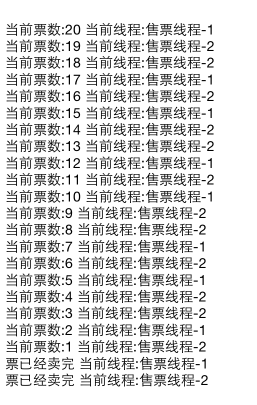
演示结果如下:
iOS:操作队列实现多线程NSOperation的更多相关文章
- iOS开发:Swift多线程NSOperation的使用
介绍: NSOperation是基于GCD实现,封装了一些更为简单实用的功能,因为GCD的线程生命周期是自动管理,所以NSOperation也是自动管理.NSOperation配合NSOperatio ...
- iOS边练边学--多线程NSOperation介绍,子类实现多线程的介绍(任务和队列),队列的取消、暂停(挂起)和恢复,操作依赖与线程间的通信
一.NSOperation NSOperation和NSOperationQueue实现多线程的具体步骤 先将需要执行的操作封装到一个NSOperation对象中 然后将NSOperation对象添加 ...
- iOS的三种多线程技术NSThread/NSOperation/GCD
1.iOS的三种多线程技术 1.NSThread 每个NSThread对象对应一个线程,量级较轻(真正的多线程) 2.以下两点是苹果专门开发的"并发"技术,使得程序员可以不再去关心 ...
- iOS之多线程NSOperation
目前在 iOS 和 OS X 中有两套先进的同步 API 可供我们使用:NSOperation 和 GCD .其中 GCD 是基于 C 的底层的 API ,而 NSOperation 则是 GCD 实 ...
- iOS 多线程 NSOperation、NSOperationQueue
1. NSOperation.NSOperationQueue 简介 NSOperation.NSOperationQueue 是苹果提供给我们的一套多线程解决方案.实际上 NSOperation.N ...
- IOS高级开发之多线程(四)NSOperation
1.什么是NSOperation,NSOperationQueue? NSOperation是一个抽象的基类,表示一个独立的计算单元,可以为子类提供有用且线程安全的建立状态,优先级,依赖和取消等操作. ...
- iOS中的多线程 NSOperation
在ios中,使用多线程有三种方式,分别是:NSThread.NSOperation和NSOperationQueue.GCD,在本节,主要讲解一下NSOperation的使用. NSOperation ...
- swift语言之多线程操作和操作队列(下)———坚持51天吃掉大象(写技术文章)
欢迎有兴趣的朋友,参与我的美女同事发起的活动<51天吃掉大象>,该美女真的很疯狂,希望和大家一起坚持51天做一件事情,我加入这个队伍,希望坚持51天每天写一篇技术文章.关注她的微信公众号: ...
- swift语言之多线程操作和操作队列(上)———坚持51天吃掉大象
欢迎有兴趣的朋友,参与我的美女同事发起的活动<51天吃掉大象>,该美女真的很疯狂,希望和大家一起坚持51天做一件事情,我加入这个队伍,希望坚持51天每天写一篇技术文章.关注她的微信公众号: ...
随机推荐
- DateTimeToUnix/UnixToDateTime 对接时间转换
问题,通过毫秒数来解析出时间:(很多对接的时候经常需要用到) <?php $MyJson = '{"jingdong_vas_subscribe_get_responce": ...
- selenium+python自动化80-文件下载(不弹询问框)【转载】
转至博客:上海-悠悠 前言 上一篇是点弹出框上的按钮去保存文件,本篇介绍一种更加优雅的方法,加载Firefox和Chrome的配置文件,不弹出询问框后台下载. 一.FirefoxProfile 1.点 ...
- hdu 1003(最大子段和)
Max Sum Time Limit: 2000/1000 MS (Java/Others) Memory Limit: 65536/32768 K (Java/Others)Total Sub ...
- Java学习笔记(十三)——通过Netbeans开发环境生成oracle数据库中表的对应hibernate映射文件
[前面的话] 身体慢慢已经快好了,感觉真好,哈哈. 这篇文章要通过Hibernate对数据库进行操作,而Netbeans可以直接通过数据库逆向生成对应的映射文件.基础文章,选择性阅读. [步骤] 1. ...
- BotFramework Nodejs示例
关于Bot Framework知识,可以参考<Nodejs Bot学习> 本文是根据bot framework sample<https://github.com/Microsoft ...
- 【转】Django中的cookie与session
转自:https://www.cnblogs.com/chenchao1990/p/5283725.html cookie与session的实现原理 HTTP被设计为”无状态”,每次请求都处于相同的空 ...
- Bootstrap 实现CRUD示例及代码
https://github.com/wenzhixin/bootstrap-table-examples/blob/master/crud/index.html <!DOCTYPE html& ...
- 【转载】文件下载FileDownloader
原文地址:https://github.com/lingochamp/FileDownloader 特点 简单易用 高并发 灵活 可选择性支持: 独立/非独立进程 自动断点续传 需要注意 当下载的文件 ...
- Codeforces 713A. Sonya and Queries
题目链接:http://codeforces.com/problemset/problem/713/A 题意: Sonya 有一个可放置重复元素的集合 multiset, 初始状态为空, 现给予三种类 ...
- http://download.eclipse.org/technology/m2e/releases install error
Can you try running Eclipse as Admin and try this again?. Let me know how that goes. what is the upd ...