
Dependent Parameters in Concurrent Program using Special Value Set
Dependent Parameters in Oracle Applications
Requirement:
Say there is a concurrent program that lets you retrieve employee details based on employee name or employee number.
The concurrent program has 3 parameters:
1.Search Criteria is a value set containing “Employee Name” and “Employee Number” as values
2.Employee Name
3.Employee Number
When the user wants to search employee based on Employee number, he selects Employee Number in the parameter “Search Criteria”.
Automatically Employee name parameter should be disabled so that user can enter only number in the parameter Employee number to search that employee.
Similarly if the users wants to to search employee based on Employee name, Employee number parameter should be disabled thus preventing the users to search based on Employee number.

As seen in the above screenshot, say there is a Concurrent program which has 3 parameters defined:
1. Select Parameter to Disable
2. Parameter – 1
3. Parameter – 2
And Parameter “Select Parameter to Disable” is a value set that has values –
PARAM-1, PARAM-2
The requirement here is if the user selects PARAM-1 as the value for the parameter “Select Parameter to Disable”, then the Parameter “Parameter – 1” should be disabled meaning the user should not be able to enter any information for that parameter.
If user selects PARAM-2 as the value for the parameter “Select Parameter to Disable”, then the Parameter “Parameter – 2” should be disabled.
Steps to implement the above requirement:
1. Create the below Value Sets:
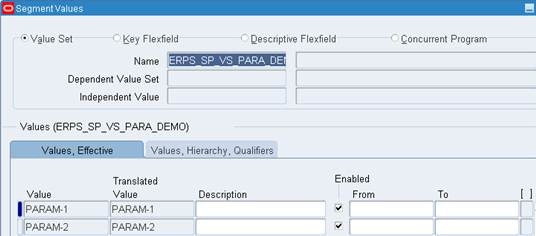
I. Value Set “ERPS_SP_VS_PARA_DEMO”:
· Navigation: System Administrator responsibility>Application>Validation>Set
· Enter the details as shown in screenshot below and save your work.

· Navigation: System Administrator responsibility>Application>Validation>Values
· Give the name as “ERPS_SP_VS_PARA_DEMO” and click on Find.

· Enter Values as PARAM-1 and PARAM-2 as shown bin the below screenshot and save your work.
II. Value Set “ERPS_SP_VS_PAR1_DUMMY”:
· Navigation: System Administrator responsibility>Application>Validation>Set
· Enter the details as shown in screenshot below and save your work.

III. Value Set ERPS_SP_VS_PAR2_DUMMY
· Navigation: System Administrator responsibility>Application>Validation>Set
· Enter the details as shown in screenshot below

IV. Create Value Set ERPS_SP_VS_PAR1
· Navigation: System Administrator responsibility>Application>Validation>Set
· Enter the details as shown in screenshot below.
· Click “Edit Information” button.

· Select Event as Validate and add the below code in the Function textbox
FND PLSQL”BEGIN
IF :$FLEX$.ERPS_SP_VS_PAR1_DUMMY <> 1 THEN
NULL;
END IF;
END;
”
· Save your work

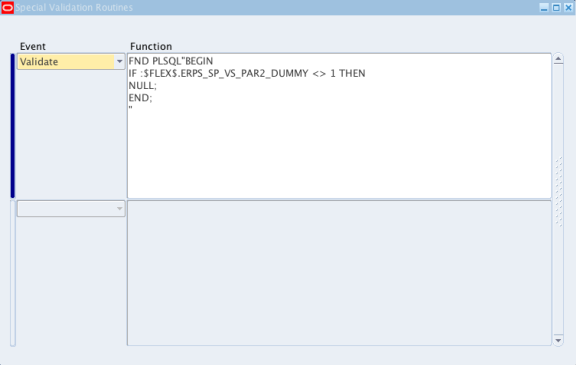
V. Create Value Set ERPS_SP_VS_PAR2
· Navigation: System Administrator responsibility>Application>Validation>Set
· Enter the details as shown in screenshot below.
· Click “Edit Information” button.

· Select Event as Validate and add the below code in the Function textbox
FND PLSQL”BEGIN
IF :$FLEX$.ERPS_SP_VS_PAR2_DUMMY <> 1 THEN
NULL;
END;
”
· Save your work
2. Define Executable for the concurrent program
· Navigation: System Administrator responsibility>Concurrent>Program>Executable
· Enter the details as shown in screenshot below.
· Save your work

3. Define the concurrent program:
· Navigation: System Administrator responsibility>Concurrent>Program>Define
· Enter the details as shown in screenshot below.
· Save your work

4. Define Parameters for the concurrent program:
· Click on “Parameters” button and enter the below details
A. Seq: 10
B. Parameter: Enter Parameter Num to Disable
C. Value Set: ERPS_SP_VS_PARA_DEMO
D. Prompt: Select Parameter to Disable

A. Seq:15
B. Parameter: Parameter – 1 Dummy
C. Value Set: ERPS_SP_VS_PAR1_DUMMY
D. Default Type: SQL Statement
E. Default Value: select 1 from Dual where :$FLEX$.ERPS_SP_VS_PARA_DEMO != ‘PARAM-1’
F. Uncheck the Display Checkbox

A. Seq:20
B. Parameter: Parameter – 1
C. Value Set: ERPS_SP_VS_PAR1

A. Seq:25
B. Parameter: Parameter – 2 Dummy
C. Value Set: ERPS_SP_VS_PAR2_DUMMY
D. Default Type: SQL Statement
E. Default Value: select 1 from Dual where :$FLEX$.ERPS_SP_VS_PARA_DEMO != ‘PARAM-2’
F. Uncheck the Display Checkbox

A. Seq:30
B. Parameter: Parameter – 2
C. Value Set: ERPS_SP_VS_PAR2
D. Save the work.

Assign this concurrent program to the desired responsibility and check the result.
For detailed explanation on how to define a concurrent program, please refer to the below article:
http://erpschools.com/articles/concurrent-program-registration-and-add-it-to-request-group
Dependent Parameters in Concurrent Program using Special Value Set的更多相关文章
- How to Create a Java Concurrent Program
In this Document Goal Solution Overview Steps in writing Java Concurrent Program Template ...
- Email the output of a concurrent program as Attachment
This article illustrates the steps to be followed to Email a concurrent program's output. Write a pr ...
- IGS_学习笔记05_IREP开发Concurrent Program为客户化集合接口(案例)
20150819 Created By BaoXinjian
- R12: Improving Performance of General Ledger and Journal Import (Doc ID 858725.1 )
In this Document Purpose Scope Details A) Database Init.ora Parameters B) Concurrent Progr ...
- Credit Summaries & Importing External Credit Exposure
In this Document Goal Solution APPLIES TO: Oracle Order Management - Version 11.5.10.2 to 12.1.3 ...
- Concurrent.Thread.js
(function(){ if ( !this.Data || (typeof this.Data != 'object' && typeof this.Data != 'functi ...
- How To Get Log, Trace Files In OA Framework Pages And Concurrent Request Programs
Goal Solution References APPLIES TO: Oracle Supplier Lifecycle Management - Version 12.1.2 and l ...
- Form_通过Trace分析Concurrent和Form性能和异常详解(案例)
2014-06-21 Created By BaoXinjian
- Spring Named Parameters examples in SimpleJdbcTemplate
In JdbcTemplate, SQL parameters are represented by a special placeholder "?" symbol and bi ...
随机推荐
- 【bzoj1798】【AHOI2009】维护序列
练一下线段树模板,区间乘法. #include<bits/stdc++.h> #define lson (o<<1) #define rson (o<<1|1) ; ...
- 使用OC swift 截取路径中的最后的文件名
使用 OC swift 截取路径中的最后的文件名 如何截取下面路径中最后的文件名 AppDelegate.swift /Users/XXX/Desktop/Swift/swift02/code/02- ...
- elasticsearch使用Analyze API
curl -XGET 'localhost:9200/index_name/_analyze?pretty&field=type_name.field_name' -d 'Robots car ...
- Linux系统格式化磁盘+挂载分区
1.查看可使用的磁盘: $fdisk -l 2.对磁盘进行分区: $fdisk /dev/vdb 3.格式化磁盘: $fdisk -l --查看已经分区的磁盘 $mkfs -t ext4 /dev/v ...
- Ext 目录
adapter:负责将里面提供第三方底层库(包括Ext自带的底层库)映射为Ext所支持的底层库. build: 压缩后的ext全部源码(里面分类存放). docs: API帮助文档. exmaples ...
- 封装ajax支持get、post
为什么要封装ajax,因为…… for(var i=0;i<20;i++){ $.ajax(……) } 的时候,整个页面都卡死了,于是,我开始找答案. 后来,找到了,就是jquery的ajax属 ...
- RadioGroup多行显示
今天做一个单选框,效果如下: 使用原始的RadioGroup可以实现布局,但因为把6个单选分为两个LinearLayout,导致无法互斥,Google官方的做法是写两个RadioGroup,但是要动态 ...
- python的Django使用mysql基本操作
环境:Centos6.6 ,python2.6 准备工作: mysql的安装,以及MySQL-python的安装 http://www.cnblogs.com/zychengzhiit1/p/4437 ...
- POJ3468 A Simple Problem with Interger [树状数组,差分]
题目传送门 A Simple Problem with Integers Time Limit: 5000MS Memory Limit: 131072K Total Submissions: 1 ...
- Codeforces Round #294 (Div. 2) A and B and Lecture Rooms(LCA 倍增)
A and B and Lecture Rooms time limit per test 2 seconds memory limit per test 256 megabytes input st ...