
Dependent Parameters in Concurrent Program using Special Value Set
Dependent Parameters in Oracle Applications
Requirement:
Say there is a concurrent program that lets you retrieve employee details based on employee name or employee number.
The concurrent program has 3 parameters:
1.Search Criteria is a value set containing “Employee Name” and “Employee Number” as values
2.Employee Name
3.Employee Number
When the user wants to search employee based on Employee number, he selects Employee Number in the parameter “Search Criteria”.
Automatically Employee name parameter should be disabled so that user can enter only number in the parameter Employee number to search that employee.
Similarly if the users wants to to search employee based on Employee name, Employee number parameter should be disabled thus preventing the users to search based on Employee number.

As seen in the above screenshot, say there is a Concurrent program which has 3 parameters defined:
1. Select Parameter to Disable
2. Parameter – 1
3. Parameter – 2
And Parameter “Select Parameter to Disable” is a value set that has values –
PARAM-1, PARAM-2
The requirement here is if the user selects PARAM-1 as the value for the parameter “Select Parameter to Disable”, then the Parameter “Parameter – 1” should be disabled meaning the user should not be able to enter any information for that parameter.
If user selects PARAM-2 as the value for the parameter “Select Parameter to Disable”, then the Parameter “Parameter – 2” should be disabled.
Steps to implement the above requirement:
1. Create the below Value Sets:
I. Value Set “ERPS_SP_VS_PARA_DEMO”:
· Navigation: System Administrator responsibility>Application>Validation>Set
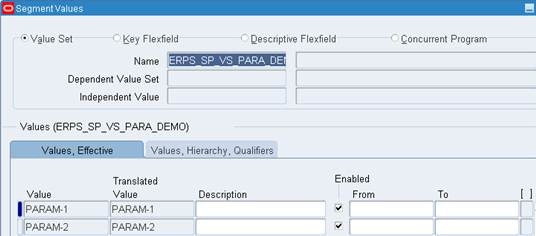
· Enter the details as shown in screenshot below and save your work.

· Navigation: System Administrator responsibility>Application>Validation>Values
· Give the name as “ERPS_SP_VS_PARA_DEMO” and click on Find.

· Enter Values as PARAM-1 and PARAM-2 as shown bin the below screenshot and save your work.
II. Value Set “ERPS_SP_VS_PAR1_DUMMY”:
· Navigation: System Administrator responsibility>Application>Validation>Set
· Enter the details as shown in screenshot below and save your work.

III. Value Set ERPS_SP_VS_PAR2_DUMMY
· Navigation: System Administrator responsibility>Application>Validation>Set
· Enter the details as shown in screenshot below

IV. Create Value Set ERPS_SP_VS_PAR1
· Navigation: System Administrator responsibility>Application>Validation>Set
· Enter the details as shown in screenshot below.
· Click “Edit Information” button.

· Select Event as Validate and add the below code in the Function textbox
FND PLSQL”BEGIN
IF :$FLEX$.ERPS_SP_VS_PAR1_DUMMY <> 1 THEN
NULL;
END IF;
END;
”
· Save your work

V. Create Value Set ERPS_SP_VS_PAR2
· Navigation: System Administrator responsibility>Application>Validation>Set
· Enter the details as shown in screenshot below.
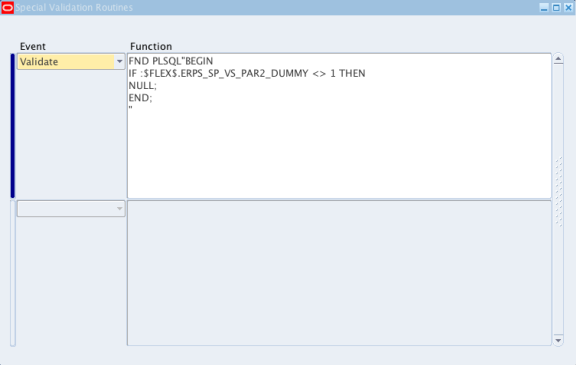
· Click “Edit Information” button.

· Select Event as Validate and add the below code in the Function textbox
FND PLSQL”BEGIN
IF :$FLEX$.ERPS_SP_VS_PAR2_DUMMY <> 1 THEN
NULL;
END;
”
· Save your work
2. Define Executable for the concurrent program
· Navigation: System Administrator responsibility>Concurrent>Program>Executable
· Enter the details as shown in screenshot below.
· Save your work

3. Define the concurrent program:
· Navigation: System Administrator responsibility>Concurrent>Program>Define
· Enter the details as shown in screenshot below.
· Save your work

4. Define Parameters for the concurrent program:
· Click on “Parameters” button and enter the below details
A. Seq: 10
B. Parameter: Enter Parameter Num to Disable
C. Value Set: ERPS_SP_VS_PARA_DEMO
D. Prompt: Select Parameter to Disable

A. Seq:15
B. Parameter: Parameter – 1 Dummy
C. Value Set: ERPS_SP_VS_PAR1_DUMMY
D. Default Type: SQL Statement
E. Default Value: select 1 from Dual where :$FLEX$.ERPS_SP_VS_PARA_DEMO != ‘PARAM-1’
F. Uncheck the Display Checkbox

A. Seq:20
B. Parameter: Parameter – 1
C. Value Set: ERPS_SP_VS_PAR1

A. Seq:25
B. Parameter: Parameter – 2 Dummy
C. Value Set: ERPS_SP_VS_PAR2_DUMMY
D. Default Type: SQL Statement
E. Default Value: select 1 from Dual where :$FLEX$.ERPS_SP_VS_PARA_DEMO != ‘PARAM-2’
F. Uncheck the Display Checkbox

A. Seq:30
B. Parameter: Parameter – 2
C. Value Set: ERPS_SP_VS_PAR2
D. Save the work.

Assign this concurrent program to the desired responsibility and check the result.
For detailed explanation on how to define a concurrent program, please refer to the below article:
http://erpschools.com/articles/concurrent-program-registration-and-add-it-to-request-group
Dependent Parameters in Concurrent Program using Special Value Set的更多相关文章
- How to Create a Java Concurrent Program
In this Document Goal Solution Overview Steps in writing Java Concurrent Program Template ...
- Email the output of a concurrent program as Attachment
This article illustrates the steps to be followed to Email a concurrent program's output. Write a pr ...
- IGS_学习笔记05_IREP开发Concurrent Program为客户化集合接口(案例)
20150819 Created By BaoXinjian
- R12: Improving Performance of General Ledger and Journal Import (Doc ID 858725.1 )
In this Document Purpose Scope Details A) Database Init.ora Parameters B) Concurrent Progr ...
- Credit Summaries & Importing External Credit Exposure
In this Document Goal Solution APPLIES TO: Oracle Order Management - Version 11.5.10.2 to 12.1.3 ...
- Concurrent.Thread.js
(function(){ if ( !this.Data || (typeof this.Data != 'object' && typeof this.Data != 'functi ...
- How To Get Log, Trace Files In OA Framework Pages And Concurrent Request Programs
Goal Solution References APPLIES TO: Oracle Supplier Lifecycle Management - Version 12.1.2 and l ...
- Form_通过Trace分析Concurrent和Form性能和异常详解(案例)
2014-06-21 Created By BaoXinjian
- Spring Named Parameters examples in SimpleJdbcTemplate
In JdbcTemplate, SQL parameters are represented by a special placeholder "?" symbol and bi ...
随机推荐
- mysql连接池优化笔记
中间件mycat是一个高性能的分表分库读写分离的中间件,但配置不好的情况会出现很多性能问题. 1.mycat-web的监控的准确性有问题,1.6-RELEASE ,1.0-SNAPSHOT (web ...
- sicily 1059. Exocenter of a Trian
Description Given a triangle ABC, the Extriangles of ABC are constructed as follows: On each side of ...
- lsb_release查看当前系统的发行版信息
Linux除了用uname -r查看系统版本信息外,还可以用lsb_release. 安装: yum install -y redhat-lsb-core 使用: lsb_release -a
- [How to]如何通过xib来自定义UIViewController
代码:https://github.com/xufeng79x/CreateControllerByXib 1.简介 UIViewController实例可以通过代码.storyborad或者xib方 ...
- 前言-关于学习OC还是学习Swift的个人理解
一直在考虑一个问题!到底是学swift好呢还是学OC好. 然后得到了解答: 1.如果你只是对苹果系统软件开发有兴趣,把开发作为一种业务爱好,那么选swift就没错,swift也是大势所趋. 2.如果你 ...
- [ python ] 项目一:FTP程序
声明: 该项目参考学习地址: http://www.cnblogs.com/lianzhilei/p/5869205.html , 感谢博主分享,如有侵权,立即删除. 作业:开发一个支持多用户在线的F ...
- 在一个Ubuntu系统上配置Apache支持多个站点
查看原文请访问:http://codewenda.com/ubuntu16-04%E9%85%8D%E7%BD%AEapache%E6%94%AF%E6%8C%81%E5%A4%9A%E4%B8%AA ...
- leetcode 之Plus One(9)
这题需要注意的是最后的进位 vector<int> plusOne(vector<int>& nums,int num) { add(nums, num); } voi ...
- 把web项目部署到tomcat上
首先在服务器搭建JDK环境:https://www.cnblogs.com/lb809663396/p/5855877.html 然后把tomcat文件包复制到服务器上,访问http://localh ...
- AC日记——围栏木桩 洛谷 P2362
围栏木桩 思路: DP: 代码: #include <bits/stdc++.h> using namespace std; #define maxn 2001 int n,m,ai[ma ...