
linux任务计划cron
linux任务计划cron
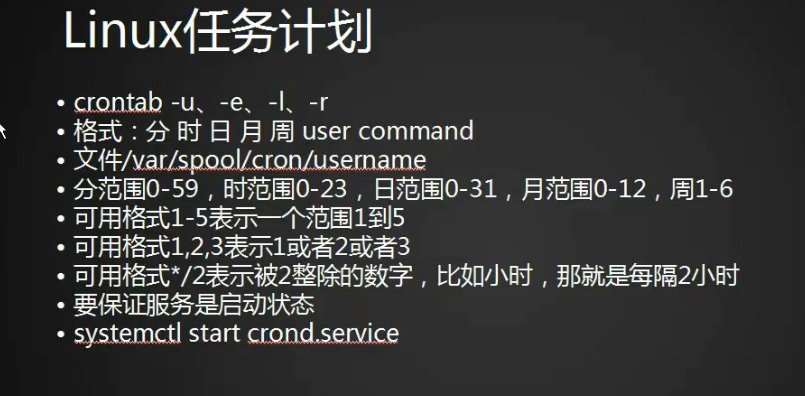
1.crontab命令任务计划配置文件
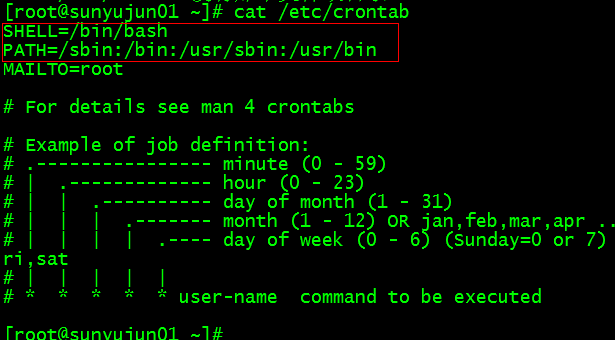
[root@bogon ~]# cat /etc/crontab

SHELL=/bin/bash

PATH=/sbin:/bin:/usr/sbin:/usr/bin

MAILTO=root

# For details see man 4 crontabs

# Example of job definition:

# .---------------- minute (0 - 59)

# |  .------------- hour (0 - 23)

# |  |  .---------- day of month (1 - 31)

# |  |  |  .------- month (1 - 12) OR jan,feb,mar,apr ...

# |  |  |  |  .---- day of week (0 - 6) (Sunday=0 or 7) OR sun,mon,tue,wed,thu,fri,sat

# |  |  |  |  |

# *  *  *  *  * user-name  command to be executed

[root@bogon ~]#
2.编辑计划任务crontab -e
[root@bogon ~]# crontab -e
3. 每天三点执行并把正确的和错误的输出到123.log文件中 0 3 * * * /bin/bash /usr/loacl/sbin/123.sh >/tmp/123.log 2>/tmp/123.log,如果是追加将>改成>>会将每天的输出以追加的方式写入文件
4.一号到十号的三点执行0 3 1-10 * * /bin/bash /usr/loacl/sbin/123.sh >/tmp/123.log 2>/tmp/123.log
5.一号到十号的每两个月(能被2整除的月份)三点执行0 3 1-10 */2 * /bin/bash /usr/loacl/sbin/123.sh >/tmp/123.log 2>/tmp/123.log
6.一号到十号的每两个月(能被2整除的月份)的周二和周五三点执行0 3 1-10 */2 2,5 /bin/bash /usr/loacl/sbin/123.sh >/tmp/123.log 2>/tmp/123.log
7.启动并查看crond服务
[root@sunyujun01 ~]# systemctl start crond

[root@sunyujun01 ~]# ps aux|grep crond

root       1393  0.0  0.0 124144   508 ?        Ss   09:44   0:00 /usr/sbin/crond -n

root      16427  0.0  0.0 112672   972 pts/2    R+   11:55   0:00 grep --color=auto crond

[root@sunyujun01 ~]#
8.也可以用systemctl status crond命令查看crond启动状态
[root@sunyujun01 ~]# systemctl status crond

● crond.service - Command Scheduler

   Loaded: loaded (/usr/lib/systemd/system/crond.service; enabled; vendor preset: enabled)

   Active: active (running) since 三 2018-01-24 09:44:22 CST; 3h 26min ago

 Main PID: 1393 (crond)

   CGroup: /system.slice/crond.service

           └─1393 /usr/sbin/crond -n

1月 24 09:44:22 localhost.localdomain systemd[1]: Started Command Scheduler.

1月 24 09:44:22 localhost.localdomain systemd[1]: Starting Command Scheduler...

1月 24 09:44:23 localhost.localdomain crond[1393]: (CRON) INFO (Syslog will ...

1月 24 09:44:23 localhost.localdomain crond[1393]: (CRON) INFO (RANDOM_DELAY...

1月 24 09:44:23 localhost.localdomain crond[1393]: (CRON) INFO (running with...

Hint: Some lines were ellipsized, use -l to show in full.

[root@sunyujun01 ~]#
9.停掉crond
[root@sunyujun01 ~]# systemctl stop crond
10.如果脚步中的命令没有执行,可能是命令没有加入到crond变量里面,也可以直接写绝对路径
11.这个文件的内容是crontab -l列出来的计划任务列表,如果备份的话直接拷贝这个文件就行
[root@sunyujun01 ~]# cat /var/spool/cron/root
12.crontab -r 删除
chkconfig工具
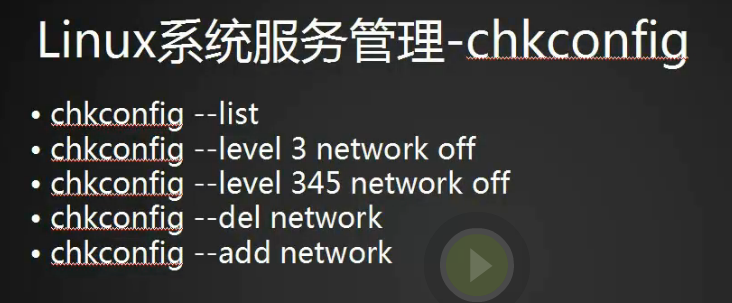
1.chkconfig --list查看使用chkconfig工具的服务
[root@sunyujun01 ~]# chkconfig --list

注意:该输出结果只显示 SysV 服务,并不包含原生 systemd 服务。SysV 配置数据可能被原生 systemd 配置覆盖。

      如果您想列出 systemd 服务,请执行 'systemctl list-unit-files'。

      欲查看对特定 target 启用的服务请执行

      'systemctl list-dependencies [target]'。

mysql           0:关    1:关    2:开    3:开    4:开    5:开    6:关

netconsole      0:关    1:关    2:关    3:关    4:关    5:关    6:关

network         0:关    1:关    2:开    3:开    4:开    5:开    6:关

nginx           0:关    1:关    2:开    3:开    4:开    5:开    6:关

php-fpm         0:关    1:关    2:开    3:开    4:开    5:开    6:关

[root@sunyujun01 ~]#
2.对应的服务都在/etc/init.d/目录下
[root@sunyujun01 ~]# ls /etc/init.d/

functions  mysql  netconsole  network  nginx  php-fpm  README

[root@sunyujun01 ~]#
3.关闭network服务 chkconfig network off
[root@sunyujun01 ~]# chkconfig network off
[root@sunyujun01 ~]# chkconfig --list

注意:该输出结果只显示 SysV 服务,并不包含原生 systemd 服务。SysV 配置数据可能被原生 systemd 配置覆盖。

      如果您想列出 systemd 服务,请执行 'systemctl list-unit-files'。

      欲查看对特定 target 启用的服务请执行

      'systemctl list-dependencies [target]'。

mysql           0:关    1:关    2:开    3:开    4:开    5:开    6:关

netconsole      0:关    1:关    2:关    3:关    4:关    5:关    6:关

network         0:关    1:关    2:关    3:关    4:关    5:关    6:关

nginx           0:关    1:关    2:开    3:开    4:开    5:开    6:关

php-fpm         0:关    1:关    2:开    3:开    4:开    5:开    6:关

[root@sunyujun01 ~]#
4.network的6个级别都变成关闭状态了
5.重新启动network
0 停机

1 单用户模式

2 多用户,没有 NFS

3 完全多用户模式

4 没有用到

5 图形界面

6 重新启动

S s Single user mode
[root@sunyujun01 ~]# chkconfig network on

[root@sunyujun01 ~]# chkconfig --list

注意:该输出结果只显示 SysV 服务,并不包含原生 systemd 服务。SysV 配置数据可能被原生 systemd 配置覆盖。

      如果您想列出 systemd 服务,请执行 'systemctl list-unit-files'。

      欲查看对特定 target 启用的服务请执行

      'systemctl list-dependencies [target]'。

mysql           0:关    1:关    2:开    3:开    4:开    5:开    6:关

netconsole      0:关    1:关    2:关    3:关    4:关    5:关    6:关

network         0:关    1:关    2:开    3:开    4:开    5:开    6:关

nginx           0:关    1:关    2:开    3:开    4:开    5:开    6:关

php-fpm         0:关    1:关    2:开    3:开    4:开    5:开    6:关

[root@sunyujun01 ~]#
6.在centos7之前的版本可以通过编辑文件定义系统级别
[root@sunyujun01 ~]# vim /etc/inittab
7. 设定某个运行级别开关
[root@sunyujun01 ~]# chkconfig --level 3 network off
8.也可以写多个345
[root@sunyujun01 ~]# chkconfig --level 345 network off
9.将123服务添加到服务中
[root@sunyujun01 init.d]# cp network 123^C

[root@sunyujun01 init.d]# ls -l

总用量 60

-rwxr-xr-x  1 root root  6630 1月  24 14:17 123

-rw-r--r--. 1 root root 13948 9月  16 2015 functions

-rwxr-xr-x. 1 root root 10880 2月  10 2017 mysql

-rwxr-xr-x. 1 root root  2989 9月  16 2015 netconsole

-rwxr-xr-x. 1 root root  6630 9月  16 2015 network

-rwxr-xr-x. 1 root root  2652 2月  10 2017 nginx

-rwxr-xr-x. 1 root root  2401 2月  10 2017 php-fpm

-rw-r--r--. 1 root root  1160 11月 22 2016 README

[root@sunyujun01 init.d]# chkconfig --list

注意:该输出结果只显示 SysV 服务,并不包含原生 systemd 服务。SysV 配置数据可能被原生 systemd 配置覆盖。

      如果您想列出 systemd 服务,请执行 'systemctl list-unit-files'。

      欲查看对特定 target 启用的服务请执行

      'systemctl list-dependencies [target]'。

mysql           0:关    1:关    2:开    3:开    4:开    5:开    6:关

netconsole      0:关    1:关    2:关    3:关    4:关    5:关    6:关

network         0:关    1:关    2:开    3:开    4:开    5:开    6:关

nginx           0:关    1:关    2:开    3:开    4:开    5:开    6:关

php-fpm         0:关    1:关    2:开    3:开    4:开    5:开    6:关

[root@sunyujun01 init.d]# chkconfig --add 123

[root@sunyujun01 init.d]# chkconfig --list

注意:该输出结果只显示 SysV 服务,并不包含原生 systemd 服务。SysV 配置数据可能被原生 systemd 配置覆盖。

      如果您想列出 systemd 服务,请执行 'systemctl list-unit-files'。

      欲查看对特定 target 启用的服务请执行

      'systemctl list-dependencies [target]'。

123             0:关    1:关    2:开    3:开    4:开    5:开    6:关

mysql           0:关    1:关    2:开    3:开    4:开    5:开    6:关

netconsole      0:关    1:关    2:关    3:关    4:关    5:关    6:关

network         0:关    1:关    2:开    3:开    4:开    5:开    6:关

nginx           0:关    1:关    2:开    3:开    4:开    5:开    6:关

php-fpm         0:关    1:关    2:开    3:开    4:开    5:开    6:关

[root@sunyujun01 init.d]#
10.删除一个服务
[root@sunyujun01 init.d]# chkconfig --del 123

[root@sunyujun01 init.d]#
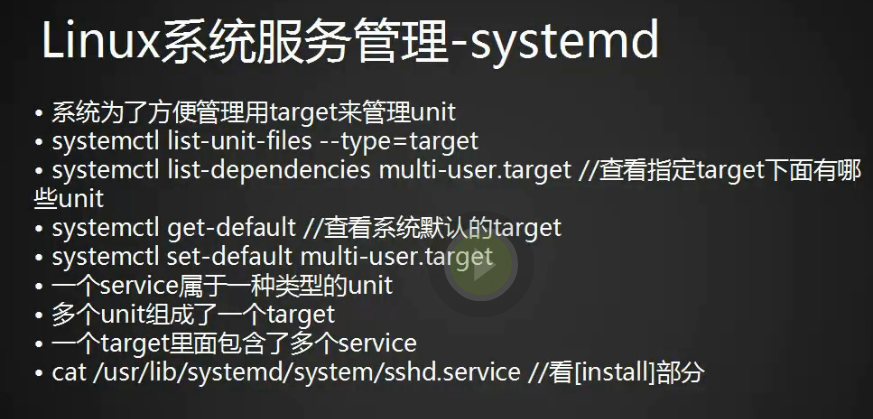
systemd管理服务

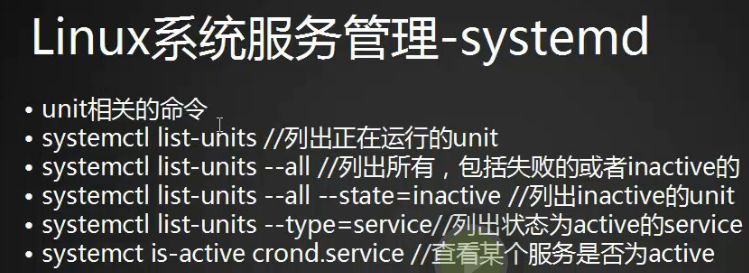
1.列出所有service服务,如果想列出所有用systemctl list-unit-files
[root@sunyujun01 init.d]# systemctl list-units -all --type=service
unit介绍

1.7个运行级别一一对应的软连接
[root@sunyujun01 system]# ls -l runlevel*

lrwxrwxrwx. 1 root root 15 2月  10 2017 runlevel0.target -> poweroff.target

lrwxrwxrwx. 1 root root 13 2月  10 2017 runlevel1.target -> rescue.target

lrwxrwxrwx. 1 root root 17 2月  10 2017 runlevel2.target -> multi-user.target

lrwxrwxrwx. 1 root root 17 2月  10 2017 runlevel3.target -> multi-user.target

lrwxrwxrwx. 1 root root 17 2月  10 2017 runlevel4.target -> multi-user.target

lrwxrwxrwx. 1 root root 16 2月  10 2017 runlevel5.target -> graphical.target

lrwxrwxrwx. 1 root root 13 2月  10 2017 runlevel6.target -> reboot.target
target介绍(一个target是多个unit的组合)
linux任务计划cron的更多相关文章
- linux任务计划cron、chkconfig工具、systemd管理服务、unit和target介绍
第8周第1次课(5月14日) 课程内容: 10.23 linux任务计划cron10.24 chkconfig工具10.25 systemd管理服务10.26 unit介绍10.27 target介绍 ...
- Linux centos7 linux任务计划cron、chkconfig工具、systemd管理服务、unit介绍、 target介绍
一.linux任务计划cron crontab -u -e -l -r 格式;分 时 日 月 周 user command 文件/var/spool/corn/username 分范围0-59,时范 ...
- Linux任务计划
Linux任务计划: 一次性任务执行(at.batch): at:定时任务,指定一个时间执行一个任务,只能执行一次. at使用方式: 交互式:让用户在at>提示符输入多个要执行的命令: 批处理: ...
- Linux定时任务系统 Cron
运行计划任务时:service crond restart提示:crond: unrecognized service安装计划任务:yum -y install vixie-cron 另外附计划任务的 ...
- 配置Linux任务计划
Linux有三种计划任务: at:指定一个时间执行一个任务 (适用一个或多个任务,执行一次后就不用) cron:根据一个时间表自动执行任务 (使用一个或多个任务,周期性执行) 系统级别的计划任务及其扩 ...
- linux crontab 计划任务 atd和windows下的计划任务
crontab 命令 如果发现您的系统里没有这个命令,请安装下面两个软件包. vixie-cron crontabs crontab 是用来让使用者在固定时间或固定间隔执行程序之用,换句话说,也就是类 ...
- Linux操作系统计划任务
++++++++++++++++++++++++++++++++++++++++++++++++标题:Linux操作系统的计划任务内容:计划任务分为单次任务和周期性任务,周期任务分为系统级计划任务和用 ...
- Linux中计划任务、周期性任务设置
Linux中计划任务.周期性任务设置 计划任务:指在未来的特定时间里,执行一次某一特定任务.当然,如果同一任务需要在不同时间点执行执行两次.三次或多次,可以视为多个一次看待. 周期性任务:指某一任务需 ...
- Linux定时任务计划
Linux定时任务计划 在使用Linux系统时,我们有时会需要让系统在某个时间去执行特定的任务,这时就需要去了解Linux提供的定时任务功能 种类 Linux的定时任务分为两种:单一型和循环型 单一型 ...
随机推荐
- [转] Hibernate与 MyBatis的比较
hibernateHibernateibatisIBATISMyBatismybatis 目录(?)[-] 第一章 Hibernate与MyBatis 1 Hibernate 简介 2 MyB ...
- hdu3401 Trade 单调队列优化dp
Trade Time Limit: 2000/1000 MS (Java/Others) Memory Limit: 32768/32768 K (Java/Others) Total Subm ...
- 【Sets】使用Google Guava工程中Sets工具包,实现集合的并集/交集/补集/差集
获取两个txt文档的内容~存储进集合中求集合的并集/交集/补集/差集 package com.sxd.readLines.aboutDB; import java.io.BufferedReader; ...
- iOS:quartz2D绘图(处理图像,绘制图像并添加水印)
绘制图像既可以重写drawRect:方法并在该方法中绘制,也可以不用重写该方法,它有封装好的函数获取自己的图像绘制上下文,即UIGraphicsBeginImageContext(CGSize siz ...
- jersey rest webservice
参考官网:https://jersey.github.io/documentation/latest/getting-started.html#new-webapp 创建一个 JavaEE Web A ...
- axios put and patch
window.axios.patch('https://fir-3-test-2332e.firebaseio.com/notes/' + this.$route.params.key + '.jso ...
- jQuery选取表单元素
表单元素选择器 选择器 说明 :button <button>元素和type属性值为button的<input& ...
- 1年内4次架构调整,谈Nice的服务端架构变迁之路
Nice 本身是一款照片分享社区类型的应用,在分享照片和生活态度的同时可以在照片上贴上如品牌.地点.兴趣等tag. Nice从2013.10月份上线App Store到目前每天2亿PV,服务端架构经过 ...
- 【转】iBatis简单入门教程
1. iBatis 简介: iBatis 是apache 的一个开源项目,一个O/R Mapping 解决方案,iBatis 最大的特点就是小巧,上手很快.如果不需要太多复杂的功能,iBatis 是能 ...
- Angular 监听路由变化事件
摘要: $stateChangeStart- 当模板开始解析之前触发 $rootScope.$on('$stateChangeStart', function(event, toState, toPa ...