
linux任务计划cron
linux任务计划cron
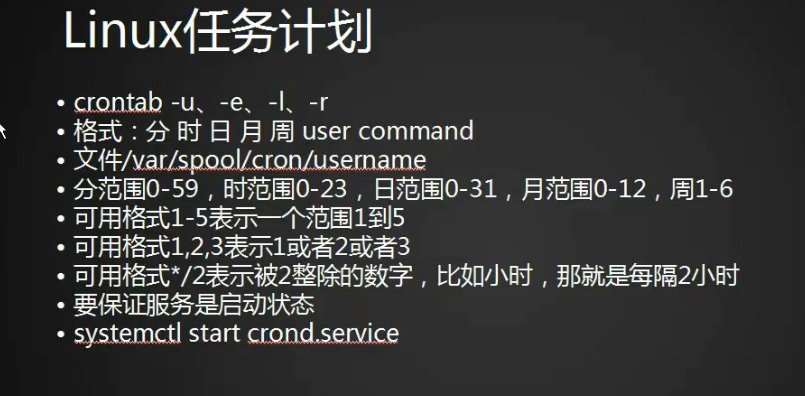
1.crontab命令任务计划配置文件
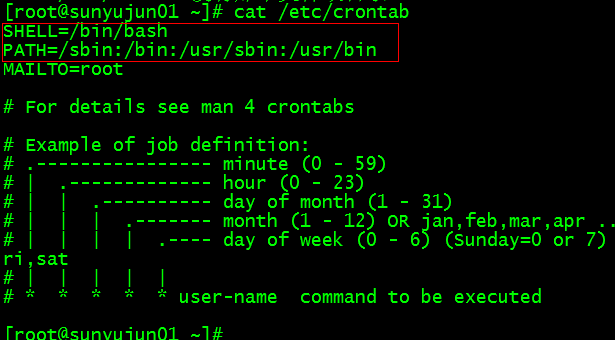
[root@bogon ~]# cat /etc/crontab

SHELL=/bin/bash

PATH=/sbin:/bin:/usr/sbin:/usr/bin

MAILTO=root

# For details see man 4 crontabs

# Example of job definition:

# .---------------- minute (0 - 59)

# |  .------------- hour (0 - 23)

# |  |  .---------- day of month (1 - 31)

# |  |  |  .------- month (1 - 12) OR jan,feb,mar,apr ...

# |  |  |  |  .---- day of week (0 - 6) (Sunday=0 or 7) OR sun,mon,tue,wed,thu,fri,sat

# |  |  |  |  |

# *  *  *  *  * user-name  command to be executed

[root@bogon ~]#
2.编辑计划任务crontab -e
[root@bogon ~]# crontab -e
3. 每天三点执行并把正确的和错误的输出到123.log文件中 0 3 * * * /bin/bash /usr/loacl/sbin/123.sh >/tmp/123.log 2>/tmp/123.log,如果是追加将>改成>>会将每天的输出以追加的方式写入文件
4.一号到十号的三点执行0 3 1-10 * * /bin/bash /usr/loacl/sbin/123.sh >/tmp/123.log 2>/tmp/123.log
5.一号到十号的每两个月(能被2整除的月份)三点执行0 3 1-10 */2 * /bin/bash /usr/loacl/sbin/123.sh >/tmp/123.log 2>/tmp/123.log
6.一号到十号的每两个月(能被2整除的月份)的周二和周五三点执行0 3 1-10 */2 2,5 /bin/bash /usr/loacl/sbin/123.sh >/tmp/123.log 2>/tmp/123.log
7.启动并查看crond服务
[root@sunyujun01 ~]# systemctl start crond

[root@sunyujun01 ~]# ps aux|grep crond

root       1393  0.0  0.0 124144   508 ?        Ss   09:44   0:00 /usr/sbin/crond -n

root      16427  0.0  0.0 112672   972 pts/2    R+   11:55   0:00 grep --color=auto crond

[root@sunyujun01 ~]#
8.也可以用systemctl status crond命令查看crond启动状态
[root@sunyujun01 ~]# systemctl status crond

● crond.service - Command Scheduler

   Loaded: loaded (/usr/lib/systemd/system/crond.service; enabled; vendor preset: enabled)

   Active: active (running) since 三 2018-01-24 09:44:22 CST; 3h 26min ago

 Main PID: 1393 (crond)

   CGroup: /system.slice/crond.service

           └─1393 /usr/sbin/crond -n

1月 24 09:44:22 localhost.localdomain systemd[1]: Started Command Scheduler.

1月 24 09:44:22 localhost.localdomain systemd[1]: Starting Command Scheduler...

1月 24 09:44:23 localhost.localdomain crond[1393]: (CRON) INFO (Syslog will ...

1月 24 09:44:23 localhost.localdomain crond[1393]: (CRON) INFO (RANDOM_DELAY...

1月 24 09:44:23 localhost.localdomain crond[1393]: (CRON) INFO (running with...

Hint: Some lines were ellipsized, use -l to show in full.

[root@sunyujun01 ~]#
9.停掉crond
[root@sunyujun01 ~]# systemctl stop crond
10.如果脚步中的命令没有执行,可能是命令没有加入到crond变量里面,也可以直接写绝对路径
11.这个文件的内容是crontab -l列出来的计划任务列表,如果备份的话直接拷贝这个文件就行
[root@sunyujun01 ~]# cat /var/spool/cron/root
12.crontab -r 删除
chkconfig工具
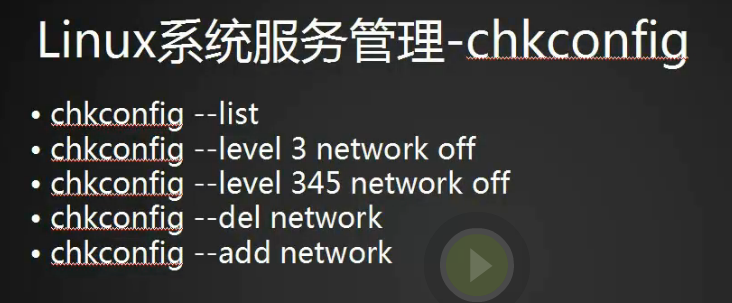
1.chkconfig --list查看使用chkconfig工具的服务
[root@sunyujun01 ~]# chkconfig --list

注意:该输出结果只显示 SysV 服务,并不包含原生 systemd 服务。SysV 配置数据可能被原生 systemd 配置覆盖。

      如果您想列出 systemd 服务,请执行 'systemctl list-unit-files'。

      欲查看对特定 target 启用的服务请执行

      'systemctl list-dependencies [target]'。

mysql           0:关    1:关    2:开    3:开    4:开    5:开    6:关

netconsole      0:关    1:关    2:关    3:关    4:关    5:关    6:关

network         0:关    1:关    2:开    3:开    4:开    5:开    6:关

nginx           0:关    1:关    2:开    3:开    4:开    5:开    6:关

php-fpm         0:关    1:关    2:开    3:开    4:开    5:开    6:关

[root@sunyujun01 ~]#
2.对应的服务都在/etc/init.d/目录下
[root@sunyujun01 ~]# ls /etc/init.d/

functions  mysql  netconsole  network  nginx  php-fpm  README

[root@sunyujun01 ~]#
3.关闭network服务 chkconfig network off
[root@sunyujun01 ~]# chkconfig network off
[root@sunyujun01 ~]# chkconfig --list

注意:该输出结果只显示 SysV 服务,并不包含原生 systemd 服务。SysV 配置数据可能被原生 systemd 配置覆盖。

      如果您想列出 systemd 服务,请执行 'systemctl list-unit-files'。

      欲查看对特定 target 启用的服务请执行

      'systemctl list-dependencies [target]'。

mysql           0:关    1:关    2:开    3:开    4:开    5:开    6:关

netconsole      0:关    1:关    2:关    3:关    4:关    5:关    6:关

network         0:关    1:关    2:关    3:关    4:关    5:关    6:关

nginx           0:关    1:关    2:开    3:开    4:开    5:开    6:关

php-fpm         0:关    1:关    2:开    3:开    4:开    5:开    6:关

[root@sunyujun01 ~]#
4.network的6个级别都变成关闭状态了
5.重新启动network
0 停机

1 单用户模式

2 多用户,没有 NFS

3 完全多用户模式

4 没有用到

5 图形界面

6 重新启动

S s Single user mode
[root@sunyujun01 ~]# chkconfig network on

[root@sunyujun01 ~]# chkconfig --list

注意:该输出结果只显示 SysV 服务,并不包含原生 systemd 服务。SysV 配置数据可能被原生 systemd 配置覆盖。

      如果您想列出 systemd 服务,请执行 'systemctl list-unit-files'。

      欲查看对特定 target 启用的服务请执行

      'systemctl list-dependencies [target]'。

mysql           0:关    1:关    2:开    3:开    4:开    5:开    6:关

netconsole      0:关    1:关    2:关    3:关    4:关    5:关    6:关

network         0:关    1:关    2:开    3:开    4:开    5:开    6:关

nginx           0:关    1:关    2:开    3:开    4:开    5:开    6:关

php-fpm         0:关    1:关    2:开    3:开    4:开    5:开    6:关

[root@sunyujun01 ~]#
6.在centos7之前的版本可以通过编辑文件定义系统级别
[root@sunyujun01 ~]# vim /etc/inittab
7. 设定某个运行级别开关
[root@sunyujun01 ~]# chkconfig --level 3 network off
8.也可以写多个345
[root@sunyujun01 ~]# chkconfig --level 345 network off
9.将123服务添加到服务中
[root@sunyujun01 init.d]# cp network 123^C

[root@sunyujun01 init.d]# ls -l

总用量 60

-rwxr-xr-x  1 root root  6630 1月  24 14:17 123

-rw-r--r--. 1 root root 13948 9月  16 2015 functions

-rwxr-xr-x. 1 root root 10880 2月  10 2017 mysql

-rwxr-xr-x. 1 root root  2989 9月  16 2015 netconsole

-rwxr-xr-x. 1 root root  6630 9月  16 2015 network

-rwxr-xr-x. 1 root root  2652 2月  10 2017 nginx

-rwxr-xr-x. 1 root root  2401 2月  10 2017 php-fpm

-rw-r--r--. 1 root root  1160 11月 22 2016 README

[root@sunyujun01 init.d]# chkconfig --list

注意:该输出结果只显示 SysV 服务,并不包含原生 systemd 服务。SysV 配置数据可能被原生 systemd 配置覆盖。

      如果您想列出 systemd 服务,请执行 'systemctl list-unit-files'。

      欲查看对特定 target 启用的服务请执行

      'systemctl list-dependencies [target]'。

mysql           0:关    1:关    2:开    3:开    4:开    5:开    6:关

netconsole      0:关    1:关    2:关    3:关    4:关    5:关    6:关

network         0:关    1:关    2:开    3:开    4:开    5:开    6:关

nginx           0:关    1:关    2:开    3:开    4:开    5:开    6:关

php-fpm         0:关    1:关    2:开    3:开    4:开    5:开    6:关

[root@sunyujun01 init.d]# chkconfig --add 123

[root@sunyujun01 init.d]# chkconfig --list

注意:该输出结果只显示 SysV 服务,并不包含原生 systemd 服务。SysV 配置数据可能被原生 systemd 配置覆盖。

      如果您想列出 systemd 服务,请执行 'systemctl list-unit-files'。

      欲查看对特定 target 启用的服务请执行

      'systemctl list-dependencies [target]'。

123             0:关    1:关    2:开    3:开    4:开    5:开    6:关

mysql           0:关    1:关    2:开    3:开    4:开    5:开    6:关

netconsole      0:关    1:关    2:关    3:关    4:关    5:关    6:关

network         0:关    1:关    2:开    3:开    4:开    5:开    6:关

nginx           0:关    1:关    2:开    3:开    4:开    5:开    6:关

php-fpm         0:关    1:关    2:开    3:开    4:开    5:开    6:关

[root@sunyujun01 init.d]#
10.删除一个服务
[root@sunyujun01 init.d]# chkconfig --del 123

[root@sunyujun01 init.d]#
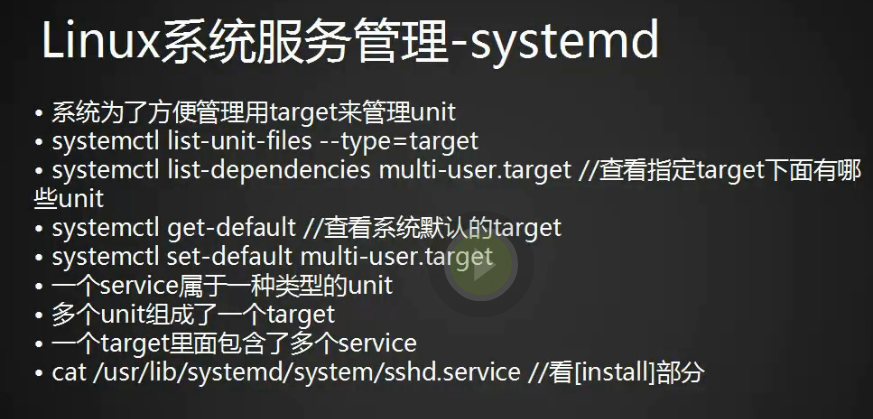
systemd管理服务

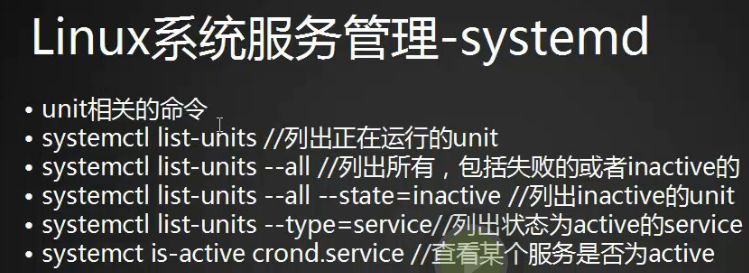
1.列出所有service服务,如果想列出所有用systemctl list-unit-files
[root@sunyujun01 init.d]# systemctl list-units -all --type=service
unit介绍

1.7个运行级别一一对应的软连接
[root@sunyujun01 system]# ls -l runlevel*

lrwxrwxrwx. 1 root root 15 2月  10 2017 runlevel0.target -> poweroff.target

lrwxrwxrwx. 1 root root 13 2月  10 2017 runlevel1.target -> rescue.target

lrwxrwxrwx. 1 root root 17 2月  10 2017 runlevel2.target -> multi-user.target

lrwxrwxrwx. 1 root root 17 2月  10 2017 runlevel3.target -> multi-user.target

lrwxrwxrwx. 1 root root 17 2月  10 2017 runlevel4.target -> multi-user.target

lrwxrwxrwx. 1 root root 16 2月  10 2017 runlevel5.target -> graphical.target

lrwxrwxrwx. 1 root root 13 2月  10 2017 runlevel6.target -> reboot.target
target介绍(一个target是多个unit的组合)
linux任务计划cron的更多相关文章
- linux任务计划cron、chkconfig工具、systemd管理服务、unit和target介绍
第8周第1次课(5月14日) 课程内容: 10.23 linux任务计划cron10.24 chkconfig工具10.25 systemd管理服务10.26 unit介绍10.27 target介绍 ...
- Linux centos7 linux任务计划cron、chkconfig工具、systemd管理服务、unit介绍、 target介绍
一.linux任务计划cron crontab -u -e -l -r 格式;分 时 日 月 周 user command 文件/var/spool/corn/username 分范围0-59,时范 ...
- Linux任务计划
Linux任务计划: 一次性任务执行(at.batch): at:定时任务,指定一个时间执行一个任务,只能执行一次. at使用方式: 交互式:让用户在at>提示符输入多个要执行的命令: 批处理: ...
- Linux定时任务系统 Cron
运行计划任务时:service crond restart提示:crond: unrecognized service安装计划任务:yum -y install vixie-cron 另外附计划任务的 ...
- 配置Linux任务计划
Linux有三种计划任务: at:指定一个时间执行一个任务 (适用一个或多个任务,执行一次后就不用) cron:根据一个时间表自动执行任务 (使用一个或多个任务,周期性执行) 系统级别的计划任务及其扩 ...
- linux crontab 计划任务 atd和windows下的计划任务
crontab 命令 如果发现您的系统里没有这个命令,请安装下面两个软件包. vixie-cron crontabs crontab 是用来让使用者在固定时间或固定间隔执行程序之用,换句话说,也就是类 ...
- Linux操作系统计划任务
++++++++++++++++++++++++++++++++++++++++++++++++标题:Linux操作系统的计划任务内容:计划任务分为单次任务和周期性任务,周期任务分为系统级计划任务和用 ...
- Linux中计划任务、周期性任务设置
Linux中计划任务.周期性任务设置 计划任务:指在未来的特定时间里,执行一次某一特定任务.当然,如果同一任务需要在不同时间点执行执行两次.三次或多次,可以视为多个一次看待. 周期性任务:指某一任务需 ...
- Linux定时任务计划
Linux定时任务计划 在使用Linux系统时,我们有时会需要让系统在某个时间去执行特定的任务,这时就需要去了解Linux提供的定时任务功能 种类 Linux的定时任务分为两种:单一型和循环型 单一型 ...
随机推荐
- Spring p名称空间配置属性
1.p 名称空间介绍 从 2.0开始,Spring支持使用名称空间的可扩展配置格式.这些名称空间都是基于一种XML Schema定义.事实上,我们所看到的所有bean的配置格式都是基于一个 XML S ...
- Activity(活动)的启动模式
在实际项目中我们应该根据特定的需求为每个活动指定相应的启动模式.启动模式一共分为4种:standar.singleTop.singleTask和singleInstance.可以在AndroidMan ...
- [转]Windows7下如何在MyEclipse更改JSP默认编码
分步阅读 一般情况下,用MyEclipse创建Web项目,在WebRoot目录下新建JSP页面,页面的编码格式是:ISO-8859-1,而这个编码格式不 可以解决多种语言文本显示问题,特别是中文,容易 ...
- Codeforces Round #345 (Div. 2) E. Table Compression 并查集
E. Table Compression 题目连接: http://www.codeforces.com/contest/651/problem/E Description Little Petya ...
- 基于tiny4412的Linux内核移植 -- PWM子系统学习(八)
作者信息 作者: 彭东林 邮箱:pengdonglin137@163.com QQ:405728433 平台简介 开发板:tiny4412ADK + S700 + 4GB Flash 要移植的内核版本 ...
- CentOS上安装分布式文件系统FastDFS & 配置和问题解决
原文:https://my.oschina.net/wangmengjun/blog/1142982 什么是FastDFS? FastDFS是一个开源的分布式文件系统,她对文件进行管理,功能包括:文件 ...
- Android内存优化10 内存泄漏常见情况1 静态泄漏
1,内存泄漏到本质是该释放的对象被持久化的对象引用了,造成持久化的常见情况有1,静态持久化 2,线程持久化 线程持久化 因为存活的线程是有dvk虚拟久直接持有,所以存活的线程都是持久化的 内存泄漏1: ...
- js中几种常见的方法的实例 shift,unshift,push,prop
1.shift()定义和用法 shift() 方法用于把数组的第一个元素从其中删除,并返回第一个元素的值. 语法:arrayObject.shift() 返回值:数组原来的第一个元素的值. 说明:如果 ...
- ecshop ecmall shopex
ecshop 是一个B2C商城 适合企业及个人快速构建个性化网上商店.系统是基于PHP语言及MYSQL数据库构架开发的跨平台开源程序.(如沃购网) 山大路是dedecms ecmall(ECMall ...
- XssEncode
0x00 闲扯 好吧继上一篇文章之后,就没发文章了!(其实是一直在写但是写的很少还凑不起一篇文章而已) 但是这几天对插件进行了一定的改良了 因为在自己在实际的XSS过程中也发现了自己的插件 还不够强大 ...