
Django实现组合搜索的方法示例
一、实现方法
1.纯模板语言实现
2.自定义simpletag实现(本质是简化了纯模板语言的判断)
二、基本原理
原理都是通过django路由系统,匹配url筛选条件,将筛选条件作为数据库查询结果,返回给前端。
例如:路由系统中的url格式是这样:
|
1
|
url(r'^article-(?P<article_type_id>\d+)-(?P<category_id>\d+).html',views.filter) |
其中article_type_id和category_id和数据库中字段是相对应的,此时当一个url为article-1-2.html时候,后台处理函数的参数将是一个字典{'article_type_id': 1, 'category_id': 1},然后将该条件作为数据库查询条件,最后得出结果返回给前端
三、代码样例
方法1:纯模板语言实现
urls.py
|
1
2
3
4
5
6
7
8
9
10
|
#!/usr/bin/env python3#_*_ coding:utf-8 _*_#Author:wdfrom django.conf.urls import urlfrom . import viewsurlpatterns = [ url(r'^$',views.index), url(r'^article-(?P<article_type_id>\d+)-(?P<category_id>\d+).html',views.filter),] |
models.py
|
1
2
3
4
5
6
7
8
9
10
11
12
13
|
from django.db import modelsclass Category(models.Model): caption=models.CharField(max_length=64)class Article_type(models.Model): caption=models.CharField(max_length=64)class Article(models.Model): title=models.CharField(max_length=64) content=models.CharField(max_length=256) category=models.ForeignKey(to='Category') article_type=models.ForeignKey(to='Article_type' |
views.py
|
1
2
3
4
5
6
7
8
9
10
11
12
13
14
15
16
17
18
|
def filter(request,*args,**kwargs): if request.method=="GET": condition={} for k,v in kwargs.items(): kwargs[k]=int(v) #模板if判断row.id是数字,所以这里需要转换 if v=="0":#当条件为0代表所选的是全部,那么就不必要加入到过滤条件中 pass else: condition[k]=int(v) aritcle=models.Article.objects.filter(**condition) aritcle_type=models.Article_type.objects.all() aritcle_category=models.Category.objects.all() return render(request,'search.html',{ 'aritcle':aritcle, 'article_type':aritcle_type, 'article_category':aritcle_category, 'article_arg':kwargs,#将当前的筛选条件传递给html }) |
html模板
|
1
2
3
4
5
6
7
8
9
10
11
12
13
14
15
16
17
18
19
20
21
22
23
24
25
26
27
28
29
30
31
32
33
34
35
36
37
38
39
40
41
42
43
44
45
46
47
48
49
50
51
52
53
54
55
56
|
<!DOCTYPE html><html lang="en"><head> <meta charset="UTF-8"> <title>Title</title> <style> .container a{ display: inline-block; padding: 3px 5px; margin: 5px; border: 1px solid #dddddd ; } .active{ } </style></head><body><h1>搜索条件</h1><div class="container"> {% if article_arg.article_type_id == 0 %} <a class="active" href="/cmdb/article-0-{{ article_arg.category_id }}.html" rel="external nofollow" rel="external nofollow" rel="external nofollow" rel="external nofollow" >全部</a> {% else %} <a href="/cmdb/article-0-{{ article_arg.category_id }}.html" rel="external nofollow" rel="external nofollow" rel="external nofollow" rel="external nofollow" >全部</a> {% endif %} {% for row in article_type %} {% if row.id == article_arg.article_type_id %} <a class="active" href="/cmdb/article-{{ row.id }}-{{ article_arg.category_id }}.html" rel="external nofollow" rel="external nofollow" rel="external nofollow" rel="external nofollow" rel="external nofollow" rel="external nofollow" >{{ row.caption }}</a> {% else %} <a href="/cmdb/article-{{ row.id }}-{{ article_arg.category_id }}.html" rel="external nofollow" rel="external nofollow" rel="external nofollow" rel="external nofollow" rel="external nofollow" rel="external nofollow" >{{ row.caption }}</a> {% endif %} {% endfor %}</div><div class="container"> {% if article_arg.category_id == 0 %} <a class="active" href="/cmdb/article-{{ article_arg.article_type_id }}-0.html" rel="external nofollow" rel="external nofollow" >全部</a> {% else %} <a href="/cmdb/article-{{ article_arg.article_type_id }}-0.html" rel="external nofollow" rel="external nofollow" >全部</a> {% endif %} {% for row in article_category %} {% if row.id == article_arg.category_id %} <a class="active" href="/cmdb/article-{{ article_arg.article_type_id }}-{{ row.id }}.html" rel="external nofollow" rel="external nofollow" rel="external nofollow" rel="external nofollow" >{{ row.caption }}</a> {% else %} <a href="/cmdb/article-{{ article_arg.article_type_id }}-{{ row.id }}.html" rel="external nofollow" rel="external nofollow" rel="external nofollow" rel="external nofollow" >{{ row.caption }}</a> {% endif %} {% endfor %}</div><h1>查询结果</h1><div> {% for row in aritcle %} <div>{{ row.id }}-{{ row.title }}</div> {% endfor %}</div></body></html> |
方法二:使用simpletag实现
定义simpletag
myfilter.py
|
1
2
3
4
5
6
7
8
9
10
11
12
13
14
15
16
17
18
19
20
21
22
23
24
25
26
27
28
29
30
31
32
33
34
35
36
37
38
39
40
41
42
43
44
45
46
47
48
49
50
51
52
53
54
55
56
57
58
59
60
61
62
63
64
65
66
67
68
69
70
71
72
73
74
75
76
77
78
79
80
81
82
83
84
85
86
|
#!/usr/bin/env python3#_*_ coding:utf-8 _*_#Author:wdfrom django import templatefrom django.utils.safestring import mark_saferegister=template.Library()@register.simple_tagdef filter_all(article_arg,condition): ''' 处理条件为全部 :param article_arg: 当前url字典:如{'article_type_id': 1, 'category_id': 1} :param condition: 要处理的条件,如article_type_id,用于区分当前处理选择了那个全部 :return: 返回下面页面形式 {% if article_arg.article_type_id == 0 %} <a class="active" href="/cmdb/article-0-{{ article_arg.category_id }}.html" rel="external nofollow" rel="external nofollow" rel="external nofollow" rel="external nofollow" >全部</a> {% else %} <a href="/cmdb/article-0-{{ article_arg.category_id }}.html" rel="external nofollow" rel="external nofollow" rel="external nofollow" rel="external nofollow" >全部</a> {% endif %} {% for row in article_type %} {% if row.id == article_arg.article_type_id %} <a class="active" href="/cmdb/article-{{ row.id }}-{{ article_arg.category_id }}.html" rel="external nofollow" rel="external nofollow" rel="external nofollow" rel="external nofollow" rel="external nofollow" rel="external nofollow" >{{ row.caption }}</a> {% else %} <a href="/cmdb/article-{{ row.id }}-{{ article_arg.category_id }}.html" rel="external nofollow" rel="external nofollow" rel="external nofollow" rel="external nofollow" rel="external nofollow" rel="external nofollow" >{{ row.caption }}</a> {% endif %} {% endfor %} ''' if condition=='article_type_id': if article_arg[condition]==0: print(article_arg['category_id']) res= '<a class ="active" href="/cmdb/article-0-%s.html" rel="external nofollow" rel="external nofollow" >全部</a>' % article_arg['category_id'] else: res = '<a href="/cmdb/article-0-%s.html" rel="external nofollow" rel="external nofollow" >全部</a>' % article_arg['category_id'] return mark_safe(res) elif condition=='category_id': if article_arg['category_id']==0: res = '<a class ="active" href="/cmdb/article-%s-0.html" rel="external nofollow" rel="external nofollow" >全部</a>' % article_arg['article_type_id'] else: res = '<a href="/cmdb/article-%s-0.html" rel="external nofollow" rel="external nofollow" >全部</a>' % article_arg['article_type_id'] return mark_safe(res)@register.simple_tagdef filter_type(article_type,article_arg): ''' :param article_type: article_type对象 :param article_arg: 当前url字典 :return: {% for row in article_type %} {% if row.id == article_arg.article_type_id %} <a class="active" href="/cmdb/article-{{ row.id }}-{{ article_arg.category_id }}.html" rel="external nofollow" rel="external nofollow" rel="external nofollow" rel="external nofollow" rel="external nofollow" rel="external nofollow" >{{ row.caption }}</a> {% else %} <a href="/cmdb/article-{{ row.id }}-{{ article_arg.category_id }}.html" rel="external nofollow" rel="external nofollow" rel="external nofollow" rel="external nofollow" rel="external nofollow" rel="external nofollow" >{{ row.caption }}</a> {% endif %} {% endfor %} ''' res=[] for row in article_type: if row.id== article_arg['article_type_id']: temp='<a class="active" href="/cmdb/article-%s-%s.html" rel="external nofollow" rel="external nofollow" rel="external nofollow" rel="external nofollow" >%s</a>' %(row.id,article_arg['category_id'],row.caption) else: temp = '<a href="/cmdb/article-%s-%s.html" rel="external nofollow" rel="external nofollow" rel="external nofollow" rel="external nofollow" >%s</a>' % (row.id, article_arg['category_id'],row.caption) res.append(temp) return mark_safe("".join(res))@register.simple_tagdef filter_category(article_category,article_arg): ''' :param article_type: article_category对象 :param article_arg: 当前url字典 :return: {% for row in article_category %} {% if row.id == article_arg.category_id %} <a class="active" href="/cmdb/article-{{ article_arg.article_type_id }}-{{ row.id }}.html" rel="external nofollow" rel="external nofollow" rel="external nofollow" rel="external nofollow" >{{ row.caption }}</a> {% else %} <a href="/cmdb/article-{{ article_arg.article_type_id }}-{{ row.id }}.html" rel="external nofollow" rel="external nofollow" rel="external nofollow" rel="external nofollow" >{{ row.caption }}</a> {% endif %} {% endfor %} ''' res=[] for row in article_category: if row.id== article_arg['category_id']: temp='<a class="active" href="/cmdb/article-%s-%s.html" rel="external nofollow" rel="external nofollow" rel="external nofollow" rel="external nofollow" >%s</a>' %(article_arg['article_type_id'],row.id,row.caption) else: temp = '<a href="/cmdb/article-%s-%s.html" rel="external nofollow" rel="external nofollow" rel="external nofollow" rel="external nofollow" >%s</a>' % (article_arg['article_type_id'],row.id,row.caption) res.append(temp) return mark_safe("".join(res)) |
html模板
|
1
2
3
4
5
6
7
8
9
10
11
12
13
14
15
16
17
18
19
20
21
22
23
24
25
26
27
28
29
30
31
32
33
34
35
36
37
|
{% load myfilter %}<!DOCTYPE html><html lang="en"><head> <meta charset="UTF-8"> <title>Title</title> <style> .container a{ display: inline-block; padding: 3px 5px; margin: 5px; border: 1px solid #dddddd ; } .active{ } </style></head><body><h1>搜索条件</h1><div class="container"> {% filter_all article_arg 'article_type_id' %} {% filter_type article_type article_arg %}</div><div class="container"> {% filter_all article_arg 'category_id' %} {% filter_category article_category article_arg %}</div><h1>查询结果</h1><div> {% for row in aritcle %} <div>{{ row.id }}-{{ row.title }}</div> {% endfor %}</div></body></html> |
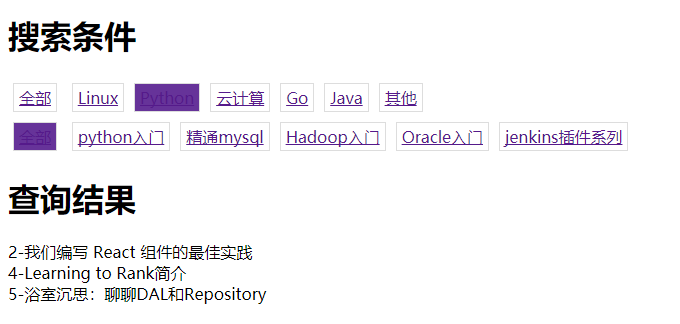
ps附上简图:
四、其他变化
在如上的示例中,我们的过滤条件是从数据库中拿到,有时候我们定义的时候使用的是静态字段,此时组合搜索会稍微修改。
1.model定义
|
1
2
3
4
5
6
7
8
9
|
class Article(models.Model): title=models.CharField(max_length=64) content=models.CharField(max_length=256) category=models.ForeignKey(to='Category') article_type=( #使用静态字段放入内存 (1,'linux'), (2,'python'), (3,'go'), ) |
2.处理函数变化
|
1
2
|
###获取####aritcle_type=models.Article.article_type#直接获取类的静态字段 |
3.simpletag相应改变
|
1
2
3
|
###由于我们传递的元祖,所以取值使用元祖方式article_type[0]# 筛选条件idarticle_type[1]# 筛选条件名称 |
以上就是本文的全部内容,希望对大家的学习有所帮助,也希望大家多多支持脚本之家。
您可能感兴趣的文章:
原文链接:http://www.cnblogs.com/wdliu/p/8331375.html
Django实现组合搜索的方法示例的更多相关文章
- Django之组合搜索组件(二)--另附simple_tag的创建使用方法
这次的代码为Django之组合搜索组件(一)的改版,实现的结果和(一)相同,不同的是,这次运用simple_tag方式,使.html程序简化 所以现在就开始编程吧! 首先想使用simple_tag方法 ...
- Django实现组合搜索
一.实现方法 1.纯模板语言实现 2.自定义simpletag实现(本质是简化了纯模板语言的判断) 二.基本原理 原理都是通过django路由系统,匹配url筛选条件,将筛选条件作为数据库查询结果,返 ...
- python(Django之组合搜索、JSONP、XSS过滤 )
一.组合搜索 二.jsonp 三.xss过滤 一.组合搜索 首先,我们在做一个门户网站的时候,前端肯定是要进行搜索的,但是如果搜索的类型比较多的话,怎么做才能一目了然的,这样就引出了组合搜索的这个案例 ...
- Django中组合搜索功能
需求分析 很多电商网站中有组合搜索的功能,所谓组合搜索就是网页中组合多个条件,对数据库中进行查询,并且将结果显示在页面中,看个例子吧: 注意红框中的标识,我们可以根据URL来做组合搜索. video- ...
- Django学习---组合搜索组件
组合搜索组件 我们都会写博客,写文章之后我们要给文章设置目录,设置类型.之后我们在浏览文章的时候就能够按类别进行精确定位到文章,那这个组合搜索我们应该怎么做呢? 首先我们先创建3张表,分别存放文章,文 ...
- Django之组合搜索组件(一)
什么是组合搜索呢? 比如你想买车,但手里只有10万块!所以你只能在10万块的车里挑选,但你喜欢黑色,因为觉得很高端大气上档次,说白了就是装逼杠杠的!之后售车姐给你拿了个表表,你看到了低于10万块且颜色 ...
- Django 之组合搜索
现在很多网站都会有这样的组合搜索功能,其实质是几个模型之间组合对数据库进行查询,并将结果显示到页面上. 每一行都是一个模型,模型之间有着连表关系(一对多.多对多等) 模型设计 总共四个模型:分别为方向 ...
- Django实现瀑布流,组合搜索
Django中组合搜索功能 需求分析 很多电商网站中有组合搜索的功能,所谓组合搜索就是网页中组合多个条件,对数据库中进行查询,并且将结果显示在页面中,看个例子吧: 注意红框中的标识,我们可以根据URL ...
- django实现瀑布流、组合搜索、阶梯评论、验证码
django实现图片瀑布流布局 我们在一些图片网站上经常会看到,满屏都是图片,而且图片都大小不一,却可以按空间排列.默认一个div是占用一行,当想把div里的图片并排显示的时候,只能使用float属性 ...
随机推荐
- android 总结
两点说明: 1. 本文我的老大推荐给的, 我自己之前也写过自学的帖子, 现在看看感觉不是很完整, 故转载此篇 2. 本文最后附有<android讲义 第二版> 下载地址, 我个人认为最适 ...
- ASP.NET请求管道、应用程序生命周期、整体运行机制
我们知道在ASP.NET中,若要对ASP.NET应用程序进行 初始化并使它处理请求,必须执行一些处理步骤,熟悉应用程序生命周期非常重要,这样才能在适当的生命周期阶段编写代码,达到预期的效果.永远不要做 ...
- Ubuntu下安装JDK7(附Clojure下载)
转:http://www.linuxidc.com/Linux/2012-10/71557.htm 首先确实不得不说,网上有很多类似Ubuntu下安装JDK7的教程.不过大都是基于JDK6的bin文件 ...
- Unity3D-rigidBody.velocity
还有半小时就下班了.写一下今天遇到的问题.处理方法以及一些自己的理解.理解的不一定对,还希望大家指正. 今天我做的效果是,hero的移动. 曾经做过用的是transform.Translate(Vec ...
- sublime for mac 注册码
https://www.jianshu.com/p/04e1b65dd2c0https://fatesinger.com/100121
- SQL Like中的逗号分隔符
SQL Like中的逗号分隔符 在与数据库交互的过程中,我们经常需要把一串ID组成的字符串当作参数传给存储过程获取数据.很多时候我们希望把这个字符串转成集合以方便用于in操作. 有两种方式可以方便 ...
- C++刷题——2830: 递归求1*1+2*2+3*3+……+n*n
Description 定义一个递归函数sum int sum(int n); //函数声明,返回12+22+32+--+n2的和 注意:sum为递归函数 Input 正整数n的值 Output 12 ...
- atitit. 分销系统规划p8k
atitit. 分销系统规划p8k 1. 商户平台管理 overview2 1.1. 分销业务管理2 1.2. 文案管理2 1.3. 订单管理3 1.4. 统计报表3 1.5. 财务结算3 1.6. ...
- [svc]jdk1.7.0_13(系列)下载url
蛋疼了,这个版本,找了老半天没找到 最后是同事找到的 http://download.oracle.com/otn/java/jdk/7u13-b20/jdk-7u13-linux-x64.tar.g ...
- poj2392 Space Elevator(多重背包问题)
Space Elevator Time Limit: 1000MS Memory Limit: 65536K Total Submissions: 8569 Accepted: 4052 ...