
2. 单主机 Elasticsearch 双节点或多节点集群环境部署
我已经买了一年的腾讯云轻量级服务器,并且安装好了ES,也做了一些系统配置,比如 修改vm.max_map_count、修改文件描述符数量
同时,也用ES安装目录下的
bin/elasticsearch脚本尝试了第一次启动 ES,并且用https://localhost:9200来访问它。本文,我打算在我的腾讯云服务器上搭一个双节点的环境,并且用上 kibana 来管理。
网上给出了两种方案:
- 把 elasticsearch.tar.gz 解压多次到不同的文件夹,每个文件夹作为一个节点,然后分别修改每个文件夹中的 elasticsearch.yml,再分别启动。比如 Elasticsearch 在本地单机多节点部署集群
- 把 elasticsearch.tar.gz 解压一次,然后准备多个YAML配置文件,然后启动时,每个节点用上不同的配置文件。比如 配置Elasticsearch
我倾向于第2种,可以把集群中的各个节点的配置文件放到一个文件夹下,方便查看。
1. 查看可执行文件 elasticsearch
使用命令 more bin/elasticsearch 查看启动脚本,如下图所示:
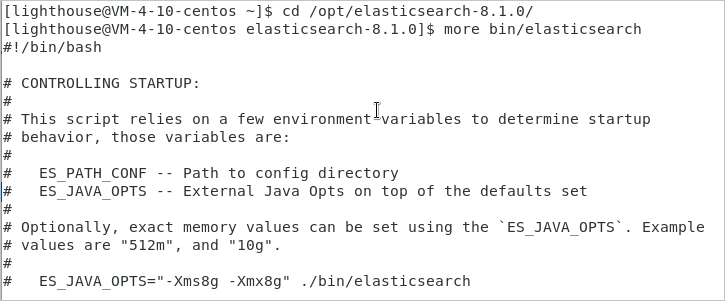
从启动脚本 elasticsearch 的头部注释可以看出,可以使用
ES_PATH_CONF=/path/to/custom/config ./bin/elasticsearch
这样的命令来指定启动节点时,使用不同的配置文件!
有了思路之后,接下来就开始实践。
2. 准备两个配置文件
| 配置项 | 节点1 | 节点2 |
|---|---|---|
| 节点名称 | node1 | node2 |
| 配置文件目录 | /opt/config/es-cluster/node1/ | /opt/config/es-cluster/node2/ |
| data目录 | /var/lib/es-cluster/node1 | /var/lib/es-cluster/node2 |
| log目录 | /var/log/es-cluster/node1 | /var/log/es-cluster/node2 |
执行以下命令创建目标文件夹和文件:
[lighthouse@centos ~]$ cd /opt

[lighthouse@centos opt]$ sudo mkdir config

[lighthouse@centos opt]$ cd config

[lighthouse@centos config]$ sudo mkdir es-cluster

[lighthouse@centos config]$ sudo chown elastic:elastic es-cluster/

[lighthouse@centos config]$ ls -al

total 12

drwxr-xr-x   3  root     root     4096  0ct  9  17:59  .

drwxr-xr-x.  6  root     root     4096  0ct  9  17:59  ..

drwxr-xr-x.  2  elastic  elastic  4096  0ct  9  17:59  es-cluster

[lighthouse@centos config]$ su elastic

Password:

[elastic@centos config]$ cd es-cluster

[elastic@centos es-cluster]$ mkdir node1

[elastic@centos es-cluster]$ mkdir node2

[elastic@centos es-cluster]$ touch node1/elasticsearch.yml

[elastic@centos es-cluster]$ touch node2/elasticsearch.yml

[elastic@centos es-cluster]$ exit

[lighthouse@centos es-cluster]$ cd /var/lib

[lighthouse@centos lib]$ sudo mkdir es-cluster

[lighthouse@centos lib]$ cd es-cluster

[lighthouse@centos es-cluster]$ sudo mkdir node1

[lighthouse@centos es-cluster]$ sudo mkdir node2

[lighthouse@centos es-cluster]$ cd ..

[lighthouse@centos lib]$ sudo chown -R elastic:elastic es-cluster/

[lighthouse@centos lib]$ cd /var/log

[lighthouse@centos log]$ sudo mkdir es-cluster

[lighthouse@centos log]$ cd es-cluster

[lighthouse@centos es-cluster]$ sudo mkdir node1

[lighthouse@centos es-cluster]$ sudo mkdir node2

[lighthouse@centos es-cluster]$ cd ..

[lighthouse@centos log]$ sudo chown -R elastic:elastic es-cluster/
修改 node1/elasticsearch.yml 内容如下:
cluster.name: es-cluster

node.name: node1

node.roles: ["master", "data", "ingest"]

network.host: 10.0.4.10

http.port: 9200

transport.port: 9300

path:

  data: /var/lib/es-cluster/node1

  logs: /var/log/es-cluster/node1

discovery.seed_hosts:

  - 10.0.4.10:9300

  - 10.0.4.10:9301

cluster.initial_master_nodes:

  - node1

  - node2

xpack.security.enabled: false

xpack.security.transport.ssl.enabled: false
修改 node2/elasticsearch.yml 内容如下:
cluster.name: es-cluster

node.name: node2

node.roles: ["master", "data", "ingest"]

network.host: 10.0.4.10

http.port: 9201

transport.port: 9301

path:

  data: /var/lib/es-cluster/node2

  logs: /var/log/es-cluster/node2

discovery.seed_hosts:

  - 10.0.4.10:9300

  - 10.0.4.10:9301

cluster.initial_master_nodes:

  - node1

  - node2

xpack.security.enabled: false

xpack.security.transport.ssl.enabled: false
3. 启动两个es实例
[lighthouse@centos es-cluster]$ su elastic

Password:

[elastic@centos es-cluster]$ cd /opt/elasticsearch-8.1.0

[elastic@centos elasticsearch-8.1.0]$ ES_PATH_CONF=/opt/config/es-cluster/node1 ES_JAVA_OPTS="-Xms256m -Xmx256m" ./bin/elasticsearch -d

[elastic@centos elasticsearch-8.1.0]$ ES_PATH_CONF=/opt/config/es-cluster/node2 ES_JAVA_OPTS="-Xms256m -Xmx256m" ./bin/elasticsearch -d
首次尝试启动时,遇到异常报错 Exception in thread "main" java.nio.file.NoSuchFileException: /opt/config/es-cluster/node1/jvm.options
于是,执行命令拷贝 jvm.options 文件:
[elastic@centos elasticsearch-8.1.0]$ cp config/jvm.options /opt/config/es-cluster/node1

[elastic@centos elasticsearch-8.1.0]$ cp config/jvm.options /opt/config/es-cluster/node2
类似地,还会出现错误 ERROR: no log4j2.properties found; tried [/opt/config/es-cluster/node2] and its subdirectories
因此,执行命令拷贝 log4j2.properties 文件:
[elastic@centos elasticsearch-8.1.0]$ cp config/log4j2.properties /opt/config/es-cluster/node1

[elastic@centos elasticsearch-8.1.0]$ cp config/log4j2.properties /opt/config/es-cluster/node2
4. Kibana
4.1 下载Kibana
https://www.elastic.co/cn/downloads/past-releases#kibana
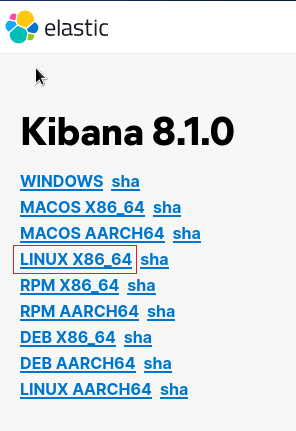
选择:8.1.0版本下载,如下图所示:

选择:LINUX_X86_64,如下图所示:
解压并把 kibana 移动到目标文件夹:
[lighthouse@centos Downloads]$ tar -zxvf kibana-8.1.0-linux-x86_64.tar.gz

[lighthouse@centos Downloads]$ sudo mv kibana-8.1.0 /opt/kibana-8.1.0
4.2 修改kibana.yml配置
使用命令 cd /opt/kibana-8.1.0/config 进入配置文件夹,再用命令 vim kibana.yml 修改文件
server.port: 5601

server.host: "10.0.4.10"

elasticsearch.hosts: ["http://10.0.4.10:9200"]

server.publicBaseUrl: "http://10.0.4.10:5601"
server.publicBaseUrl is missing and should be configured when running in a production environment. Some features may not behave correctly. See the documentation.
报错解决方案
4.3 启动kibana
nohup ./bin/kibana --allow-root & > /dev/null 2>&1
kibana 使用
ps -ef|grep kibana是查不到进程的,主要原因大概是因为 kibana 是 node 写的。所以 kibana 运行的时候是运行在 node 里面。所以,可以使用
ps -ef|grep node查看到进程。
kibana 启动成功后,可以在浏览器中访问:

选择 Explore on my own,新手暂时不需要添加整合 Add integrations。
2. 单主机 Elasticsearch 双节点或多节点集群环境部署的更多相关文章
- MySQL+MGR 单主模式和多主模式的集群环境 - 部署手册 (Centos7.5)
MySQL Group Replication(简称MGR)是MySQL官方于2016年12月推出的一个全新的高可用与高扩展的解决方案.MGR是MySQL官方在5.7.17版本引进的一个数据库高可用与 ...
- Centos7.5基于MySQL5.7的 InnoDB Cluster 多节点高可用集群环境部署记录
一. MySQL InnoDB Cluster 介绍MySQL的高可用架构无论是社区还是官方,一直在技术上进行探索,这么多年提出了多种解决方案,比如MMM, MHA, NDB Cluster, G ...
- Kafka 单节点多Kafka Broker集群
Kafka 单节点多Kafka Broker集群 接前一篇文章,今天搭建一下单节点多Kafka Broker集群环境. 配置与启动服务 由于是在一个节点上启动多个 Kafka Broker实例,所以我 ...
- windows单节点下安装es集群
linux下的es的tar包,拖到windows下,配置后,启动bin目录下的bat文件,也是可以正常运行的. 从linux下拷的tar包,需要修改虚拟机的内存elasticsearch.in.bat ...
- redhat6.5 redis单节点多实例3A集群搭建
在进行搭建redis3M 集群之前,首先要明白如何在单节点上完成redis的搭建. 单节点单实例搭建可以参看这个网:https://www.cnblogs.com/butterflies/p/9628 ...
- ElasticSearch高可用集群环境搭建和分片原理
1.ES是如何实现分布式高并发全文检索 2.简单介绍ES分片Shards分片技术 3.为什么ES主分片对应的备分片不在同一台节点存放 4.索引的主分片定义好后为什么不能做修改 5.ES如何实现高可用容 ...
- ELK 中的elasticsearch 集群的部署
本文内容 背景 ES集群中第一个master节点 ES slave节点 本文总结 Elasticsearch(以下简称ES)搭建集群的经验.以 Elasticsearch-rtf-2.2.1 版本为例 ...
- Redis 单例、主从模式、sentinel 以及集群的配置方式及优缺点对比(转)
摘要: redis作为一种NoSql数据库,其提供了一种高效的缓存方案,本文则主要对其单例,主从模式,sentinel以及集群的配置方式进行说明,对比其优缺点,阐述redis作为一种缓存框架的高可用性 ...
- ElasticSearch 5.2.2 集群环境的搭建
在之前 ElasticSearch 搭建好之后,我们通过 elasticsearch-header 插件在查看 ES 服务的时候,发现 cluster-health 显示的是 YELLOW. Why? ...
随机推荐
- 丽泽普及2022交流赛day20 1/4社论
目录 T1 正方形 T2 玩蛇 T3 嗷呜 T4 开车 T1 正方形 略 T2 玩蛇 略 T3 嗷呜 (插一个删一个?) 找出相同的,丢掉循环节 . 感觉非常离谱,,, 正确性存疑 正确性问 SoyT ...
- Rust 从入门到精通03-helloworld
安装完成 Rust 之后,我们可以编写 Rust 的 Hello Word.这里介绍两种方式,一种是rust原生方式,一种是利用 cargo 工具(重要) 1.rustc 方式 1.1 创建项目目录 ...
- 哎,又跟HR在小群吵了一架!
原创不易,求分享.求一键三连 书接上文: 跟HR在大群吵了一架... 难道,降本增效就是裁员吗 前段时间我问了自己一个问题,如果自己真的是公司内部的外包团队,会怎么样?自从思维转变后,很多事情居然得到 ...
- 程序思想中的冒泡法在python和1200PLC中scl高级编程中的应用
冒泡排序:是计算机科学领域里面的一种算法. header 这个算法名字的由来是因为在执行算法的时候越小的元素会经由交换慢慢"浮"到数列的顶端(升序或降序排列),就如同碳酸饮料中二氧 ...
- Docker 链接sqlserver时出现en-us is an invalid culture错误解决方案
在部署服务到docker的时候出现全球化错误 System . Global ization . Cul tureNotFoundException: Only the invariant cultu ...
- flutter系列之:flutter架构什么的,看完这篇文章就全懂了
目录 简介 Flutter的架构图 embedder engine Flutter framework Widgets Widgets的可扩展性 Widgets的状态管理 渲染和布局 总结 简介 Fl ...
- ArkUI 自定义组件
基础入门 组件可以把一段代码封装起来,目的是提高这一段代码的复用率,并且也可以减少开发人员多次编写相同的代码.一旦组件定义好了之后,在页面中只需要通过<element /> 标签引入进来就 ...
- C++ UAC 提权 以一个管理员身份运行程序
这里是我编译的和一个测试Demo:http://pan.baidu.com/s/1qWNgC6C 大家如果看我下边的不是很清楚,可以下载这个具体工程: 群:103197177 C++进阶讨论:欢迎喜欢 ...
- 轻量级消息队列 Django-Q 轻度体验
前言 最近做的这个项目(基于Django),需要做个功能,实现定时采集车辆定位. 这让我想起来几年前那个OneCat项目,当时我用的是Celery这个很重的组件 Celery实在是太重了,后来我做公众 ...
- Linux虚拟机启动报错operating system not found解决步骤
此报错为硬盘上的启动代码丢失 实验准备步骤 1) 准备: dd if=/dev/zero of=/dev/nvme0n1 bs=446 count=1 2) 系统启动报错截图 修复步骤如下 第一步:选 ...