
开源框架YiShaAdmin如何使用任务计划
1.在Startup添加 new JobCenter().Start();(红色字体,下同)
// This method gets called by the runtime. Use this method to configure the HTTP request pipeline.

        public void Configure(IApplicationBuilder app, IWebHostEnvironment env)

        {

            if (!string.IsNullOrEmpty(GlobalContext.SystemConfig.VirtualDirectory))

            {

                app.UsePathBase(new PathString(GlobalContext.SystemConfig.VirtualDirectory)); // 让 Pathbase 中间件成为第一个处理请求的中间件, 才能正确的模拟虚拟路径

            }

            if (WebHostEnvironment.IsDevelopment())

            {

                GlobalContext.SystemConfig.Debug = true;

                app.UseDeveloperExceptionPage();

            }

            else

            {

                app.UseExceptionHandler("/Home/Error");

            }

            string resource = Path.Combine(env.ContentRootPath, "Resource");

            FileHelper.CreateDirectory(resource);

            app.UseStaticFiles(new StaticFileOptions

            {

                OnPrepareResponse = GlobalContext.SetCacheControl

            });

            app.UseStaticFiles(new StaticFileOptions

            {

                RequestPath = "/Resource",

                FileProvider = new PhysicalFileProvider(resource),

                OnPrepareResponse = GlobalContext.SetCacheControl

            });

            app.UseSession();

            app.UseRouting();

            app.UseEndpoints(endpoints =>

            {

                endpoints.MapControllerRoute("areas", "{area:exists}/{controller=Home}/{action=Index}/{id?}");

                endpoints.MapControllerRoute("default", "{controller=Home}/{action=Index}/{id?}");

            });

            GlobalContext.ServiceProvider = app.ApplicationServices;

            new JobCenter().Start();        }
2.在YiSha.Business.AutoJob的Job文件夹新建TestConsoleJob.cs
using System.Threading.Tasks;

using YiSha.Util.Model;

namespace YiSha.Business.AutoJob

{

    internal class TestConsoleJob : IJobTask

    {

        public async Task<TData> Start()

        {

            TData obj = new TData();

            obj.Tag = 1;

            obj.Message = "测试调用成功";

            return obj;

        }

    }

}
3.在JobExecute中加入新添加的任务
using System;

using System.Collections.Generic;

using System.Text;

using System.Threading.Tasks;

using Quartz;

using Quartz.Impl.Triggers;

using YiSha.Entity.SystemManage;

using YiSha.Enum;

using YiSha.Service.SystemManage;

using YiSha.Util;

using YiSha.Util.Extension;

using YiSha.Util.Model;

namespace YiSha.Business.AutoJob

{

    public class JobExecute : IJob

    {

        private AutoJobService autoJobService = new AutoJobService();

        private AutoJobLogService autoJobLogService = new AutoJobLogService();

        public Task Execute(IJobExecutionContext context)

        {

            return Task.Run(async () =>

            {

                TData obj = new TData();

                long jobId = 0;

                JobDataMap jobData = null;

                AutoJobEntity dbJobEntity = null;

                try

                {

                    jobData = context.JobDetail.JobDataMap;

                    jobId = jobData["Id"].ParseToLong();

                    // 获取数据库中的任务

                    dbJobEntity = await autoJobService.GetEntity(jobId);

                    if (dbJobEntity != null)

                    {

                        if (dbJobEntity.JobStatus == StatusEnum.Yes.ParseToInt())

                        {

                            CronTriggerImpl trigger = context.Trigger as CronTriggerImpl;

                            if (trigger != null)

                            {

                                if (trigger.CronExpressionString != dbJobEntity.CronExpression)

                                {

                                    // 更新任务周期

                                    trigger.CronExpressionString = dbJobEntity.CronExpression;

                                    await JobScheduler.GetScheduler().RescheduleJob(trigger.Key, trigger);

                                }

                                #region 执行任务

                                switch (context.JobDetail.Key.Name)

                                {

                                    case "数据库备份":

                                        obj = await new DatabasesBackupJob().Start();

                                        break;

                                    case "测试任务计划":

                                        obj = await new TestConsoleJob().Start();

                                        break;

                                }

                                #endregion

                            }

                        }

                    }

                }

                catch (Exception ex)

                {

                    obj.Message = ex.GetOriginalException().Message;

                    LogHelper.Error(ex);

                }

                try

                {

                    if (dbJobEntity != null)

                    {

                        if (dbJobEntity.JobStatus == StatusEnum.Yes.ParseToInt())

                        {

                            #region 更新下次运行时间

                            await autoJobService.SaveForm(new AutoJobEntity

                            {

                                Id = dbJobEntity.Id,

                                NextStartTime = context.NextFireTimeUtc.Value.DateTime.AddHours(8)

                            });

                            #endregion

                            #region 记录执行状态

                            await autoJobLogService.SaveForm(new AutoJobLogEntity

                            {

                                JobGroupName = context.JobDetail.Key.Group,

                                JobName = context.JobDetail.Key.Name,

                                LogStatus = obj.Tag,

                                Remark = obj.Message

                            });

                            #endregion

                        }

                    }

                }

                catch (Exception ex)

                {

                    obj.Message = ex.GetOriginalException().Message;

                    LogHelper.Error(ex);

                }

            });

        }

    }

}
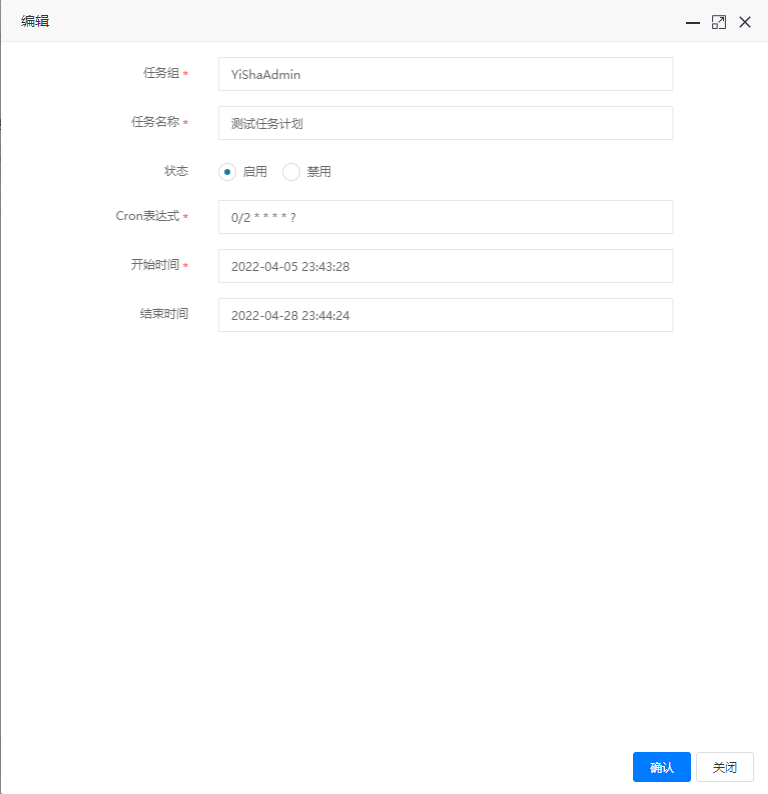
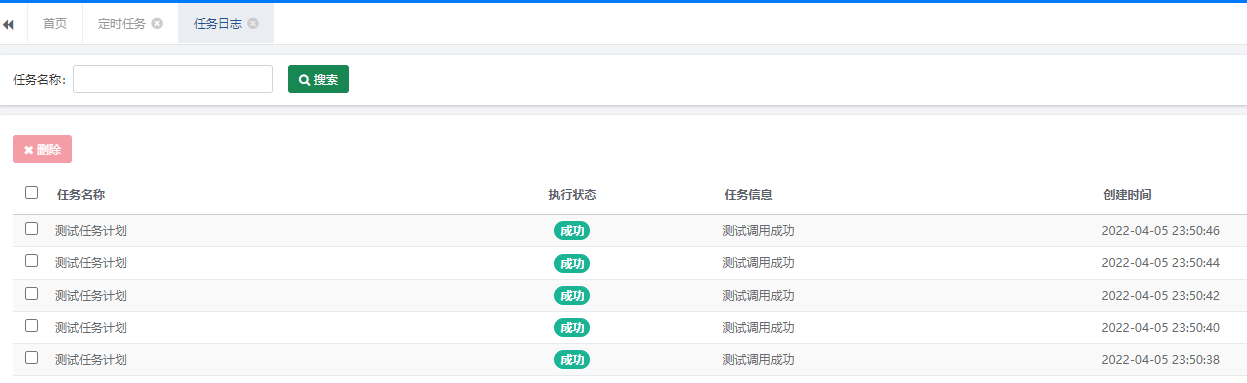
4.添加任务计划,测试
开源框架YiShaAdmin如何使用任务计划的更多相关文章
- Pyhton开源框架(加强版)
info:Djangourl:https://www.oschina.net/p/djangodetail: Django 是 Python 编程语言驱动的一个开源模型-视图-控制器(MVC)风格的 ...
- Python开源框架
info:更多Django信息url:https://www.oschina.net/p/djangodetail: Django 是 Python 编程语言驱动的一个开源模型-视图-控制器(MVC) ...
- Scut游戏服务器免费开源框架-3
Scut游戏服务器免费开源框架--快速开发(3) Scut快速开发(3) 1 开发环境 需要安装的软件 a) 消息队列 b) 数据库,Sql2005以上版本 ...
- 值得学习的C/C++开源框架(转)
值得学习的C语言开源项目 - 1. Webbench Webbench是一个在linux下使用的非常简单的网站压测工具.它使用fork()模拟多个客户端同时访问我们设定的URL,测试网站在压力下工作的 ...
- .Net开源框架列表
API 框架 NancyFx:轻量.用于构建 HTTP 基础服务的非正式(low-ceremony)框架,基于.Net 及 Mono 平台.官网 ASP.NET WebAPI:快捷创建 HTTP 服务 ...
- 值得推荐的C/C++开源框架和库
值得推荐的C/C++开源框架和库 转自:http://www.cnblogs.com/lidabo/p/5514155.html - 1. Webbench Webbench是一个在Linux下 ...
- C++的一些不错开源框架,可以学习和借鉴
from https://www.cnblogs.com/charlesblc/p/5703557.html [本文系外部转贴,原文地址:http://coolshell.info/c/c++/201 ...
- 关于Farseer.net轻量级ORM开源框架 V1.0 概念版本开发的消息
V0.2版的开源距离今天(05年03月)已有近3年的时间.可以说这个版本已经有点落伍的感觉了,呵呵. V0.2版至今一直处于BUG的修复及一些细小功能的增加,所以版本号上一直没有变化. 其实在这1.2 ...
- Android开源框架ViewPageIndicator和ViewPager实现Tab导航
前言: 关于使用ViewPageIndicator和ViewPager实现Tab导航,在开发社区里已经有一堆的博客对其进行了介绍,假设我还在这里写怎样去实现.那简直就是老生常谈,毫无新奇感,并且.我也 ...
随机推荐
- 论文解读(GMI)《Graph Representation Learning via Graphical Mutual Information Maximization》2
Paper Information 论文作者:Zhen Peng.Wenbing Huang.Minnan Luo.Q. Zheng.Yu Rong.Tingyang Xu.Junzhou Huang ...
- 记-Golang获取本机IP及快速搭建局域FTP
1 package main 2 3 import ( 4 "fmt" 5 "net" 6 "net/http" 7 "strin ...
- phpstorm 快捷生成函数
在函数上一行键入 /** /** * @param $a * @param $b * @return mixed */ function abc($a, $b) { $c = $a + $b; ret ...
- @Qualifier 注解 ?
当有多个相同类型的 bean 却只有一个需要自动装配时,将@Qualifier 注解和 @Autowire 注解结合使用以消除这种混淆,指定需要装配的确切的 bean.
- final、finalize 和 finally 的不同之处?
final 是一个修饰符,可以修饰变量.方法和类.如果 final 修饰变量,意味着该 变量的值在初始化后不能被改变.finalize 方法是在对象被回收之前调用的方法, 给对象自己最后一个复活的机会 ...
- isNotEmpty 与 isNotBlank 的区别
isNotEmpty(str)等价于 str != null && str.length > 0 isNotBlank(str) 等价于 str != null &&am ...
- 插值方法 - Lagrange插值多项式
Lagrange插值多项式代码: 1 # -*- coding: utf-8 -*- 2 """ 3 Created on Wed Mar 25 15:43:42 202 ...
- list集合的快速筛选条件方法
List<String> list = new ArrayList<>();list.add("张无忌");list.add("周芷若" ...
- Python学习--Python的了解与安装
Python简介: Python 是一种解释型.面向对象.动态数据类型的高级程序设计语言. Python 由荷兰人Guido van Rossum 于 1989 年底发明,第一个公开发行版发行于 19 ...
- c源文件中为什么要包含自己对应的头文件
另一篇:.c文件和.h文件的关系 引言: 我们经常在c工程中发现,源文件中要包含自己的头文件.一直以来,都不知道为什么这样做.现在,我知道了. 以前的认知: 我认为,.c文件没有必要包含自己的.h文件 ...