
小程序TAB列表切换内容动态变化,scrollview高度根据内容动态获取
滑动tab选项卡
一、在小程序里面tab选项卡是用的是自带的swiper组件,下面直接上代码
    <view class="container">

  <view class="tab">

    <view class="tab-list {{currentTab==0? 'active':''}}" data-current="0" bindtap='switchNav'>运动专区</view>

    <view class="tab-list {{currentTab==1? 'active':''}}" data-current="1" bindtap='switchNav'>美食专区</view>

  </view>

  <swiper current='{{currentTab}}' class="swiper-box" duration='300' bindchange='bindChange' style="height: {{clientHeight?clientHeight+'px':'auto'}}">

  <!--运动专区  -->

  <swiper-item class="swiper-content">

    <scroll-view scroll-y="{{true}}" style="height: {{clientHeight?clientHeight+'px':'auto'}}">

      <block wx:for="{{video}}" wx:key="video">

      <!-- <template name="video-detail"> -->

        <view class="video-detail-list">

          <view class="original">

            <text class="original-name">{{original}}</text>

            <view class="original-video">

              <video src="{{item.url}}"></video>

            </view>

            <view class="original-video-explain">

                <text class="original-video-date">{{item.addtime}}</text>

                <text class="original-video-name">{{item.title}}</text>

                <view class="original-video-detail">

                  <text>{{originalContent}}</text>

                </view>

            </view>

          </view>

        </view>

      </block>

    </scroll-view>

  </swiper-item>

<!--美食专区  -->

    <swiper-item class="swiper-content">

      <scroll-view scroll-y="{{true}}" style="height: {{clientHeight?clientHeight+'px':'auto'}}">

        <block wx:for="{{video}}" wx:key="video">

          <view class="video-detail-list">

            <view class="original">

              <text class="original-name">{{original}}</text>

              <view class="original-video">

                <video src="{{item.url}}"></video>

              </view>

              <view class="original-video-explain">

                  <text class="original-video-date">{{item.addtime}}</text>

                  <text class="original-video-name">{{item.title}}</text>

                  <view class="original-video-detail">

                    <text>{{originalContent}}</text>

                  </view>

              </view>

            </view>

          </view>

        </block>

      </scroll-view>

    </swiper-item>

  </swiper>

</view>
ps:大家都知道小程序是不能操作DOM的,所以这里用getSystemInfo获取设备高度,scrollview在这里是一个内嵌的框架,列表在框架内滚动,它的高度其实就是屏幕的高度,不是里边列表项目的高度,
所以这里设置max-height等都是无效的。
样式代码:
.container{

  width:100%;

  height: 100%;

  background:#eee;

}

/*tab切换导航 */

.tab{

  width: 100%;

  color:#666666;

  height: 70rpx;

  font-size:28rpx;

  display: inline-block;

  text-align: center;

  background: #fff;

}

.tab-list{

  height: 70rpx;

  line-height: 70rpx;

  width: 50%;

  display: inline-block;

  z-index: 1000;

}

.active{

  border-bottom:4rpx solid #FD9D80;

}

.swiper-box{

  width: 100%;

  max-height:9999px;

  display: block;

}

.video-detail-list{

  margin-top:16rpx;

  width:100%;

  background: #fff;

}

.video-detail-list .original-name{

   height: 80rpx;

   line-height: 80rpx;

  text-align: center;

  display: block;

  font-size:28rpx;

}

.original-name{

  color:#999999;

}

.original-video{

  text-align: center;

}

.original-video video{

  width: 640rpx;

}

.original-video video{

  border-radius:16rpx;

}

.original-video-explain{

  width: 640rpx;

  margin-left:50rpx;

}

.original-video-date{

  font-size:28rpx;

  color:#6C6C6C;

}

.original-video-date text{

  display: inline-block;

}

.original-video-name{

  text-align: center;

  width: 55%;

  margin-top:8rpx;

  float:right;

  font-size:28rpx;

  color:#6C6C6C;

  overflow: hidden;  /* 超出自动隐藏 */

  text-overflow:ellipsis;  /* 文字隐藏后添加省略号 */

  white-space:nowrap;    /*  强制不换行 */

}

.original-video-detail{

  color:#A1A1A1;

  height: 30rpx;

  font-size:20rpx;

  /* margin-top:-10rpx; */

}

.original-video-detail text{

    width: 100%;

    display: -webkit-box;

    word-break: break-all;

    -webkit-box-orient: vertical;

    -webkit-line-clamp:3;

    overflow: hidden;

    text-overflow:ellipsis;

    color:#666;

}
js代码:
var videoUrl = 'http://t.jingduhealth.com/index/xcsvideo'

var app = getApp()

Page({

  data: {

    true:true,

    video:[],

    winWidth: 0,

    winHeight: 0,

    currentTab: 0,  // tab切换

  },

  //tab导航条切换事件

  bindChange:function(e){

    var that = this;

    that.setData({

      currentTab: e.detail.current

    })

  },

  switchNav:function(e){

    var that = this;

    if (this.data.currentTab === e.target.dataset.current){

      return false;

    }else{

      that.setData({

        currentTab: e.target.dataset.current

      })

    }

  },

  onLoad: function () {

    var that = this;

    //进入页面显示正在加载的图标

    wx.showToast({

      title: '正在加载中...',

      icon: 'loading',

      duration: 10000

    })

    wx.request({

      url:videoUrl,

      data:{},

      header:{

        'ContentType':'application/json'

      },

      success: function (res){

        //获取到数据后隐藏正在加载图标

        wx.hideLoading();

        console.log(res.data)

        that.setData({

            video:res.data.slice(0,2)  //获取的数据截取数组下标0-2的数据

        })

      }

    })

    //获取系统信息

    wx.getSystemInfo({

      success:function(res){

        that.setData({

          clientHeight: res.windowHeight   //设备的高度等于scroll-view内容的高度

        })

      }

    })

  }

})
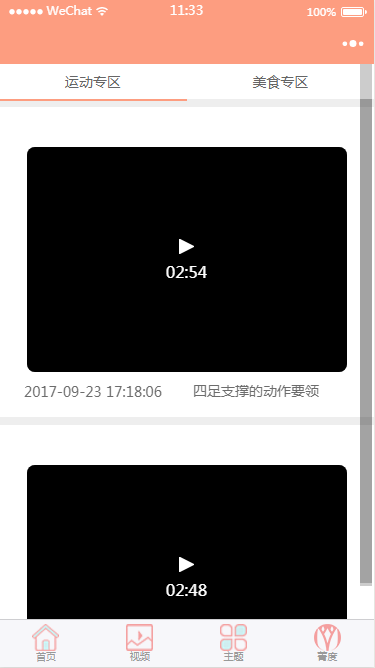
成功后的截图
小程序TAB列表切换内容动态变化,scrollview高度根据内容动态获取的更多相关文章
- 微信小程序Tab选项卡切换大集合
代码地址如下:http://www.demodashi.com/demo/14028.html 一.前期准备工作 软件环境:微信开发者工具 官方下载地址:https://mp.weixin.qq.co ...
- 微信小程序tab栏切换
Wxml代码:<view class="body"> <view class="nav bc_white"> <view clas ...
- 微信小程序 - tab+swiper切换(非组件)
无奈slot不支持循环,无法成为组件. 该模板适用于新闻等,点击下载示例:tabswiper
- 微信小程序--Tab栏切换的快速实现
上效果! wxss样式代码: .tabs-item.selected { color:rgba(,,,.); border-bottom:2px solid rgba(,,,.); } .tabs-i ...
- 微信小程序新闻列表功能(读取文件、template模板使用)
微信小程序新闻列表功能(读取文件.template) 不忘初心,方得始终.初心易得,始终难守. 在之前的项目基础上进行修改,实现读取文件内容作为新闻内容进行展示. 首先,修改 post.wxml 文件 ...
- 微信小程序左右滑动切换页面示例代码--转载
微信小程序——左右滑动切换页面事件 微信小程序的左右滑动触屏事件,主要有三个事件:touchstart,touchmove,touchend. 这三个事件最重要的属性是pageX和pageY,表示X, ...
- wepy小程序实现列表分页上拉加载(2)
第一篇:wepy小程序实现列表分页上拉加载(1) 本文接着上一篇内容: 4.优化-添加加载动画 (1)首先写加载动画的结构和样式 打开list.wpy文件 template结构代码: <temp ...
- wepy小程序实现列表分页上拉加载(1)
使用wepy开发微信小程序商城第一篇:项目初始化 使用wepy开发微信小程序商城第二篇:路由配置和页面结构 列表页效果图: 1.新建列表页 (1)在pages里面新建一个list.wpy文件 初始代码 ...
- 微信小程序tab切换,可滑动切换,导航栏跟随滚动实现
简介 看到今日头条小程序页面可以滑动切换,而且tab导航条也会跟着滚动,点击tab导航,页面滑动,切导航栏也会跟着滚动,就想着要怎么实现这个功能 像商城类商品类目如果做成左右滑动切换类目用户体验应该会 ...
随机推荐
- 【洛谷】P1447 能量采集
此题虽为紫,但其实在水 能量采集 题目描述 栋栋有一块长方形的地,他在地上种了一种能量植物,这种植物可以采集太阳光的能量.在这些植物采集能量后,栋栋再使用一个能量汇集机器把这些植物采集到的能量汇集到一 ...
- 上传css,js文件并引用
今天在做单页面的简历,由于css样式跟js代码过多,所以就想着可不可以把css文件跟js文件上传到网上,然后引用. 一开始的想法是我上传到gitee上,但是从gitee服务器返回的Header上加了C ...
- CSAPP-Lab03 Attack Lab 记录
纸上得来终觉浅,绝知此事要躬行 实验概览 Attack!成为一名黑客不正是我小时候的梦想吗?这个实验一定会很有趣. CMU 对本实验的官方说明文档:http://csapp.cs.cmu.edu/3e ...
- thinkphp6的一些用法
Thinkphp6笔记一:安装http://www.thinkphp.cn/topic/68371.htmlThinkphp6笔记二:开启多应用模式http://www.thinkphp.cn/top ...
- 小程序 laravel 实现秒杀
参考博客: https://blog.csdn.net/m0_56487875/article/details/118603439 小程序登录: https://www.cnblogs.com/xia ...
- PHP魔术方法11种
1.构造函数:__construct(): 构造函数是类中的一个特殊函数,当我们使用new关键字实例化对象时,相当于调用了类的构造函数. function __construct($name){ $t ...
- ASP.NET CORE 项目搭建(2022 年 3 月版)
ASP.NET CORE 项目搭建(2022 年 3 月版) 自读 沉淀了多年的技术积累,在 .NET FRAMEWORK 的框架下尝试造过自己的轮子. 摸索着闭门造过 基于 OWIN 服务后端. 摸 ...
- CF802O题解
太厉害啦,出题人究竟是怎么想到的. 首先这题很显然可以使用费用流:对于 \(i \leq j\),连接一条边 \((i,j+n)\),流量为 \(1\),费用为 \(a_i+b_j\).最后连接 \( ...
- Mybatis工具类(自动提交事务)
public class MybatisUtils { private static SqlSessionFactory sqlSessionFactory; static { try { //获取工 ...
- ArcMap操作随记(2)
1.空间校正 变换-仿射 仅发生偏移 橡皮页变化 形状改变 变换-投影 旋转,改变角度 变换-相似 改变大小.形状不变 2.计算行列号 Int(([POINT_Y]-1273.143242)/30)+ ...