
跳板攻击之:NPS代理转发
跳板攻击之:NPS代理转发
1 NPS介绍
官方介绍太官方了,看了还需要时间慢慢理解,因此写此文章,以具体案例方便理解
nps是一款轻量级、高性能、功能强大的内网穿透代理服务器。目前支持tcp、udp流量转发,可支持任何tcp、udp上层协议(访问内网网站、本地支付接口调试、ssh访问、远程桌面,内网dns解析等等……),此外还支持内网http代理、内网socks5代理、p2p等,并带有功能强大的web管理端。
2 NPS特点
协议支持全面,兼容几乎所有常用协议,例如tcp、udp、http(s)、socks5、p2p、http代理...
全平台兼容(linux、windows、macos、群辉等),支持一键安装为系统服务
控制全面,同时支持服务端和客户端控制
https集成,支持将后端代理和web服务转成https,同时支持多证书
操作简单,只需简单的配置即可在web ui上完成其余操作
展示信息全面,流量、系统信息、即时带宽、客户端版本等
扩展功能强大,该有的都有了(缓存、压缩、加密、流量限制、带宽限制、端口复用等等)
域名解析具备自定义header、404页面配置、host修改、站点保护、URL路由、泛解析等功能
服务端支持多用户和用户注册功能
3 实验环境
3.1 实验准备
- 添加 A 记录 <your_vps_ domain> 指向 VPS IP
- Metasploitable主机开放了22,23与80端口与服务
3.2 实验拓扑
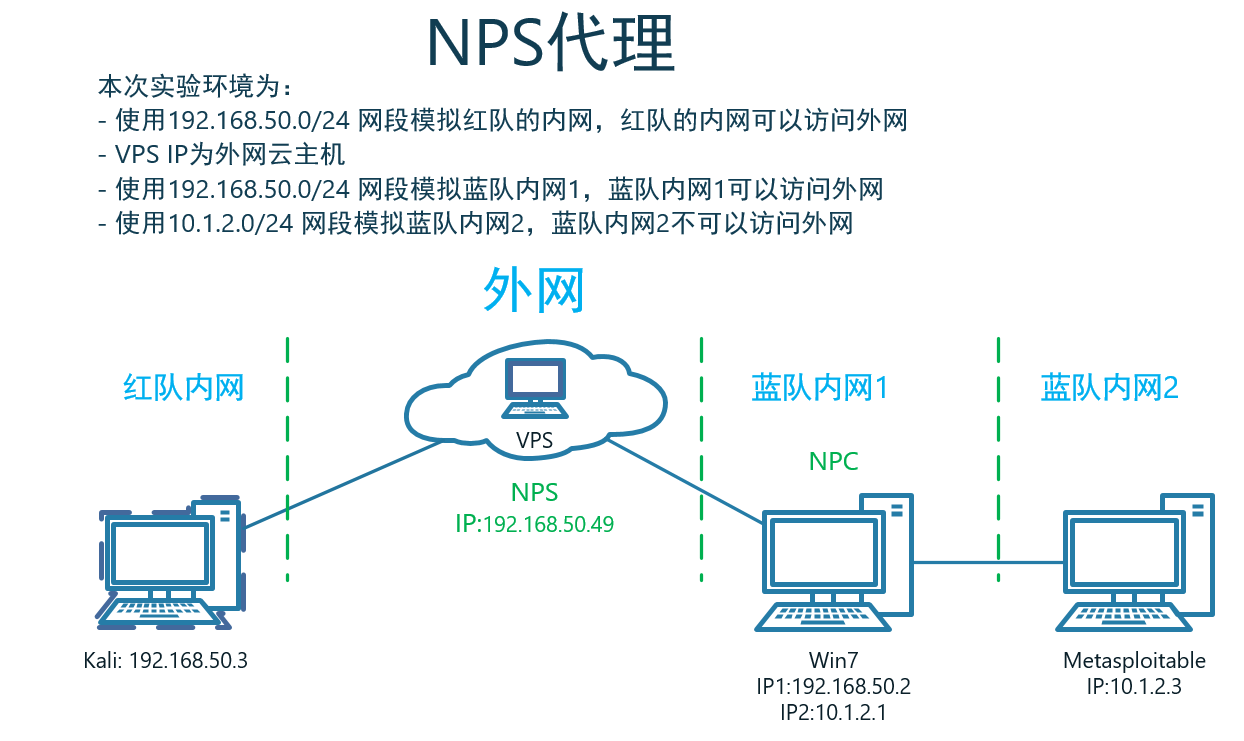
3.3 NPS配置
3.3.1 conf/nps.conf
appname = nps

#Boot mode(dev|pro)

runmode = dev

#HTTP(S) proxy port, no startup if empty

http_proxy_ip=0.0.0.0

http_proxy_port=80

https_proxy_port=443

https_just_proxy=true

#default https certificate setting

https_default_cert_file=conf/server.pem

https_default_key_file=conf/server.key

##bridge,默认是8084,此处修改为8081

bridge_type=tcp

bridge_port=8081

bridge_ip=0.0.0.0

# Public password, which clients can use to connect to the server

# After the connection, the server will be able to open relevant ports and parse related domain names according to its own configuration file.

public_vkey=Admin@123

#Traffic data persistence interval(minute)

#Ignorance means no persistence

#flow_store_interval=1

# log level LevelEmergency->0  LevelAlert->1 LevelCritical->2 LevelError->3 LevelWarning->4 LevelNotice->5 LevelInformational->6 LevelDebug->7

log_level=7

#log_path=nps.log

#Whether to restrict IP access, true or false or ignore

#ip_limit=true

#p2p

#p2p_ip=127.0.0.1

#p2p_port=6000

#web

web_host=a.o.com

web_username=fcarey

web_password=Aadmin@123

web_port = 8080

web_ip=0.0.0.0

web_base_url=

web_open_ssl=false

web_cert_file=conf/server.pem

web_key_file=conf/server.key

# if web under proxy use sub path. like http://host/nps need this.

#web_base_url=/nps

#Web API unauthenticated IP address(the len of auth_crypt_key must be 16)

#Remove comments if needed

#auth_key=test

#auth_crypt_key =1234567812345678

auth_crypt_key =admin123admin123

#allow_ports=9001-9009,10001,11000-12000

#Web management multi-user login

allow_user_login=false

allow_user_register=false

allow_user_change_username=false

#extension

allow_flow_limit=false

allow_rate_limit=false

allow_tunnel_num_limit=false

allow_local_proxy=false

allow_connection_num_limit=false

allow_multi_ip=false

system_info_display=false

#cache

http_cache=false

http_cache_length=100

#get origin ip

http_add_origin_header=false

#pprof debug options

#pprof_ip=0.0.0.0

#pprof_port=9999

#client disconnect timeout

disconnect_timeout=60
3.3.2 NPS配置客户端
| 类型 | 内容 |
|---|---|
| 备注 | Client1 |
Basic 认证用户名仅限Socks5、Web、HTTP转发代理 |
Client1 |
Basic 认证密码仅限Socks5、Web、HTTP转发代理 |
Aadmin@123 |
唯一验证密钥唯一值,不填将自动生成 |
Aadmin@123 |
| 允许客户端通过配置文件连接 | 是 |
| 压缩 | 是 |
| 加密 | 是 |
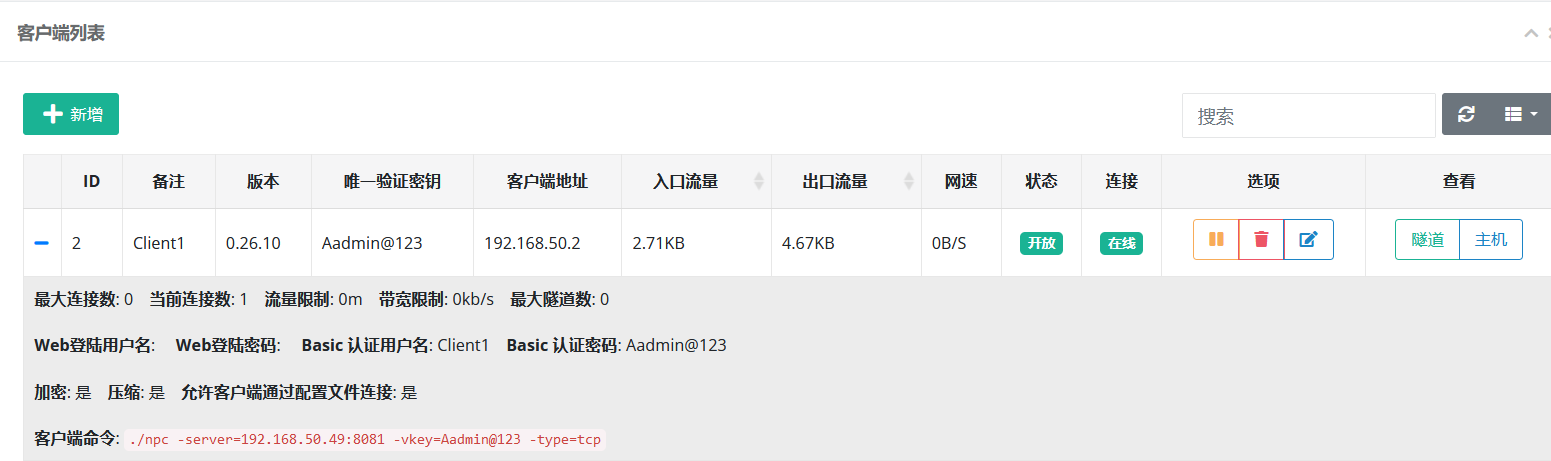
3.4 NPC 无配置文件连接 NPS
./npc -server=192.168.50.49:8081 -vkey=Aadmin@123 -type=tcp
3.4.1 若遇到错误提示:找不到配置文件
0.26.7 客户端无法无配置文件启动 · Issue #556 · ehang-io/nps · GitHub
下载客户端并解压,运行
./npc -server=xxxxxx:8024 -vkey=xxxxxx

2020/05/24 20:00:59.554 [I] [npc.go:231]  the version of client is 0.26.7, the core version of client is 0.26.0

2020/05/24 20:00:59.570 [I] [control.go:97]  Loading configuration file conf/npc.conf successfully

2020/05/24 20:01:20.574 [E] [control.go:111]  dial tcp 172.0.0.1:8024: connectex: A connection attempt failed because the connected party did not properly respond after a period of time, or established connection failed because connected host has failed to respond.

2020/05/24 20:01:20.575 [I] [control.go:102]  Reconnecting...
中断运行并删除conf文件夹再运行
2020/05/24 19:57:37.941 [I] [npc.go:231]  the version of client is 0.26.7, the core version of client is 0.26.0

2020/05/24 19:57:37.957 [E] [control.go:94]  Config file conf/npc.conf loading error open conf/npc.conf: The system cannot
解决方式:
- 参数没传进去就用的配置文件,参数能不能传进去与你用的shell用法有关,换个shell试试
4 NPS代理socks
实现:kali通过socks代理,访问蓝队内网2 Metasploitable的 ssh 服务。
NPS WEB上配置:
类型 内容 模式 SOCKS代理 客户端 ID 2 备注 SOCKS_Proxy 服务端端口 2333 kali配置
/etc/proxychains4.conf:socks5 <your_vps_IP> 2333 Client1 Aadmin@123
- 代理服务器IP为:VPS 的 IP
kali通过NPS socks代理,访问蓝队内网2 Metasploitable的 ssh 服务。
# proxychains ssh msfadmin@192.168.50.49

The authenticity of host '192.168.50.49 (192.168.50.49)' can't be established.

ED25519 key fingerprint is SHA256:6Z6oAq5VrJ6itY95hYppj4VxvrdVRplMQGjvER7fBOE.

This key is not known by any other names.

Are you sure you want to continue connecting (yes/no/[fingerprint])? yes

Warning: Permanently added '192.168.50.49' (ED25519) to the list of known hosts.

msfadmin@192.168.50.49's password:

msfadmin@metasploitable:~$ id

uid=1000(msfadmin) gid=1000(msfadmin) groups=4(adm),20(dialout),24(cdrom),25(floppy),29(audio),30(dip),44(video),46(plugdev),107(fuse),111(lpadmin),112(admin),119(sambashare),1000(msfadmin)
5 NPS HTTP 代理
实现:kali通过NPS HTTP代理,创建一个只有自己能访问到蓝队内网2 Metasploitable的 web 服务代理。
NPS WEB上配置:
类型 内容 模式 HTTP 客户端 ID 2 备注 HTTP_Proxy 服务端端口 8082 kali通过NPS HTTP 代理,访问到蓝队内网2 Metasploitable的 WEB 服务。
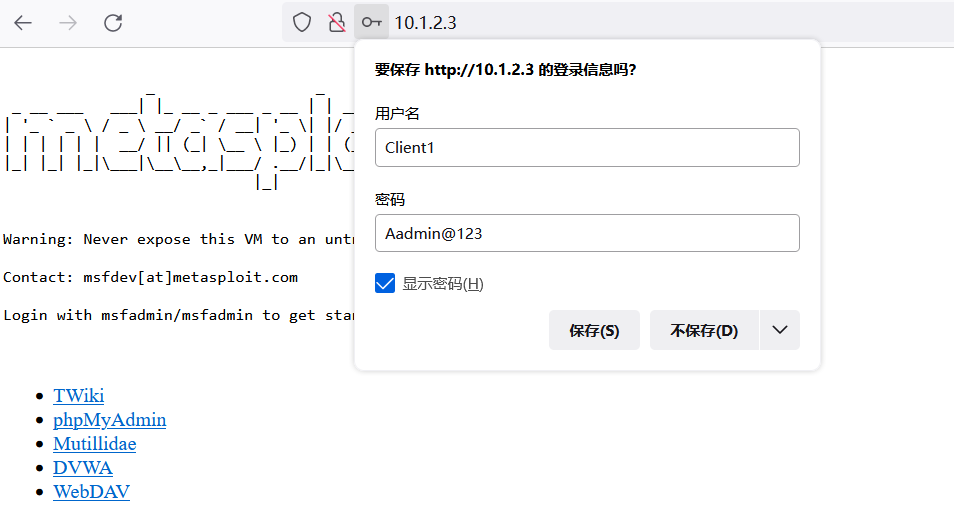
- 注:此处的用户与密码是创建客户端的时,配置完成的
6 NPS代理tcp
实现:kali通过NPS tcp代理,访问蓝队内网2 Metasploitable的 ssh 服务。
NPS WEB上配置:
类型 内容 模式 TCP 客户端 ID 2 备注 MSF_SSH 服务端端口 2222 目标 (IP:端口) 10.1.2.3:22kali通过NPStcp代理,访问蓝队内网2 Metasploitable的 ssh 服务。
# ssh msfadmin@192.168.50.49 2222

The authenticity of host '192.168.50.49 (192.168.50.49)' can't be established.

ED25519 key fingerprint is SHA256:6Z6oAq5VrJ6itY95hYppj4VxvrdVRplMQGjvER7fBOE.

This key is not known by any other names.

Are you sure you want to continue connecting (yes/no/[fingerprint])? yes

Warning: Permanently added '192.168.50.49' (ED25519) to the list of known hosts.

msfadmin@192.168.50.49's password:

msfadmin@metasploitable:~$ id

uid=1000(msfadmin) gid=1000(msfadmin) groups=4(adm),20(dialout),24(cdrom),25(floppy),29(audio),30(dip),44(video),46(plugdev),107(fuse),111(lpadmin),112(admin),119(sambashare),1000(msfadmin)
7 NPS代理通过自定义域名访问内网的 Web 服务(域名解析功能)
实现:kali通过NPS 域名解析功能,使用
http://<your_vps_sub.domain>,访问蓝队内网2 Metasploitable 上的 WEB 服务器(80端口)。NPS WEB上配置:
类型 内容 客户端 ID 2 备注 DNS_Paser 主机 a.fcarey.com 模式 所有 URL路由 / 目标 (IP:端口) 10.1.2.3:80- 如果想访问
Win7上的web服务器(80端口),127.0.0.1
- 如果想访问
kali通过
http://a.fcarey.com:8888,访问蓝队内网2 Metasploitable上的 WEB 服务器(80端口)。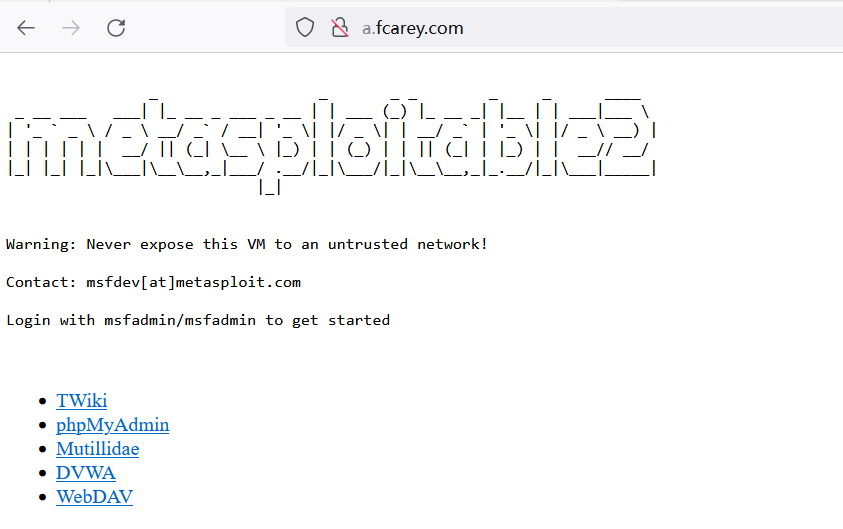
注:若没有域名又想做实验,确认效果:可以在本地修改host文件:
192.168.50.49 a.fcarey.com
8 NPS私密代理
实现:kali通过NPS 私密代理代理,创建一个只有自己能访问到蓝队内网2 Metasploitable的 telnet 服务代理。
NPS WEB上配置:
类型 内容 模式 私密代理 客户端 ID 2 备注 Screct_Proxy 目标 (IP:端口) 10.1.2.3:23唯一标识密钥 Aadmin@123 访问端命令(此处为Kali下的命令):
./npc -server=192.168.50.49:8081 -vkey=Aadmin@123 -type=tcp -password=Aadmin@123 -local_type=secret# npc -server=192.168.50.49:8081 -vkey=Aadmin@123 -type=tcp -password=Aadmin@123 -local_type=secret
2023/02/25 20:29:05.919 [I] [local.go:115] successful start-up of local tcp monitoring, port 2000
2023/02/25 20:29:32.319 [D] [local.go:117] new secret connection
kali通过NPS私密代理,访问到蓝队内网2 Metasploitable的 Telnet 服务。
# telnet -l msfadmin 127.0.0.1 2000

Password:

Last login: Fri Feb 24 12:00:19 EST 2023 from 10.1.2.1 on pts/2

Linux metasploitable 2.6.24-16-server #1 SMP Thu Apr 10 13:58:00 UTC 2008 i686

The programs included with the Ubuntu system are free software;

the exact distribution terms for each program are described in the

individual files in /usr/share/doc/*/copyright.

Ubuntu comes with ABSOLUTELY NO WARRANTY, to the extent permitted by

applicable law.

To access official Ubuntu documentation, please visit:

http://help.ubuntu.com/

No mail.

msfadmin@metasploitable:~$
9 高级功能
10 交个朋友

跳板攻击之:NPS代理转发的更多相关文章
- ssh代理转发
实验环境 serverA:172.16.2.116 serverB:172.16.2.225 serverC:172.16.2.115 "代理转发"是针对ssh认证过程的一种转发 ...
- curl运行json串,代理转发格式
curl -b 'uin=o0450654733; skey=@tq9xjRvYy' -H "Content-Type: application/json" -X POST -d ...
- windows下使用密钥登录Linux及xshell代理转发
1.密钥登录原理 一般我们使用xshell访问远程主机(Linux主机)时,都是先请管理员给我们开一个账户,即为我们设置一个一个用户名和对应的密码,然后我们就可以使用下面的方式登录到远程主机了: 在这 ...
- IIS充当代理转发请求到Kestrel
接着上篇博文为ASP.NetCore程序启用SSL的code,这篇将介绍如何用IIS充当反向代理的角色转发请求到Kestrel服务器 与ASP.NET不同,ASP.netCore使用的是自托管web服 ...
- Nginx代理转发Apache+svn
1.安装svn和httpd yum install httpd yum install subversion mod_dav_svn 创建仓库目录 mkdir -p /var/www/svn 3.创建 ...
- nginx反向代理转发后页面上的js css文件无法加载【原创】
故障现象:nginx做代理转发后,发现页面上的js css文件无法加载,页面样式乱了. 原因:没有配置静态资源 解决js css文件无法加载无法访问的问题 解决办法: 修改配置文件nginx.conf ...
- Docker Kubernetes hostPort 代理转发
Docker Kubernetes hostPort 代理转发 hostPort: 1. 类似docker -p 映射宿主级端口到容器. 2. 容器所在的主机暴露端口转发到指定容器中. 3. hos ...
- IIS充当反向代理转发请求到Kestrel
接着上篇博文为ASP.NetCore程序启用SSL的code,这篇将介绍如何用IIS充当反向代理的角色转发请求到Kestrel服务器 介绍 与ASP.NET不同,ASP.netCore使用的是自托管w ...
- iis和apache共用80端口,IIS代理转发apache
为什么共用80端口应该不用多说了,服务器上程序运行环境有很多套,都想抢用80端口,所以就有了共用80端口的解决方案. 网上很多的教程一般都是设置APACHE使用默认80端口,代理转发IIS的网站,II ...
- (转)基于live555的流媒体代理转发服务器
对于并发量并不大而且对性能要求不是很高的流媒体传输模块,live555还是很好的选择,下面说一下我所实现的流媒体代理服务器(目前只能实现对H264单视频的转发)代理转发主要 对于并发量并不大而且对性能 ...
随机推荐
- editorial 专栏
社论 22.10.1 solution for pl_er 密码是我的名字的拼音 全小写无空格 社论 22.10.2 solution for Simu. 密码是联考密码 社论 22.10.4 sol ...
- Python3.9.5安装
参考教程1:https://www.cnblogs.com/xiaoyanhuo/p/16362875.html 参考教程2:https://www.cnblogs.com/feng18/p/5854 ...
- linux-微服务-jar包部署指令
1 orderservice docker build -t orderservice . docker run -d -p 8084:8084 --name orderservice orderse ...
- vue后退页面刷新数据和缓存数据
我们在项目中经常使用this.$router.go(-1) 但是,有时我们需要把前一个页面的数据进行缓存,有时需要刷新数据,下面来记录一下怎么操作吧 首先:在vue项目中缓存页面我们能想到 keep ...
- 开源库libcli的安装与使用
源码:https://github.com/dparrish/libcli 环境 Ubuntu 20.04.2 LTS 编译libcli 参考:README.md 按照libcli中的 README ...
- 【转载】SQL SERVER 中单字节和双字节互转自定义函数(全角半角转换)
一.首先创建一个自定义函数,代码如下: alter function f_convert( @str nvarchar(4000), --要转换的字符串 @flag bit --转换标志,0转换成半角 ...
- [OpenCV实战]48 基于OpenCV实现图像质量评价
本文主要介绍基于OpenCV contrib中的quality模块实现图像质量评价.图像质量评估Image Quality Analysis简称IQA,主要通过数学度量方法来评价图像质量的好坏. 本文 ...
- solidity 内存(memory) 可变数组的增删改查 操作
// SPDX-License-Identifier: MIT pragma solidity ^0.8.9; library Array { function push(uint256[] memo ...
- STM32 的学习方法
前言 学习知识要掌握有效的学习方法,学习技术也是一样,本篇分享关于我学习 STM32 后总结的学习方法. 推荐的学习方法 系统学习 在网上购买一款开发板,使用开发板+开发板配套视频教程+开发板配套源码 ...
- 移动端安卓开发学习记录--Android Studio打断点调试操作步骤记录
今天我发现一个很迷的事情,我是安卓初学者,发现打印对象的话,打印不出来,但是打印对象的属性值,却可以打印出来,迷啊!!!我好迷茫 咨询大佬后,得知,JAVA打印对象的话,打印出来的不是它自己的内容,而 ...