
构建api gateway之 openresty 中如何使用 wasm
openresty 中如何使用 wasm
WASM 是什么?
WebAssembly是一种运行在现代网络浏览器中的新型代码,并且提供新的性能特性和效果。它设计的目的不是为了手写代码而是为诸如C、C++和Rust等低级源语言提供一个高效的编译目标。
对于网络平台而言,这具有巨大的意义——这为客户端app提供了一种在网络平台以接近本地速度的方式运行多种语言编写的代码的方式;在这之前,客户端app是不可能做到的。
而且,你在不知道如何编写WebAssembly代码的情况下就可以使用它。WebAssembly的模块可以被导入的到一个网络app(或Node.js)中,并且暴露出供JavaScript使用的WebAssembly函数。JavaScript框架不但可以使用WebAssembly获得巨大性能优势和新特性,而且还能使得各种功能保持对网络开发者的易用性。
比如在envoy 中,主要是通过wasm 提供多语言开发扩展envoy功能的目的
openresty如何玩?
那么在openresty 中是否也可以这么集成wasm呢?
当然是可以的,毕竟openresty 本身就是 nginx + lua , 再加一个 wasm vm 进去也是一样可以做到的。
利用nginx模块化系统就可以做到这个事情了
由于模块的代码都是 c, 大家都不太有兴趣,
这里就不细说了, 有兴趣的小伙伴 可以在 api7/wasm-nginx-module 这里了解细节
nginx 模块怎么开发可以看 nginx 模块开发 - Google 搜索
proxy-wasm是什么?
这里重点提 proxy-wasm 这个东西, 它是上述加在nginx 中的wasm 模块中的 api 标准集合
最初出现与 envoy, 现在也是 Istio 1.6 之后扩展选项, 如下图
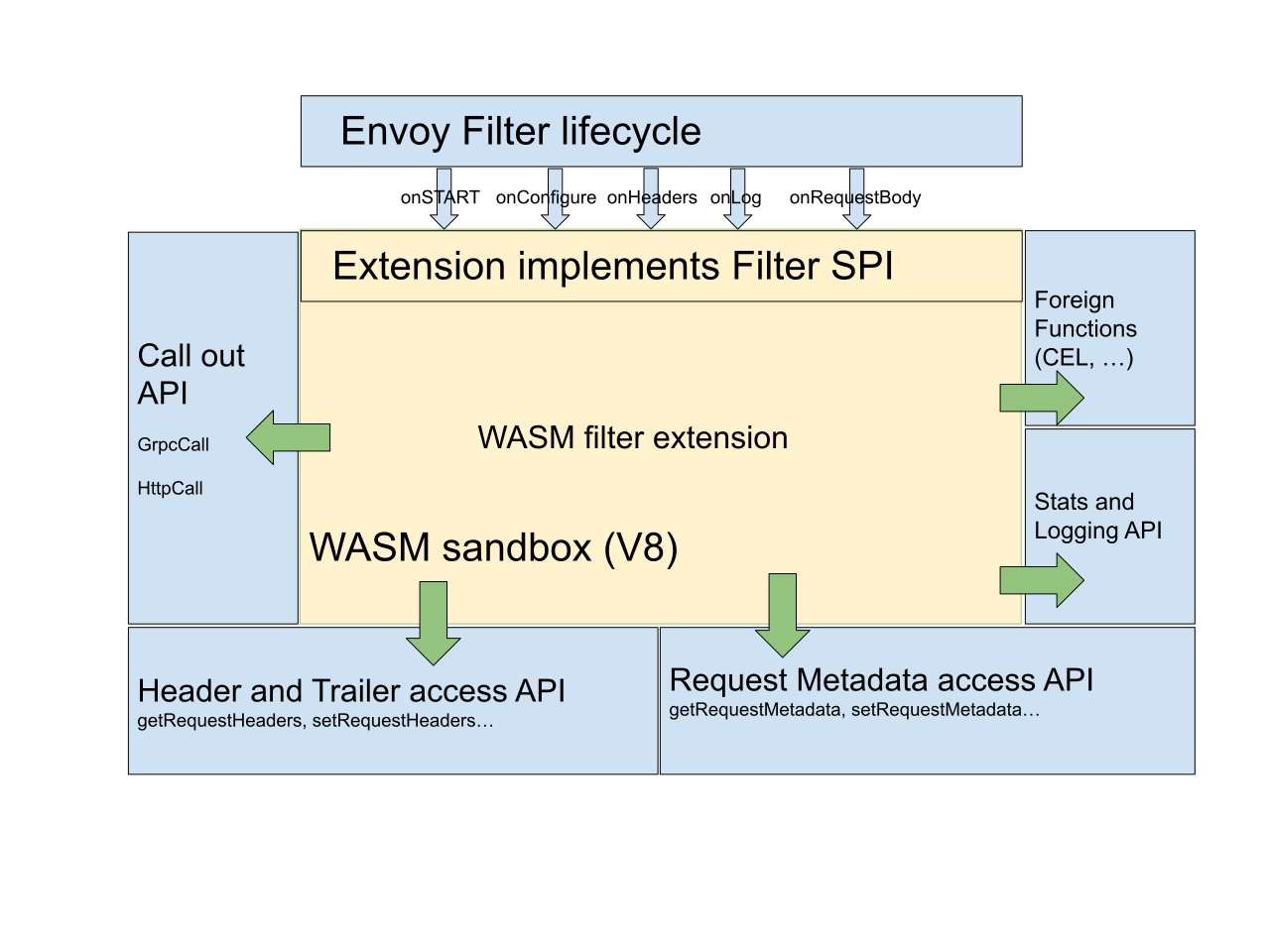
目前支持如下
SDKs
- AssemblyScript SDK
- C++ SDK
- Go (TinyGo) SDK
- Rust SDK
- Zig SDK
Servers
- Envoy
- Istio Proxy (Envoy-based)
- MOSN
- OpenResty (work-in-progress)
- ATS (proof-of-concept)
Libraries
openresty 中使用wasm 的例子
1. 基于 assemblyscript 的示例代码
内容主要为添加 response header
export * from "@solo-io/proxy-runtime/assembly/proxy"; // this exports the required functions for the proxy to interact with us.

import { RootContext, Context, registerRootContext, FilterHeadersStatusValues, stream_context } from "@solo-io/proxy-runtime/assembly";

class AddHeaderRoot extends RootContext {

  createContext(context_id: u32): Context {

    return new AddHeader(context_id, this);

  }

}

class AddHeader extends Context {

  constructor(context_id: u32, root_context: AddHeaderRoot) {

    super(context_id, root_context);

  }

  onResponseHeaders(a: u32, end_of_stream: bool): FilterHeadersStatusValues {

    const root_context = this.root_context;

    if (root_context.getConfiguration() == "") {

      stream_context.headers.response.add("hello", "world!");

    } else {

      stream_context.headers.response.add("hello", root_context.getConfiguration());  // 添加 response header

    }

    return FilterHeadersStatusValues.Continue;

  }

}

registerRootContext((context_id: u32) => { return new AddHeaderRoot(context_id); }, "add_header");
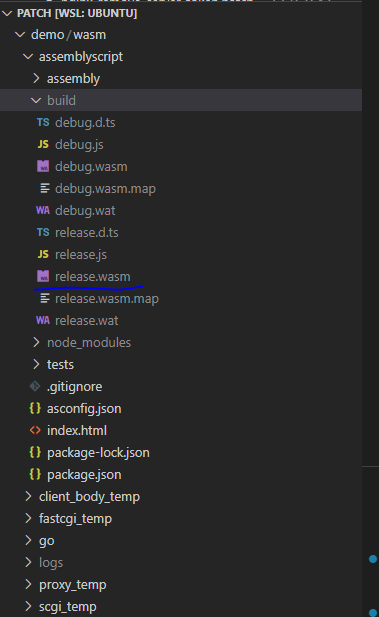
编译可以得到,我们只需要 release.wasm 文件其实
2. 为 openresty 按照 wasm
重新构建 openresty 并安装 wasm 模块, 如下为对应脚本 build.sh
#!/usr/bin/env bash

# prev_workdir="$PWD"

# repo=$(basename "$prev_workdir")

# workdir=$(mktemp -d)

# cd "$workdir" || exit 1

# echo $workdir

or_ver="$1"

cc_opt=${cc_opt:-}

ld_opt=${ld_opt:-}

luajit_xcflags=${luajit_xcflags:="-DLUAJIT_NUMMODE=2 -DLUAJIT_ENABLE_LUA52COMPAT"}

OR_PREFIX=${OR_PREFIX:="/usr/local/openresty"}

debug_args=${debug_args:-}

wasm_nginx_module_ver="0.6.2"

git clone --depth=1 -b $wasm_nginx_module_ver \

        https://github.com/api7/wasm-nginx-module.git \

        wasm-nginx-module-${wasm_nginx_module_ver}

cd wasm-nginx-module-${wasm_nginx_module_ver} || exit 1

./install-wasmtime.sh

cd ..

cd openresty-${or_ver} || exit 1

./configure --prefix="$OR_PREFIX" \

    --with-cc-opt="$cc_opt" \

    --with-ld-opt="-Wl,-rpath,$OR_PREFIX/wasmtime-c-api/lib $ld_opt" \

    $debug_args \

    --add-module=../wasm-nginx-module-${wasm_nginx_module_ver} \

    --with-poll_module \

    --with-pcre-jit \

    --without-http_rds_json_module \

    --without-http_rds_csv_module \

    --without-lua_rds_parser \

    --with-stream \

    --with-stream_ssl_module \

    --with-stream_ssl_preread_module \

    --with-http_v2_module \

    --without-mail_pop3_module \

    --without-mail_imap_module \

    --without-mail_smtp_module \

    --with-http_stub_status_module \

    --with-http_addition_module \

    --with-http_auth_request_module \

    --with-http_secure_link_module \

    --with-http_random_index_module \

    --with-http_gzip_static_module \

    --with-http_sub_module \

    --with-http_dav_module \

    --with-http_flv_module \

    --with-http_mp4_module \

    --with-http_gunzip_module \

    --with-threads \

    --with-compat \

    --with-luajit-xcflags="$luajit_xcflags" \

    -j`nproc`

make -j`nproc`

make install DESTDIR="$PWD"

OPENRESTY_PREFIX="$PWD$OR_PREFIX"

cd ..

cd wasm-nginx-module-${wasm_nginx_module_ver} || exit 1

OPENRESTY_PREFIX="$OPENRESTY_PREFIX" make install

cd ..
运行
#!/usr/bin/env bash

or_ver="1.21.4.1"

tempdir=$(mktemp -d)

echo "do at ${tempdir}"

cp -R ./ ${tempdir}

cd ${tempdir}

wget --no-check-certificate https://openresty.org/download/openresty-${or_ver}.tar.gz

tar -zxvpf openresty-${or_ver}.tar.gz > /dev/null

sh build.sh $or_ver
3. 测试
这里就只列举 demo 文件,感兴趣的自己测试
worker_processes 1;

worker_cpu_affinity auto;

worker_rlimit_nofile 65535;

events {

    use epoll;

    worker_connections 65535;

    accept_mutex off;

    multi_accept on;

}

http {

    lua_package_path  "${prefix}deps/share/lua/5.1/?.lua;${prefix}deps/share/lua/5.1/?/init.lua;${prefix}?.lua;${prefix}?/init.lua;;./?.lua;/usr/local/openresty/luajit/share/luajit-2.1.0-beta3/?.lua;/usr/local/share/lua/5.1/?.lua;/usr/local/share/lua/5.1/?/init.lua;/usr/local/openresty/luajit/share/lua/5.1/?.lua;/usr/local/openresty/luajit/share/lua/5.1/?/init.lua;";

    lua_package_cpath "${prefix}deps/lib64/lua/5.1/?.so;${prefix}deps/lib/lua/5.1/?.so;;./?.so;/usr/local/lib/lua/5.1/?.so;/usr/local/openresty/luajit/lib/lua/5.1/?.so;/usr/local/lib/lua/5.1/loadall.so;";

    lua_socket_log_errors off;

    wasm_vm wasmtime;  # wasm 运行时设置

    init_by_lua_block {   # 初始化加载可以复用wasm。避免运行时加载的损耗

        wasm = require("resty.proxy-wasm")

        plugin = wasm.load("add_header", "/app/wasm/assemblyscript/build/release.wasm")

    }

    server {

        listen 80;

        server_tokens off;

        location /t {

            return 200;

            header_filter_by_lua_block {  # 这里设置调用 wasm

                local ctx = wasm.on_configure(plugin, 'add_header')

                wasm.on_http_response_headers(ctx)

            }

        }

         location /d {

            return 200;

            header_filter_by_lua_block {

                ngx.header['test'] = 'add_header'

            }

        }

    }

}
构建api gateway之 openresty 中如何使用 wasm的更多相关文章
- 构建api gateway之 动态插件
动态插件 之前已经拆解细点逐个介绍了 tcp .http 代理相关核心点,现在介绍一个让 api gateway 变得很灵活的功能实现: 动态插件. 由于 lua 的动态语言特点,我们可以比较方便做到 ...
- 构建api gateway之 健康检查
Healthcheck 由于服务无法保证永远不会下线,而且下线时不一定能有人员能及时发现, 所以api gateway 一般会引入一个监工 Healthcheck, 像大家每年体检一样定时确认服务是否 ...
- 构建api gateway之 http路由实现
http路由 路由是指路由器从一个接口上收到数据包,根据数据包的目的地址进行定向并转发到另一个接口的过程. 而这里的http路由其实等同于web开发中,根据http相关参数(比如url.http me ...
- 构建api gateway之 负载均衡
什么是负载均衡 负载均衡,英文名称为Load Balance,其含义就是指将负载(工作任务)进行平衡.分摊到多个操作单元上进行运行 以下为几种负载均衡策略介绍 1.随机(Random) 大家很多时候说 ...
- 构建api gateway之 基于etcd实现动态配置同步
配置中心 在之前 tcp的yaml配置 介绍了如何监听yaml文件变化然后更新配置. 当然假如我们有很多实例,那么yaml改动将是非常痛苦的事情,那么如何做到配置文件统一管理,实时更新呢? 我们可以引 ...
- 谈谈微服务中的 API 网关(API Gateway)
前言 又是很久没写博客了,最近一段时间换了新工作,比较忙,所以没有抽出来太多的时间写给关注我的粉丝写一些干货了,就有人问我怎么最近没有更新博客了,在这里给大家抱歉. 那么,在本篇文章中,我们就一起来探 ...
- 微服务中的 API 网关(API Gateway)
API 网关(API Gateway)提供高性能.高可用的 API 托管服务,帮助用户对外开放其部署在 ECS.容器服务等云产品上的应用,提供完整的 API 发布.管理.维护生命周期管理.用户只需进行 ...
- 服务中的 API 网关(API Gateway)
我们知道在微服务架构风格中,一个大应用被拆分成为了多个小的服务系统提供出来,这些小的系统他们可以自成体系,也就是说这些小系统可以拥有自己的数据库,框架甚至语言等,这些小系统通常以提供 Rest Api ...
- [转载] 构建微服务:使用API Gateway
原文: http://mp.weixin.qq.com/s?__biz=MzA5OTAyNzQ2OA==&mid=206889381&idx=1&sn=478ccb35294c ...
- Spring Boot中使用Swagger2构建API文档
程序员都很希望别人能写技术文档,自己却很不愿意写文档.因为接口数量繁多,并且充满业务细节,写文档需要花大量的时间去处理格式排版,代码修改后还需要同步修改文档,经常因为项目时间紧等原因导致文档滞后于代码 ...
随机推荐
- C#与Halcon联合编程之用PictureBox控件替代HWindowControl控件
在使用HALCON和C#联合编程,有时候要使用halcon的HWindowControl控件,但是我发现,HWindowControl的图片显示控件,不能使用GDI+绘制ROI,不知道为什么,反正我测 ...
- 思维分析逻辑 2 DAY
目录 数据分析多元思维模型 微观能力 中观能力 宏观能力 电商平台分析 整体数据 漏斗模型 互联网金融分析 授信模型 了解芝麻信用分结构 数据源的数据变量 数据处理 游戏数据分析 常规指标 商业化指标 ...
- Vue3 企业级优雅实战 - 组件库框架 - 5 组件库通用工具包
该系列已更新文章: 分享一个实用的 vite + vue3 组件库脚手架工具,提升开发效率 开箱即用 yyg-cli 脚手架:快速创建 vue3 组件库和vue3 全家桶项目 Vue3 企业级优雅实战 ...
- 基于SpERT的中文关系抽取
SpERT_chinese 基于论文SpERT: "Span-based Entity and Relation Transformer"的中文关系抽取,同时抽取实体.实体类别和关 ...
- oracle常用查看命令
select sum(bytes/1024/1024/1024) from dba_segments; #注:查看表空间大小,除以3个1024后的大小为GB du instance_name(实例 ...
- 【Logback+Spring-Aop】实现全面生态化的全链路日志追踪系统服务插件「Logback-MDC篇」
日志追踪 日志追踪对于功能问题的排查和数据流转的路径分析时非常重要的,有了全链路日志追踪体系机制可以非常有效且快速的定位问题,但在多线程环境中,若没有相关成熟的框架的支持,想要实现日志追踪,就需要手动 ...
- bugku web2
打开全是滑稽.... 直接查看源码(用firefox的F12来查看,其他的会注释掉)可以得到flag(抓包不知道怎么回事抓不到,不然应该也可以看到注释的flag)
- 关于 python 中比较运算的顺序
先来看一个例子: "x" > "y" == True 结果为 False 因为这里的表达式可以等同于 "x" > "y ...
- 基于pyecharts的中医药知识图谱可视化
基于pyecharts的中医药知识图谱可视化 关键词: pyecharts:可视化:中医药知识图谱 摘要: 数据可视化是一种直观展示数据结果和变化情况的方法,可视化有助于知识发现与应用.Neo4j数据 ...
- Ajax---EventLoop事件循环
前言 JavaScript 是一门单线程执行的脚本语言.也就是说,同一时间只能做一件事情. JavaScript要运行在宿主环境中(浏览器,nodejs)下.浏览器内部有执行js代码的引擎 ...