
SpringBoot——静态资源及原理
一、使用 SpringBoot 的步骤
【1】创建 SpringBoot应用,选中自己需要的模块。
【2】SpringBoot 已经默认将这些场景配置好,只需要在配置文件中指定少量配置就可以运行起来。
【3】编写业务逻辑代码。
二、自动配置原理
我们要了解 SpringBoot帮我们配置了什么?能不能修改?能修改那些配置?能不能扩展等等。
【1】xxxAutoConfiguration:帮我们给容器中自动配置组件。
【2】xxxProperties:配置来封装配置文件的内容。
三、SpringBoot 对静态资源的映射规则
当创建一个 jar工程时,想引入 css等静态资源时,需要遵守 SpringBoot的静态资源映射关系,通过 WebMvcAutoConfiguration查看静态配置资源的规则。
 1 //添加资源映射addResourceHandlers

 2 public void addResourceHandlers(ResourceHandlerRegistry registry) {

 3     if(!this.resourceProperties.isAddMappings()) {

 4         logger.debug("Default resource handling disabled");

 5     } else {

 6         Integer cachePeriod = this.resourceProperties.getCachePeriod();

 7         if(!registry.hasMappingForPattern("/webjars/**")) {

 8             this.customizeResourceHandlerRegistration(registry.addResourceHandler(new String[]{"/webjars/**"}).addResourceLocations(new String[]{"classpath:/META-INF/resources/webjars/"}).setCachePeriod(cachePeriod));

 9         }

10         // 3中说明

11         String staticPathPattern = this.mvcProperties.getStaticPathPattern();

12         if(!registry.hasMappingForPattern(staticPathPattern)) {

13             this.customizeResourceHandlerRegistration(registry.addResourceHandler(new String[]{staticPathPattern}).addResourceLocations(this.resourceProperties.getStaticLocations()).setCachePeriod(cachePeriod));

14         }

15     }

16 }
【1】如上配置的 /webjars/** 可知,所有的获取都去 classpath:/META-INF/resources/webjars 下找资源。而 webjar实际上是以 jar包的方式引入静态资源,可以参考官方文档:http://www.webjars.org/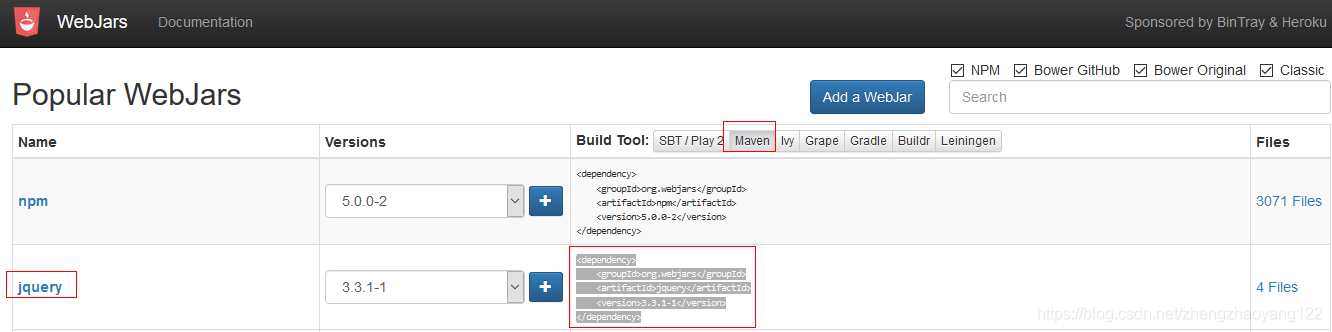

获取 Jquery的 jar包依赖:
1 <dependency>

2     <groupId>org.webjars</groupId>

3     <artifactId>jquery</artifactId>

4     <version>3.3.1-1</version>

5 </dependency>
进入导入的 Jquery的 jar包中,查看目录结构如下:所有的 /webjars/**,都去 classpath:/META‐INF/resources/webjars/找资源。例如:localhost:8080/webjars/jquery/3.3.1/jquery.js(在访问的时候,只需要写webjars下面资源的名称即可)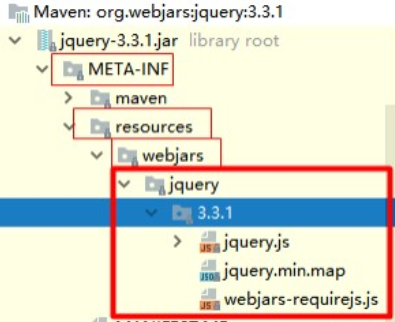
【2】同时可以在 ResourceProperties设置与静态资源有关的参数,例如缓存时间。
1 @ConfigurationProperties(

2     prefix = "spring.resources",

3     ignoreUnknownFields = false

4 )

5 public class ResourceProperties implements ResourceLoaderAware, InitializingBean {
【3】除了 /webjars/**,我们看下紧接着的第二个方法获取 staticPathPattern 路径:最终方法指向 =“/**” 访问当前项目的任何资源(静态资源的文件夹)。
this.staticPathPattern = "/**";
如果没有进行处理,就会从如下路径中进行获取: classpath:/META-INF/resources/", "classpath:/resources/", "classpath:/static/", "classpath:/public/" "/":当前项目根路径 ,以上就是静态资源的文件处理。
 1 private static final String[] SERVLET_RESOURCE_LOCATIONS = new String[]{"/"};//当前项目根路径

 2 private static final String[] CLASSPATH_RESOURCE_LOCATIONS = new String[]{"classpath:/META-INF/resources/",

 3 "classpath:/resources/", "classpath:/static/", "classpath:/public/"};

 4 private static final String[] RESOURCE_LOCATIONS;

 5 static {

 6     RESOURCE_LOCATIONS = new String[CLASSPATH_RESOURCE_LOCATIONS.length + SERVLET_RESOURCE_LOCATIONS.length];

 7     System.arraycopy(SERVLET_RESOURCE_LOCATIONS, 0, RESOURCE_LOCATIONS, 0, SERVLET_RESOURCE_LOCATIONS.length);

 8     System.arraycopy(CLASSPATH_RESOURCE_LOCATIONS, 0, RESOURCE_LOCATIONS, SERVLET_RESOURCE_LOCATIONS.length,

 9     CLASSPATH_RESOURCE_LOCATIONS.length);

10 }
【4】获取欢迎页,通过如下代码可知:静态资源文件夹下的所有 index.html页面,都被“/**”映射。(localhost:8080——就能够访问首页)
 1 // 获取欢迎页

 2 @Bean

 3 public WebMvcAutoConfiguration.WelcomePageHandlerMapping welcomePageHandlerMapping(ResourceProperties resourceProperties) {

 4         return new WebMvcAutoConfiguration.WelcomePageHandlerMapping(resourceProperties.getWelcomePage(),

 5         this.mvcProperties.getStaticPathPattern());

 6 }

 7

 8 //进入如上的resourceProperties.getWelcomePage()方法,会获取到当前项目路径下的index.html文件。

 9 private String[] getStaticWelcomePageLocations() {

10     String[] result = new String[this.staticLocations.length];

11

12     for(int i = 0; i < result.length; ++i) {

13         String location = this.staticLocations[i];

14         if(!location.endsWith("/")) {

15             location = location + "/";

16         }

17

18         result[i] = location + "index.html";

19     }

20

21     return result;

22 }

23

24 //进入如上的this.mvcProperties.getStaticPathPattern()方法,获取映射的路径

25 this.staticPathPattern = "/**";
【5】所有的 **/favicon.ico 都是从静态文件中获取一个 favicon.ico文件。图标:
 1 @Configuration

 2 @ConditionalOnProperty(

 3     value = {"spring.mvc.favicon.enabled"},

 4     matchIfMissing = true

 5 )

 6 public static class FaviconConfiguration {

 7     private final ResourceProperties resourceProperties;

 8

 9     public FaviconConfiguration(ResourceProperties resourceProperties) {

10         this.resourceProperties = resourceProperties;

11     }

12

13     @Bean

14     public SimpleUrlHandlerMapping faviconHandlerMapping() {

15         SimpleUrlHandlerMapping mapping = new SimpleUrlHandlerMapping();

16         mapping.setOrder(-2147483647);

17         //默认获取图标的位置和名称

18         mapping.setUrlMap(Collections.singletonMap("**/favicon.ico", this.faviconRequestHandler()));

19         return mapping;

20     }

21 }
【6】也可以在 application.properties全局配置文件中自定义静态文件:在配置文件中设置如下,那么默认的就不在生效。
1 #配置文件是一个数组,可以用逗号进行分隔

2 spring.resources.static-locations=classpath:/hello/,calsspath:/xxx/
SpringBoot——静态资源及原理的更多相关文章
- SpringBoot静态资源访问+拦截器+Thymeleaf模板引擎实现简单登陆
在此记录一下这十几天的学习情况,卡在模板引擎这里已经是四天了. 对Springboot的配置有一个比较深刻的认识,在此和大家分享一下初学者入门Spring Boot的注意事项,如果是初学SpringB ...
- springboot静态资源映射
springboot静态资源映射 WebMvcAutoConfiguration @Override public void addResourceHandlers(ResourceHandlerRe ...
- springboot 静态资源访问,和文件上传 ,以及路径问题
springboot 静态资源访问: 这是springboot 默认的静态资源访问路径 访问顺序依次从前到后(http://localhost:8080/bb.jpg) spring.resourc ...
- Spring Boot 静态资源访问原理解析
一.前言 springboot配置静态资源方式是多种多样,接下来我会介绍其中几种方式,并解析一下其中的原理. 二.使用properties属性进行配置 应该说 spring.mvc.static-pa ...
- springboot静态资源处理
转:https://blog.csdn.net/catoop/article/details/50501706 Spring Boot 默认为我们提供了静态资源处理,使用 WebMvcAutoConf ...
- SpringBoot静态资源目录
在web开发中,静态资源的访问是必不可少的,如:图片.js.css 等资源的访问. SpringBoot对静态资源访问提供了很好的支持,基本使用默认配置就能满足开发需求. 在传统的web项目中静态资源 ...
- 聊聊、SpringBoot 静态资源访问
SpringBoot 1.X 版本和 SpringBoot 2.X 版本在静态资源访问上有一些区别,如果直接从 1.X 升级到 2.X 肯定是有问题的.这篇文章就来讲讲这方面问题,也是项目中的坑. 先 ...
- springmvc、springboot静态资源访问配置
如何访问项目中的静态资源? 一.springmvc springmvc中访问静态资源,如果DispatcherServlet拦截的为"",那么静态资源的访问也会交给Dispatch ...
- SpringBoot 静态资源的配置
springboot默认的静态资源目录: classpath:/static classpath:/public classpath:/resources classpath:/META-INF/re ...
- springboot静态资源映射规则
一.所有/webjars/**的请求,都会去classpath:/META-INF/resources/webjars/下的目录去找资源. 二.访问/**,即访问任何资源,如果没有controller ...
随机推荐
- 2021/9/26 Leetcode 两数之和
题目:给你两个整数 a 和 b ,不使用 运算符 + 和 - ,计算并返回两整数之和. int getSum(int a, int b) { while(b != 0){ unsigne ...
- 20192305 王梓全Python程序设计实验三报告
20192305 王梓全Python程序设计实验三报告 课程:<Python程序设计> 班级: 1923 姓名: 王梓全 学号:20192305 实验教师:王志强 实验日期:2021年5月 ...
- 在Unity3D中开发的角色视觉系统插件Sight Detect System
Sight-Detect-System 这款Sight Detect System插件由本人用Unity3D所开发,它在游戏中可以成为角色的视觉感知系统. 如果你想开发潜行类游戏时,那么这款视觉插件非 ...
- 在CentOS7中安装Redis
一.检查操作系统中是否安装gcc依赖 [root@192 bin]# yum list installed gcc 如果出现上面图片内容则是已经安装.(由于我是安装了的,所以会存在) 二.安装gcc- ...
- vs xamarin获取sha1申请百度sdk密钥
请查看微软帮助文档 查找密钥存储的签名 - Xamarin | Microsoft Docs
- 解决VSCode无法显示Unity代码提示和源代码
1,先删除项目目录下的配置文件,也可以理解为除文件夹外的其他文件 2,先把vscode选中,下拉框中没有vscode的找到文件就可以导进来再选中.然后红框里的不要勾选,因为我是这么做的,你也可以试着勾 ...
- 字符流---->字符过滤流 缓冲流 : -----> printWrite用法:和BufferedReader用法
printWrite用法:1.创建字符节点流FileWriter fw = new FileWriter("Files\\bufchar.txt");2创建字符过滤流 PrintW ...
- 使用idea从零编写SpringCloud项目-Hystrix
ps:Hystrix和Fegin里面使用的Hystrix,有些许区别.我理解的是Fegin.Hystrix主要是用于消费方在调用服务方接口时的异常处理,返回兜底数据等,而Hystrix则是消费方自己本 ...
- [Leetcode 104]二叉树最大深度Maximum Depth of Binary Tree
题目 求二叉树的深度,即根节点出发的最长路径上点的个数,即最长路径+1(本身这个点 https://leetcode.com/problems/maximum-depth-of-binary-tree ...
- 如何确保获取的输入为整数-C语言基础
这一篇探讨的是如何确保你输入的数据是一个整数.虽然标题用的是这个,但我其实真正想要探讨的内容是 "在程序调试的过程中,需要注意把输入缓存区中的上一次输入的残留信息清理干净,以免影响下一次的输 ...