
FLV文件分析
很久没看,做下关于FLV文件格式知识点回顾!
一、简单介绍
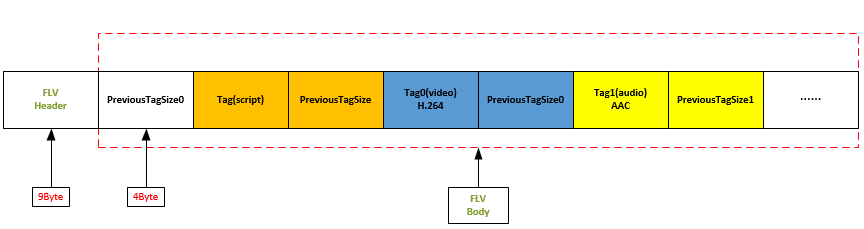
二、FLV文件头
FLV Header 官方协议文档定义如下:
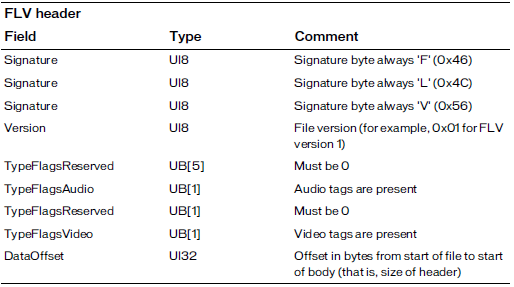
针对FLV Header相关字段,解释下其中的含义:
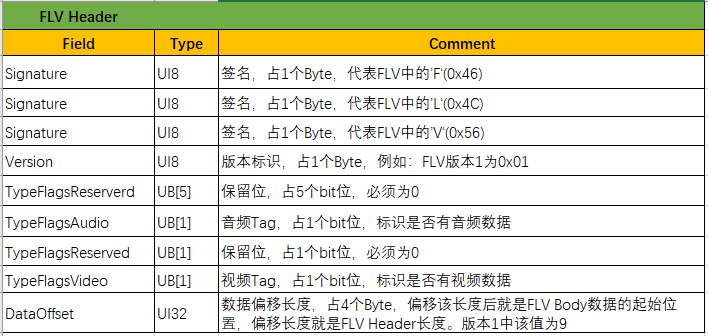
46 4c 56 01 05 20 20 20 09 //就代表该FLV文件包含音频、视频
二、FLV文件Body
FLV Body 官方协议文档定义如下:
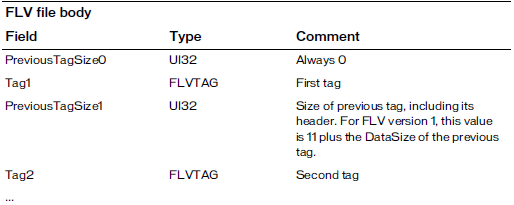

针对FLV Body相关字段,解释下其中的含义:
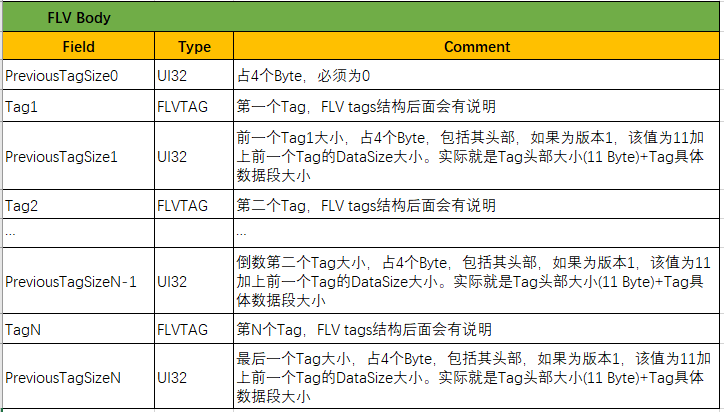
2.1 FLV Tag
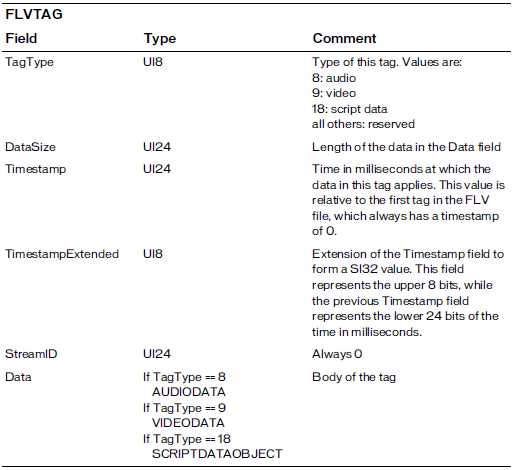
针对FLV Tag相关字段,解释下其中含义:

2.2 Tag data
2.2.1 Audio data tags(音频数据tag)
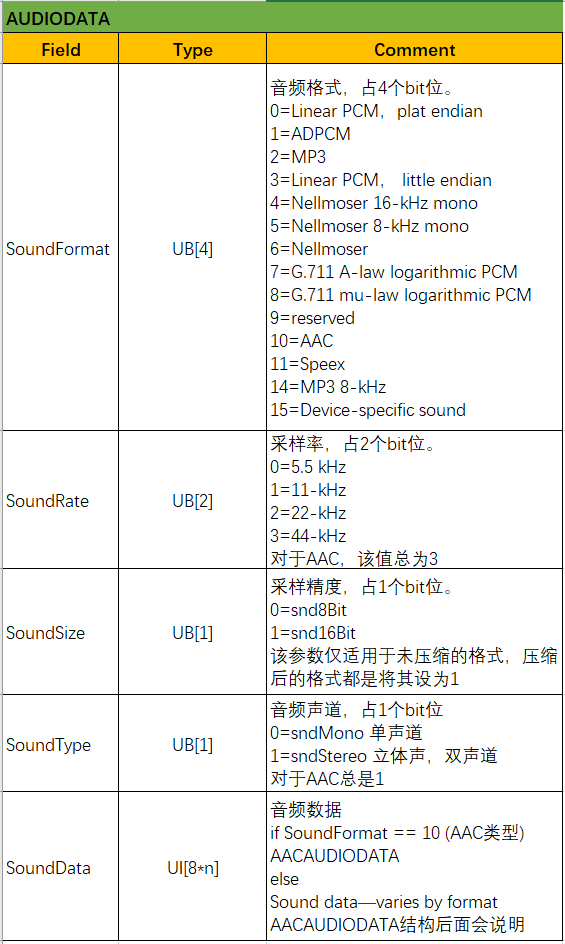
AUDIODATA官方协议文档定义如下:
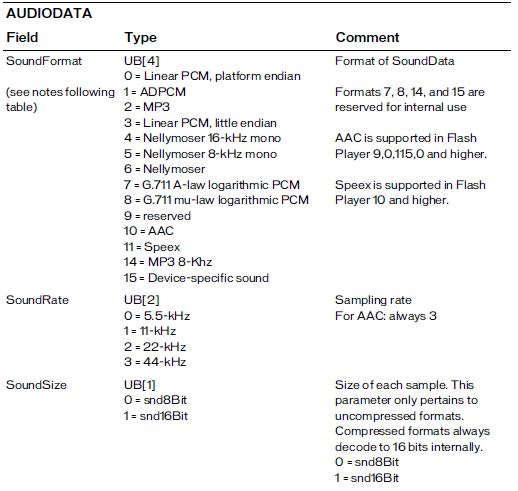
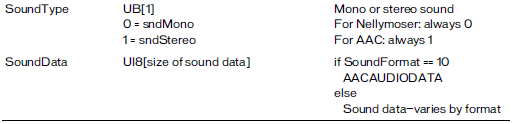
针对AUDIODATA相关字段,解释下其中的含义:
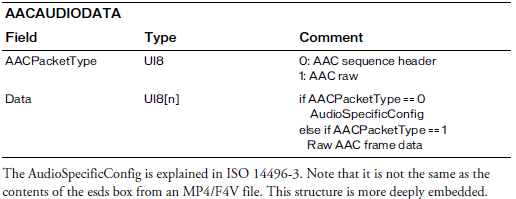
AACAUDIODATA官方协议定义如下:
其中如果AACPacketType==0时,AudioSpecificConfig结构在ISO 14496-3文档中有定义该结构,部分结构如下图:
AudioSpecificConfig() {

        audioObjectType = GetAudioObjectType();

        samplingFrequencyIndex; // 4 bslbf

        if (samplingFrequencyIndex == 0xf) {

                samplingFrequency; // 24 uimsbf

        }

        channelConfiguration; // 4 bslbf

        sbrPresentFlag = -1;

        psPresentFlag = -1;

        if (audioObjectType == 5 || audioObjectType == 29) {

                // ...

        }

        else {

                extensionAudioObjectType = 0;

        }

        switch (audioObjectType) {

        case 1: case 2: case 3: case 4: //...

                GASpecificConfig();

                break:

        case ...:

                //...

        }

        if (extensionAudioObjectType != 5 && bits_to_decode() >= 16) {

                //...

        }

GetAudioObjectType() {

        audioObjectType; // 5 uimsbf

        if (audioObjectType == 31) {

                audioObjectType = 32 + audioObjectTypeExt; // 6 uimsbf

        }

        return audioObjectType;

}
2.2.2 Video data tags(视频数据Tag)
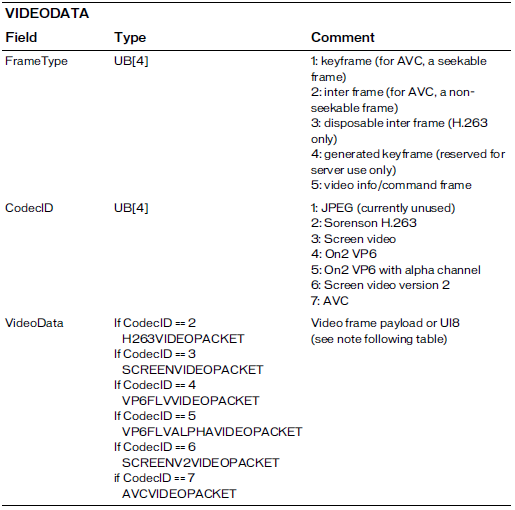
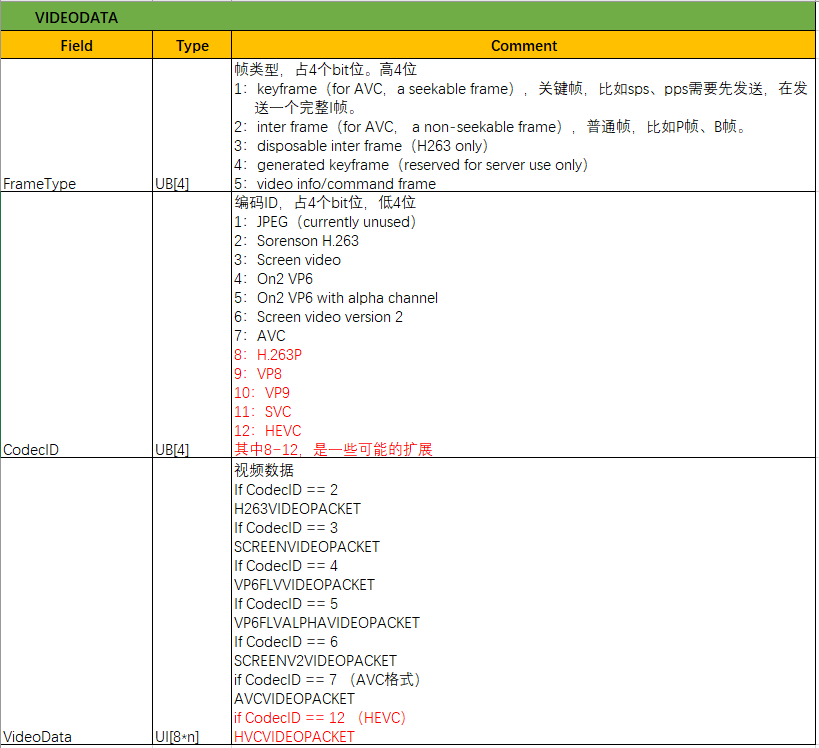
针对VIDEODATA相关字段,解释下其中的含义:
AVCVIDEOPACKET官方协议定义如下:
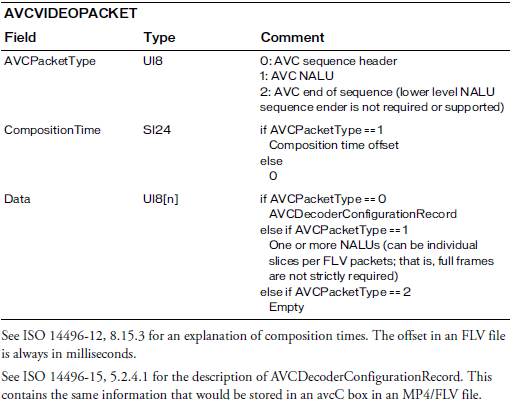
其中如果是AVCPacketType==0时,即AVC sequence header,AVCDecoderConfigurationRecord在ISO 14496-15中定义如下:
aligned(8) class AVCDecoderConfigurationRecord {

        unsigned int(8) configurationVersion = 1;

        unsigned int(8) AVCProfileIndication;

        unsigned int(8) profile_compatibility;

        unsigned int(8) AVCLevelIndication;

        bit(6) reserved = '111111'b;

        unsigned int(2) lengthSizeMinusOne;

        bit(3) reserved = '111'b;

        unsigned int(5) numOfSequenceParameterSets;

        for (i = 0; i < numOfSequenceParameterSets; i++) {

                unsigned int(16) sequenceParameterSetLength ;

                bit(8*sequenceParameterSetLength) sequenceParameterSetNALUnit;

        }

        unsigned int(8) numOfPictureParameterSets;

        for (i = 0; i < numOfPictureParameterSets; i++) {

                unsigned int(16) pictureParameterSetLength;

                bit(8*pictureParameterSetLength) pictureParameterSetNALUnit;

        }

        if (profile_idc == 100 || profile_idc == 110 ||

            profile_idc == 122 || profile_idc == 144)

        {

                bit(6) reserved = '111111'b;

                unsigned int(2) chroma_format;

                bit(5) reserved = '11111'b;

                unsigned int(3) bit_depth_luma_minus8;

                bit(5) reserved = '11111'b;

                unsigned int(3) bit_depth_chroma_minus8;

                unsigned int(8) numOfSequenceParameterSetExt;

                for (i = 0; i < numOfSequenceParameterSetExt; i++) {

                        unsigned int(16) sequenceParameterSetExtLength;

                        bit(8*sequenceParameterSetExtLength) sequenceParameterSetExtNALUnit;

                }

        }

}
如果是H265,HEVCDecoderConfigurationRecord定义如下:
aligned(8) class HEVCDecoderConfigurationRecord {

        unsigned int(8) configurationVersion = 1;

        unsigned int(2) general_profile_space;

        unsigned int(1) general_tier_flag;

        unsigned int(5) general_profile_idc;

        unsigned int(32) general_profile_compatibility_flags;

        unsigned int(48) general_constraint_indicator_flags;

        unsigned int(8) general_level_idc;

        bit(4) reserved = ‘1111’b;

        unsigned int(12) min_spatial_segmentation_idc;

        bit(6) reserved = ‘111111’b;

        unsigned int(2) parallelismType;

        bit(6) reserved = ‘111111’b;

        unsigned int(2) chromaFormat;

        bit(5) reserved = ‘11111’b;

        unsigned int(3) bitDepthLumaMinus8;

        bit(5) reserved = ‘11111’b;

        unsigned int(3) bitDepthChromaMinus8;

        bit(16) avgFrameRate;

        bit(2) constantFrameRate;

        bit(3) numTemporalLayers;

        bit(1) temporalIdNested;

        unsigned int(2) lengthSizeMinusOne;

        unsigned int(8) numOfArrays;

        for (j=0; j < numOfArrays; j++) {

                bit(1) array_completeness;

                unsigned int(1) reserved = 0;

                unsigned int(6) NAL_unit_type;

                unsigned int(16) numNalus;

                for (i=0; i< numNalus; i++) {

                        unsigned int(16) nalUnitLength;

                        bit(8*nalUnitLength) nalUnit;

                }

        }

}
FLV文件分析的更多相关文章
- 【转】打包AAC码流到FLV文件
AAC编码后数据打包到FLV很简单.1. FLV音频Tag格式 字节位置 意义0x08, ...
- linux实践之ELF文件分析
linux实践之ELF文件分析 下面开始elf文件的分析. 我们首先编写一个简单的C代码. 编译链接生成可执行文件. 首先,查看scn15elf.o文件的详细信息. 以16进制形式查看scn15elf ...
- 蓝屏 Dump文件分析方法
WinDbg使用有点麻烦,还要符号表什么的.试了下,感觉显示很乱,分析的也不够全面... 试试其他的吧!今天电脑蓝屏了,就使用其dump文件测试,如下: 1.首先,最详细的,要属Osr Online这 ...
- C# 版 flvmerge:快速合并多个flv文件
网上的视频很多都是分片的flv文件,怎么把他们合为一体呢?GUI工具就不考虑了,不适合批量执行,不适合在后台运行.有没有命令行工具或库可以实现呢? ffmpeg 提供了一个方法: (1)先把flv文件 ...
- KEIL MDK输出map文件分析
一.文件分析流程 1.第一部分:Section Cross References 主要是各个源文件生成的模块之间相互引用的关系. stm32f10x.o(STACK) refers (Special) ...
- ecshop init.php文件分析
1. ecshop init.php文件分析 2. <?php 3. 4. /** 5. * ECSHOP 前台公用文件 6. * ===================== ...
- [转载]mysql慢日志文件分析处理
原文地址:mysql慢日志文件分析处理作者:maxyicha mysql有一个功能就是可以log下来运行的比较慢的sql语句,默认是没有这个log的,为了开启这个功能,要修改my.cnf或者在mysq ...
- 使用 Eclipse Memory Analyzer 进行堆转储文件分析
Eclipse Memory Analyzer(MAT)是著名的跨平台集成开发环境 Eclipse Galileo 版本的 33 个组成项目中之一,它是一个功能丰富的 JAVA 堆转储文件分析工具,可 ...
- Android JNI入门第三篇——jni头文件分析
一. 首先写了java文件: public class HeaderFile { private native void doVoid(); native int doShort(); native ...
- Java class文件分析工具 -- Classpy
Classpy Classpy是一个图形化的class文件分析工具,功能和javap类似,界面主要參考了Java Class Viewer: 为什么要又一次创造轮子? 写这个工具花了将近一周的时间.那 ...
随机推荐
- Lombok和MapStruct冲突
Lombok和MapStruct冲突导致无法生成正确的class文件. lombok自动生成getset等冗余代码. MapStruct对象copy.传统的BeanUtils.copy等利用的反射原理 ...
- 7.webpack与vue-cli
一.模块化相关规范 1.1 模块化概述 传统开发模式的主要问题 命名冲突:多个JS文件之间,如果存在重名的变量,会发生变量覆盖问题 文件依赖:JS文件无法实现相互的引用 通过模块化解决上述问题 模块化 ...
- Cross Site Scripting DOM (XSS) 攻击jQuery append() 的处理方法
做安全红线使用Fortify工具进行扫描时,jquery append会报Cross Site Scripting DOM风险.解决该问题有两种办法. 一.原生dom方式 使用JavaScript原生 ...
- selenium 模拟鼠标滚轮,滚动到可见的选项
self.wrap_driver.move_to_element(locator=const_xpath.monitor_select) #鼠标移动到某个区域target = self.driver. ...
- java8-并行计算
java8提供一个fork/join framework,fork/join框架是ExecutorService接口的一个实现,它可以帮助你充分利用你电脑中的多核处理器,它的设计理念是将一个任务分割成 ...
- IPAD变成电脑的副屏
IPAD变成电脑的副屏方法一:把平板电脑变成显示器:Splashtop Wired XDisplayhttps://www.splashtop.cn/cn/wiredxdisplay方法二:space ...
- 给jui(dwz)的toolbar添加漂亮的图标
前面两篇把菜单树和navTab的图标都换了.今天来添加toolbar的图标. 因为JUI(DWZ)自带的toolbar图标就三四个,根本不够用.于是只能是进行自定义添加 这是系统自带的图标,也就4个. ...
- LoadRunner——创建场景及运行场景(三)
1. 创建场景 场景:用户并发访问的策略,包含用户数.加载用户的时间等 启动第二个组件 : 控制台 (controller) 方式1: 开始->所有程序->HPLoadRunner-> ...
- 17.explicit关键字
c++提供了关键字explicit,禁止通过构造函数进行的隐式转换.声明为explicit的构造函数不能在隐式转换中使用. [explicit注意] ● explicit用于修饰构造函数,防止隐式转化 ...
- 基于 HLS 创建 Golang 视频流服务器
HLS 是 HTTP Live Streaming 的缩写,是苹果开发的一种基于 HTTP 的自适应比特率流媒体传输协议, 并于 2009 年. HLS 流媒体已经成为应用最广泛的实时视频协议.它是一 ...