
延申三大问题中的第二个问题处理---收集查看k8s中pod的控制台日志
1.不使用logstash
2.步骤:
2.1 先获取一个文件的日志
2.2 再获取多个文件的日志
2.3 批量获取文件日志
pod日志文件路径
[root@worker hkd-eureka]# pwd

/var/log/pods/test_cloud-eureka-0_26292b87-08d2-495e-a141-81304dd9ef07/hkd-eureka

[root@worker hkd-eureka]# ll

总用量 0

lrwxrwxrwx 1 root root 165 7月   7 09:23 0.log -> /var/lib/docker/containers/24a1f5bc57a81fc61043ebc0ce4daff859096a8c026bf54497d434bdc538e7ee/24a1f5bc57a81fc61043ebc0ce4daff859096a8c026bf54497d434bdc538e7ee-json.log
2.1 先获取一个文件的日志
filebeat.yml文件配置
filebeat.inputs:

- type: log

  enabled: true

  paths:

    - /var/log/pods/test_cloud-eureka-*/*/*.log

  symlinks: true

  fileds:

    level: eureka

  fields_under_root: true

  json.keys_under_root: true

  json.add_error_key: true

  json.message_key: log

  tail_files: true

  multiline.pattern: '^[0-9]{4}-[0-9]{2}-[0-9]{2}'

  multiline.negate: true

  multiline.match: after

  multiline.timeout: 10s

output.elasticsearch:

  hosts: ["192.168.75.21:9200"]

  username: "elastic"

  password: "IjGj8QwWYeXY7rVoLLQ6"
es的Discover中查看
{

  "_index": "filebeat-7.5.0",

  "_type": "_doc",

  "_id": "7KAaJ3MBSoQZ5wHWGij-",

  "_version": 1,

  "_score": null,

  "_source": {

    "@timestamp": "2020-07-07T02:28:03.237Z",

    "ecs": {

      "version": "1.1.0"

    },

    "container": {

      "id": "hkd-eureka"

    },

    "log": {

      "offset": 238675,

      "file": {

        "path": "/var/log/pods/test_cloud-eureka-0_26292b87-08d2-495e-a141-81304dd9ef07/hkd-eureka/0.log"

      }

    },

    "stream": "stdout",

    "time": "2020-07-07T02:28:02.722603324Z",

    "input": {

      "type": "log"

    },

    "host": {

      "name": "worker",

      "os": {

        "platform": "centos",

        "version": "7 (Core)",

        "family": "redhat",

        "name": "CentOS Linux",

        "kernel": "3.10.0-1062.el7.x86_64",

        "codename": "Core"

      },

      "id": "a392797746874909a0980d75e417dc04",

      "containerized": false,

      "hostname": "worker",

      "architecture": "x86_64"

    },

    "agent": {

      "version": "7.5.0",

      "type": "filebeat",

      "ephemeral_id": "411e333b-208a-44e7-9ae0-6d4ae4b6e694",

      "hostname": "worker",

      "id": "d45e4661-8b64-4ee5-8d63-884e20096aee"

    }

  },

  "fields": {

    "@timestamp": [

      "2020-07-07T02:28:03.237Z"

    ],

    "time": [

      "2020-07-07T02:28:02.722Z"

    ]

  },

  "sort": [

    1594088883237

  ]

}
查看日志可以发现,filebeat中配置的fields.level没有生效,同时日志中有一个container.id,这个正好是容器名称,这样的话那就没必要在filebeat中新增fields.level了,直接根据container.id来区分不同的pod日志来源
同时还有个重大问题,里面没有日志数据,这俩问题还需要进一步处理
改造filebeat.yml配置文件
filebeat.inputs:

- type: log

  enabled: true

  paths:

    - /var/log/pods/test_cloud-eureka-*/*/*.log

  symlinks: true

setup.ilm.enabled: false

setup.template.settings:

  index.number_of_shards: 1

  index.number_of_replicas: 0

  index.codec: best_compression

output.elasticsearch:

  hosts: ["192.168.75.21:9200"]

  indices:

    - index: "hkd-eureka_%{+yyyy.MM.dd}"

      when.equals:

        container.id: "hkd-eureka"

  username: "elastic"

  password: "IjGj8QwWYeXY7rVoLLQ6"
改造后es中Discover日志查看结果
{

  "_index": "hkd-eureka_2020.07.07",

  "_type": "_doc",

  "_id": "W6BAJ3MBSoQZ5wHWHSto",

  "_version": 1,

  "_score": null,

  "_source": {

    "@timestamp": "2020-07-07T03:09:41.177Z",

    "input": {

      "type": "log"

    },

    "agent": {

      "id": "d45e4661-8b64-4ee5-8d63-884e20096aee",

      "version": "7.5.0",

      "type": "filebeat",

      "ephemeral_id": "823fd876-9983-4382-91f7-bc9a263962c7",

      "hostname": "worker"

    },

    "ecs": {

      "version": "1.1.0"

    },

    "host": {

      "name": "worker",

      "architecture": "x86_64",

      "os": {

        "family": "redhat",

        "name": "CentOS Linux",

        "kernel": "3.10.0-1062.el7.x86_64",

        "codename": "Core",

        "platform": "centos",

        "version": "7 (Core)"

      },

      "id": "a392797746874909a0980d75e417dc04",

      "containerized": false,

      "hostname": "worker"

    },

    "container": {

      "id": "hkd-eureka"

    },

    "log": {

      "offset": 372774,

      "file": {

        "path": "/var/log/pods/test_cloud-eureka-0_26292b87-08d2-495e-a141-81304dd9ef07/hkd-eureka/0.log"

      }

    },

    "message": "{\"log\":\"2020-07-07 11:09:40.862  INFO 1 --- [a-EvictionTimer] c.n.e.r.AbstractInstanceRegistry         : Running the evict task with compensationTime 3ms\\n\",\"stream\":\"stdout\",\"time\":\"2020-07-07T03:09:40.865567577Z\"}"

  },

  "fields": {

    "@timestamp": [

      "2020-07-07T03:09:41.177Z"

    ]

  },

  "sort": [

    1594091381177

  ]

}
可以看到有message字段了,也就是pod日志文件中的日志数据
2.2 再获取多个文件的日志
针对多个文件的配置
filebeat.inputs:

- type: log

  enabled: true

  paths:

    - /var/log/pods/test_cloud-eureka-*/*/*.log

  symlinks: true

- type: log

  enabled: true

  paths:

    - /var/log/pods/test_cloud-config-*/*/*.log

  symlinks: true

setup.ilm.enabled: false

setup.template.settings:

  index.number_of_shards: 1

  index.number_of_replicas: 0

  index.codec: best_compression

output.elasticsearch:

  hosts: ["192.168.75.21:9200"]

  indices:

    - index: "filebeat-hkd-eureka_%{+yyyy.MM.dd}"

      when.equals:

        container.id: "hkd-eureka"

    - index: "filebeat-hkd-config_%{+yyyy.MM.dd}"

      when.equals:

        container.id: "hkd-config"

  username: "elastic"

  password: "IjGj8QwWYeXY7rVoLLQ6"
多个文件的es中Discover日志查看
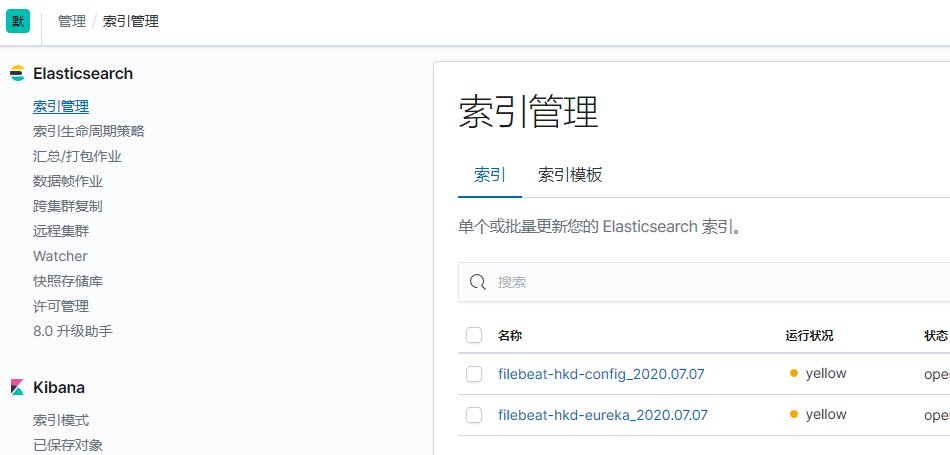
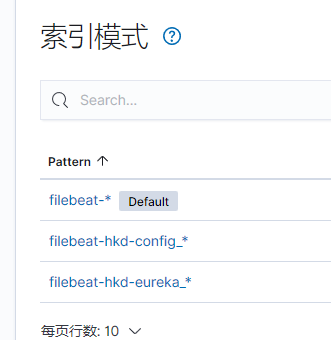
{

  "_index": "filebeat-hkd-eureka_2020.07.07",

  "_type": "_doc",

  "_id": "66B4J3MBSoQZ5wHWJjKY",

  "_version": 1,

  "_score": null,

  "_source": {

    "@timestamp": "2020-07-07T04:10:53.451Z",

    "container": {

      "id": "hkd-eureka"

    },

    "log": {

      "offset": 166290,

      "file": {

        "path": "/var/log/pods/test_cloud-eureka-0_6a964a51-f1de-4b5a-8cc4-03b495c42e82/hkd-eureka/0.log"

      }

    },

    "message": "{\"log\":\"2020-07-07 12:10:52.750  INFO 1 --- [a-EvictionTimer] c.n.e.r.AbstractInstanceRegistry         : Running the evict task with compensationTime 0ms\\n\",\"stream\":\"stdout\",\"time\":\"2020-07-07T04:10:52.751269899Z\"}",

    "input": {

      "type": "log"

    },

    "ecs": {

      "version": "1.1.0"

    },

    "host": {

      "containerized": false,

      "name": "worker",

      "hostname": "worker",

      "architecture": "x86_64",

      "os": {

        "version": "7 (Core)",

        "family": "redhat",

        "name": "CentOS Linux",

        "kernel": "3.10.0-1062.el7.x86_64",

        "codename": "Core",

        "platform": "centos"

      },

      "id": "a392797746874909a0980d75e417dc04"

    },

    "agent": {

      "type": "filebeat",

      "ephemeral_id": "cea92563-33c5-450e-baf1-0dc1eb3059ca",

      "hostname": "worker",

      "id": "db1fe7ec-6e4e-468b-a9d9-d28e6a695b09",

      "version": "7.5.0"

    }

  },

  "fields": {

    "@timestamp": [

      "2020-07-07T04:10:53.451Z"

    ]

  },

  "sort": [

    1594095053451

  ]

}

########################## 分割线 ##################################################

{

  "_index": "filebeat-hkd-config_2020.07.07",

  "_type": "_doc",

  "_id": "xqB1J3MBSoQZ5wHW7jI5",

  "_version": 1,

  "_score": null,

  "_source": {

    "@timestamp": "2020-07-07T04:08:28.817Z",

    "container": {

      "id": "hkd-config"

    },

    "log": {

      "file": {

        "path": "/var/log/pods/test_cloud-config-0_cca3f5ee-16f1-44b4-9306-11d65e5ffc54/hkd-config/0.log"

      },

      "offset": 42984

    },

    "message": "{\"log\":\"2020-07-07 12:08:19.752  INFO 1 --- [trap-executor-0] c.n.d.s.r.a.ConfigClusterResolver        : Resolving eureka endpoints via configuration\\n\",\"stream\":\"stdout\",\"time\":\"2020-07-07T04:08:19.753343937Z\"}",

    "input": {

      "type": "log"

    },

    "host": {

      "name": "worker",

      "hostname": "worker",

      "architecture": "x86_64",

      "os": {

        "version": "7 (Core)",

        "family": "redhat",

        "name": "CentOS Linux",

        "kernel": "3.10.0-1062.el7.x86_64",

        "codename": "Core",

        "platform": "centos"

      },

      "id": "a392797746874909a0980d75e417dc04",

      "containerized": false

    },

    "agent": {

      "type": "filebeat",

      "ephemeral_id": "cea92563-33c5-450e-baf1-0dc1eb3059ca",

      "hostname": "worker",

      "id": "db1fe7ec-6e4e-468b-a9d9-d28e6a695b09",

      "version": "7.5.0"

    },

    "ecs": {

      "version": "1.1.0"

    }

  },

  "fields": {

    "@timestamp": [

      "2020-07-07T04:08:28.817Z"

    ]

  },

  "sort": [

    1594094908817

  ]

}
2.3 批量获取文件日志
在不使用logstash的情况下,暂时没有想到啥好办法能获取到指定索引,所以这次是获取所有日志文件写入到一个索引文件中,区分查找的话根据container.id字段的值进行操作
同时也提供了一个思路,在使用logstash的情况下,可以根据container.id的值来区分开不同的日志来源,并创建使用相对应的索引,这个有待后续研究
filebeat.yml配置文件
filebeat.inputs:

- type: log

  enabled: true

  paths:

    - /var/log/pods/*/*/*.log

  symlinks: true

output.elasticsearch:

  hosts: ["192.168.75.21:9200"]

  username: "elastic"

  password: "IjGj8QwWYeXY7rVoLLQ6"
es中discover日志查看
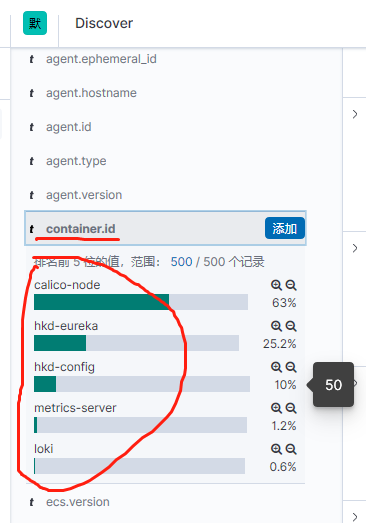
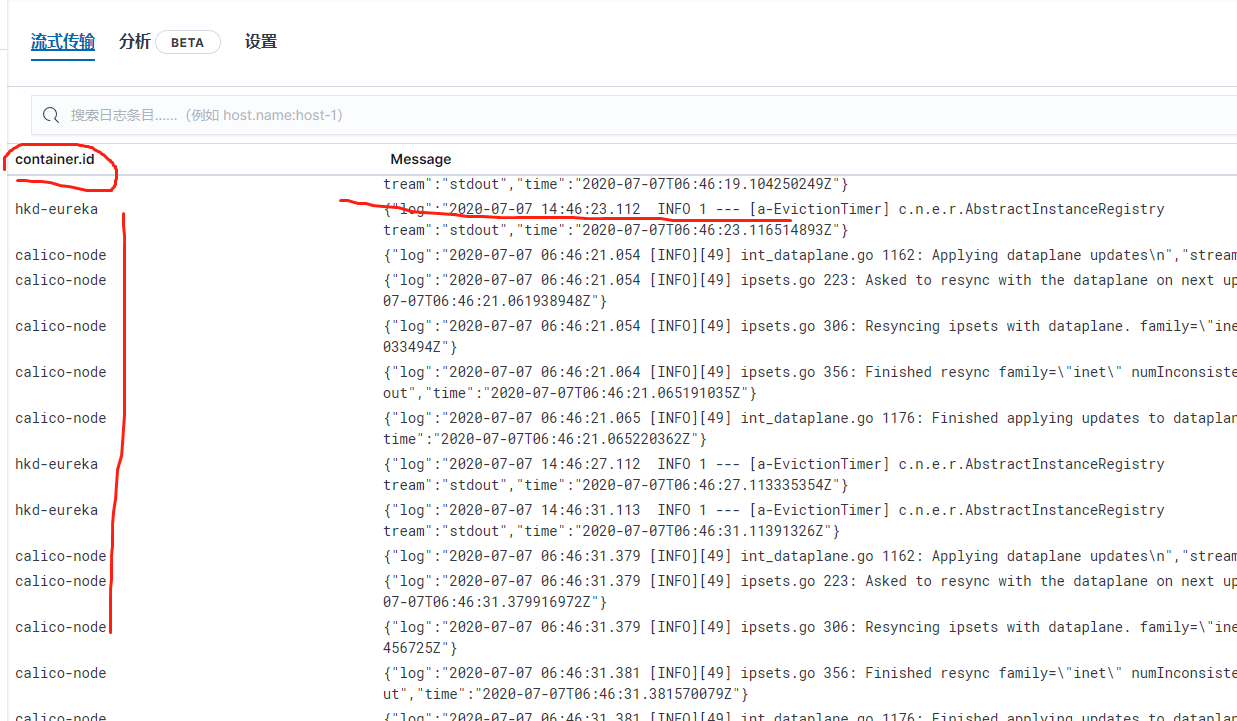
使用logstash处理日志来源并在es中创建相应的索引文件
filebeat.yml配置文件
filebeat.inputs:

- type: log

  enabled: true

  paths:

    - /var/log/pods/*/*/*.log

  symlinks: true

output.logstash:

  hosts: ["192.168.75.21:5044"]
logstash配置文件:./config/conf.d/pods.conf
input {

  beats {

    port => "5044"

  }

}

output {

    #stdout {

    #    codec => rubydebug

    #}

    elasticsearch {

       hosts => ["192.168.75.21:9200"]

       index => "%{[container][id]}-%{+yyyy.MM.dd}" # 注意这个数据

       user => "elastic"

       password => "IjGj8QwWYeXY7rVoLLQ6"

    }

}
效果展示:
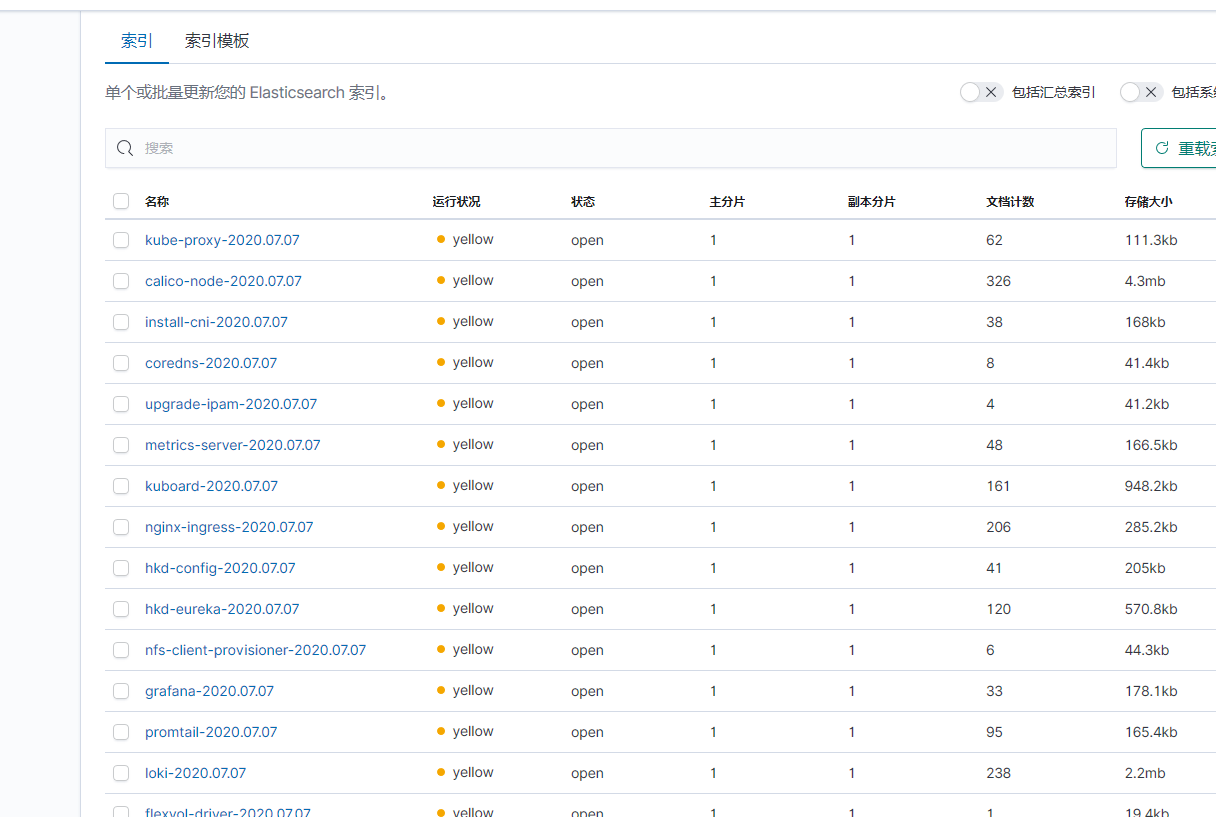
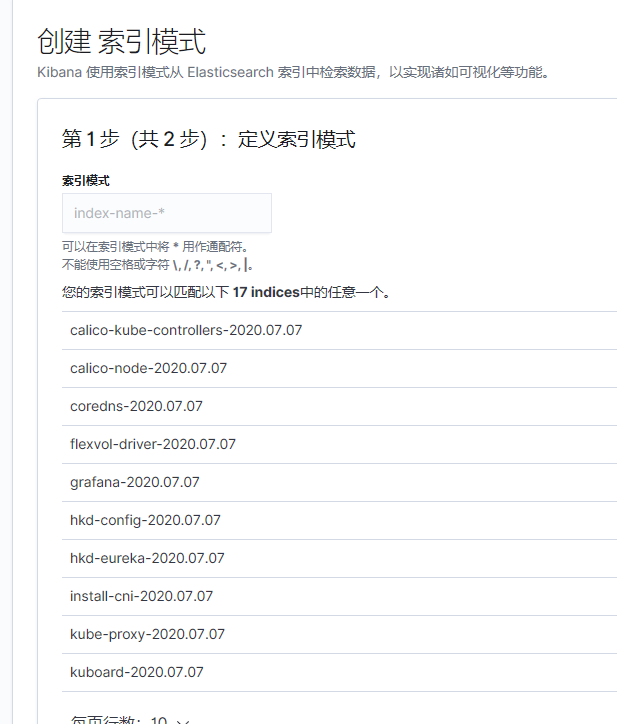
稍微延申一下,多个日志文件的话也可以使用logstash来这样处理
算是不怎么完美的解决这个问题了。
延申三大问题中的第二个问题处理---收集查看k8s中pod的控制台日志的更多相关文章
- 延申三大问题中的第三个问题处理---发布更新时先把服务从注册中心给down下来,等待一段时间后再能更新模块
一开始采取的思路大致如下: 在preStop中使用/bin/sh命令,先down 然后sleep一段时间, 这种思路的执行情况如下: 假若升级容器使用的镜像版本的话,先执行preStop中的命令,sl ...
- 查看k8s中etcd数据
#查看etcd pod kubectl get pod -n kube-system | grep etcd #进入etcd pod kubectl exec -it -n kube-system e ...
- 延申三大问题中的第一个问题处理---原先shell脚本中启动jar文件命令的配置,附加参数等
经过一系列的试错,最终采用的解决办法如下: 采用的配置文件 附加的启动参数 或者把这些都给统一添加到ConfigMap中
- Gradle查看Project中的所有 Task
查看Project中所有的Task:$ gradle tasks 查看Project中所有的properties:$ gradle properties 如: 参照了: https://www.jia ...
- Effective Objective-C 2.0 — 第二条:类的头文件中尽量少引入其他头文件
第二条:类的头文件中尽量少引入其他头文件 使用向前声明(forward declaring) @class EOCEmployer 1, 将引入头文件的实际尽量延后,只在确有需要时才引入,这样就可以减 ...
- 在SQL SERVER中获取表中的第二条数据
在SQL SERVER中获取表中的第二条数据, 思路:先根据时间逆排序取出前2条数据作为一个临时表,再按顺时排序在临时表中取出第一条数据 sql语句如下: select top 1 * from(se ...
- 剑指Offer:从第一个字符串中删除第二个字符串中出现过的所有字符
// 从第一个字符串中删除第二个字符串中出现过的所有字符 #include <stdio.h> char* remove_second_from_first( char *first, c ...
- Python之路【第二十篇】:待更新中.....
Python之路[第二十篇]:待更新中.....
- Python开发【第二十三篇】:持续更新中...
Python开发[第二十三篇]:持续更新中...
随机推荐
- pyinstaller打包一些三方库后,报资源不存在
在目录site-packages\PyInstaller\hooks下新建对应文件hook-对应三方库名字.py,如hook-ngender.py 编辑hook-ngender.py: from Py ...
- API 开发者需要避免的10个错误【翻译】
随着低代码和无代码工具的出现,构建API比以往任何时候都更简单.更快.不过因为开发简单了,开发者很容易忽略一些潜在的问题,导致整个业务的下游影响. 在设计阶段多花点时间,可以确保API真正有用.安全. ...
- 多校B层冲刺NOIP20211111模拟12
题面:PDFhttp://xn--gwt928b.accoders.com/pdf/10248/10248.pdfhttp://xn--gwt928b.accoders.com/pdf/10248/1 ...
- 干货分享:小技巧大用处之Bean管理类工厂多种实现方式
前言:最近几个月很忙,都没有时间写文章了,今天周末刚好忙完下班相对早点(20:00下班)就在家把之前想总结的知识点写出来,于是就有了这篇文章.虽无很高深的技术,但小技巧有大用处. 有时我们经常需要将实 ...
- 高通cDSP简单编程例子(实现查询高通cDSP使用率、签名),RK3588 npu使用率查询
PS:要转载请注明出处,本人版权所有. PS: 这个只是基于<我自己>的理解, 如果和你的原则及想法相冲突,请谅解,勿喷. 前置说明 本文作为本人csdn blog的主站的备份.(Bl ...
- YII事件EVENT示例
模型中/** * 在初始化时进行事件绑定 */ public function init() { $this->on(self::EVENT_HELLO,[$this,'sendMail']); ...
- 从函数计算到 Serverless 架构
前言 随着 Serverless 架构的不断发展,各云厂商和开源社区都已经在布局 Serverless 领域,一方面表现在云厂商推出传统服务/业务的 Serverless 化版本,或者 Serverl ...
- 发布 .NET MAUI / MAUI Blazor 应用 (1) - Windows
发布用于Windows的 .NET MAUI 应用 打开 PowerShell 终端 , 命令行进入工程目录,以我的例子工程为例, cd BlazorMaui BlazorMaui 替换为你自己工程名 ...
- [网鼎杯2018]Unfinish-1|SQL注入|二次注入
1.进入题目之后只有一个登录界面,检查源代码信息并没有发现有用的信息,尝试万能密码登录也不行,结果如下: 2.进行目录扫描,发现了注册界面:register.php,结果如下: 3.那就访问注册界面, ...
- 使用idea remote 开发体验
本地使用idea开发最不好的一个体验就是打开稍大的工程就非常的卡,怎么调参数都没用,现在idea推出了idea remote就赶紧来体验下. 使用方式 除了idea不需要额外下载什么包,但是因为rem ...