
微信小程序搜索并高亮关键字
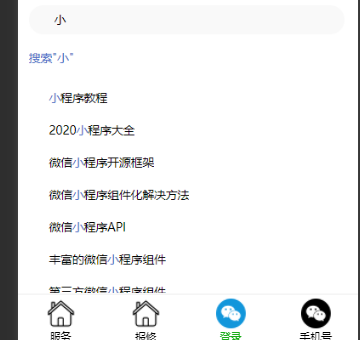
更多解读可使用博客:
https://www.jianshu.com/p/86d73745e01c
实现流程:
1.在文本框中输入关键字key,如“比赛”,检索出比赛相关的列表
key = 小程序
2.处理结果列表:在key的前后加分隔符,如“%%”
3.通过第2步的分隔符进行切割,获取新的数组:str.split("%%")
4.页面for循环上面的新数组:与key相等,则高亮显示,否则常规样式显示
wxml:
<!-- 搜索并高亮关键字 -->

<view class="main">

    <view class="header-search">

        <image class="searchImg" src="/images/search_icon.png" mode="aspectFill" ></image>

        <input type="text" class="searchInput" focus="{{autoFocus}}" hold-keyborad="true" placeholder="请输入名称进行搜索" placeholder-style="color:#999999" bindinput = "input"></input>

        <view class="clearInput" bindtap = "clearInput" wx:if="{{searchText}}">

            <image class="clearInputImg" src="/images/clear.png" mode="aspectFill" ></image>

        </view>

    </view>

    <view style="padding: 0 24rpx;">

        <view class="searchResult" wx:if="{{searchText}}">

             <view class="searchText" data-type="1" bindtap = "toHandleSearch">搜索"{{searchText}}"</view>

             <view class="border-LR"></view>

        </view>

        <view wx:for="{{searchResultList}}" wx:key="index">

            <view class="searchResultItem" data-type="2" bindtap = "toHandleSearch">

                <image class="searchImg2" src="/images/search_icon.png" mode="aspectFill" ></image>

                <view class="searchResultItem-context">

                    <text wx:for="{{item.searchArray}}" wx:for-item="item2"  wx:key="index2" style="{{item2 == searchText?'color:#4E70C7':''}}">{{item2}}</text>

                </view>

            </view>

            <view class="border-item-LR"></view>

        </view>

    </view>

</view>
wxss
/* pages/gologin/gologin.wxss */

/* pages/search-effects/search-effects.wxss */

.header-search{

    position: relative;

    margin: 10rpx 24rpx 40rpx 24rpx;

}

/*搜索图标*/

.searchImg{

    position: absolute;

    left: 24rpx;

    bottom: 18rpx;

    width: 28rpx;

    height: 28rpx;

}

/*搜索图标*/

.searchImg2{

    width: 28rpx;

    height: 28rpx;

}

/*搜索文本框*/

.searchInput{

    width: 83%;

    height: 64rpx;

    font-size: 28rpx;

    font-family: PingFang SC;

    font-style: normal;

    font-weight: normal;

    line-height: 64rpx;

    color: #000000;

    opacity: 1;

    overflow: hidden;

    white-space: nowrap;

    text-overflow: ellipsis;

    min-height: unset;

    background: #f9f9f9;

    border-radius: 200rpx;

    padding: 0 58rpx;

}

/*清空文本框view*/

.clearInput{

    width: 100rpx;

    height: 64rpx;

    display: flex;

    align-items: center;

    justify-content: center;

    position: absolute;

    right: 0;

    bottom: 0;

    z-index: 10;

}

/*清空图标*/

.clearInputImg{

    width: 36rpx;

    height: 36rpx;

    flex-shrink: 0;

}

/*搜索结果*/

.searchResult .searchText{

    max-width: 93%;

    font-family: PingFang SC;

    font-style: normal;

    font-weight: normal;

    font-size: 26rpx;

    line-height: 26rpx;

    color: #4e70c7;

    overflow-x: hidden;

    white-space: nowrap;

    text-overflow: ellipsis;

    padding-bottom: 40rpx;

}

.searchResultItem {

    display: flex;

    flex-direction: row;

    justify-content: flex-start;

    align-items: center;

  }

.searchResultItem-context{

    font-family: PingFang SC;

    font-style: normal;

    font-weight: normal;

    font-size: 26rpx;

    line-height: 26rpx;

    color: #000000;

    margin-left: 20rpx;

    padding: 24rpx 0;

    overflow-x: hidden;

    white-space: nowrap;

    text-overflow: ellipsis;

}
wxjs
// pages/search-effects/search-effects.js

Page({

    /**

     * 页面的初始数据

     */

    data: {

        searchText:'',//文本框内容

        searchResultList:[],//搜索结果

        autoFocus: true,//自动聚焦

        holdKeyboard: true//focus时,点击页面的时候收齐键盘 true:不收起

    },

    /**

     * 生命周期函数--监听页面初次渲染完成

     */

    onReady: function () {

    },

    //文本框输入

    input(e){

    //   console.log(e)

      this.setData({

        searchText:e.detail.value.trim()

      })

      //根据名称进行搜索

      this.getSearchListByName()

    },

    //根据名称进行搜索

    getSearchListByName(){

        let that = this

        //模拟数据请求

        var dataList=[

            {M_NAME:'小程序教程'},

            {M_NAME:'2020小程序大全'},

            {M_NAME:'微信小程序开源框架'},

            {M_NAME:'微信小程序组件化解决方法'},

            {M_NAME:'微信小程序API'},

            {M_NAME:'丰富的微信小程序组件'},

            {M_NAME:'第三方微信小程序组件'},

            {M_NAME:'自定义小程序UI组件'},

            {M_NAME:'小程序可滑动标签的使用'}

        ]

        var searchResultList = []

        for(var i=0;i<dataList.length;i++){

            let obj={

                M_NAME:dataList[i].M_NAME

            };

            //高亮字符串数组

            obj.searchArray=that.getHilightStrArray(dataList[i].M_NAME,this.data.searchText)

            searchResultList.push(obj)

        }

        that.setData({

            searchResultList:searchResultList

        })

        // wx.request({

        //     url: 'http://192.168.0.76:8080/open/getSearchListByName', // 仅为示例,并非真实的接口地址

        //     data: {

        //         m_name:this.data.searchText

        //     },

        //     method: 'post',

        //     header: {

        //         'content-type': 'application/json' // 默认值

        //     },

        //     success(res) {

        //         console.log(res)

        //         var searchText = that.data.searchText

        //         if (res.data.errcode === 200) {

        //             var searchResultList = []

        //             //比赛 数据

        //             if(res.data.matchList){

        //                 for(var i=0;i<res.data.matchList.rows.length;i++){

        //                     let obj={

        //                         M_NAME:res.data.matchList.rows[i].M_NAME

        //                     };

        //                     //高亮字符串数组

        //                     obj.searchArray=that.getHilightStrArray(res.data.matchList.rows[i].M_NAME,searchText)

        //                     searchResultList.push(obj)

        //                 }

        //             }

        //             that.setData({

        //                searchResultList:searchResultList

        //             })

        //         }

        //     },

        //     fail() {

        //     }

        // })

    },

    // 返回一个使用key切割str后的数组,key仍在数组中

    getHilightStrArray(str,key){

        return str.replace(new RegExp(`${key}`, 'g'), `%%${key}%%`).split('%%');

    },

    /**

     * 页面相关事件处理函数--监听用户下拉动作

     */

    onPullDownRefresh: function () {

    },

    /**

     * 页面上拉触底事件的处理函数

     */

    onReachBottom: function () {

    },

})
注意:下面的函数 比较关键
//返回一个使用key切割str后的数组,key仍在数组中

//str:字符串  key:关键字

function getHilightStrArray (str,key) {

  return str.replace(new RegExp(`${key}`, 'g'), `%%${key}%%`).split('%%');

}
微信小程序搜索并高亮关键字的更多相关文章
- 微信小程序--搜索关键词高亮
代码地址如下:http://www.demodashi.com/demo/14249.html 一.前期准备工作 软件环境:微信开发者工具 官方下载地址:https://mp.weixin.qq.co ...
- 微信小程序 —搜索框
wxSearch优雅的微信小程序搜索框 一.功能 支持自定义热门key 支持搜索历史 支持搜索建议 支持搜索历史(记录)缓存 二.使用 1.将wxSearch文件夹整个拷贝到根目录下 2.引入 // ...
- 微信小程序----搜索框input回车搜索事件
在微信小程序里的搜索框,按软键盘回车键触发搜索事件. <input type="text" placeholder="搜索" value="{ ...
- 微信小程序搜索框代码组件
search.wxml <view class="header"> <view class="search"> <icon typ ...
- Vscode插件--微信小程序格式化以及高亮组件wxml-vscode
wxml-vscode wxml-vscode 仓库 提问题 安装 通过 F1 或者 CMD + Shift + P 输入 install. 选择: Install Extension. 特性 格式化 ...
- Hbuilder 开发微信小程序的代码高亮
一.点击“工具”-“选项”-搜索“文件关联” 二.点击“添加”文件类型,点击确定 三.在相关联的编辑器中点击“添加”按钮,选择CSS Editor,点击确定,重新打开 *.wxss 类型的文件即可 其 ...
- 两天快速开发一个自己的微信小程序
p.p1 { margin: 0.0px 0.0px 0.0px 0.0px; font: 12.0px "Songti SC" } p.p2 { margin: 0.0px 0. ...
- 小程序开发运营必看:微信小程序平台运营规范
一.原则及相关说明 微信最核心的价值,就是连接——提供一对一.一对多和多对多的连接方式,从而实现人与人.人与智能终端.人与社交化娱乐.人与硬件设备的连接,同时连接服务.资讯.商业. 微信团队一 ...
- 业余时间折腾了个微信小程序版本的街机游戏模拟器(吾爱街机),8090后的童年回忆,欢迎大家体验
好多年没来博客园了,有段时间想玩街机游戏,发现都需要下载安装,现在小程序这么流行,是不是可以集成到小程序里(无需下载,在线玩),出于这想法,就业余时间折腾了下,分享给大家,偶尔可以回味畅玩下. 中间遇 ...
随机推荐
- java中使用反射获取pojo(实体)类的所有字段值
出处:https://developer.aliyun.com/article/239346 说起反射,不得不说它实在是太强大了,通过反射就可以轻轻松松拿到各种东东,如果你想在项目中解除对某个类的依赖 ...
- select 级联选择
转载请注明来源:https://www.cnblogs.com/hookjc/ <script language="javascript"> <!-- ...
- AttributeText创建多彩文字Label --- hl
一般用富文本实现多种花样的Label文字,下图是利用UILabel分类快速创建的多彩多样lable文字,快速简单,自定义性强,更重要的是无代码污染,特别适合轻量级使用 https://github.c ...
- Python--操作列表
Python--操作列表 目录 Python--操作列表 一.遍历整个列表 1. 深入研究循环 2. 在for循环中执行更多操作 3. 在for循环结束后执行一些操作 二.避免缩进错误 1. 忘记缩进 ...
- MATLAB基础学习篇(1)
MATLAB中只定义了以2和10为底对数,其它 使用换底公式,例如:log8(7)=log7/log8. x=input('Please enter x:'); y=input('Please ent ...
- 主机磁盘使用率超过85%导致es索引变为只读模式
[ type=cluster_block_exception, reason=index [ index_name ] FORBIDDEN/12/index read-only / allow del ...
- ESXI 7.0.0 U2 部署
文章目录 什么是ESXI? ESXi 的优势 功能特性 部署ESXI 创建虚拟机 开始安装 打开浏览器输入ip进行管理 什么是ESXI? ESXI官网:https://www.vmware.com/c ...
- suse 12 二进制部署 Kubernetets 1.19.7 - 第08章 - 部署kube-scheduler组件
文章目录 1.8.部署kube-scheduler 1.8.0.创建kube-scheduler请求证书 1.8.1.生成kube-scheduler证书和私钥 1.8.2.创建kube-schedu ...
- Ribbon负载均衡及其应用
nginx - 随笔分类 - 池塘里洗澡的鸭子 - 博客园 (cnblogs.com)中涉及到负载均衡,为何此处由涉及Ribbon负载均衡呢?那是因为ngnix是服务端的负责均衡,而Ribbon是客户 ...
- Vue 源码解读(5)—— 全局 API
目标 深入理解以下全局 API 的实现原理. Vue.use Vue.mixin Vue.component Vue.filter Vue.directive Vue.extend Vue.set V ...