
kNN-识别手写数字
最后,我们要进行手写数字分类任务,但是现在我们是用kNN算法,可能会比较慢
首先,完整地看完2.3.1和2.3.2的内容,然后找到trainingDigits和testDigits文件夹,大致浏览下

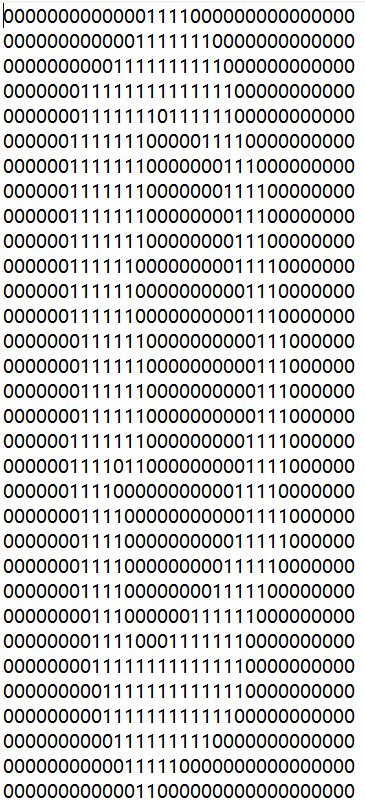
那么思路应该是:
- 从文件夹中获取文件名,,并且文件名中包含了标记,再分别打开每个文件
- 对打开的每个文件,对其向量化
- 然后从上述文件获得的每个向量,数据集,标记集和选定的k,用分类器进行输出
import numpy as np

def txt2vec(filename):

    # 32*32的规模,用1*1024的向量接收

    vecContent = np.zeros((1, 1024))

    with open(filename, 'r') as fobj:

        for i in range(32):

            line = fobj.readline()

            for j in range(32):

                vecContent[0, 32 * i + j] = int(line[j])

        return vecContent

# 打印输出看一下结果

filename = './trainingDigits/0_0.txt'

a = txt2vec(filename)

print(a[0, 0:64])

[0. 0. 0. 0. 0. 0. 0. 0. 0. 0. 0. 0. 0. 1. 1. 1. 1. 0. 0. 0. 0. 0. 0. 0.

 0. 0. 0. 0. 0. 0. 0. 0. 0. 0. 0. 0. 0. 0. 0. 0. 0. 0. 0. 0. 1. 1. 1. 1.

 1. 1. 1. 0. 0. 0. 0. 0. 0. 0. 0. 0. 0. 0. 0. 0.]
没有问题,这样我们的txt转换成vector函数就做好了
接下来,有一个难点,要把trainingDigits和testDigits文件夹的文件名分别获得,并得到标记
需要使用listdir函数,需要从os导包
import numpy as np

from os import listdir

trainingFilePath = './trainingDigits'

testFilePath = './testDigits'

# 获得trainingDigits的各文件

trainingFileList = listdir(trainingFilePath)

# 获得标记集

labelSet = []

dataSetNum = len(trainingFileList)

print(dataSetNum)

1934
之后便把之前写的代码综合起来
import numpy as np

import kNN

def txt2vec(filename):

    # 32*32的规模,用1*1024的向量接收

    vecContent = np.zeros((1, 1024))

    with open(filename, 'r') as fobj:

        for i in range(32):

            line = fobj.readline()

            for j in range(32):

                vecContent[0, 32 * i + j] = int(line[j])

        return vecContent

# 打印输出看一下结果

# filename = './trainingDigits/0_0.txt'

# a = txt2vec(filename)

# print(a[0, 0:64])

trainingFilePath = './trainingDigits'

testFilePath = './testDigits'

from os import listdir

def hwPredict():

    # 获得trainingDigits的各文件

    trainingFileList = listdir(trainingFilePath)

    # 获得标记集

    labelSet = []

    dataSetNum = len(trainingFileList)

    # 获得数据集

    dataSet = np.zeros((dataSetNum, 1024))

    # print(dataSetNum)

    for i in range(dataSetNum):

        # 获得每一个txt文件

        eachTrainingFile = trainingFileList[i]

        # 因为文件时0_0.txt类型,所以先按.分割,再按_分割

        eachTrainingFile = eachTrainingFile.split('.')[0]

        eachTrainingFileLabel = int(eachTrainingFile.split('_')[0])

        labelSet.append(eachTrainingFileLabel)

        # 通过txt2vec获得数据集

        trainingFilename = 'trainingDigits/' + eachTrainingFile + '.txt'

        dataSet[i, :] = txt2vec(trainingFilename)

        # print(len(dataSet))

        # print(dataSet.shape)

        # print(type(dataSet))

        # print(labelSet)

    # 现在我们的数据集和label都做好了

    # 开始用测试集的数据来进行判断

    testFileList = listdir(testFilePath)

    # print(testFileList)

    errorCount = 0.0

    testSetNum = len(testFileList)

    # print(testSetNum)

    for i in range(testSetNum):

        # 老样子,先进行每个向量的划分

        eachTestFile = testFileList[i]

        # print(eachTestFile)

        eachTestFile = eachTestFile.split('.')[0]

        # print(eachTestFile)

        eachTestFileLabel = int(eachTestFile.split('_')[0])

        # 转换成向量

        testFilename = 'trainingDigits/' + eachTestFile + '.txt'

        testVector = txt2vec(testFilename)

        # print(testVector)

        testClassifierResult = kNN.classifier(testVector,dataSet,labelSet,3)

        print("the classifier came back with:%d,the real answer is:%d"%(testClassifierResult,eachTestFileLabel))

        if testClassifierResult != eachTestFileLabel:

            errorCount += 1.0

    print("\nthe total number of errors is:",errorCount)

    print("\nthe total error rate is:",errorCount/testSetNum)

hwPredict()
结果如下:
the classifier came back with:0,the real answer is:0

the classifier came back with:0,the real answer is:0

the classifier came back with:0,the real answer is:0

...

the classifier came back with:9,the real answer is:9

the classifier came back with:9,the real answer is:9

the total number of errors is: 13.0

the total error rate is: 0.013742071881606765
kNN算法至此告一段落,代码均上传至https://github.com/lpzju/-
kNN算法在分类算法中最简单最有效,但是复杂度也比较大,且使用大量存储空间。另一个缺点是无法给出任何数据的基础结构信息
kNN-识别手写数字的更多相关文章
- KNN识别手写数字
一.问题描述 手写数字被存储在EXCEL表格中,行表示一个数字的标签和该数字的像素值,有多少行就有多少个样本. 一共42000个样本 二.KNN KNN最邻近规则,主要应用领域是对未知事物的识别,即判 ...
- KNN实现手写数字识别
KNN实现手写数字识别 博客上显示这个没有Jupyter的好看,想看Jupyter Notebook的请戳KNN实现手写数字识别.ipynb 1 - 导入模块 import numpy as np i ...
- KNN 算法-实战篇-如何识别手写数字
公号:码农充电站pro 主页:https://codeshellme.github.io 上篇文章介绍了KNN 算法的原理,今天来介绍如何使用KNN 算法识别手写数字? 1,手写数字数据集 手写数字数 ...
- 使用神经网络来识别手写数字【译】(三)- 用Python代码实现
实现我们分类数字的网络 好,让我们使用随机梯度下降和 MNIST训练数据来写一个程序来学习怎样识别手写数字. 我们用Python (2.7) 来实现.只有 74 行代码!我们需要的第一个东西是 MNI ...
- 学习笔记TF024:TensorFlow实现Softmax Regression(回归)识别手写数字
TensorFlow实现Softmax Regression(回归)识别手写数字.MNIST(Mixed National Institute of Standards and Technology ...
- TensorFlow实战之Softmax Regression识别手写数字
关于本文说明,本人原博客地址位于http://blog.csdn.net/qq_37608890,本文来自笔者于2018年02月21日 23:10:04所撰写内容(http://blog.c ...
- 一文全解:利用谷歌深度学习框架Tensorflow识别手写数字图片(初学者篇)
笔记整理者:王小草 笔记整理时间2017年2月24日 原文地址 http://blog.csdn.net/sinat_33761963/article/details/56837466?fps=1&a ...
- python手写神经网络实现识别手写数字
写在开头:这个实验和matlab手写神经网络实现识别手写数字一样. 实验说明 一直想自己写一个神经网络来实现手写数字的识别,而不是套用别人的框架.恰巧前几天,有幸从同学那拿到5000张已经贴好标签的手 ...
- 3 TensorFlow入门之识别手写数字
------------------------------------ 写在开头:此文参照莫烦python教程(墙裂推荐!!!) ---------------------------------- ...
- 用BP人工神经网络识别手写数字
http://wenku.baidu.com/link?url=HQ-5tZCXBQ3uwPZQECHkMCtursKIpglboBHq416N-q2WZupkNNH3Gv4vtEHyPULezDb5 ...
随机推荐
- 使用 Spring 通过什么方式访问 Hibernate?
在 Spring 中有两种方式访问 Hibernate:控制反转 Hibernate Template 和 Callback.继承 HibernateDAOSupport 提供一个 AOP 拦截器.
- HTML 5中的输出元素是什么?
当你需要计算两个输入的结果并将结果放到一个标签里的时候,就需要输出元素了.比如你有两个文本框(参见下图),你想要让这些文本框数字相加,然后输出给标签. 下面就是如何使用HTML 5代码输出元素. &l ...
- 学习 MongoDB(一)
1.介绍 MongoDB是C++语言编写,是一个基于分布式文件存储的开源数据库系统,MongoDB将数据存储为一个文档, 数据结构由键值对(key=>value)组成,MongoDB文档类似于 ...
- Python - numpy.clip()函数
np.clip( a, a_min, a_max, out=None): 部分参数解释: 该函数的作用是将数组a中的所有数限定到范围a_min和a_max中.a:输入矩阵:a_min:被限定的最小值, ...
- Tomcat安装流程(无图简易)
笔记:web->3小结
- vs code下代码提示图标的含义(c++)
其实不同的语言这些东西的含义还有不同 但差别也不是很大,比如Python中的那个大括号图标就成了模块(module)了
- Quantum CSS,一个超快的CSS引擎
开始 本文翻译自Inside a super fast CSS engine: Quantum CSS,如果想要阅读原文,可以点击前往,以下内容夹杂本人一些思考,翻译也并不一定完全. 碎碎念 为什么翻 ...
- jquery+html5实现单张图片上传预览
js: if (window.File && window.FileReader && window.FileList && window.Blob){ ...
- JavaScript 工作原理之三-内存管理及如何处理 4 类常见的内存泄漏问题(译)
原文请查阅这里,本文有进行删减,文后增了些经验总结. 本系列持续更新中,Github 地址请查阅这里. 这是 JavaScript 工作原理的第三章. 我们将会讨论日常使用中另一个被开发者越来越忽略的 ...
- python-你好
你的程序会读入一个名字,比如John,然后输出"Hello John". 输入格式: 一行文字. 输出格式: 一行文字. 输入样例: Mary Johnson 输出样例: Hell ...