
关闭 Microsoft Compatibility Telemetry
Microsoft Compatibility Telemetry可能会导致操作系统(Win10)启动后一直读盘,打开任务管理器可能会看到 Microsoft Compatibility Telemetry 占用了不少硬盘性能。
从网上搜到了一种看起来有效的解决方案 (https://winaero.com/how-to-disable-telemetry-and-data-collection-in-windows-10/):
- 打开注册表编辑器,定位到 "计算机\HKEY_CURRENT_USER\SOFTWARE\Policies\Microsoft\Windows\DataCollection",添加AllowTelemetry和Allow Telemetry一共2个DWORD值(暂时没有尝试哪个有效),用默认的0就行;
- 打开“服务”,找到“Connected User Experiences and Telemetry” (旧的win10可能是“Diagnostics Tracking Service”),关闭该服务并禁用,重启后生效。
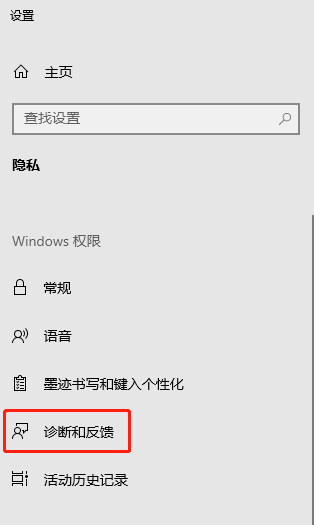
- 最后建议在“隐私设置”-“诊断和反馈”关闭不需要的配置
- (不知道有没有效果,但有的网址推荐了)组策略中,找到“计算机配置”-管理模板-windows组件-数据收集和预览版,关闭“允许遥测”
关闭 Microsoft Compatibility Telemetry的更多相关文章
- How to disable Microsoft Compatibility Telemetry
Issue: How to disable Microsoft Compatibility Telemetry (CompatTelRunner.exe)? Option : Disable Mi ...
- Windows10 Compatibility Telemetry(CompatTelRunner.exe) 占用硬盘100%
相信很多人跟我一样总被Compatibility Telemetry(CompatTelRunner.exe) 占用硬盘100%困扰,Compatibility Telemetry翻译过来就是“微软兼 ...
- Windows权限维持总结
windows权限维持 注册服务 sc create 服务名 binpath= "cmd.exe /k 木马路径" start="auto" obj=" ...
- 系统重装助手教你如何在Microsoft Edge中恢复“关闭所有选项卡”警告
在Microsoft Edge中,当您打开多个选项卡时,浏览器将显示“您要关闭所有选项卡吗?” 警告,以防止您意外关闭重要标签. 通常,在没有第二个想法的情况下,您会立即禁用此功能,检查提示中的“始终 ...
- Microsoft visual studio关闭安全检查
在用Microsoft visual studio进行代码编写时,使用到列如sprintlf这种比较旧的指令,需要关闭Microsoft visual studio的安全检查: 设置预处理选项:a. ...
- Microsoft Visual C++ Runtime Library Runtime Error的解决的方法
打开浏览器时,出现Microsoft Visual C++ Runtime Library Runtime Error错误,初步预计是软件冲突,可能有多种出错的方式,我的是浏览器自己主动关闭. 一. ...
- Microsoft Visual C++ Runtime Library Runtime Error解决的方式
打开浏览器时,出现Microsoft Visual C++ Runtime Library Runtime Error错误,初步预计是软件冲突,可能有多种出错的方式,我的是浏览器自己主动关闭. 一. ...
- win10 磁盘占用高--- 禁用用户改善反馈 CompatTelRunner.exe
1. 2.右键点开[这台电脑],点[管理],点[服务和应用程序]点[服务],在右边框里把[superfetch] [windows search][HomeGroupListener] [HomeGr ...
- 绿色 或者 免安装 软件 PortableApps
Refer to http://portableapps.com/apps for detail. Below is just a list at Jan-01-2017 for quick show ...
- Windows Server 2016 桌面环境的自动配置脚本
除非学习要求,还是建议使用Windows 10 LTSB 2016或其他桌面系统. github:https://github.com/m2nlight/WindowsServerToWindowsD ...
随机推荐
- MATLAB批量处理表格类型文件
MATLAB版本2020b 问题背景:预处理数据,有若干变压器温度表格,要将变压器运行温度数据提取出来 通过LSTM模型进行温度预测
- hexo-theme-tree
Hexo 主题 Tree 一个简洁的主题,主要功能是 "树状导航" + "树状目录",可选配"评论"和"阅读量"功能,支 ...
- 杭电oj 进制转换
Problem Description 输入一个十进制数N,将它转换成R进制数输出. Input 输入数据包含多个测试实例,每个测试实例包含两个整数N(32位整数)和R(2<=R<=1 ...
- express的使用:web开发(四)
1.开发模式 1.服务端渲染 2.前后端分离 2.身份认证 1.服务端渲染推荐使用session认证机制 2.前端后端分离建议使用JWT认证机制 3.http协议的无状态性 4.cookie特性 1. ...
- redis底层数据结构之双向链表(linkedlist)
双向链表(linkedlist) redis的双向链表(linkedlist)是基于链表的一种数据结构 链表是一种常见的基础数据结构,是一种非顺序存储数据的线性表,在每一个节点里存储了下一个节点的指针 ...
- software_programming
2020-04-04 12:05:43 todo list Java8 实战2> chapter2 行为参数化 业务逻辑的隔离 DSL
- C++ 手动实现队列(queue) (课后作业版)
#include <iostream> using namespace std; template <typename T> class Queue { public: Que ...
- 升级版本后,报错go: -i flag is deprecated
环境 go version go1.18.6 升级go版本后,本地项目起不来 将-i去掉 应用,在重启,则正常启动
- shell脚本实战笔录-在PATH中查找程序
#!/bin/bashin_path(){ cmd=$1 ourpath=$2 result=1 #将默认的IFS(分隔符)为空格,这里先保留原本的给变量oldIFS,然 ...
- beanshell 响应数据的解析与变量的保存
获取响应的数据 response = prev.getResponseDataAsString() //prev.getResponseDataAsString是Jmeter提供的方法,可以调取上次请 ...