
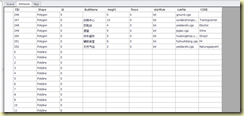
Arc Engiene读取文档的属性
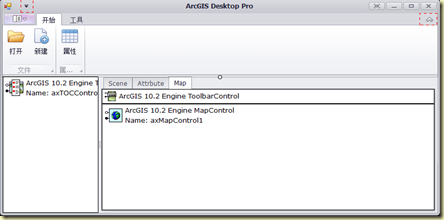
设计界面
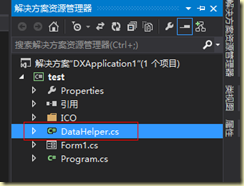
创建类
代码如下
using System;


using System.Collections.Generic;


using System.Linq;


using System.Text;


using System.Threading.Tasks;


using ESRI.ArcGIS.Controls;


using System.Data;


using ESRI.ArcGIS.Carto;


using ESRI.ArcGIS.Geodatabase;


using ESRI.ArcGIS.Geometry;


namespace test


{


   public class DataHelper


    {


        #region 读取mapControl属性表


        public static DataTable GetAttribute(AxMapControl axMapControl)


        {


            int layerCount = axMapControl.Map.LayerCount;


           // IFeature pFeature;


            string fieldName=string.Empty;


            int fieldCount;


            bool firstThroght=true;


            DataTable dataTable = new DataTable();


            //循环图层得到每一层的数据


            for (int l = 0; l < layerCount; l++)


            {


                IFeatureLayer pFeatureLayer = axMapControl.Map.get_Layer(l) as IFeatureLayer;


                IFeatureClass pFeatureClass = pFeatureLayer.FeatureClass;


                fieldCount = pFeatureClass.Fields.FieldCount;


                int featureCount = pFeatureClass.FeatureCount(new QueryFilterClass());


                if (firstThroght)


                {


                    for (int i = 0; i < fieldCount; i++)


                    {


                        string fieldHeadName = pFeatureClass.Fields.get_Field(i).AliasName;


                        dataTable.Columns.Add(fieldHeadName);


                    }


                    firstThroght = false;


                }


                //判断feature的类型


                int indexofShape = pFeatureClass.FindField("Shape");


                ESRI.ArcGIS.Geometry.esriGeometryType pFeatureClassShapeType = pFeatureClass.ShapeType;


                for (int i = 0; i < featureCount; i++)


                {


                    DataRow dataRow = dataTable.NewRow();


                    for (int j = 0; j < fieldCount; j++)


                    {


                        if (j == indexofShape)


                        {


                            //Geometroy.shapetype转换


                            switch (pFeatureClassShapeType)


                            {


                                case esriGeometryType.esriGeometryPoint:


                                    fieldName = "Point";


                                    break;


                                case esriGeometryType.esriGeometryPolyline:


                                    fieldName = "Polyline";


                                    break;


                                case esriGeometryType.esriGeometryPolygon:


                                    fieldName = "Polygon";


                                    break;


                                default:


                                    break;


                            }


                            // fieldName = pFeatureClass.GetFeature(i).get_Value(j).ToString();


                            //dataTable.Columns.Add(fieldName);


                            dataRow[j] = fieldName;


                        }


                        else


                        {


                            //添加非shape字段到表中


                            fieldName = pFeatureClass.GetFeature(i).get_Value(j).ToString();


                            //dataTable.Columns.Add(fieldName);


                            dataRow[j] = fieldName;


                        }


                        //dataTable[i][j] = fieldName;


                    }


                    dataTable.Rows.Add(dataRow);


                }


            }


            return dataTable;


        }


        #endregion


    }


}
Arc Engiene读取文档的属性的更多相关文章
- 基本控件文档-UILabel属性
CHENYILONG Blog 基本控件文档-UILabel属性 Fullscreen UILabel属性技术博客http://www.cnblogs.com/ChenYilong/ 新浪微博http ...
- 基本控件文档-UITextField属性
CHENYILONG Blog 基本控件文档-UITextField属性 Fullscreen UITextField属性技术博客http://www.cnblogs.com/ChenYilong ...
- 基本控件文档-UIButton属性
CHENYILONG Blog 基本控件文档-UIButton属性 Fullscreen UIButton属性技术博客http://www.cnblogs.com/ChenYilong/ 新浪微博ht ...
- 基本控件文档-UISlider属性
CHENYILONG Blog 基本控件文档-UISlider属性 Fullscreen UISlide属性技术博客http://www.cnblogs.com/ChenYilong/ 新浪微 ...
- 基本控件文档-UISegment属性
CHENYILONG Blog 基本控件文档-UISegment属性 Fullscreen UISegment属性技术博客http://www.cnblogs.com/ChenYilong/ 新浪 ...
- 基本控件文档-UISwitch属性
CHENYILONG Blog 基本控件文档-UISwitch属性 Fullscreen UISwitch属性 技术博客http://www.cnblogs.com/ChenYilong/ 新 ...
- 基本控件文档-UIView属性
CHENYILONG Blog 基本控件文档-UIView属性 Fullscreen UIView属性技术博客http://www.cnblogs.com/ChenYilong/ 新浪微博http ...
- 解决Spring的java项目打包后执行出现“无法读取方案文档...“、“原因为 1) 无法找到文档; 2) 无法读取文档; 3) 文档的根元素不是...”问题
问题 一个用Spring建的java项目,在Eclipse或idea中运行正常,为什么打包后运行出现如下错误呢? 2019/07/10/19:04:07 WARN [main] org.springf ...
- golang mongodb (mgo)插入或读取文档的字段值为空(nil)问题解决
问题描述 当使用mgo操作mongodb时,遇到数据插入正常,但是在数据库查看时只能看到objectid被插入了:读取的时候,可以查询到记录,但是读入对象时,却所有的值均为0或者空的情况. mongo ...
随机推荐
- MAC上 nodejs express 安装
最近在MAC上搭建 nodejs环境以及安装 express 框架,遇到了一些问题,不过最后总算还是安装成功了,下面是操作步骤 1.node js 安装 访问nodejs官网进入下载mac上的安装包 ...
- 你必须知道的.NET
作者博客地址:http://www.cnblogs.com/anytao/archive/2008/04/09/anytao_insidenet_center.html 第1章 OO大智慧 1.1对象 ...
- java调用存储过程和函数
以对表test进行增,删,改,查进行说明:1.新建表test create table TEST ( TID NUMBER not null, TNAME VARCHAR2(32), TCODE VA ...
- backbone前端基础框架搭建
前端站点名为:site: 前端框架分为:css.js和img,框架的核心在js文件夹下: js中包括collections.models.views.lib和一个app入口js
- 转字符驱动实例gpio
概述: 字符设备驱动程序: 是按照字符设备要求完成的由操作系统调用的代码. 重点理解以下内容: 1. 驱动是写给操作系统的代码,它不是直接给用户层程序调用的,而是给系统调用的 2. 所以驱动要向系 ...
- phonegap ios插件开发及无限后台运行解决
1.首先开发插件:因为我的项目前需要所以要做(根据情况) 在项目的plugins文件中新建obj c文件.如 Demo,此时会产生出Demo.h和Demo.m两个文件. .h文件主要就是定义一些方法, ...
- iOS中Cell高度如何能够自动适应需要显示的内容
本文的代码例子 : "Cell行高自适应.zip" http://vdisk.weibo.com/s/Gb9Mt 下面我们来看看代码.我需要一个第三方库EGO异步下载.addtio ...
- 如何自定义Liferay 7 portal的Log in登录界面
前提: 1. Liferay portal 7 2. Liferay IDE 3.0.1 Liferay现有的工具中提供了很多修改portal的模板,以满足开发者的各种自定义需求. 修改的原理是利用M ...
- android 自定义ratingbar 图片显示不全的解决方案
在res/style中自定义评分条: <!-- 自定义评分条 --> <style name="roomRatingBar" parent="@andr ...
- 编译dubbo2.5.4时遇到的问题及解决
dubbo的官方git地址为:https://github.com/alibaba/dubbo 按照其流程进行下载及编译,遇到的问题为: 1. 执行 mvn clean install -Dmaven ...