
[iOS 多线程 & 网络 - 2.5] - 小文件上传
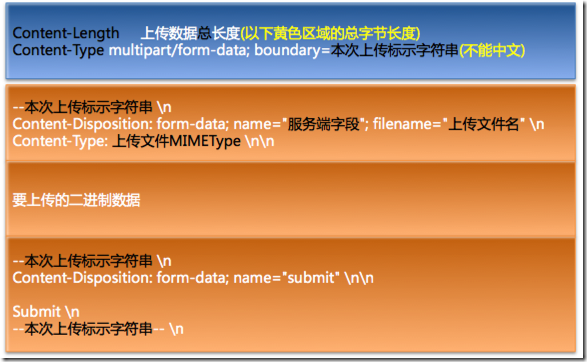
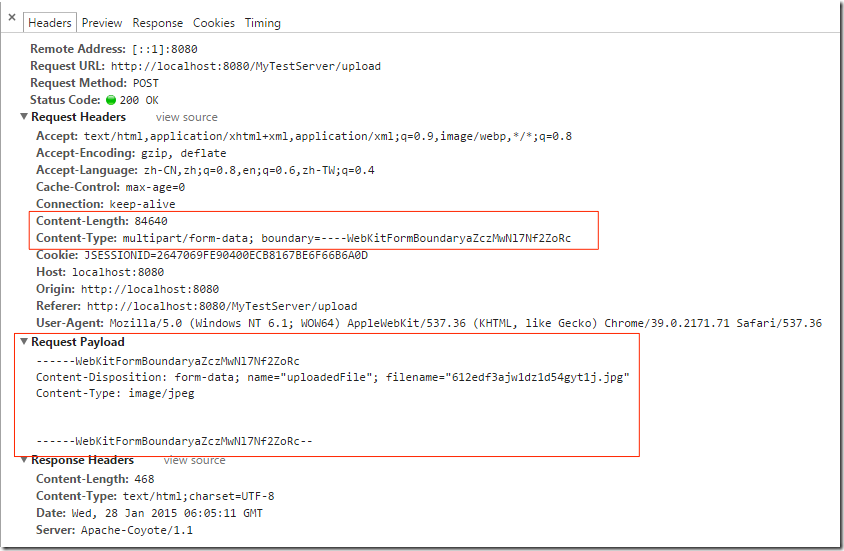
 /** 取得本地文件的MIMEType */

 - (void) getMIMEType {

     // Socket 实现断点上传

     //apache-tomcat-6.0.41/conf/web.xml 查找 文件的 mimeType

     //    UIImage *image = [UIImage imageNamed:@"test"];

     //    NSData *filedata = UIImagePNGRepresentation(image);

     //    [self upload:@"file" filename:@"test.png" mimeType:@"image/png" data:filedata parmas:@{@"username" : @"123"}];

     // 给本地文件发送一个请求

     NSURL *fileurl = [[NSBundle mainBundle] URLForResource:@"itcast.txt" withExtension:nil];

     NSURLRequest *request = [NSURLRequest requestWithURL:fileurl];

     NSURLResponse *repsonse = nil;

     NSData *data = [NSURLConnection sendSynchronousRequest:request returningResponse:&repsonse error:nil];

     // 得到mimeType

     NSLog(@"%@", repsonse.MIMEType);

     [self upload:@"file" filename:@"itcast.txt" mimeType:repsonse.MIMEType data:data parmas:@{@"username":@"tom", @"type":@"xml"}];

 }
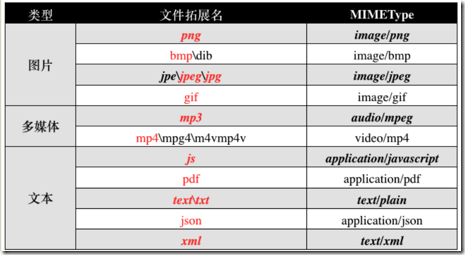
 //

 //  ViewController.m

 //  UploadFileDemo

 //

 //  Created by hellovoidworld on 15/1/28.

 //  Copyright (c) 2015年 hellovoidworld. All rights reserved.

 //

 #import "ViewController.h"

 #define UTF8Encode(str) [str dataUsingEncoding:NSUTF8StringEncoding]

 @interface ViewController ()

 - (IBAction)upload;

 @end

 @implementation ViewController

 - (void)viewDidLoad {

     [super viewDidLoad];

     // Do any additional setup after loading the view, typically from a nib.

 }

 - (void)didReceiveMemoryWarning {

     [super didReceiveMemoryWarning];

     // Dispose of any resources that can be recreated.

 }

 - (IBAction)upload {

     UIImage *image = [UIImage imageNamed:@"IMG_0413"];

     NSData *imageData = UIImagePNGRepresentation(image);

     [self upload:@"uploadedFile" filename:@"IMG_0413.PNG" mimeType:@"image/png" data:imageData parmas:nil];

 }

 - (void)upload:(NSString *)name filename:(NSString *)filename mimeType:(NSString *)mimeType data:(NSData *)data parmas:(NSDictionary *)params

 {

     // 文件上传

     NSURL *url = [NSURL URLWithString:@"http://192.168.0.21:8080/MyTestServer/upload"];

     NSMutableURLRequest *request = [NSMutableURLRequest requestWithURL:url];

     request.HTTPMethod = @"POST";

     // 设置请求体

     NSMutableData *body = [NSMutableData data];

     /***************文件参数***************/

     // 参数开始的标志

     [body appendData:UTF8Encode(@"--HelloVoidWorldBoundary\r\n")];

     // name : 指定参数名(必须跟服务器端保持一致)

     // filename : 文件名

     NSString *disposition = [NSString stringWithFormat:@"Content-Disposition: form-data; name=\"%@\"; filename=\"%@\"\r\n", name, filename];

     [body appendData:UTF8Encode(disposition)];

     NSString *type = [NSString stringWithFormat:@"Content-Type: %@\r\n", mimeType];

     [body appendData:UTF8Encode(type)];

     [body appendData:UTF8Encode(@"\r\n")];

     [body appendData:data];

     [body appendData:UTF8Encode(@"\r\n")];

     /***************普通参数***************/

     [params enumerateKeysAndObjectsUsingBlock:^(id key, id obj, BOOL *stop) {

         // 参数开始的标志

         [body appendData:UTF8Encode(@"--HelloVoidWorldBoundary\r\n")];

         NSString *disposition = [NSString stringWithFormat:@"Content-Disposition: form-data; name=\"%@\"\r\n", key];

         [body appendData:UTF8Encode(disposition)];

         [body appendData:UTF8Encode(@"\r\n")];

         [body appendData:UTF8Encode(obj)];

         [body appendData:UTF8Encode(@"\r\n")];

     }];

     /***************参数结束***************/

     // HelloVoidWorldBoundary--\r\n

     [body appendData:UTF8Encode(@"--HelloVoidWorldBoundary--\r\n")];

     request.HTTPBody = body;

     // 设置请求头

     // 请求体的长度

     [request setValue:[NSString stringWithFormat:@"%zd", body.length] forHTTPHeaderField:@"Content-Length"];

     // 声明这个POST请求是个文件上传

     [request setValue:@"multipart/form-data; boundary=HelloVoidWorldBoundary" forHTTPHeaderField:@"Content-Type"];

     // 发送请求

     [NSURLConnection sendAsynchronousRequest:request queue:[NSOperationQueue mainQueue] completionHandler:^(NSURLResponse *response, NSData *data, NSError *connectionError) {

         NSLog(@"开始上传~~~");

         if (data) {

             NSDictionary *dict = [NSJSONSerialization JSONObjectWithData:data options:NSJSONReadingMutableLeaves error:nil];

             NSLog(@"%@", dict);

         } else {

             NSLog(@"上传失败");

         }

     }];

 }

 /** 取得本地文件的MIMEType */

 - (void) getMIMEType {

     // Socket 实现断点上传

     //apache-tomcat-6.0.41/conf/web.xml 查找 文件的 mimeType

     //    UIImage *image = [UIImage imageNamed:@"test"];

     //    NSData *filedata = UIImagePNGRepresentation(image);

     //    [self upload:@"file" filename:@"test.png" mimeType:@"image/png" data:filedata parmas:@{@"username" : @"123"}];

     // 给本地文件发送一个请求

     NSURL *fileurl = [[NSBundle mainBundle] URLForResource:@"itcast.txt" withExtension:nil];

     NSURLRequest *request = [NSURLRequest requestWithURL:fileurl];

     NSURLResponse *repsonse = nil;

     NSData *data = [NSURLConnection sendSynchronousRequest:request returningResponse:&repsonse error:nil];

     // 得到mimeType

     NSLog(@"%@", repsonse.MIMEType);

     [self upload:@"file" filename:@"itcast.txt" mimeType:repsonse.MIMEType data:data parmas:@{@"username":@"tom", @"type":@"xml"}];

 }

 @end
[iOS 多线程 & 网络 - 2.5] - 小文件上传的更多相关文章
- iOS多线程与网络开发之小文件上传
郝萌主倾心贡献,尊重作者的劳动成果,请勿转载. /** 取得本地文件的MIMEType */ 2 - (void) getMIMEType { 3 // Socket 实现断点上传 4 5 //apa ...
- [iOS 多线程 & 网络 - 2.11] - ASI框架上传文件
A.ASI的上传功能基本使用 1.实现步骤 (1)创建请求 使用ASIFormDataRequest (2)设置上传文件路径 (3)发送请求 2.上传相册相片 UIImagePickerCon ...
- [iOS 多线程 & 网络 - 2.6] - 使用POST上传JSON数据 & 多值参数
A.上传JSON 1.思路: 必须使用POST方法才能上传大量JSON数据 设置请求头:设置Content-Type 设置请求体,JSON实际相当于字典,可以用NSDictionary NSJSONS ...
- 阿里云 oss 小文件上传进度显示
对阿里云OSS上传小文件时的进度,想过两个方法:一是.通过多线程监測Inputstream剩余的字节数来计算,可是由于Inputstream在两个线程中共用,假设上传线程将Inputstream关闭, ...
- iOS分享 - AFNetworking之多图片/文件上传
在分享经验之前,先说点题外话,之前的一个项目涉及到了多图片的上传,本来以为是一个很简单的事情,却着实困扰了我好久,究其原因,一是我不够细心,二是与后台人员的交流不够充分.在此,我想将我的老师常说的一句 ...
- ASP.NET访问网络映射盘&实现文件上传读取功能
最近在改Web的时候,遇到一个问题,要跨机器访问共享文件夹,以实现文件正常上传下载功能. 要实现该功能,可以采用HTTP的方式,也可以使用网络映射磁盘的方式,今天主要给大家分享一下使用网络映射磁盘的方 ...
- 【iOS】OC-AFNetworking 2.0 跟踪文件上传进度
我是较新的 AFNetworking 2.0.使用下面的代码片段,我已经能够成功地将一张照片上传到我的 url.我想要跟踪的增量上载进度,但我找不到这样做 2.0 版的示例.我的应用程序是 iOS 7 ...
- JavaScript实现拖拽预览,AJAX小文件上传
本地上传,提前预览(图片,视频) 1.html中div标签预览显示,button标签触发上传事件. <div id="drop_area" style="bord ...
- Bottle + WebUploader 修改Bottle框架从而大文件上传实现方案
Bottle 是个轻量级的Web框架,小巧又强大,真不愧是个轻量级的框架.可扩展性非常好,可以扩展很多功能,但是有些功能就不得不自己动手修改了. Bottle:http://www.bottlepy. ...
随机推荐
- new int[]和new int()的区别
1. new int[] 是创建一个int型数组,数组大小是在[]中指定,例如:int * p = new int[10]; //p执行一个长度为10的int数组.2. new int()是创建一个i ...
- Codeforces 4538 (状态压缩dp)Little Pony and Harmony Chest
Little Pony and Harmony Chest 经典状态压缩dp #include <cstdio> #include <cstring> #include < ...
- js 时间转成时间戳对比;My97DatePicker日历控件时间格式;Date.parse Firefox火狐浏览器返回Nan的解决办法
有个情况,我在显示时间的时候是需要显示为 2013年8月15日 14时28分15秒 但是假如我用js去获取到这个时间,并且想进行时间对比的时候,这个时间2013年8月15日 14时28分15秒根本就 ...
- [反汇编练习] 160个CrackMe之009
[反汇编练习] 160个CrackMe之009. 本系列文章的目的是从一个没有任何经验的新手的角度(其实就是我自己),一步步尝试将160个CrackMe全部破解,如果可以,通过任何方式写出一个类似于注 ...
- WDF模型驱动程序开发
WDF驱动程序开发 1. 引言 设备驱动程序是硬件设备连接到计算机系统的软件接口,任何设备都必须有相应的驱动程序才能在计算机系统上正常工作.设备驱动程序的优劣直接关系到整个系统的性能和稳定性,因此,设 ...
- UVA 11806 Cheerleaders (容斥原理)
题意 一个n*m的区域内,放k个啦啦队员,第一行,最后一行,第一列,最后一列一定要放,一共有多少种方法. 思路 设A1表示第一行放,A2表示最后一行放,A3表示第一列放,A4表示最后一列放,则要求|A ...
- LeetCode Reverse Linked List (反置链表)
题意: 将单恋表反转. 思路: 两种方法:迭代和递归. 递归 /** * Definition for singly-linked list. * struct ListNode { * int va ...
- django - get_or_create() 使用提醒
[omron - debug] user_id建表的时候,不能使用unique,因为一个用户,可能有多个product_id,相对应的是,get_or_create()中的查询参数,如果在建表中有un ...
- 【C#学习笔记】smtp发邮件
using System; using System.Net; using System.Net.Mail; using System.Text; namespace ConsoleApplicati ...
- OutputCache缓存各参数的说明
Duration 缓存时间,以秒为单位,这个除非你的Location=None,可以不添加此属性,其余时候都是必须的. Location Location当被设置为None时,其余的任何设置将不起作用 ...