
IOS开发UI篇之tableView 的用法详解
1.我们知道tableView是IOS中的高级视图,其继承与ScrollView,故我们知道他有具有ScrollView的所有功能。而且还扩展了许多。当然在这里就不一一介绍了。
2.tableView的表现格式分两种Plain和Grouped两种风格
3.tableView的两种代理类delegate和dataSource.这两种代理至关重要,我们在做tableView和这些代理是分不开的。
4.代理中比较常用的代理方法:
(1)dataSource的两个必须使用的代理
@required
//显示UITableView的Cell的个数
- (NSInteger)tableView:(UITableView *)tableView numberOfRowsInSection:(NSInteger)section
//Cell和model的数据的交互
- (UITableViewCell *)tableView:(UITableView *)tableView cellForRowAtIndexPath:(NSIndexPath *)indexPath
(2)delegate的常用代理方法
@optional
//用于设定tableView的高度
- (CGFloat)tableView:(UITableView *)tableView heightForRowAtIndexPath:(NSIndexPath *)indexPath
//当选中Cell时候调用的方法
- (void)tableView:(UITableView *)tableView didSelectRowAtIndexPath:(NSIndexPath *)indexPath
4.一般来说这四个代理已经能够处理函数tableView没有问题了,但是有时我们在做tableView时候,tableView的第一个Cell或者最后一个Cell和其他Cell不同,所以我们有可能用到下面的两个函数
//给tableview头的Cell和Model的数据交互
- (UIView *)tableView:(UITableView *)tableView viewForHeaderInSection:(NSInteger)section
//定义tableView的头部的高度
- (CGFloat)tableView:(UITableView *)tableView heightForHeaderInSection:(NSInteger)section
//给tableview尾部的Cell和Model的数据交互
- (UIView *)tableView:(UITableView *)tableView viewForFooterInSection:(NSInteger)section
//定义tableView的尾部的高度
- (CGFloat)tableView:(UITableView *)tableView heightForFooterInSection:(NSInteger)section
5.还有一种方法,应为tableView的对象自带的有这两个属性
例如:
ableView的对象自带的有这两个属性的属性要注意的是他接收的对象UIView
//截图
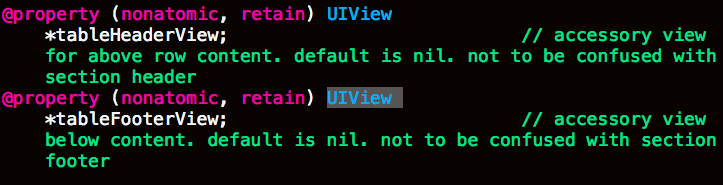
self.tableView.tableFooterView
self.tableView.tableHeaderView
以上基本上就可以做出完整的tableView了。那下面我们看一看tableView的扩展吧
6.我们知道tableView继承于scrollview,但是scrollView有时候加载过多的东西时候使用内存较大,会导致手机卡死;这时候我们一般有三个方法解决,一,重用scrollView 二,使用瀑布流 三,使用横向tableView
使用横向tableView:
一下例子只是我从工程中取出来的文件,可能运行不了,但是可以借鉴其步骤
其中代理函数不会发生改变,但是其中心和Frame都要发生改变
Frame需要X与Y 宽度和长度都要反过来
横向tableView主要有几句很重要的代码
这两句话:第一句话是将tableView横向旋转,第二句话是改变tableView中心。这两句话放在tabbleView的对象定义的时候,可见下面“设置界面”代码
table.transform = CGAffineTransformMakeRotation(- M_PI / 2);
table.center = CGPointMake(self.view.frame.size.width / 2 , self.view.frame.size.height / 2 + 30);
这一句话是放在Cell和Model数据交互中,其作用是将Cell也横向旋转
cell.contentView.transform = CGAffineTransformMakeRotation(M_PI / 2);
//设置界面

- (void) SettingsView

{

    self.tableViewX = [[UITableView alloc] initWithFrame:CGRectMake(, , HEIGHT -, WIDTH)];

    self.tableViewX.transform = CGAffineTransformMakeRotation(- M_PI / );

    self.tableViewX.center = CGPointMake(WIDTH /  , (HEIGHT + ) / + );

    self.tableViewX.dataSource =self;

    self.tableViewX.delegate = self;

    self.tableViewX.pagingEnabled = YES;

    self.tableViewX.showsVerticalScrollIndicator= NO;

    self.tableViewX.bounces = YES;

    [self.view addSubview:self.tableViewX];

}

//显示有几个Cell

- (NSInteger)tableView:(UITableView *)tableView numberOfRowsInSection:(NSInteger)section

{

    return ;

}

//数据交互

- (UITableViewCell *)tableView:(UITableView *)tableView cellForRowAtIndexPath:(NSIndexPath *)indexPath

{

    //数据

    NSArray * newpho = allNewsarray[];

    NSArray * newarr = allNewsarray[];

    NSDictionary * newsPhotosDic = newpho[indexPath.row];

    NSDictionary * newsdic = newarr[indexPath.row];

    NSArray * photos = [newsPhotosDic objectForKey:@"data"];

    NSString * identifier = [NSString stringWithFormat:@"Cell%lu",indexPath.row];

    YZXViewCellX * Cell = [tableView dequeueReusableCellWithIdentifier:identifier];

    if (Cell == nil)

    {

        Cell = [[YZXViewCellX alloc] initWithStyle:UITableViewCellStyleDefault reuseIdentifier:identifier andArray:photos];

    }

    Cell.nowArray = [newsdic objectForKey:@"data"];

    Cell.PhotoArray = [newsPhotosDic objectForKey:@"data"];

    NSLog(@"+++++++++++++++%lu %lu",Cell.nowArray.count, Cell.PhotoArray.count);

    Cell.contentView.transform = CGAffineTransformMakeRotation(M_PI / );

    Cell.block = ^(YZXViewCellX * newCell, newsList * aa)

    {

        NSLog(@"详情");

        DetailedNewsController * det = [[DetailedNewsController alloc] init];

        det.New = aa;

        [self.navigationController pushViewController:det animated:YES];

    };

    return Cell;

}

//因为横向tableView代替scroll故,高度为屏幕宽度

- (CGFloat)tableView:(UITableView *)tableView heightForRowAtIndexPath:(NSIndexPath *)indexPath

{

    return WIDTH;

}
IOS开发UI篇之tableView 的用法详解的更多相关文章
- iOS开发UI篇 -- UISearchBar 属性、方法详解及应用(自定义搜索框样式)
很多APP都会涉及到搜索框,苹果也为我们提供了默认的搜索框UISearchBar.但实际项目中我们通常需要更改系统默认搜索框的样式.为了实现这一目标,我们需要先搞懂 UISearchBar 的属性及方 ...
- iOS开发UI篇-实现tableView的层级显示
进来要实现一个tableView 的cell层级显示,网上找的思路都各不相同.下面说一下我的实现思路. 根据根标题存储cell的展开状态,添加到字典中. 话不多说,直接上代码. #define S ...
- ios开发 <AppName>-Prefix.pch文件的用法详解
我们知道,每新建立一个工程,比如说HelloWord,在分类SupportingFiles里都会有一个以工程名开头-Prefix.pch结尾的文件,如HelloWord-Prefix.pch.对于这个 ...
- iOS开发UI篇—iPad开发中得modal介绍
iOS开发UI篇—iPad开发中得modal介绍 一.简单介绍 说明1: 在iPhone开发中,Modal是一种常见的切换控制器的方式 默认是从屏幕底部往上弹出,直到完全盖住后面的内容为止 说明2: ...
- ios开发UI篇—使用纯代码自定义UItableviewcell实现一个简单的微博界面布局
本文转自 :http://www.cnblogs.com/wendingding/p/3761730.html ios开发UI篇—使用纯代码自定义UItableviewcell实现一个简单的微博界面布 ...
- iOS开发UI篇—Kvc简单介绍
ios开发UI篇—Kvc简单介绍 一.KVC简单介绍 KVC key valued coding 键值编码 KVC通过键值间接编码 补充: 与KVC相对的时KVO,即key valued observ ...
- iOS开发UI篇—UITableview控件简单介绍
iOS开发UI篇—UITableview控件简单介绍 一.基本介绍 在众多移动应⽤用中,能看到各式各样的表格数据 . 在iOS中,要实现表格数据展示,最常用的做法就是使用UITableView,UIT ...
- iOS开发UI篇—UITableview控件基本使用
iOS开发UI篇—UITableview控件基本使用 一.一个简单的英雄展示程序 NJHero.h文件代码(字典转模型) #import <Foundation/Foundation.h> ...
- iOS开发UI篇—UITableviewcell的性能优化和缓存机制
iOS开发UI篇—UITableviewcell的性能问题 一.UITableviewcell的一些介绍 UITableView的每一行都是一个UITableViewCell,通过dataSource ...
随机推荐
- POJ 1947 Rebuilding Roads (树dp + 背包思想)
题目链接:http://poj.org/problem?id=1947 一共有n个节点,要求减去最少的边,行号剩下p个节点.问你去掉的最少边数. dp[u][j]表示u为子树根,且得到j个节点最少减去 ...
- Domino 迁移到Exchange 服务器 之在Domino Server 创建用户!
我们打开Lotus Admin,导航到注册,点击到需要设置的人,然后再选择验证者标识符选择相应的组织配置标识符:
- poj1061 青蛙的约会 扩展欧几里德的应用
这个题解得改一下,开始接触数论,这道题目一开始是看了别人的思路做的,后来我又继续以这种方法去做题,发现很困难,学长告诉我先看书,把各种词的定义看懂了,再好好学习,我做了几道朴素的欧几里德,尽管是小学生 ...
- c++中智能输出文件
首先我们要为每一时间步,设置一个文件名: ] = "; itoa(time,timestr,); std::string s; s += timestr; std::string path ...
- XGrid绑定(转)
using System; using System.Collections.Generic; using System.ComponentModel; using System.Windows.Fo ...
- MySQL 4种日志
- Codeforces Beta Round #6 (Div. 2 Only) E. Exposition multiset
E. Exposition Time Limit: 20 Sec Memory Limit: 256 MB 题目连接 http://codeforces.com/problemset/problem/ ...
- Codeforces Round #308 (Div. 2) D. Vanya and Triangles 水题
D. Vanya and Triangles Time Limit: 20 Sec Memory Limit: 256 MB 题目连接 http://codeforces.com/contest/55 ...
- DataInputStream和DataOutputStream使用方法细节探讨
DataInputStream和DataOutputStream都是Java中输入输出流的装饰类,用起来非常方便.今天就来讨论一下使用该类时候遇到的编码问题. package com.vince ...
- SQL Server数据库大型应用解决方案总结
随着互联网应用的广泛普及,海量数据的存储和访问成为了系统设计的瓶颈问题.对于一个大型的互联网应用,每天百万级甚至上亿的PV无疑对数据库造成了相当高的负载.对于系统的稳定性和扩展性造成了极大的问题. 一 ...