
IAR EWARM Argument variables $PROJ_DIR$ $TOOLKIT_DIR$
IAR参数变量
您可以为路径和参数使用参数变量,例如,当您在选项对话框中指定include路径时,或者当需要基于当前上下文的类似宏的扩展时,例如在工具的参数中。您可以使用广泛的预定义参数变量以及创建自己的参数变量,请参见配置自定义参数变量对话框。这些是预定义的参数变量:
| 变量 | 描述 |
|---|---|
| $COMPILER_ARGS$ | 除了在编译使用编译器时使用的文件名之外,所有编译 |
| $CONFIG_NAME$ | 当前构建配置的名称,例如Debug或者Release. |
| $CUR_DIR$ | 当前目录 |
| $CUR_LINE$ | 当前行 |
| $DATE$ | 今天的日期 |
| $EW_DIR$ | IAR Embedded Workbench的目录, 例如:c:\program files\iar systems\embedded workbench 6.n |
| $EXE_DIR$ | 可执行文件输出目录 |
| $FILE_BNAME$ | 活动文件名(不带文件扩展类型) |
| $FILE_BPATH$ | 活动文件路径+文件名(不带文件扩展类型) |
| $FILE_DIR$ | 活动文件路径(不带文件名) |
| $FILE_FNAME$ | 活动文件名(带扩展类型) |
| $FILE_PATH$ | 活动文件路径 (在编辑器、项目或消息窗口中) |
| $LIST_DIR$ | List输出目录 |
| $OBJ_DIR$ | Obj输出目录 |
| $PROJ_DIR$ | 工程目录 |
| $PROJ_FNAME$ | 项目文件名 |
| $PROJ_PATH$ | 项目文件的完整路径 |
| $TARGET_DIR$ | 主输出文件的目录 |
| $TARGET_BNAME$ | 主输出文件名(不带文件扩展类型) |
| $TARGET_BPATH$ | 主输出文件路径+文件名(不带文件扩展类型) |
| $TARGET_FNAME$ | 主输出文件名(带扩展类型) |
| $TARGET_PATH$ | 主输出文件的完整路径 |
| $TOOLKIT_DIR$ | 活动产品目录,例如:c:\program files\iar systems\embedded workbench 7.n\arm |
| $USER_NAME$ | 您的主机登录名 |
| $_ENVVAR_$ | Windows环境变量ENVVAR. $_和_$内的任何名称将扩展到该系统环境变量。 |
| $MY_CUSTOM_VAR$ | 您自己的参数变量,参见配置自定义参数变量对话框。$和$中的任何名称都将扩展到您定义的值。 |
参数变量还可以在IDE选项对话框中的一些页面上使用,参见工具菜单。
您可以对路径和参数使用参数变量,例如在“选项”对话框中指定包含路径时,或者需要依赖于当前上下文的宏类扩展,例如在工具的参数中。您可以使用各种预定义的参数变量以及创建自己的参数,请参阅配置自定义参数变量对话框。这些是预定义的参数变量:
| Variable | Description |
|---|---|
$COMPILER_ARGS$ |
All compiler options except for the filename that is used when compiling using the compiler. Note that this argument variable is restricted to the Arguments text box in the External Analyzer dialog box.所有编译器选项,除了使用编译器编译时使用的文件名。请注意,此参数变量仅限于“外部分析器”对话框中的“参数”文本框。 |
$CONFIG_NAME$ |
The name of the current build configuration, for example Debug or Release.所有编译器选项,除了使用编译器编译时使用的文件名。请注意,此参数变量仅限于“外部分析器”对话框中的“参数”文本框。 |
$CUR_DIR$ |
Current directory.当前目录 |
$CUR_LINE$ |
Current line当前行 |
$DATE$ |
Today’s date今天的日期 |
$EW_DIR$ |
Top directory of IAR Embedded Workbench, for example c:\Program Files\IAR Systems\Embedded Workbench N.n IAR Embedded Workbench的顶级目录,例如c:\ Program Files \ IAR Systems \ Embedded Workbench N.n |
$EXE_DIR$ |
Directory for executable output可执行输出目录 |
$FILE_BNAME$ |
Filename without extension无扩展名的文件名 |
$FILE_BPATH$ |
Full path without extension全路径无延伸 |
$FILE_DIR$ |
Directory of active file, no filename灵活文件目录,无文件名 |
$FILE_FNAME$ |
Filename of active file without path没有路径的活动文件的文件名 |
$FILE_PATH$ |
Full path of active file (in Editor, Project, or Message window)活动文件的完整路径(在编辑器,项目或消息窗口中) |
$LIST_DIR$ |
Directory for list output列表输出目录 |
$OBJ_DIR$ |
Directory for object output目标输出目录 |
$PROJ_DIR$ |
Project directory项目目录 |
$PROJ_FNAME$ |
Project filename without path没有路径的项目文件名 |
$PROJ_PATH$ |
Full path of project file项目文件的完整路径 |
$TARGET_DIR$ |
Directory of primary output file主输出文件目录 |
$TARGET_BNAME$ |
Filename without path of primary output file and without extension文件名无路径的主输出文件,无扩展名 |
$TARGET_BPATH$ |
Full path of primary output file without extension主要输出文件的完整路径,无需扩展 |
$TARGET_FNAME$ |
Filename without path of primary output file没有主输出文件路径的文件名 |
$TARGET_PATH$ |
Full path of primary output file主输出文件的完整路径 |
$TOOLKIT_DIR$ |
Directory of the active product, for example c:\Program Files\IAR Systems\Embedded Workbench N.n\arm活动产品的目录,例如c:\ Program Files \ IAR Systems \ Embedded Workbench N.n \ arm |
$USER_NAME$ |
Your host login name您的主机登录名 |
$WS_DIR$ |
The active workspace directory (only available in the IDE, not when using iarbuild.exe or cspybat.exe)活动工作区目录(仅在IDE中可用,而不是使用iarbuild.exe或cspybat.exe时) |
$_ENVVAR_$ |
The Windows environment variable ENVVAR. Any name within $_ and _$ will be expanded to that system environment variable.Windows环境变量ENVVAR。 $ _和_ $中的任何名称都将扩展到该系统环境变量。 |
$MY_CUSTOM_VAR$ |
Your own argument variable, see Configure Custom Argument Variables dialog box. Any name within $ and $ will be expanded to the value you have defined.您自己的参数变量,请参阅配置自定义参数变量对话框。 和和中的任何名称将被扩展为您定义的值。 |
在IAR中的help中输入argument variables时会找到这样的一个列表:
|
Variable
|
Description
|
|
$CONFIG_NAME$
|
The name of the current build configuration, for example Debug or Release.
|
|
$CUR_DIR$
|
Current directory //当前目录
|
|
$CUR_LINE$
|
Current line //当前行
|
|
$DATE$
|
Today’s date
|
|
$EW_DIR$
|
Top directory of IAR Embedded Workbench, for example c:\program files\iar systems\embedded workbench 6.n //EW的安装目录
|
|
$EXE_DIR$
|
Directory for executable output //可执行文件的输出目录
|
|
$FILE_BNAME$
|
Filename without extension //无扩展名文件
|
|
$FILE_BPATH$
|
Full path without extension //无扩展名全部路径
|
|
$FILE_DIR$
|
Directory of active file, no filename //当前活动文件目录,不包含文件名
|
|
$FILE_FNAME$
|
Filename of active file without path //当前活动文件,不包含路径
|
|
$FILE_PATH$
|
Full path of active file (in Editor, Project, or Message window) //当前活动文件的完整路径
|
|
$LIST_DIR$
|
Directory for list output //列表文件的输出路径
|
|
$OBJ_DIR$
|
Directory for object output //目标文件输出路径
|
|
$PROJ_DIR$
|
Project directory //工程目录
|
|
$PROJ_FNAME$
|
Project filename without path //工程名称 不包含路径
|
|
$PROJ_PATH$
|
Full path of project file //工程文件的完整路径
|
|
$TARGET_DIR$
|
Directory of primary output file //主输出文件路径
|
|
$TARGET_BNAME$
|
Filename without path of primary output file and without extension //无主输出文件目录,无扩展名的文件名
|
|
$TARGET_BPATH$
|
Full path of primary output file without extension //无扩展名的主输出文件的完整路径
|
|
$TARGET_FNAME$
|
Filename without path of primary output file //无路径的主输出文件名
|
|
$TARGET_PATH$
|
Full path of primary output file //主输出文件的完整路径
|
|
$TOOLKIT_DIR$
|
Directory of the active product, for example c:\program files\iar systems\embedded workbench 6.n\arm //已激活的开发环境的目录
|
|
$USER_NAME$
|
Your host login name
|
|
$_ENVVAR_$
|
The environment variable ENVVAR. Any name within $_ and _$ will be expanded to that system environment variable.
|
You can use argument variables for paths and arguments, for example when you specify
include paths in the Options dialog box. These are the available argument variables:
$COMPILER_ARGS$

All compiler options except for the filename that is used when compiling using the compiler.

Note that this argument variable is restricted to the Arguments text box in the External Analyzer dialog box.

$CONFIG_NAME$

The name of the current build configuration, for example Debug or Release.

$CUR_DIR$

Current directory

$CUR_LINE$

Current line

$DATE$

Today’s date

$EW_DIR$

Top directory of IAR Embedded Workbench, for example c:\program files\iar systems\embedded workbench 6.n

$EXE_DIR$

Directory for executable output

$FILE_BNAME$

Filename without extension

$FILE_BPATH$

Full path without extension

$FILE_DIR$

Directory of active file, no filename

$FILE_FNAME$

Filename of active file without path

$FILE_PATH$

Full path of active file (in Editor, Project, or Message window)

$LIST_DIR$

Directory for list output

$OBJ_DIR$

Directory for object output

$PROJ_DIR$

Project directory

$PROJ_FNAME$

Project filename without path

$PROJ_PATH$

Full path of project file

$TARGET_DIR$

Directory of primary output file

$TARGET_BNAME$

Filename without path of primary output file and without extension

$TARGET_BPATH$

Full path of primary output file without extension

$TARGET_FNAME$

Filename without path of primary output file

$TARGET_PATH$

Full path of primary output file

$TOOLKIT_DIR$

Directory of the active product, for example c:\program files\iar systems\embedded workbench 6.n\arm

$USER_NAME$

Your host login name

$_ENVVAR_$

The environment variable ENVVAR. Any name within
$COMPILER_ARGS$
All compiler options except for the filename that is used when compiling using the compiler.
Note that this argument variable is restricted to the Arguments text box in the External Analyzer dialog box.
$CONFIG_NAME$
The name of the current build configuration, for example Debug or Release.
$CUR_DIR$
Current directory
$CUR_LINE$
Current line
$DATE$
Today’s date
$EW_DIR$
Top directory of IAR Embedded Workbench, for example c:\Program Files\IAR Systems\Embedded Workbench N.n
$PROJ_DIR$
Project directory
$EXE_DIR$
Directory for executable output
$LIST_DIR$
Directory for list output
$OBJ_DIR$
Directory for object output
$FILE_BNAME$
Filename without extension
$FILE_BPATH$
Full path without extension
$FILE_DIR$
Directory of active file, no filename
$FILE_FNAME$
Filename of active file without path
$FILE_PATH$
Full path of active file (in editor, project, or message window)
$PROJ_FNAME$
Project filename without path
$PROJ_PATH$
Full path of project file
$TARGET_DIR$
Directory of primary output file
$TARGET_BNAME$
Filename without path of primary output file and without extension
$TARGET_BPATH$
Full path of primary output file without extension
$TARGET_FNAME$
Filename without path of primary output file
$TARGET_PATH$
Full path of primary output file
$TOOLKIT_DIR$
Directory of the active product, for example c:\Program Files\IAR Systems\Embedded Workbench N.n\arm
$USER_NAME$
Your host login name
$WS_DIR$
The active workspace directory (only available in the IDE, not when using iarbuild.exe or cspybat.exe)
$_ENVVAR_$
The Windows environment variable ENVVAR. Any name within $_ and _$ will be expanded to that system environment variable.
$MY_CUSTOM_VAR$
Your own argument variable, see Configure Custom Argument Variables dialog box, page 87.
Any name within $ and $ will be expanded to the value you have defined.
The Configure Custom Argument Variables dialog box is available from the Tools menu.
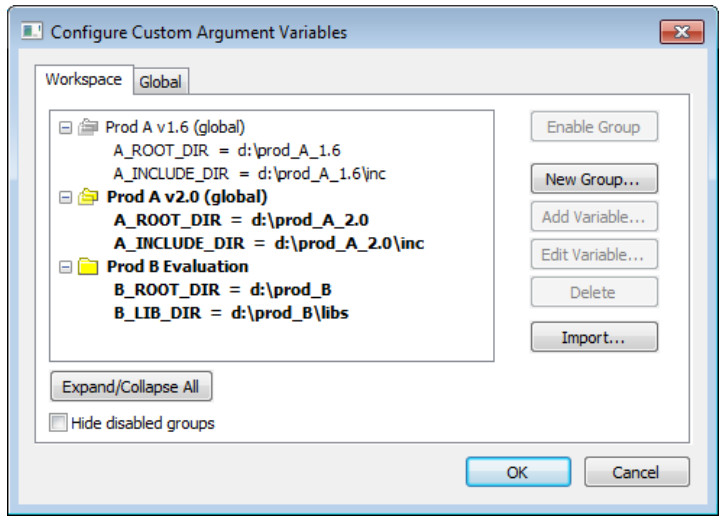
Use this dialog box to define and edit your own custom argument variables.
Typically, this can be useful if you install a third-party product and want to specify its include directory by using argument variables.
Custom argument variables can also be used for simplifying references to files that you want to be part of your project.
Custom argument variables have one of two different scopes:
● Workspace-local variables, which are associated with a specific workspace
and can only be seen by the workspace that was loaded when the variables were created.
● Global variables, which are available for use in all workspaces
You can organize your variables in named groups
随机推荐
- 最全的PHP开发Android应用程序
第一部分是指在Android系统的手机上直接写PHP脚本代码并立即运行: 第二部分则继续讲解如何把写好的PHP脚本代码打包成akp安装文件. 首先,在手机上安装两个apk包. 一个是SL4A(Scri ...
- getHibernateTemplate() 一直报NullPointerException 错误
原来是调用方法有误正确调用方法: ApplicationContext ctx = new ClassPathXmlApplicationContext("applicationContex ...
- 360网站卫士推出google字体加速方案
最近,有网友反映称谷歌官网域名google.com.谷歌香港google.com.hk都打不开, ping了一下google.com和google.com.hk两个域名的服务器情况,最后ping出来的 ...
- new 动态分配数组空间 .xml
pre{ line-height:1; color:#3c3c3c; background-color:#d2c39b; font-size:16px;}.sysFunc{color:#627cf6; ...
- OpenGl从零开始之坐标变换(上)
坐标变换是深入理解三维世界的基础,非常重要.学习这部分首先要清楚几个概念:视点变换.模型变换.投影变换.视口变换. 在现实世界中,所有的物体都具有三维特征,但计算机本身只能处理数字,显示二维的图形,因 ...
- Page 63-64 Exercises 2.3.7 -------Introduction to Software Testing (Paul Ammann and Jeff Offutt)
Use the following method printPrimes() for question a-d below //Find and prints n prime integers pri ...
- 【LeetCode】107 - Binary Tree Level Order Traversal II
Given a binary tree, return the bottom-up level order traversal of its nodes' values. (ie, from left ...
- BITED-Windows8应用开发学习札记之三:如何在Win8应用中实现数据绑定
在微软官方提供的资源中,我们可以看到SampleDataSource.cs已经拥有了定义好了相应的数据结构以及实现类: 建立本地数据 由于我们已经有数据以及相应的数据类,我们需要做的仅仅是将数据放进数 ...
- AutoCompleteTextView使用 监听
AutoCompleteTextView使用 An editable text view that shows completion suggestions automatically while t ...
- 200 OK (from cache) 与 304 Not Modified
解释: 200 OK (from cache) 是浏览器没有跟服务器确认,直接用了浏览器缓存: 304 Not Modified 是浏览器和服务器多确认了一次缓存有效性,再用的缓存. 触发区别: 2 ...