
IAR EWARM Argument variables $PROJ_DIR$ $TOOLKIT_DIR$
IAR参数变量
您可以为路径和参数使用参数变量,例如,当您在选项对话框中指定include路径时,或者当需要基于当前上下文的类似宏的扩展时,例如在工具的参数中。您可以使用广泛的预定义参数变量以及创建自己的参数变量,请参见配置自定义参数变量对话框。这些是预定义的参数变量:
| 变量 | 描述 |
|---|---|
| $COMPILER_ARGS$ | 除了在编译使用编译器时使用的文件名之外,所有编译 |
| $CONFIG_NAME$ | 当前构建配置的名称,例如Debug或者Release. |
| $CUR_DIR$ | 当前目录 |
| $CUR_LINE$ | 当前行 |
| $DATE$ | 今天的日期 |
| $EW_DIR$ | IAR Embedded Workbench的目录, 例如:c:\program files\iar systems\embedded workbench 6.n |
| $EXE_DIR$ | 可执行文件输出目录 |
| $FILE_BNAME$ | 活动文件名(不带文件扩展类型) |
| $FILE_BPATH$ | 活动文件路径+文件名(不带文件扩展类型) |
| $FILE_DIR$ | 活动文件路径(不带文件名) |
| $FILE_FNAME$ | 活动文件名(带扩展类型) |
| $FILE_PATH$ | 活动文件路径 (在编辑器、项目或消息窗口中) |
| $LIST_DIR$ | List输出目录 |
| $OBJ_DIR$ | Obj输出目录 |
| $PROJ_DIR$ | 工程目录 |
| $PROJ_FNAME$ | 项目文件名 |
| $PROJ_PATH$ | 项目文件的完整路径 |
| $TARGET_DIR$ | 主输出文件的目录 |
| $TARGET_BNAME$ | 主输出文件名(不带文件扩展类型) |
| $TARGET_BPATH$ | 主输出文件路径+文件名(不带文件扩展类型) |
| $TARGET_FNAME$ | 主输出文件名(带扩展类型) |
| $TARGET_PATH$ | 主输出文件的完整路径 |
| $TOOLKIT_DIR$ | 活动产品目录,例如:c:\program files\iar systems\embedded workbench 7.n\arm |
| $USER_NAME$ | 您的主机登录名 |
| $_ENVVAR_$ | Windows环境变量ENVVAR. $_和_$内的任何名称将扩展到该系统环境变量。 |
| $MY_CUSTOM_VAR$ | 您自己的参数变量,参见配置自定义参数变量对话框。$和$中的任何名称都将扩展到您定义的值。 |
参数变量还可以在IDE选项对话框中的一些页面上使用,参见工具菜单。
您可以对路径和参数使用参数变量,例如在“选项”对话框中指定包含路径时,或者需要依赖于当前上下文的宏类扩展,例如在工具的参数中。您可以使用各种预定义的参数变量以及创建自己的参数,请参阅配置自定义参数变量对话框。这些是预定义的参数变量:
| Variable | Description |
|---|---|
$COMPILER_ARGS$ |
All compiler options except for the filename that is used when compiling using the compiler. Note that this argument variable is restricted to the Arguments text box in the External Analyzer dialog box.所有编译器选项,除了使用编译器编译时使用的文件名。请注意,此参数变量仅限于“外部分析器”对话框中的“参数”文本框。 |
$CONFIG_NAME$ |
The name of the current build configuration, for example Debug or Release.所有编译器选项,除了使用编译器编译时使用的文件名。请注意,此参数变量仅限于“外部分析器”对话框中的“参数”文本框。 |
$CUR_DIR$ |
Current directory.当前目录 |
$CUR_LINE$ |
Current line当前行 |
$DATE$ |
Today’s date今天的日期 |
$EW_DIR$ |
Top directory of IAR Embedded Workbench, for example c:\Program Files\IAR Systems\Embedded Workbench N.n IAR Embedded Workbench的顶级目录,例如c:\ Program Files \ IAR Systems \ Embedded Workbench N.n |
$EXE_DIR$ |
Directory for executable output可执行输出目录 |
$FILE_BNAME$ |
Filename without extension无扩展名的文件名 |
$FILE_BPATH$ |
Full path without extension全路径无延伸 |
$FILE_DIR$ |
Directory of active file, no filename灵活文件目录,无文件名 |
$FILE_FNAME$ |
Filename of active file without path没有路径的活动文件的文件名 |
$FILE_PATH$ |
Full path of active file (in Editor, Project, or Message window)活动文件的完整路径(在编辑器,项目或消息窗口中) |
$LIST_DIR$ |
Directory for list output列表输出目录 |
$OBJ_DIR$ |
Directory for object output目标输出目录 |
$PROJ_DIR$ |
Project directory项目目录 |
$PROJ_FNAME$ |
Project filename without path没有路径的项目文件名 |
$PROJ_PATH$ |
Full path of project file项目文件的完整路径 |
$TARGET_DIR$ |
Directory of primary output file主输出文件目录 |
$TARGET_BNAME$ |
Filename without path of primary output file and without extension文件名无路径的主输出文件,无扩展名 |
$TARGET_BPATH$ |
Full path of primary output file without extension主要输出文件的完整路径,无需扩展 |
$TARGET_FNAME$ |
Filename without path of primary output file没有主输出文件路径的文件名 |
$TARGET_PATH$ |
Full path of primary output file主输出文件的完整路径 |
$TOOLKIT_DIR$ |
Directory of the active product, for example c:\Program Files\IAR Systems\Embedded Workbench N.n\arm活动产品的目录,例如c:\ Program Files \ IAR Systems \ Embedded Workbench N.n \ arm |
$USER_NAME$ |
Your host login name您的主机登录名 |
$WS_DIR$ |
The active workspace directory (only available in the IDE, not when using iarbuild.exe or cspybat.exe)活动工作区目录(仅在IDE中可用,而不是使用iarbuild.exe或cspybat.exe时) |
$_ENVVAR_$ |
The Windows environment variable ENVVAR. Any name within $_ and _$ will be expanded to that system environment variable.Windows环境变量ENVVAR。 $ _和_ $中的任何名称都将扩展到该系统环境变量。 |
$MY_CUSTOM_VAR$ |
Your own argument variable, see Configure Custom Argument Variables dialog box. Any name within $ and $ will be expanded to the value you have defined.您自己的参数变量,请参阅配置自定义参数变量对话框。 和和中的任何名称将被扩展为您定义的值。 |
在IAR中的help中输入argument variables时会找到这样的一个列表:
|
Variable
|
Description
|
|
$CONFIG_NAME$
|
The name of the current build configuration, for example Debug or Release.
|
|
$CUR_DIR$
|
Current directory //当前目录
|
|
$CUR_LINE$
|
Current line //当前行
|
|
$DATE$
|
Today’s date
|
|
$EW_DIR$
|
Top directory of IAR Embedded Workbench, for example c:\program files\iar systems\embedded workbench 6.n //EW的安装目录
|
|
$EXE_DIR$
|
Directory for executable output //可执行文件的输出目录
|
|
$FILE_BNAME$
|
Filename without extension //无扩展名文件
|
|
$FILE_BPATH$
|
Full path without extension //无扩展名全部路径
|
|
$FILE_DIR$
|
Directory of active file, no filename //当前活动文件目录,不包含文件名
|
|
$FILE_FNAME$
|
Filename of active file without path //当前活动文件,不包含路径
|
|
$FILE_PATH$
|
Full path of active file (in Editor, Project, or Message window) //当前活动文件的完整路径
|
|
$LIST_DIR$
|
Directory for list output //列表文件的输出路径
|
|
$OBJ_DIR$
|
Directory for object output //目标文件输出路径
|
|
$PROJ_DIR$
|
Project directory //工程目录
|
|
$PROJ_FNAME$
|
Project filename without path //工程名称 不包含路径
|
|
$PROJ_PATH$
|
Full path of project file //工程文件的完整路径
|
|
$TARGET_DIR$
|
Directory of primary output file //主输出文件路径
|
|
$TARGET_BNAME$
|
Filename without path of primary output file and without extension //无主输出文件目录,无扩展名的文件名
|
|
$TARGET_BPATH$
|
Full path of primary output file without extension //无扩展名的主输出文件的完整路径
|
|
$TARGET_FNAME$
|
Filename without path of primary output file //无路径的主输出文件名
|
|
$TARGET_PATH$
|
Full path of primary output file //主输出文件的完整路径
|
|
$TOOLKIT_DIR$
|
Directory of the active product, for example c:\program files\iar systems\embedded workbench 6.n\arm //已激活的开发环境的目录
|
|
$USER_NAME$
|
Your host login name
|
|
$_ENVVAR_$
|
The environment variable ENVVAR. Any name within $_ and _$ will be expanded to that system environment variable.
|
You can use argument variables for paths and arguments, for example when you specify
include paths in the Options dialog box. These are the available argument variables:
$COMPILER_ARGS$

All compiler options except for the filename that is used when compiling using the compiler.

Note that this argument variable is restricted to the Arguments text box in the External Analyzer dialog box.

$CONFIG_NAME$

The name of the current build configuration, for example Debug or Release.

$CUR_DIR$

Current directory

$CUR_LINE$

Current line

$DATE$

Today’s date

$EW_DIR$

Top directory of IAR Embedded Workbench, for example c:\program files\iar systems\embedded workbench 6.n

$EXE_DIR$

Directory for executable output

$FILE_BNAME$

Filename without extension

$FILE_BPATH$

Full path without extension

$FILE_DIR$

Directory of active file, no filename

$FILE_FNAME$

Filename of active file without path

$FILE_PATH$

Full path of active file (in Editor, Project, or Message window)

$LIST_DIR$

Directory for list output

$OBJ_DIR$

Directory for object output

$PROJ_DIR$

Project directory

$PROJ_FNAME$

Project filename without path

$PROJ_PATH$

Full path of project file

$TARGET_DIR$

Directory of primary output file

$TARGET_BNAME$

Filename without path of primary output file and without extension

$TARGET_BPATH$

Full path of primary output file without extension

$TARGET_FNAME$

Filename without path of primary output file

$TARGET_PATH$

Full path of primary output file

$TOOLKIT_DIR$

Directory of the active product, for example c:\program files\iar systems\embedded workbench 6.n\arm

$USER_NAME$

Your host login name

$_ENVVAR_$

The environment variable ENVVAR. Any name within
$COMPILER_ARGS$
All compiler options except for the filename that is used when compiling using the compiler.
Note that this argument variable is restricted to the Arguments text box in the External Analyzer dialog box.
$CONFIG_NAME$
The name of the current build configuration, for example Debug or Release.
$CUR_DIR$
Current directory
$CUR_LINE$
Current line
$DATE$
Today’s date
$EW_DIR$
Top directory of IAR Embedded Workbench, for example c:\Program Files\IAR Systems\Embedded Workbench N.n
$PROJ_DIR$
Project directory
$EXE_DIR$
Directory for executable output
$LIST_DIR$
Directory for list output
$OBJ_DIR$
Directory for object output
$FILE_BNAME$
Filename without extension
$FILE_BPATH$
Full path without extension
$FILE_DIR$
Directory of active file, no filename
$FILE_FNAME$
Filename of active file without path
$FILE_PATH$
Full path of active file (in editor, project, or message window)
$PROJ_FNAME$
Project filename without path
$PROJ_PATH$
Full path of project file
$TARGET_DIR$
Directory of primary output file
$TARGET_BNAME$
Filename without path of primary output file and without extension
$TARGET_BPATH$
Full path of primary output file without extension
$TARGET_FNAME$
Filename without path of primary output file
$TARGET_PATH$
Full path of primary output file
$TOOLKIT_DIR$
Directory of the active product, for example c:\Program Files\IAR Systems\Embedded Workbench N.n\arm
$USER_NAME$
Your host login name
$WS_DIR$
The active workspace directory (only available in the IDE, not when using iarbuild.exe or cspybat.exe)
$_ENVVAR_$
The Windows environment variable ENVVAR. Any name within $_ and _$ will be expanded to that system environment variable.
$MY_CUSTOM_VAR$
Your own argument variable, see Configure Custom Argument Variables dialog box, page 87.
Any name within $ and $ will be expanded to the value you have defined.
The Configure Custom Argument Variables dialog box is available from the Tools menu.
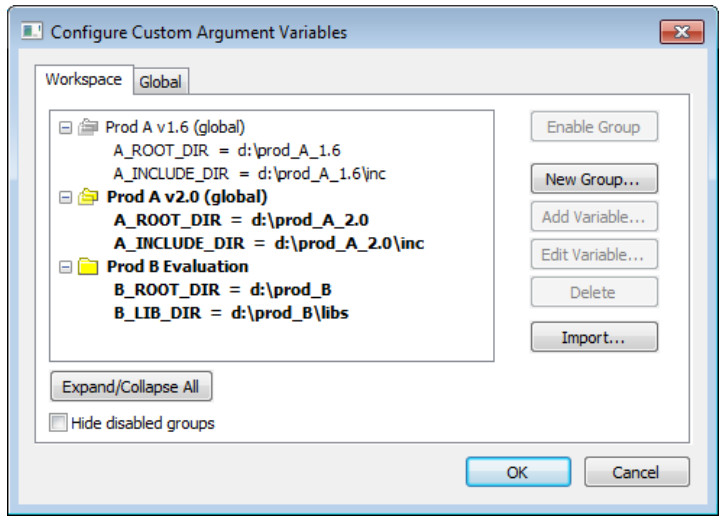
Use this dialog box to define and edit your own custom argument variables.
Typically, this can be useful if you install a third-party product and want to specify its include directory by using argument variables.
Custom argument variables can also be used for simplifying references to files that you want to be part of your project.
Custom argument variables have one of two different scopes:
● Workspace-local variables, which are associated with a specific workspace
and can only be seen by the workspace that was loaded when the variables were created.
● Global variables, which are available for use in all workspaces
You can organize your variables in named groups
随机推荐
- Bootstrap学习之路(3)---列表组件
列表是几乎所有网站都会用到的一个组件,正好bootstrap也给我们提供了这个组件的样式,下面我给大家简单介绍一下bootstrap中的列表组件的用法! 首先,重提一下引用bootstrap的核心文件 ...
- 左侧菜单 z
Dev 的tabControl
- inno setup详细使用教程
前段时间我完成了几个软件的汉化,想把它们打包起来,可是苦于我是一个很菜的鸟,很笨的瓜,只好上网找关于安装程序制作的文章.不幸我没能找到:-( 没法只好自己去华军软件园里找找制作安装程序的软件,并一把下 ...
- 在 Asp.NET MVC 中使用 SignalR 实现推送功能
一,简介Signal 是微软支持的一个运行在 Dot NET 平台上的 html websocket 框架.它出现的主要目的是实现服务器主动推送(Push)消息到客户端页面,这样客户端就不必重新发送请 ...
- python install 2.7.10
CentOS 6.5升级Python和安装IPython 后来换成了CentOS 6.5,系统自带的Python版本是2.6.6. 图一:安装IPython需求 已经安装好gcc等编译工具.系统自带P ...
- Mapreduce执行过程分析(基于Hadoop2.4)——(二)
4.3 Map类 创建Map类和map函数,map函数是org.apache.hadoop.mapreduce.Mapper类中的定义的,当处理每一个键值对的时候,都要调用一次map方法,用户需要覆写 ...
- nodejs cmd
引入系统模块 var exec = require('child_process').exec; cmd.js var exec = require('child_process').exec; va ...
- cookie一些简单的操作
cookie 保存数据 document.cookie=name+'='+value+';expires='+date; //name=shiyou ;expires=Tue Mar 08 ...
- accordion data-options iconCls
<div id="aa" class="easyui-accordion" style="width:500px;height:300px;&q ...
- 第三百二十三天 how can I 坚持
人在最绝望的时候会干啥,<进击的巨人>. 可以绝望,但一定要相信还有希望. 今天去看了<美人鱼>,确实挺好吧. 把愤怒归结于无能,其实是大错特错,愤怒是人的情绪的发泄,是人就有 ...