
EF性能调优
首先说明下:
第一次运行真是太慢了,处理9600多个员工数据,用了81分钟!!
代码也挺简单,主要是得到数据--》对比分析--》插入分析结果到数据库。用的是EF的操作模式。
  public void AllocateAllPlans()

        {

            var employees = _efWorker.EmployeeRepository.FindAll(filter: p => p.Status.Trim().ToUpper() == "ACTIVE");

            var plans = _efWorker.BenefitPlanRepository.FindAll(includeProperties: "PlanEligibility", orderBy: query => query.OrderBy(p => p.Priority), filter: p => p.Status.Trim().ToUpper() == "ACTIVE");

            if (employees == null || plans == null)

                return;

            AllocatePlanForEmployee(employees, plans);

            _efWorker.SaveChanges();

        }

        /// <summary>

        /// 根据输入员工和计划,生成PlanEntitlement以及Account初始数据

        /// </summary>

        /// <param name="employees"></param>

        /// <param name="plans"></param>

        public void AllocatePlanForEmployee(IEnumerable<Employee> employees, IEnumerable<BenefitPlan> plans)

        {

            //初始化员工积分账户,默认积分为0

            AccountingHelper accountingHelper = new AccountingHelper(_efWorker);

            foreach (var employee in employees)

            {

                //先验证业务逻辑相关基本信息

                List<string> errorMsg;

                if (!_insuredInfoValidator.ValidateEmployeeInfo(employee, out  errorMsg))

                    throw new Exception(string.Join(@"\n", errorMsg.ToArray()));

                bool joinedPlan = false;

                foreach (var plan in plans)

                {

                    var eligibilitys = plan.PlanEligibility;

                    if (_eligibilityEvaluator.MatchPlan(employee, eligibilitys))

                    {

                        //添加该员工与计划的对应数据到表PlanEntitlement

                        var planEntitlement = new PlanEntitlement

                        {

                            Id = Guid.NewGuid(),

                            PlanId = plan.Id,

                            EmployeeId = employee.Id,

                            JoinPlanDate = DateTime.Now,

                            //SelectionOpenDate = plan.SelectionOpenDate,

                            //SelectionCloseDate = plan.SelectionCloseDate,

                            Status = "ACTIVE"

                        };

                        _efWorker.PlanEntitlementRepository.Insert(planEntitlement);

                        accountingHelper.InitAccount(planEntitlement.Id, employee.Id, 0m, "EE");

                        joinedPlan = true;

                        break;//根据优先级,员工分配到一个计划就跳出计划匹配循环

                    }

                }

                if (joinedPlan == false)

                {

                    throw new Exception("Employee not match any plan,EmployeeId=" + employee.Id.ToString());

                }

            }

        }
代码写得丑,大家将就看,有什么改进建议请提出。多谢指教!
第一次优化是把查询出来的原始数据跟踪去掉:
  public IEnumerable<TEntity> FindAll(Expression<Func<TEntity, bool>> filter = null, Func<IQueryable<TEntity>, IOrderedQueryable<TEntity>> orderBy = null,

            string includeProperties = "")

        {

            IQueryable<TEntity> query = dbSet;

            if(filter!=null)

            {

                query = query.Where(filter);

            }

            foreach(var includeProperty in includeProperties.Split(new char[]{','},StringSplitOptions.RemoveEmptyEntries))

            {

                query = query.Include(includeProperty);

            }

            if(orderBy!=null)

            {

                return orderBy(query).AsQueryable().AsNoTracking().ToList();//这里之前没有添加AsNoTracking()方法

            }

            else

            {

                return query.AsQueryable().AsNoTracking().ToList();//这里之前没有添加AsNoTracking()方法

            }

        }
看注释,就改动了下获取数据集的方法,同样多的数据,执行完毕只花了12分钟。
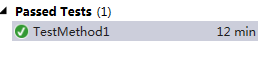
81分钟的图就不贴出来了,跑81分钟个太坑了。
12分钟还是太慢,看了各位大大的博客,于是准备再把插入数据那段优化下。
http://www.cnblogs.com/linfei721/archive/2013/06/07/3123579.html
  public void AllocateAllPlans()

        {

            var employees = _efWorker.EmployeeRepository.FindAll(filter: p => p.Status.Trim().ToUpper() == "ACTIVE");

            var plans = _efWorker.BenefitPlanRepository.FindAll(includeProperties: "PlanEligibility", orderBy: query => query.OrderBy(p => p.Priority), filter: p => p.Status.Trim().ToUpper() == "ACTIVE");

            if (employees == null || plans == null)

                return;

            _efWorker.context.Configuration.AutoDetectChangesEnabled = false;//设置不跟踪标记

            AllocatePlanForEmployee(employees, plans);

            _efWorker.SaveChanges();

        }
依葫芦画瓢,先改了试试看。
!!!果然拖拉机变灰机了。
只用了8秒,有图有真相啊。等等,先去检查下数据正确不。

看起来数据没有问题。
总结:
.AsNoTracking()和context.Configuration.AutoDetectChangesEnabled = false这两个设置都是让EF不对当前的数据集做变化跟踪,因此如果在数据集需要做更新或者删除操作时,这两个方法不能用,当然可以根据业务需求,灵活使用它们。
补充阅读:
http://www.cnblogs.com/libingql/p/3390012.html

续:
关闭跟踪虽然速度上去了,但是也留下了隐患,比如在跟踪状态下能正常保存/更新的数据,在不跟踪时却要小心处理。
这里就遇到一个
//************************EF中,关闭自动跟踪_efWorker.SetDetectChanges(false)时
//********主从表插入的时候应该先构造好主从的完整对象(先构建主对象,然后将从对象加入),productMenu->
//productMenu.ProductMenuItem.Add(productMenuItem)->productMenuItem.ProductMenuItemOption.Add(productMenuItemOption)
//********最后再将主对象Insert到Repository,这样才能保证从对象所有数据插入到数据库,如果先insert了主对象,再加入从对象对应关系,EF将不会保存从对象
//最后再saveChanges******************************//
EF性能调优的更多相关文章
- EF 性能调优
--EF 批量增删改 http://www.cnblogs.com/lori/archive/2013/01/31/2887396.html http://www.cnblogs.com/gzalrj ...
- JVM性能调优监控工具jps、jstack、jmap、jhat、jstat、hprof使用详解
摘要: JDK本身提供了很多方便的JVM性能调优监控工具,除了集成式的VisualVM和jConsole外,还有jps.jstack.jmap.jhat.jstat.hprof等小巧的工具,本博客希望 ...
- JVM性能调优监控工具jps、jstack、jmap、jhat、jstat使用详解(转VIII)
JVM本身就是一个java进程,一个java程序运行在一个jvm进程中.多个java程序同时运行就会有多个jvm进程.一个jvm进程有多个线程至少有一个gc线程和一个用户线程. JDK本身提供了很多方 ...
- JVM性能调优
摘自:http://uule.iteye.com/blog/2114697 JVM垃圾回收与性能调优总结 JVM调优的几种策略 一.JVM内存模型及垃圾收集算法 1.根据Java虚拟机规范,JVM将 ...
- JVM 性能调优实战之:一次系统性能瓶颈的寻找过程
玩过性能优化的朋友都清楚,性能优化的关键并不在于怎么进行优化,而在于怎么找到当前系统的性能瓶颈.性能优化分为好几个层次,比如系统层次.算法层次.代码层次…JVM 的性能优化被认为是底层优化,门槛较高, ...
- Tomcat性能调优-JVM监控与调优
参数设置 在Java虚拟机的参数中,有3种表示方法用"ps -ef |grep "java"命令,可以得到当前Java进程的所有启动参数和配置参数: 标准参数(-),所有 ...
- JVM性能调优监控命令jps、jinfo、jstat、jmap+jhat、jstack使用详解
JDK本身提供了很多方便的JVM性能调优监控工具,除了集成式的VisualVM和jConsole外,还有jps.jinfo.jstat.jmap+jhat.jstack等小巧的工具,本博客希望能起抛砖 ...
- 《转》:JVM性能调优监控工具jps、jstack、jmap、jhat、jstat、hprof使用详解
原链接:https://my.oschina.net/feichexia/blog/196575 现实企业级Java开发中,有时候我们会碰到下面这些问题: OutOfMemoryError,内存不足 ...
- 性能测试 Apache参数配置与性能调优
Apache性能调优 by:授客 QQ:1033553122 环境: Apache 2.4 1.选择合适的MPM(Multi -Processing Modules, 多处理模块) Unix/Linu ...
随机推荐
- js时间格式化(yy年MM月dd日 hh:mm)
//时间格式化 Date.prototype.format = function (format) { var o = { "M+": this.getMonth() + 1, / ...
- 纯CSS多级菜单
主要代码部分: /*新增的二级菜单部分*/ .menu ul ul { visibility:hidden;/*开始时是隐藏的*/ position:absolute; left:0px; top:3 ...
- 在C语言源程序中的格式字符与空格等效
#include <stdio.h> #\ i\ n\ c\ l\ u\ d\ e \ <\ s\ t\ d\ l\ i\ b\ .\ h\ > /* *预处理指令这里换行符会 ...
- 0821找不到Command Line Utility的解决方案
在Object-C基础教程中写到,要求选择Xcode中Mac OS X - Command Line Utility - Foundation Tool 但在Xcode4.5中Mac OS X中没有C ...
- HDU 5073 Galaxy(2014鞍山赛区现场赛D题)
题目链接:http://acm.hdu.edu.cn/showproblem.php?pid=5073 解题报告:在一条直线上有n颗星星,一开始这n颗星星绕着重心转,现在我们可以把其中的任意k颗星星移 ...
- iOS开发——UI基础-KVO
KVO == Key Value Observing 作用: 可以监听某个对象属性的改变 一.使用KVO Person *p = [Person new]; p.name = @"chg&q ...
- leetcode 173. Binary Search Tree Iterator
Implement an iterator over a binary search tree (BST). Your iterator will be initialized with the ro ...
- [lintcode 14] First Position of Target
For a given sorted array (ascending order) and a target number, find the first index of this number ...
- Android学习笔记(五)——活动的生命周期
//此系列博文是<第一行Android代码>的学习笔记,如有错漏,欢迎指正! 为了能写出流畅连贯的程序,我们需要了解一下活动的生命周期. 一.返回栈 Android 中的活动是可以层叠的. ...
- Oracle sysdate 时间加减
加法 select sysdate,add_months(sysdate,12) from dual; --加1年 select sysdate,add_months(sysdate,1 ...