
Clustering with the ArcGIS API for Flex
Clustering is an excellent technique for visualizing lotss of point data. We've all seen applications where there were so many points that simply appear as one big blob.Clustering takes the individual points and groups them into clusters and then renders the cluster as one graphic.In this post I will describe how you can use ArcGIS API for Flex to create clustering demo.
First,I add 500 random points in the map of tianditu.(There tell you how to create tianditu use ArcGIS API for Flex)
       // 往地图上添加点

            protected function addPointsToMap(cluseter:WeightedClusterer):void

            {

                var graphicsLayer:GraphicsLayer = new GraphicsLayer();

                for(var i:int = ; i < ; i++)

                {

                    // 产生随机数

                    var num: Number = Math.round(Math.random() * );

                    var num2: Number = Math.round(Math.random() * );

                    // 产生随机颜色

                    var index: Number = Math.round(Math.random() * );

                    var colors: Array = ["0xFF00FF", "0x0000FF", "0x000000", "0x008000", "0x800000"];

                    var color:Number = parseInt(colors[index]);

                    var sym:SimpleMarkerSymbol = new SimpleMarkerSymbol("circle",,color);

                    var geo:MapPoint = new MapPoint(120.13102 - num * 0.01, 30.19089 - num2 * 0.01);

                    var graphic:Graphic = new Graphic(geo,sym);

                    graphicsLayer.add(graphic);

                }

                myMap.addLayer(graphicsLayer);

            }
And then, I create the Cluster.
          // 文本格式

                var tf:TextFormat = new TextFormat("Arial",,0xE6E6E6);

                // 创建FlareSymbol

                var flareSymbol:FlareSymbol = new FlareSymbol();

                flareSymbol.backgroundAlphas = [0.7,1.0];

                flareSymbol.backgroundColor = 0x394B8C;

                flareSymbol.backgroundColors = [0x5B8C3E,0xBF2827];

                flareSymbol.borderColor= 0x666666;

                flareSymbol.flareMaxCount=;

                flareSymbol.flareSizeIncOnRollOver=;

                flareSymbol.sizes=[,];

                flareSymbol.textFormat=tf;

                flareSymbol.weights=[,];

                // 创建Clustering

                var cluseter:WeightedClusterer = new WeightedClusterer();

                cluseter.sizeInPixels = ;

                cluseter.symbol = flareSymbol;

                cluseter.center = new MapPoint(117.02263, 28.28375,new SpatialReference());
At last, add cluseter to graphic.
graphicsLayer.clusterer = cluseter;
The effect is like it.
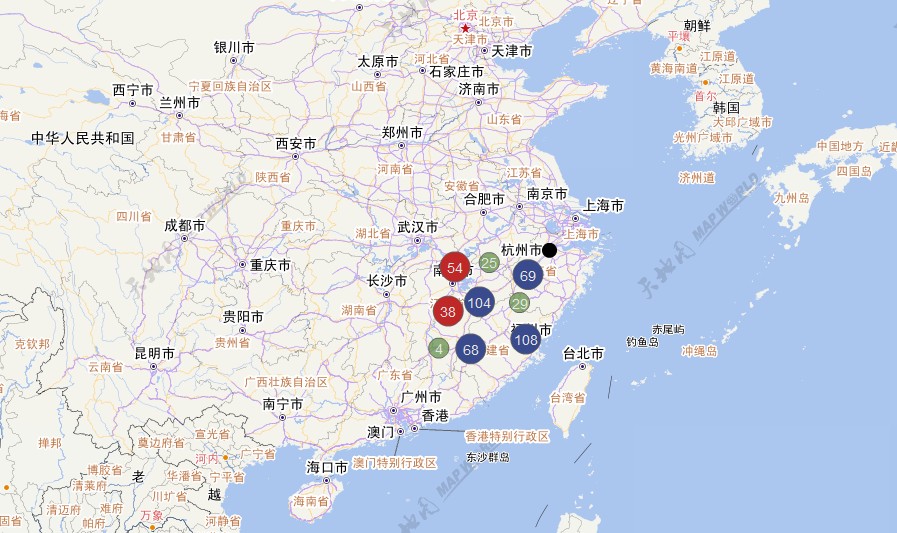
Download source here.
Clustering with the ArcGIS API for Flex的更多相关文章
- 天津政府应急系统之GIS一张图(arcgis api for flex)讲解(十)态势标绘模块
config.xml文件的配置如下: <widget label="态势标绘" icon="assets/images/impact_area_over.png&q ...
- arcgis api for flex之专题图制作(饼状图,柱状图等)
最近公司给我一个任务,就是利用arcgis api for flex实现在地图上点(业务数据)直接显示饼状图以及柱状图的专题图制作,而不是通过点击点显示气泡窗口的形式来实现,这个公司已经实现了. 经过 ...
- 天津政府应急系统之GIS一张图(arcgis api for flex)讲解(一)GIS一张图的系统开发环境以及flexviewer框架
系统的GIS功能实现是基于arcgis api for flex,首先附上系统的主界面图,接下来的是对主界面的模块功能详细讲解: 一.GIS环境软件安装 (1)arcgis desktop的安装,要是 ...
- ArcGIS API for Flex实现GraphicsLayer上画点、线、面。
目的: ArcGIS API for Flex实现GraphicsLayer上画点.线.面. 准备工作: 1.这次地图数据就用Esri提供的http://server.arcgisonline.com ...
- arcgis api for flex 开发入门(一)环境搭建
http://www.cnblogs.com/wenjl520/archive/2009/06/02/1494514.html arcgis api for flex 开发入门(一)环境搭建arcgi ...
- 天津政府应急系统之GIS一张图(arcgis api for flex)讲解(十三)台风模块
config.xml文件的配置如下: <widget label="台风" icon="assets/images/typhoon.png" config ...
- 天津政府应急系统之GIS一张图(arcgis api for flex)讲解(十一)路径导航模块
config.xml文件的配置如下: <widget label="路径导航" icon="assets/images/lujingdaohang.png" ...
- 天津政府应急系统之GIS一张图(arcgis api for flex)讲解(四)地图导航控件模块
config.xml文件的配置如下: <widget left="10" top="50" config="widgets/Navigation ...
- 天津政府应急系统之GIS一张图(arcgis api for flex)讲解(三)显示地图坐标系模块
config.xml文件的配置如下: <widget left="3" bottom="3" config="widgets/Coordinat ...
随机推荐
- leetcode N-Queens/N-Queens II, backtracking, hdu 2553 count N-Queens, dfs 分类: leetcode hdoj 2015-07-09 02:07 102人阅读 评论(0) 收藏
for the backtracking part, thanks to the video of stanford cs106b lecture 10 by Julie Zelenski for t ...
- Django+python+BeautifulSoup垂直搜索爬虫
http://blog.sina.com.cn/s/blog_709475a10100wmln.html
- 读取配置文件 PropertyPlaceholderConfigurer 的配置与使用
public class SpringPropertyConfigurer extends PropertyPlaceholderConfigurer { private static Map< ...
- UI的一些方法(按钮和线)
//设置按钮字体颜色 [self.determineBtn setTitleColor:[UIColor colorWithHexString:@"0xff9500"] forSt ...
- 《C++primer》v5 第1章 开始 读书笔记 习题答案
从今天开始在博客里写C++primer的文字.主要以后面的习题作业为主,会有必要的知识点补充. 本人也是菜鸟,可能有不对之处,还望指出. 前期内容可能会比较水. 1.1略 1.2略 1.3 cin和c ...
- UVALive 7338 (树链剖分+线段树)
Problem Toll Management IV 题目大意 给一张n个点m条边的无向图,有边权.数据保证前n-1条边构成了一棵最小生成树. 要求对于每条边求出其边权上下最多浮动范围,使得最小生成树 ...
- anjularjs 路由
在多视图单页面web应用中,angularjs使用路由‘#+标记’来区别不同的逻辑页面并将不同的页面绑定到对应的控制器上.通过一个简单的实例来深入理解: 1.index.html 主页面中插入代码: ...
- java.lang.ClassCastException: java.lang.String cannot be cast to com.jy.hfims.domain 映射实体类型错误
今天在做 excel导出的时候,出现了一个问题"java.lang.ClassCastException: java.lang.String cannot be cast to com.do ...
- 加载json文件没显示图片
IOS 9新特性要求App内访问的网络必须使用HTTPS协议. 但是现在公司的项目使用的是HTTP协议,使用私有加密方式保证数据安全.现在也不能马上改成HTTPS协议传输. 以下解决办法: 在info ...
- ssh隧道(端口转发)
本地转发: ssh -Nf -L [bind_address:]port:host:hostport sshServer -Nf 后台运行 -L 本地转发 [bind_address] 绑定本地地址, ...