
centos 下Supervisor 守护进程基本配置
supervisor:C/S架构的进程控制系统,可使用户在类UNIX系统中监控、管理进程。常用于管理与某个用户或项目相关的进程。
组成部分
supervisord:服务守护进程
supervisorctl:命令行客户端
Web Server:提供与supervisorctl功能相当的WEB操作界面
XML-RPC Interface:XML-RPC接口
安装
easy_install supervisor
创建默认的配置文件
echo_supervisord_conf >/etc/supervisord.conf

vi /etc/supervisord.conf
修改配置文件如下,这个例子设置了一个Nginx和asp.net core的守护进程
 ; Sample supervisor config file.

 ;

 ; For more information on the config file, please see:

 ; http://supervisord.org/configuration.html

 ;

 ; Notes:

 ;  - Shell expansion ("~" or "$HOME") is not supported.  Environment

 ;    variables can be expanded using this syntax: "%(ENV_HOME)s".

 ;  - Comments must have a leading space: "a=b ;comment" not "a=b;comment".

 ;[unix_http_server]

 ;file=/tmp/supervisor.sock   ; (the path to the socket file)

 ;chmod=                 ; socket file mode (default )

 ;chown=nobody:nogroup       ; socket file uid:gid owner

 ;username=user              ; (default is no username (open server))

 ;password=               ; (default is no password (open server))

 [inet_http_server]         ; inet (TCP) server disabled by default

 port=127.0.0.1:        ; (ip_address:port specifier, *:port for all iface)

 username=user              ; (default is no username (open server))

 password=               ; (default is no password (open server))

 [supervisord]

 logfile=/tmp/supervisord.log ; (main log file;default $CWD/supervisord.log)

 logfile_maxbytes=50MB        ; (max main logfile bytes b4 rotation;default 50MB)

 logfile_backups=           ; (num of main logfile rotation backups;default )

 loglevel=info                ; (log level;default info; others: debug,warn,trace)

 pidfile=/tmp/supervisord.pid ; (supervisord pidfile;default supervisord.pid)

 nodaemon=false               ; (start in foreground if true;default false)

 minfds=                  ; (min. avail startup file descriptors;default )

 minprocs=                 ; (min. avail process descriptors;default )

 ;umask=                   ; (process file creation umask;default )

 ;user=chrism                 ; (default is current user, required if root)

 ;identifier=supervisor       ; (supervisord identifier, default is 'supervisor')

 ;directory=/tmp              ; (default is not to cd during start)

 ;nocleanup=true              ; (don't clean up tempfiles at start;default false)

 ;childlogdir=/tmp            ; ('AUTO' child log dir, default $TEMP)

 ;environment=KEY="value"     ; (key value pairs to add to environment)

 ;strip_ansi=false            ; (strip ansi escape codes in logs; def. false)

 ; the below section must remain in the config file for RPC

 ; (supervisorctl/web interface) to work, additional interfaces may be

 ; added by defining them in separate rpcinterface: sections

 [rpcinterface:supervisor]

 supervisor.rpcinterface_factory = supervisor.rpcinterface:make_main_rpcinterface

 [supervisorctl]

 serverurl=unix:///tmp/supervisor.sock ; use a unix:// URL  for a unix socket

 ;serverurl=http://127.0.0.1:9001 ; use an http:// url to specify an inet socket

 ;username=chris              ; should be same as http_username if set

 ;password=                ; should be same as http_password if set

 ;prompt=mysupervisor         ; cmd line prompt (default "supervisor")

 ;history_file=~/.sc_history  ; use readline history if available

 ; The below sample program section shows all possible program subsection values,

 ; create one or more 'real' program: sections to be able to control them under

 ; supervisor.

 ;[program:theprogramname]

 ;command=/bin/cat              ; the program (relative uses PATH, can take args)

 ;process_name=%(program_name)s ; process_name expr (default %(program_name)s)

 ;numprocs=                    ; number of processes copies to start (def )

 ;directory=/tmp                ; directory to cwd to before exec (def no cwd)

 ;umask=                     ; umask for process (default None)

 ;priority=                  ; the relative start priority (default )

 ;autostart=true                ; start at supervisord start (default: true)

 ;startsecs=                   ; # of secs prog must stay up to be running (def. )

 ;startretries=                ; max # of serial start failures when starting (default )

 ;autorestart=unexpected        ; when to restart if exited after running (def: unexpected)

 ;exitcodes=,                 ; 'expected' exit codes used with autorestart (default ,)

 ;stopsignal=QUIT               ; signal used to kill process (default TERM)

 ;stopwaitsecs=               ; max num secs to wait b4 SIGKILL (default )

 ;stopasgroup=false             ; send stop signal to the UNIX process group (default false)

 ;killasgroup=false             ; SIGKILL the UNIX process group (def false)

 ;user=chrism                   ; setuid to this UNIX account to run the program

 ;redirect_stderr=true          ; redirect proc stderr to stdout (default false)

 ;stdout_logfile=/a/path        ; stdout log path, NONE for none; default AUTO

 ;stdout_logfile_maxbytes=1MB   ; max # logfile bytes b4 rotation (default 50MB)

 ;stdout_logfile_backups=     ; # of stdout logfile backups (default )

 ;stdout_capture_maxbytes=1MB   ; number of bytes in 'capturemode' (default )

 ;stdout_events_enabled=false   ; emit events on stdout writes (default false)

 ;stderr_logfile=/a/path        ; stderr log path, NONE for none; default AUTO

 ;stderr_logfile_maxbytes=1MB   ; max # logfile bytes b4 rotation (default 50MB)

 ;stderr_logfile_backups=     ; # of stderr logfile backups (default )

 ;stderr_capture_maxbytes=1MB   ; number of bytes in 'capturemode' (default )

 ;stderr_events_enabled=false   ; emit events on stderr writes (default false)

 ;environment=A="",B=""       ; process environment additions (def no adds)

 ;serverurl=AUTO                ; override serverurl computation (childutils)

 ; The below sample eventlistener section shows all possible

 ; eventlistener subsection values, create one or more 'real'

 ; eventlistener: sections to be able to handle event notifications

 ; sent by supervisor.

 ;[eventlistener:theeventlistenername]

 ;command=/bin/eventlistener    ; the program (relative uses PATH, can take args)

 ;process_name=%(program_name)s ; process_name expr (default %(program_name)s)

 ;numprocs=                    ; number of processes copies to start (def )

 ;events=EVENT                  ; event notif. types to subscribe to (req'd)

 ;buffer_size=                ; event buffer queue size (default )

 ;directory=/tmp                ; directory to cwd to before exec (def no cwd)

 ;umask=                     ; umask for process (default None)

 ;priority=-                   ; the relative start priority (default -)

 ;autostart=true                ; start at supervisord start (default: true)

 ;startsecs=                   ; # of secs prog must stay up to be running (def. )

 ;startretries=                ; max # of serial start failures when starting (default )

 ;autorestart=unexpected        ; autorestart if exited after running (def: unexpected)

 ;exitcodes=,                 ; 'expected' exit codes used with autorestart (default ,)

 ;stopsignal=QUIT               ; signal used to kill process (default TERM)

 ;stopwaitsecs=               ; max num secs to wait b4 SIGKILL (default )

 ;stopasgroup=false             ; send stop signal to the UNIX process group (default false)

 ;killasgroup=false             ; SIGKILL the UNIX process group (def false)

 ;user=chrism                   ; setuid to this UNIX account to run the program

 ;redirect_stderr=false         ; redirect_stderr=true is not allowed for eventlisteners

 ;stdout_logfile=/a/path        ; stdout log path, NONE for none; default AUTO

 ;stdout_logfile_maxbytes=1MB   ; max # logfile bytes b4 rotation (default 50MB)

 ;stdout_logfile_backups=     ; # of stdout logfile backups (default )

 ;stdout_events_enabled=false   ; emit events on stdout writes (default false)

 ;stderr_logfile=/a/path        ; stderr log path, NONE for none; default AUTO

 ;stderr_logfile_maxbytes=1MB   ; max # logfile bytes b4 rotation (default 50MB)

 ;stderr_logfile_backups=     ; # of stderr logfile backups (default )

 ;stderr_events_enabled=false   ; emit events on stderr writes (default false)

 ;environment=A="",B=""       ; process environment additions

 ;serverurl=AUTO                ; override serverurl computation (childutils)

 ; The below sample group section shows all possible group values,

 ; create one or more 'real' group: sections to create "heterogeneous"

 ; process groups.

 ;[group:thegroupname]

 ;programs=progname1,progname2  ; each refers to 'x' in [program:x] definitions

 ;priority=                  ; the relative start priority (default )

 ; The [include] section can just contain the "files" setting.  This

 ; setting can list multiple files (separated by whitespace or

 ; newlines).  It can also contain wildcards.  The filenames are

 ; interpreted as relative to this file.  Included files *cannot*

 ; include files themselves.

 ;[include]

 ;files = relative/directory/*.ini

 [program:WebApp1MVC]

 command=dotnet /home/wilson/temp/PublishOutput/WebApp1.dll

 directory=/home/wilson/temp/PublishOutput/

 autostart=true

 autorestart=true

 stderr_logfile=/var/log/hellomvc.err.log

 stdout_logfile=/var/log/hellomvc.out.log

 environment=ASPNETCORE_ENVIRONMENT=Production

 user=wilson

 stopsignal=INT

 [program:Nginx]

 command=/usr/local/nginx/sbin/nginx

 directory=/usr/local/nginx/

 autostart=true

 autorestart=true

 stderr_logfile=/usr/local/nginx/logs/nginx.err.log

 stdout_logfile=/usr/local/nginx/logs/nginx.out.log

 user=wilson

 stopsignal=INT
关键配置如下:
 [program:WebApp1MVC]

 command=/usr/bin/dotnet /home/wilson/temp/PublishOutput/WebApp1.dll

 directory=/home/wilson/temp/PublishOutput/

 autostart=true

 autorestart=true

 stderr_logfile=/var/log/hellomvc.err.log

 stdout_logfile=/var/log/hellomvc.out.log

 environment=ASPNETCORE_ENVIRONMENT=Production

 user=www-data

 stopsignal=INT

 [program:Nginx]

 command=/usr/local/nginx/sbin/nginx

 directory=/usr/local/nginx/

 autostart=true

 autorestart=true

 stderr_logfile=/usr/local/nginx/logs/nginx.err.log

 stdout_logfile=/usr/local/nginx/logs/nginx.out.log

 user=wilson

 stopsignal=INT
启动Supervisor
supervisord -c /etc/supervisord.conf
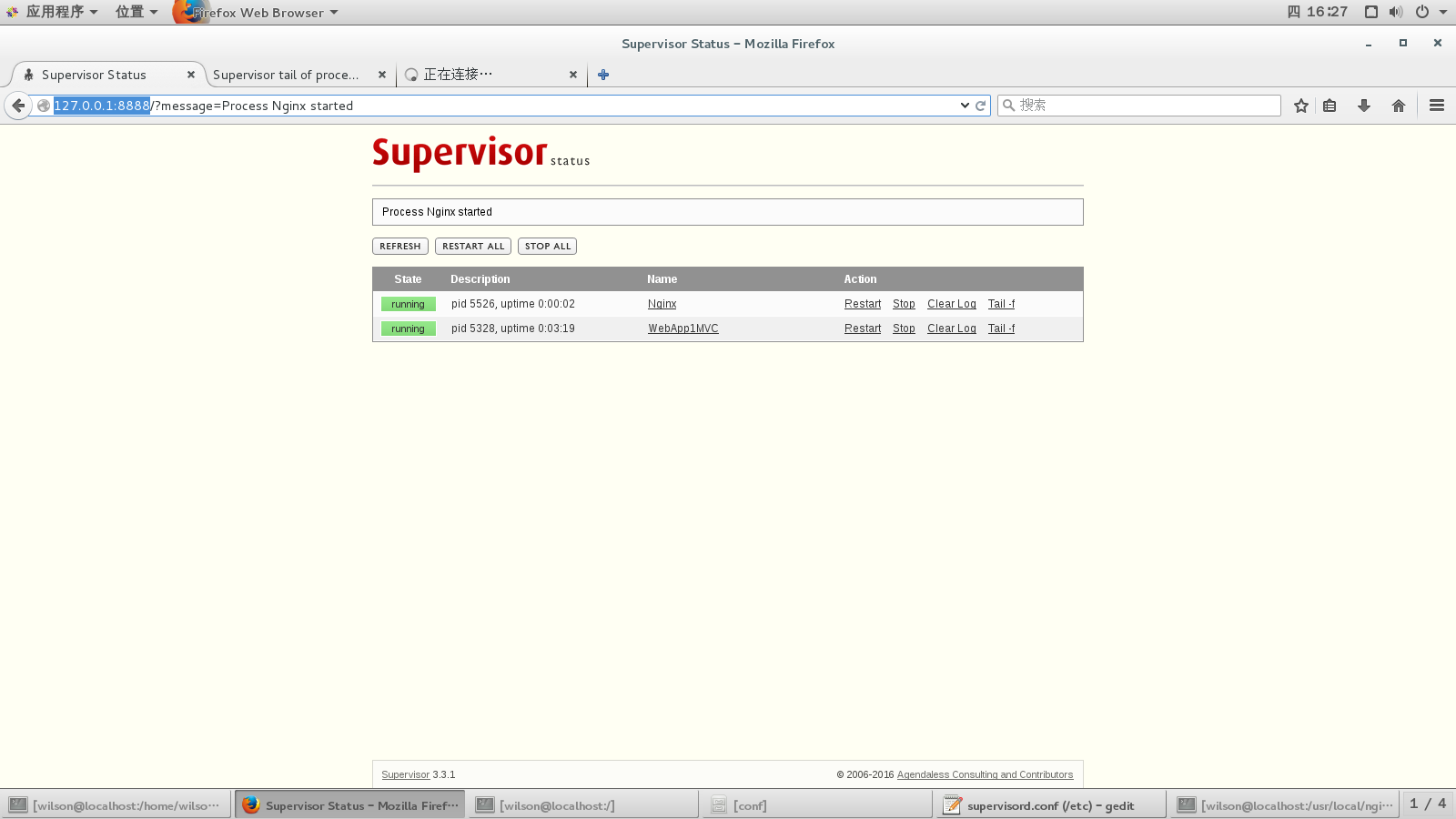
浏览器中输入http://127.0.0.1:8888,输入用户名密码,就可以看到后台进程列表
参考:
https://docs.asp.net/en/latest/publishing/linuxproduction.html#
http://supervisord.org/installing.html#internet-installing-with-setuptools
centos 下Supervisor 守护进程基本配置的更多相关文章
- Linux Supervisor 守护进程基本配置
supervisor:C/S架构的进程控制系统,可使用户在类UNIX系统中监控.管理进程.常用于管理与某个用户或项目相关的进程. 组成部分supervisord:服务守护进程supervisorctl ...
- 基于Laravel框架下使用守护进程supervisor实现定时任务(毫秒)
本篇文章给大家带来的内容是关于基于Laravel框架下使用守护进程supervisor实现定时任务(毫秒),有一定的参考价值,有需要的朋友可以参考一下,希望对你有所帮助. 公司需要实现X分钟内每隔Y秒 ...
- mac与centos下redis的安装与配置
前言 最近在用redis,下面简单写一下mac和centos下redis的安装与配置方法. 安装 mac下面 安装命令:brew intall redis 运行命令:brew services sta ...
- Centos7 使用 Supervisor 守护进程 Celery
一.Supervisor 安装(centos7 还有另一个进程守护命令 Systemd ) Centos 7 安装 Supervisord 二.Supervisor 守护进程 Centos7 使用 S ...
- 【Centos7】 中使用Supervisor守护进程
原文出处: Centos7 中使用Supervisor守护进程 配置supervisor实现进程守护 1.安装supervisor yum install Supervisor 2.启动服务 su ...
- CentOS 下SSH无密码登录的配置
CentOS 下SSH无密码登录的配置 最近学习Hadoop.它要求各节点之间通过SSH无密码登录,配置SSH的时候费了一番功夫,记录下来,以备忘. 配置SSH无密码登录需要3步: 1.生成公钥和私钥 ...
- Centos下telnet的安装和配置
Centos下telnet的安装和配置 首先为Centos配置地址(192.168.0.1/24) 一.查看本机是否有安装telnetrpm -qa | grep telnetrpm -q telne ...
- [转载]centos下yum安装samba及配置
centos下yum安装samba及配置 在我们使用 Windows 作为客户机的时候,通常有文件.打印共享的需求.作为Windows 网络功能之一,通常可以在 Windows 客户机之间通过Wind ...
- Docker 守护进程的配置和操作 & 远程访问
守护进程的配置和操作 1.查看守护进程 linux命令: ps -ef | gerp docker sudo status docker 2.开启关闭重启守护进程 sudo service docke ...
随机推荐
- JSON认识
阅读目录 JSON的两种结构 认识JSON字符串 在JS中如何使用JSON 在.NET中如何使用JSON 总结 JSON的全称是”JavaScript Object Notation”,意思是Java ...
- iOS开发拓展篇—CoreLocation简单介绍
iOS开发拓展篇—CoreLocation简单介绍 一.简介 1.在移动互联网时代,移动app能解决用户的很多生活琐事,比如 (1)导航:去任意陌生的地方 (2)周边:找餐馆.找酒店.找银行.找电影院 ...
- Top Five Hacker Tools Every CISO Should Understand
As the role of the CISO continues to evolve within organizations towards that of an executive level ...
- C# 文件夹加密
可以加密文件内容,也可以对文件夹本身进行加密,本文对文件夹加密. 一.指定或生成一个密钥 1)指定的密钥 /// <summary> /// 密钥,这个密码可以随便指定 /// </ ...
- HBase with MapReduce (MultiTable Read)
hbase当中没有两表联查的操作,要实现两表联查或者在查询一个表的同时也需要访问另外一张表的时候,可以通过mapreduce的方式来实现,实现方式如下:由于查询是map过程,因此这个过程不需要设计re ...
- Oracle数据库高效sql语句的整理
业务需求说明:由于之前公司后台APP端有一个document表,该表中包含了所有的信息,新的需求就是通过该表创建出一个新的用户表(usertable)和一个档案表(document,该表只保留原doc ...
- HTML编码规则、CSS属性声明顺序--简介
From AmazeUI:http://amazeui.org/getting-started/html-css-guide HTML 属性顺序 HTML 属性应当按照以下给出的顺序依次排列,确保代码 ...
- 从零开始学习Node.js例子三 图片上传和显示
index.js var server = require("./server"); var router = require("./router"); var ...
- 浅谈C#中的接口和抽象类
C#中接口为"其他方面互不相干"的类型提供公共的服务和特征:C#中class只支持但继承,使用接口却支持多继承,例如:C#中System.String是从System空间中的4个i ...
- 关于EEG参考电极
今天搞ADS1299,里面的BIAS偏置运放原来是设置参考电极的. The input multiplexer has EEG-specific functions for the bias driv ...