
spring 3.0系统集成webservice
spring 3.0系统集成webservice,踩了很多坑以后总算成功了,故写下这篇博客以记录。
1.准备jar包
由于项目是spring3.0,所以应该要使用cxf 2.7版本才可以成功配置,高版本会出现jar包冲突。
具体需要的jar包如下:
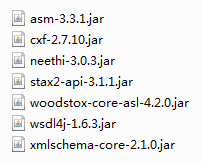
你可以点此下载:cxf 2.7所需jar包
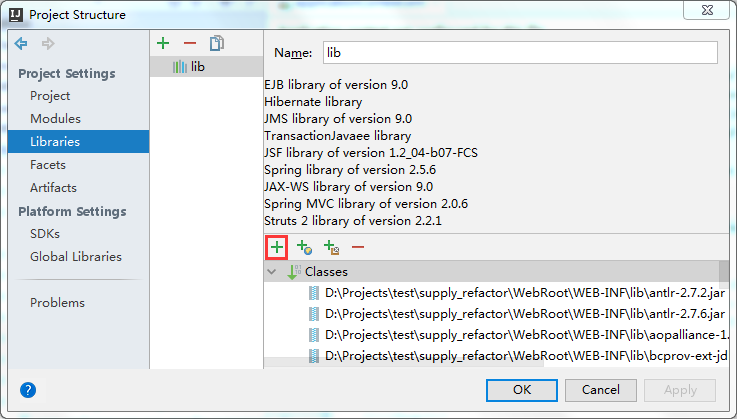
然后在idea中引入这些jar包(对于该项目来说,可以先把这些jar包复制到项目内的lib文件夹内)
idea引入jar包方法见下图(点击图中红框圈出的+号即可添加):
2.配置webService
2.1 web.xml
在web.xml中添加如下代码,用于路由/webservice开始的路径。
记得要加在原来的url配置器上方才能被优先匹配。
    <!-- webservice -->

    <servlet>

        <servlet-name>webservice</servlet-name>

        <servlet-class>org.apache.cxf.transport.servlet.CXFServlet</servlet-class>

        <load-on-startup>1</load-on-startup>

    </servlet>

    <servlet-mapping>

        <servlet-name>webservice</servlet-name>

        <url-pattern>/webservice/*</url-pattern>

    </servlet-mapping>
2.2 applicationContext.xml
首先将头修改如下,自己看实际代码缺啥补啥:
<beans xmlns="http://www.springframework.org/schema/beans"

       xmlns:xsi="http://www.w3.org/2001/XMLSchema-instance"

       xmlns:jdbc="http://www.springframework.org/schema/jdbc"

       xmlns:jaxws="http://cxf.apache.org/jaxws"

       xsi:schemaLocation="http://www.springframework.org/schema/beans http://www.springframework.org/schema/beans/spring-beans-3.0.xsd

       http://www.springframework.org/schema/jdbc http://www.springframework.org/schema/jdbc/spring-jdbc-3.0.xsd

       http://cxf.apache.org/jaxws http://cxf.apache.org/schemas/jaxws.xsd">

</beans>
然后添加cxf的配置,注意必须引入下面三个资源(据说新版本的cxf可以省去第二个配置文件)
    <!--cxf配置-->

    <!-- Import Apache CXF Bean Definition 固定配置 -->

    <import resource="classpath:META-INF/cxf/cxf.xml" />

    <import resource="classpath:META-INF/cxf/cxf-extension-soap.xml" />

    <import resource="classpath:META-INF/cxf/cxf-servlet.xml" />
对,就是这么简单,webservice服务就集成好了。

不过别急,这时候由于还没创建webservice服务,所以如果你这时候访问:
http://localhost:8080/supply_refactor/webservice,是会报错的。它会提示你初始化失败没有webservice服务。
3.数据库中创建测试数据表test
CREATE TABLE `supply`.`test` (

  `id` INT NOT NULL AUTO_INCREMENT,

  `context` VARCHAR(45) NOT NULL,

  PRIMARY KEY (`id`))

ENGINE = MyISAM

DEFAULT CHARACTER SET = utf8;
然后往里面插入一条数据,我这里插入了“测试哈哈哈”
4.创建webservice服务
4.1配置hibernate bean映射文件
Test.java
package com.supply.bean;

public class Test implements java.io.Serializable{

    private long id;

    private String context;

    public Test(){}

    public Test(long id,String context){

        super();

        this.id=id;

        this.context=context;

    }

    @Override

    public String toString() {

        return "Test{" +

                "id=" + id +

                ", context='" + context + '\'' +

                '}';

    }

    public long getId() {

        return id;

    }

    public void setId(long id) {

        this.id = id;

    }

    public String getContext() {

        return context;

    }

    public void setContext(String context) {

        this.context = context;

    }

}
Test.hbm.xml
<?xml version="1.0" encoding="utf-8"?>

<!DOCTYPE hibernate-mapping PUBLIC "-//Hibernate/Hibernate Mapping DTD 3.0//EN"

        "http://hibernate.sourceforge.net/hibernate-mapping-3.0.dtd">

<hibernate-mapping>

    <class catalog="supply" name="com.supply.bean.Test" table="test">

        <id name="id" type="java.lang.Long">

            <column name="id" precision="11" scale="0"/>

            <generator class="increment"/>

        </id>

        <property generated="never" lazy="false" name="context" type="java.lang.String">

            <column length="45" name="context"/>

        </property>

    </class>

</hibernate-mapping>
4.2在applicationContext.xml的mappingResources标签内添加如下:
<value>com/supply/bean/Test.hbm.xml</value>
4.3添加Dao文件TestDao.java
package com.supply.dao;

import com.supply.bean.Test;

import org.apache.log4j.Logger;

public class TestDao extends BaseDao{

    private static Logger log=Logger.getLogger(TestDao.class);

    public Test getDomainById(long id){

        Test test=(Test)this.findById(Test.class,id);

        return test;

    }

}
4.4添加service文件TestService.java
package com.supply.cxf;

import com.supply.bean.Test;

import javax.jws.WebService;

@WebService

public interface TestService {

    public Test getDomainById(long id);

}
4.5添加serviceImpl文件TestServiceImpl.java
package com.supply.cxf.impl;

import com.supply.bean.Test;

import com.supply.cxf.TestService;

import com.supply.dao.TestDao;

import javax.jws.WebService;

@WebService

public class TestServiceImpl  implements TestService{

    private TestDao testDao;

    public TestDao getTestDao() {

        return testDao;

    }

    public void setTestDao(TestDao testDao) {

        this.testDao = testDao;

    }

    public TestServiceImpl(){}

    @Override

    public Test getDomainById(long id){

        Test test=testDao.getDomainById(id);

        return test;

    }

}
5.添加webservice服务至applicationContext.xml
记住,这里有个大坑,implementor中不能写成com.*.*的形式,而是必须引入一个bean!
    <!-- 要发布成webservice的bean -->

    <!--cxf service-->

    <bean id="testDao" class="com.supply.dao.TestDao">

        <property name="sessionFactory" ref="sessionFactory"/>

    </bean>

    <bean id="testService" class="com.supply.cxf.impl.TestServiceImpl">

        <property name="testDao" ref="testDao"/>

    </bean>

    <jaxws:endpoint  id="testWebService" address="/testWebService"

                     implementor="#testService" >

    </jaxws:endpoint>
至此,配置全部完毕,启动Tomcat,然后输入:
http://localhost:8080/supply_refactor/webservice即可看到你配置的testWebService服务。
你也可以输入http://localhost:8080/supply_refactor/webservice/testWebService?wsdl直接查看该接口。
最后的测试
我使用了C#控制台项目进行测试。
具体流程是:创建控制台项目,然后在项目名上右键选择添加服务引用,出现如下窗口:
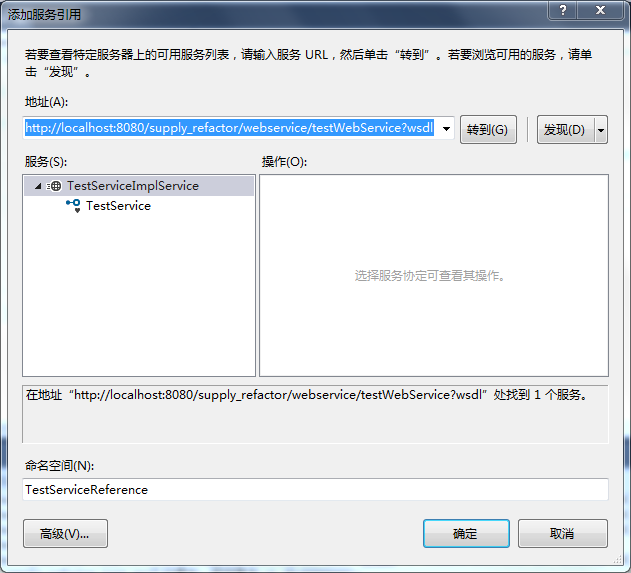
点击确定后,在主程序中写如下代码:
using System;

using System.Collections.Generic;

using System.Linq;

using System.Text;

using System.Threading.Tasks;

namespace supply_refactor_test

{

    class Program

    {

        static void Main(string[] args)

        {

            TestServiceReference.TestServiceClient client = new TestServiceReference.TestServiceClient();

            //调用服务的方法

            TestServiceReference.test test = new TestServiceReference.test();

            test = client.getDomainById();

            Console.WriteLine("testId:"+test.id+"  testContext:"+test.context);

            //完成

            Console.WriteLine("调用完成");

            Console.ReadKey();

        }

    }

}
运行成功的界面如下:
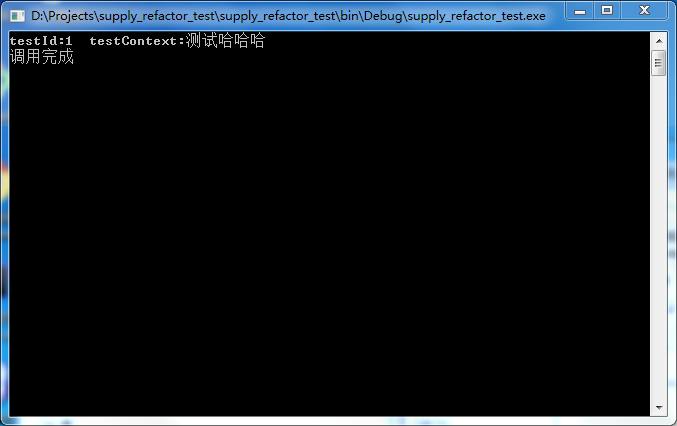
大功告成。
参考资料:
spring 3.0系统集成webservice的更多相关文章
- struts1+spring+myeclipse +cxf 开发webservice以及普通java应用调用webservice的实例
Cxf + Spring+ myeclipse+ cxf 进行 Webservice服务端开发 使用Cxf开发webservice的服务端项目结构 Spring配置文件applicationCont ...
- Spring 3.0: Unable to locate Spring NamespaceHandler for XML schema namespace
被这个问题折磨着很久:参考: http://have23.iteye.com/blog/1340777 (cfx 与 spring 整合的时候出现的问题: org.springframework.be ...
- 使用CXF与Spring集成实现RESTFul WebService
以下引用与网络中!!! 一种软件架构风格,设计风格而不是标准,只是提供了一组设计原则和约束条件.它主要用于客户端和服务器交互类的软件.基于这个风格设计的软件可以更简洁,更有层次,更易于实现缓存 ...
- Spring集成XFire开发WebService
Spring是眼下最流行的JavaEE Framework,可是使用Spring的Spring-WS开发WebService却十分繁琐.XFire是一个简化WebService开发的开源项目.通过Sp ...
- Spring Boot+CXF搭建WebService(转)
概述 最近项目用到在Spring boot下搭建WebService服务,对Java语言下的WebService了解甚少,而今抽个时间查阅资料整理下Spring Boot结合CXF打架WebServi ...
- java web项目(spring项目)中集成webservice ,实现对外开放接口
什么是WebService?webService小示例 点此了解 下面进入正题: Javaweb项目(spring项目)中集成webservice ,实现对外开放接口步骤: 准备: 采用与spring ...
- 对Maven、gradle、svn、spring 3.0 fragment、git的想法
1.Maven Maven可以构建项目,采用pom方式配置主项目和其他需要引用的项目.同时可结合spring3.0的新特性web fragment. 从现实出发,特别是对于管理不到位,程序员整体素质 ...
- Spring 3.0 AOP (一)AOP 术语
关于AOP.之前我已写过一个系列的随笔: <自己实现简单的AOP>,它的关注点在于实现.实现语言是C#,实现方式为 自定义实现 RealProxy 抽象类.重写Invoke方法,以便进行方 ...
- 详解 Spring 3.0 基于 Annotation 的依赖注入实现(转)
使用 @Repository.@Service.@Controller 和 @Component 将类标识为 Bean Spring 自 2.0 版本开始,陆续引入了一些注解用于简化 Spring 的 ...
随机推荐
- xcode的ios工程目录结构复习
目录结构: a.supporting files: main.m和资源文件 xxx-info.plist:包含应用程序相关属性列表,如版本,程序名等 .pch文件:预编译头文件,相当于MFC里的std ...
- H2数据库使用 详解
H2最完整的资料下载地址: http://download.csdn.net/detail/yixiaoping/5956595 H2数据库使用 H2数据库介绍 常用的开源数据库:H2,Derby ...
- HDU 4679 Terrorist’s destroy (2013多校8 1004题 树形DP)
Terrorist’s destroy Time Limit: 6000/3000 MS (Java/Others) Memory Limit: 65535/32768 K (Java/Othe ...
- Process ID, Process handle, Window handle
http://forums.codeguru.com/showthread.php?392273-RESOLVED-How-to-get-window-s-HWND-from-it-s-process ...
- PHP正则表达式30分钟入门教程
正则表达式30分钟入门教程 三个常用的知识点: 1.惰性匹配:正则引擎默认是贪婪的,若要最少重复的话,需要用到惰性匹配符 “?” 懒惰限定符 代码/语法 说明 *? 重复任意次,但尽可能少重复 +? ...
- (转)RTMP中FLV流到标准h264、aac的转换
这段时间,工作上的需要,在RTMP上做了flv流到标准h264.AAC的转换,服务器是开源项目CRTMPSERVER,客户端flex编写,视频编码h264,音频编码AAC,现将一些协议相关的东西记录如 ...
- text段,data段,bss段,堆和栈
转载:http://blog.chinaunix.net/uid-29025972-id-3874376.html 程序编译后生成的目标文件至少含有三个段,分别为:.text..data和.bss ...
- 初识小米Minos
1. Minos框架的基本介绍 小米公司不仅仅在搞手机以及MIUI rom的研发工作,云计算.虚拟化以及Hadoop也是小米现在在搞的东西,小米与2012年下半年成立了自己的Hadoop团队.介绍小米 ...
- Ps6 已具备图层搜索功能
层多了,找一个层非常考验我们的眼里,不过Photoshop cs6带来了福音,终于有搜索了:
- pytest文档10-命令行传参
前言 命令行参数是根据命令行选项将不同的值传递给测试函数,比如平常在cmd执行"pytest --html=report.html",这里面的"--html=report ...