
把typora改为微软雅黑+Consolas
前言
typora是一款非常方便的书写markdown文本的编辑器。官网:https://www.typora.io/
对于字体强迫症患者来说,不把字体改成微软雅黑+Consolas,那是相当难受。本文教大家一个简单粗暴的方法修改typora字体。
本人环境:win10 + typora 0.9.48
对于高手一句话总结,只需修改如下两个文件。
C:\Users\sheng7k\AppData\Roaming\Typora\conf\conf.user.json

C:\Users\sheng7k\AppData\Roaming\Typora\themes\github.css
看不懂 ? 那就对了,下面内容,小白专用。
步骤
打开Typora软件,主题选择Github。
文件 >> 偏好设置 >> 打开主题文件夹
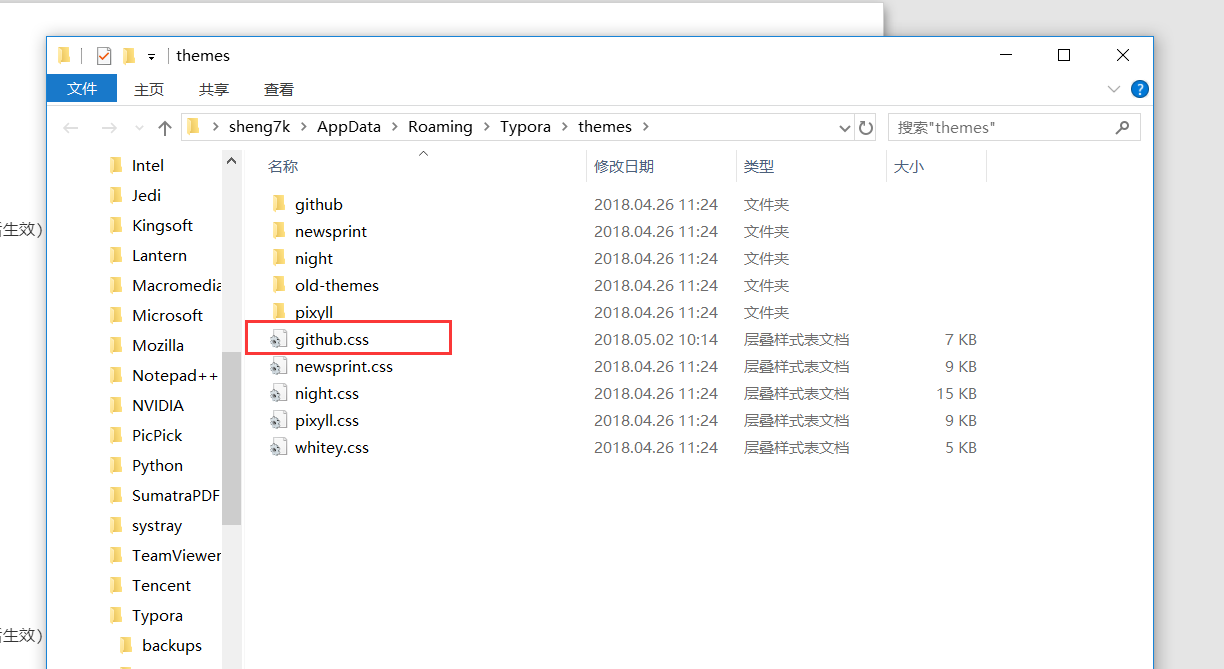
接下来我们只需要修改这个关键的github.css文件即可,有前端开发经验的修改这个就很简单了,当然没有也没关系。
为确保安全,强烈建议大家github.css文件先备份一份到别处存放,然后打开github.css文本文件开始修改(最好用专业点的文本编辑器打开,当然记事本问题也不大。)熟悉CSS代码的一看就懂,不熟悉的话,先观察下代码,可以发现基本都是名字加上一对大括号的形式,首先忽略所有@符号开头的,然后把所有带font-family这一行,修改为font-family: Consolas,"Microsoft Yahei",Arial,sans-serif;
解释下这行代码,font-family代表此处控制的是字体,一种逗号代表一个字体,这里我们写了4个字体,其中最后两种字体不重要,删去也可。我们这句话的意思就是遇到一个字体,如果是英文选用Consolas,因为它在前面,如果是中文就选用Microsoft Yahei(微软雅黑)字体,Consolas是不包含中文字体的。
纯小白(非互联网行业,完全看不懂,怎么办 ?)
很简单,修改字体等样式就是修改,github.css文件,下面是我修改后的github.css文件内容,如果你的Typora版本和我的一样,则可以完全复制粘贴来更改自己的github.css文件,当然最好还是自己比对下,我的这份和自己的那份有什么区别。
/* C:\Users\sheng7k\AppData\Roaming\Typora\themes\github.css */

:root {

    --side-bar-bg-color: #fafafa;

    --control-text-color: #777;

}

@include-when-export url(https://fonts.googleapis.com/css?family=Open+Sans:400italic,700italic,700,400&subset=latin,latin-ext);

@font-face {

    font-family: 'Open Sans';

    font-style: normal;

    font-weight: normal;

    src: local('Open Sans Regular'),url('./github/400.woff') format('woff')

}

@font-face {

    font-family: 'Open Sans';

    font-style: italic;

    font-weight: normal;

    src: local('Open Sans Italic'),url('./github/400i.woff') format('woff')

}

@font-face {

    font-family: 'Open Sans';

    font-style: normal;

    font-weight: bold;

    src: local('Open Sans Bold'),url('./github/700.woff') format('woff')

}

@font-face {

    font-family: 'Open Sans';

    font-style: italic;

    font-weight: bold;

    src: local('Open Sans Bold Italic'),url('./github/700i.woff') format('woff')

}

html {

    font-size: 16px;

}

body {

    font-family: Consolas,"Microsoft Yahei",Arial,sans-serif;

    color: rgb(51, 51, 51);

    line-height: 1.6;

}

#write{

    max-width: 860px;

  	margin: 0 auto;

  	padding: 20px 30px 40px 30px;

	padding-top: 20px;

    padding-bottom: 100px;

}

#write > ul:first-child,

#write > ol:first-child{

    margin-top: 30px;

}

body > *:first-child {

    margin-top: 0 !important;

}

body > *:last-child {

    margin-bottom: 0 !important;

}

a {

    color: #4183C4;

}

h1,

h2,

h3,

h4,

h5,

h6 {

    position: relative;

    margin-top: 1rem;

    margin-bottom: 1rem;

    font-weight: bold;

    line-height: 1.4;

    cursor: text;

}

h1:hover a.anchor,

h2:hover a.anchor,

h3:hover a.anchor,

h4:hover a.anchor,

h5:hover a.anchor,

h6:hover a.anchor {

    /*background: url("../../images/modules/styleguide/para.png") no-repeat 10px center;*/

    text-decoration: none;

}

h1 tt,

h1 code {

    font-size: inherit;

}

h2 tt,

h2 code {

    font-size: inherit;

}

h3 tt,

h3 code {

    font-size: inherit;

}

h4 tt,

h4 code {

    font-size: inherit;

}

h5 tt,

h5 code {

    font-size: inherit;

}

h6 tt,

h6 code {

    font-size: inherit;

}

h1 {

    padding-bottom: .3em;

    font-size: 2.25em;

    line-height: 1.2;

    border-bottom: 1px solid #eee;

}

h2 {

   padding-bottom: .3em;

    font-size: 1.75em;

    line-height: 1.225;

    border-bottom: 1px solid #eee;

}

h3 {

    font-size: 1.5em;

    line-height: 1.43;

}

h4 {

    font-size: 1.25em;

}

h5 {

    font-size: 1em;

}

h6 {

   font-size: 1em;

    color: #777;

}

p,

blockquote,

ul,

ol,

dl,

table{

    margin: 0.8em 0;

}

li>ol,

li>ul {

    margin: 0 0;

}

hr {

    height: 4px;

    padding: 0;

    margin: 16px 0;

    background-color: #e7e7e7;

    border: 0 none;

    overflow: hidden;

    box-sizing: content-box;

    border-bottom: 1px solid #ddd;

}

body > h2:first-child {

    margin-top: 0;

    padding-top: 0;

}

body > h1:first-child {

    margin-top: 0;

    padding-top: 0;

}

body > h1:first-child + h2 {

    margin-top: 0;

    padding-top: 0;

}

body > h3:first-child,

body > h4:first-child,

body > h5:first-child,

body > h6:first-child {

    margin-top: 0;

    padding-top: 0;

}

a:first-child h1,

a:first-child h2,

a:first-child h3,

a:first-child h4,

a:first-child h5,

a:first-child h6 {

    margin-top: 0;

    padding-top: 0;

}

h1 p,

h2 p,

h3 p,

h4 p,

h5 p,

h6 p {

    margin-top: 0;

}

li p.first {

    display: inline-block;

}

ul,

ol {

    padding-left: 30px;

}

ul:first-child,

ol:first-child {

    margin-top: 0;

}

ul:last-child,

ol:last-child {

    margin-bottom: 0;

}

blockquote {

    border-left: 4px solid #dddddd;

    padding: 0 15px;

    color: #777777;

}

blockquote blockquote {

    padding-right: 0;

}

table {

    padding: 0;

    word-break: initial;

}

table tr {

    border-top: 1px solid #cccccc;

    margin: 0;

    padding: 0;

}

table tr:nth-child(2n) {

    background-color: #f8f8f8;

}

table tr th {

    font-weight: bold;

    border: 1px solid #cccccc;

    border-bottom: 0;

    text-align: left;

    margin: 0;

    padding: 6px 13px;

}

table tr td {

    border: 1px solid #cccccc;

    text-align: left;

    margin: 0;

    padding: 6px 13px;

}

table tr th:first-child,

table tr td:first-child {

    margin-top: 0;

}

table tr th:last-child,

table tr td:last-child {

    margin-bottom: 0;

}

.CodeMirror-gutters {

    border-right: 1px solid #ddd;

}

.md-fences,

code,

tt {

    border: 1px solid #ddd;

    background-color: #f8f8f8;

    border-radius: 3px;

    padding: 0;

    font-family: Consolas,"Microsoft Yahei",Arial,sans-serif;

    padding: 2px 4px 0px 4px;

    font-size: 0.9em;

}

.md-fences {

    margin-bottom: 15px;

    margin-top: 15px;

    padding: 0.2em 1em;

    padding-top: 8px;

    padding-bottom: 6px;

}

.md-task-list-item > input {

  margin-left: -1.3em;

}

@media screen and (min-width: 914px) {

    /*body {

        width: 854px;

        margin: 0 auto;

    }*/

}

@media print {

    html {

        font-size: 13px;

    }

    table,

    pre {

        page-break-inside: avoid;

    }

    pre {

        word-wrap: break-word;

    }

}

.md-fences {

	background-color: #f8f8f8;

}

#write pre.md-meta-block {

	padding: 1rem;

    font-size: 85%;

    line-height: 1.45;

    background-color: #f7f7f7;

    border: 0;

    border-radius: 3px;

    color: #777777;

    margin-top: 0 !important;

}

.mathjax-block>.code-tooltip {

	bottom: .375rem;

}

#write>h3.md-focus:before{

	left: -1.5625rem;

	top: .375rem;

}

#write>h4.md-focus:before{

	left: -1.5625rem;

	top: .285714286rem;

}

#write>h5.md-focus:before{

	left: -1.5625rem;

	top: .285714286rem;

}

#write>h6.md-focus:before{

	left: -1.5625rem;

	top: .285714286rem;

}

.md-image>.md-meta {

    /*border: 1px solid #ddd;*/

    border-radius: 3px;

    font-family: Consolas,"Microsoft Yahei",Arial,sans-serif;

    padding: 2px 0px 0px 4px;

    font-size: 0.9em;

    color: inherit;

}

.md-tag{

	color: inherit;

}

.md-toc {

    margin-top:20px;

    padding-bottom:20px;

}

.sidebar-tabs {

    border-bottom: none;

}

#typora-quick-open {

    border: 1px solid #ddd;

    background-color: #f8f8f8;

}

#typora-quick-open-item {

    background-color: #FAFAFA;

    border-color: #FEFEFE #e5e5e5 #e5e5e5 #eee;

    border-style: solid;

    border-width: 1px;

}

#md-notification:before {

    top: 10px;

}

/** focus mode */

.on-focus-mode blockquote {

    border-left-color: rgba(85, 85, 85, 0.12);

}

header, .context-menu, .megamenu-content, footer{

    font-family: Consolas,"Microsoft Yahei",Arial,sans-serif;

}

.file-node-content:hover .file-node-icon,

.file-node-content:hover .file-node-open-state{

    visibility: visible;

}

.mac-seamless-mode #typora-sidebar {

    background-color: #fafafa;

    background-color: var(--side-bar-bg-color);

}

.md-lang {

    color: #b4654d;

}

.html-for-mac .context-menu {

    --item-hover-bg-color: #E6F0FE;

}
注意用这种简单的方案,自定义typora样式,如果typora软件版本更新后,则样式会被替换从而失效,因此注意备份。
源码模式字体的修改
经过一波折腾,发现在typora源码模式下,字体还是没能修改过来,怎么回事,不要着急。
文件 >> 偏好设置 >> 打开高级设置 ,这是会来到下面这个文件目录。
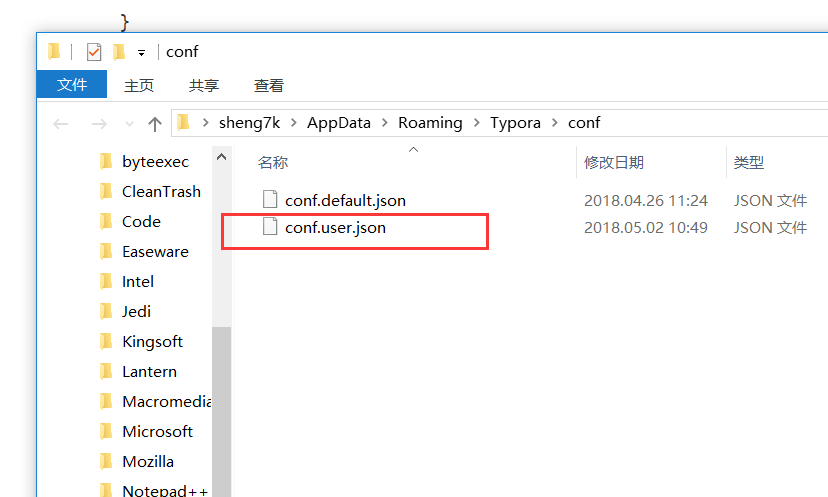
懂JSON的人可能一看就明白的,不懂也没关系,英文好点,一看也就明白啦,什么,啥都不会,没办法了,解释下,这两个文本文件都是配置文件,conf.user.json显示就是用户配置文件了,另一个则是默认配置文件,初始状态下,两则的内容时一样的,现在我们修改conf.user.json内容如下
/* C:\Users\sheng7k\AppData\Roaming\Typora\conf\conf.user.json */

/** For advanced users. */

{

  "defaultFontFamily": {

    "standard": "Microsoft Yahei", //String - Defaults to "Times New Roman".

    "serif": "Microsoft Yahei", // String - Defaults to "Times New Roman".

    "sansSerif": "Consolas", // String - Defaults to "Arial".

    "monospace": "Consolas" // String - Defaults to "Courier New".

  },

  "autoHideMenuBar": false, //Boolean - Auto hide the menu bar unless the `Alt` key is pressed. Default is false.

  // Array - Search Service user can access from context menu after a range of text is selected. Each item is formatted as [caption, url]

  "searchService": [

    ["Search with Google", "https://google.com/search?q=%s"]

  ],

  // Custom key binding, which will override the default ones.

  "keyBinding": {

    // for example:

    // "Always on Top": "Ctrl+Shift+P"

  },

  "monocolorEmoji": false, //default false. Only work for Windows

  "autoSaveTimer" : 3, // Deprecidated, Typora will do auto save automatically. default 3 minutes

  "maxFetchCountOnFileList": 500

}
OK,这样就可以确保,无论是在源码模式,还是在预览模式,我们的Typora,中文字体始终是微软雅黑,英文字体始终是Consolas。
参考链接
How to write a theme http://theme.typora.io/doc/Write-Custom-Theme/
How to install a theme http://theme.typora.io/doc/Install-Theme/
把typora改为微软雅黑+Consolas的更多相关文章
- ubuntu安装苹果Windows以及微软雅黑consolas字体
ubuntu安装苹果Windows以及微软雅黑consolas字体 ubuntu安装苹果字体 wget http://drive.noobslab.com/data/Mac/macfonts.zip ...
- XP win2003系统 微软雅黑字体的使用方法
微软雅黑是微软公司为其新一代操作系统Vista开发的中文字体,据说它将是迄今为止个人电脑上可以显示的最清晰的中文字体. 微软公司表示,在新一代操作系统中为了能够更加清晰的显示文字,目前正在 ...
- kindeditor编辑器微软雅黑样式font-family值变成"
http://www.100cm.cn/article-126-764.html kindeditor编辑器中选中文字, 修改字体(字体名称中带有空格, 例如"Microsoft YaHei ...
- 在 Win10 命令行使用 Consolas + 微软雅黑
这个过程挺神奇的,步骤参考了下面两篇文章,但是过程很曲折: 1. 使用Monaco和微软雅黑字体美化cmd和PowerShell 2. [zz]Windows的cmd.exe使用consolas加中文 ...
- Ubuntu 14 安装 “宋体,微软雅黑,WPS Office的symbol、wingdings、wingdings 2、wingdings 3、webding字体,Consolas雅黑混合版编程字体” 等 Windows 7 下的字体
Windows平台下,“宋体”.“微软雅黑”.“Courier New(编程字体)”用的比较多,看的也习惯了.那如何在 Ubuntu下也安装这些字体呢? 操作步骤如下: 第一步:从 Windows 7 ...
- 解决 Eclipse Indigo 3.7、ADT 中文字体偏小,完美 Consolas 微软雅黑混合字体!
Eclipse是著名的跨平台的自由集成开发环境(IDE).6月22日Eclipse 3.7 正式发布,代号是 Indigo . 在 Windows 7 下初始后化,发现界面变化不大,但中文字体却面目全 ...
- 轻松解决 Eclipse Indigo 3.7 中文字体偏小,完美 Consolas 微软雅黑混合字体!(转)
在 Windows 7 下初始后化,发现界面变化不大,但中文字体却面目全非,小得根本看不见,而且也看起来很不爽.其实这是 Eclipse 的默认字体换了,以前的一直是 Courier New ,这次e ...
- Ubuntu 安装 “宋体,微软雅黑,WPS Office的symbol、wingdings、wingdings 2、wingdings 3、webding字体,Consolas雅黑混合版编程字体” 等 Windows 7 下的字体(转)
Windows平台下,"宋体"."微软雅黑"."Courier New(编程字体)"用的比较多,看的也习惯了.那如何在 Ubuntu下也安装 ...
- Ubuntu16.04 安装 “宋体,微软雅黑,Consolas雅黑混合版编程字体” 等 Windows 7 下的字体
Windows平台下,“宋体”.“微软雅黑”.“Courier New(编程字体)”用的比较多,看的也习惯了.那如何在 Ubuntu下也安装这些字体呢? 操作步骤如下: 第一步:从 Windows 7 ...
随机推荐
- 查看linux系统外网ip命令
终端中输入 curl ipinfo.io 或者 curl ifconfig.me 即可通过IP地址检测网站提供的api获得取本机的外网IP,或者以 JSON 格式返回全部结果.
- Unity中用触摸控制物体旋转和放大
using UnityEngine;using System.Collections;using System.IO; public class ScaleAndRotate : MonoBehavi ...
- Mac 安装Jupyter notebook
python:mac下自带Python 2.7.10 1.先升级了pip安装工具:sudo python -m pip install --upgrade --force pip 2.安装setupt ...
- kotlin gradle的修改
Kotlin插件包括一个让我们配置Gradle的工具.但是我还是倾向于保持我对Gradle文件读写的控制权,否则它只会变得混乱而不会变得简单.不管怎么样,在使用自动工具之前知道它是怎么工作的是个不错的 ...
- M451例程讲解之按键
/**************************************************************************//** * @file main.c * @ve ...
- 这些孩子在 Ubuntu 的 Linux 终端下玩耍
导读 我发现了一个孩子们在他们的计算机教室里玩得很开心的视频.我不知道他们在哪里,但我猜测是在印度尼西亚或者马来西亚.视频请自行搭梯子: https://youtu.be/z8taQPomp0Y 在L ...
- cocos2d-x常用工具
这些工具平常也用到,不过没有像这样整理出来,这是我在网上看到的.就记录一下. 位图字体工具Bitmap Font Tools BMFont (Windows)FonteditorGlyph Desig ...
- 堪称神器的Windows软件推荐
更多软件使用技巧.破解软件以及硬件选购知识,欢迎加入我的QQ群(701974765)与我们交流!! 先贴上软件列表,详细描述后期更新,可自行百度 TrafficMonitor CPU.内存.网速资源监 ...
- CSS样式表、JS脚本加载顺序与SpringMVC在URL路径中传参数与SpringMVC 拦截器
CSS样式表和JS脚本加载顺序 Css样式表文件要在<head>中先加载,这样网页显示时可以第一次就渲染出正确的布局和样式,网页就不会闪烁,或跳变 JS脚本尽可能放在<body> ...
- angularJs-脏检查
来自:http://www.cnblogs.com/liuyanan/p/4935652.html scope是一个指向应用model的object,也是表达式的执行上下文. scope被放置在一个类 ...