
C#中读写配置参数文件(利用Windows的API)
 [DllImport("kernel32")]

         //                        读配置文件方法的6个参数:所在的分区(section)、键值、     初始缺省值、     StringBuilder、   参数长度上限、配置文件路径

         private static extern int GetPrivateProfileString(string section, string key, string deVal, StringBuilder retVal,

             int size, string filePath);

         [DllImport("kernel32")]

         //                            写配置文件方法的4个参数:所在的分区(section)、  键值、     参数值、        配置文件路径

         private static extern long WritePrivateProfileString(string section, string key, string val, string filePath);

         public static void SetValue(string section, string key, string value)

         {

             //获得当前路径,当前是在Debug路径下

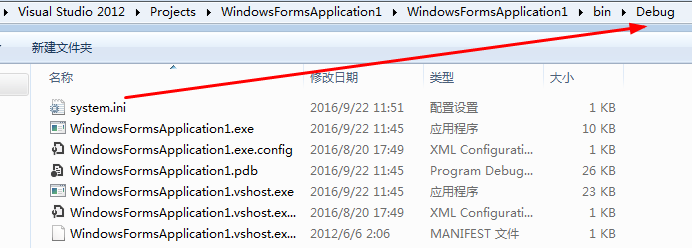
             string strPath = Environment.CurrentDirectory + "\\system.ini";

             WritePrivateProfileString(section, key, value, strPath);

         }

         public static string GetValue(string section, string key)

         {

             StringBuilder sb = new StringBuilder();

             string strPath = Environment.CurrentDirectory + "\\system.ini";

             //最好初始缺省值设置为非空,因为如果配置文件不存在,取不到值,程序也不会报错

             GetPrivateProfileString(section, key, "配置文件不存在,未取到参数", sb, , strPath);

             return sb.ToString();

         }
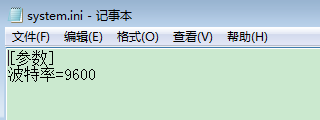
功能说明:程序加载时,创建配置文件并往里面写入波特率参数。(配置文件不需要事先存在,此Windows的API会自动创建)。点击button1,将取到的波特率显示到textBox1中。
完整代码如下:
 using System;

 using System.CodeDom;

 using System.Collections.Generic;

 using System.ComponentModel;

 using System.Data;

 using System.Drawing;

 using System.IO;

 using System.Linq;

 using System.Runtime.InteropServices;

 using System.Text;

 using System.Threading.Tasks;

 using System.Windows.Forms;

 namespace WindowsFormsApplication1

 {

     public partial class Form1 : Form

     {

         public Form1()

         {

             InitializeComponent();

         }

         [DllImport("kernel32")]

         //                        读配置文件方法的6个参数:所在的分区(section)、键值、     初始缺省值、     StringBuilder、   参数长度上限、配置文件路径

         private static extern int GetPrivateProfileString(string section, string key, string deVal, StringBuilder retVal,

             int size, string filePath);

         [DllImport("kernel32")]

         //                            写配置文件方法的4个参数:所在的分区(section)、  键值、     参数值、        配置文件路径

         private static extern long WritePrivateProfileString(string section, string key, string val, string filePath);

         public static void SetValue(string section, string key, string value)

         {

             //获得当前路径,当前是在Debug路径下

             string strPath = Environment.CurrentDirectory + "\\system.ini";

             WritePrivateProfileString(section, key, value, strPath);

         }

         public static string GetValue(string section, string key)

         {

             StringBuilder sb = new StringBuilder();

             string strPath = Environment.CurrentDirectory + "\\system.ini";

             //最好初始缺省值设置为非空,因为如果配置文件不存在,取不到值,程序也不会报错

             GetPrivateProfileString(section, key, "配置文件不存在,未取到参数", sb, , strPath);

             return sb.ToString();

         }

         private void Form1_Load(object sender, EventArgs e)

         {

             SetValue("参数","波特率","");

         }

         private void button1_Click(object sender, EventArgs e)

         {

             textBox1.Text = GetValue("参数", "波特率");

         }

     }

 }
程序界面:

C#中读写配置参数文件(利用Windows的API)的更多相关文章
- 读取xml文件中的配置参数实例_java - JAVA
文章来源:嗨学网 敏而好学论坛www.piaodoo.com 欢迎大家相互学习 paras.xml文件 <?xml version="1.0" encoding=" ...
- oracle中有关初始化参数文件的几个视图对比
涉及oracle中有关初始化参数文件的几个视图主要有:v$paraemter,v$parameter2,v$system_parameter,v$system_parameter2,v$spparam ...
- oracle中的初始化参数文件
oracle初始化参数文件管理 oracle实例是指运行状态下的oracle软件,是由内存结构跟一些进程结构组成的,主要实现数据库的访问跟控制功能,是oracle的核心. 初始化参数文件是oracle ...
- vue-cli脚手架中webpack配置基础文件详解
一.前言 原文:https://segmentfault.com/a/1190000014804826 vue-cli是构建vue单页应用的脚手架,输入一串指定的命令行从而自动生成vue.js+wep ...
- vue-cli 脚手架中 webpack 配置基础文件详解
一.前言 vue-cli是构建vue单页应用的脚手架,输入一串指定的命令行从而自动生成vue.js+wepack的项目模板.这其中webpack发挥了很大的作用,它使得我们的代码模块化,引入一些插件帮 ...
- struts2 笔记01 登录、常用配置参数、Action访问Servlet API 和设置Action中对象的值、命名空间和乱码处理、Action中包含多个方法如何调用
Struts2登录 1. 需要注意:Struts2需要运行在JRE1.5及以上版本 2. 在web.xml配置文件中,配置StrutsPrepareAndExecuteFilter或FilterDis ...
- MFC读写配置ini文件
https://blog.csdn.net/naibozhuan3744/article/details/78783446 https://blog.csdn.net/rayborn1105/arti ...
- 笔记01 登录、常用配置参数、Action访问Servlet API 和设置Action中对象的值、命名空间和乱码处理、Action中包含多个方法如何调用
Struts2登录 1. 需要注意:Struts2需要运行在JRE1.5及以上版本 2. 在web.xml配置文件中,配置StrutsPrepareAndExecuteFilter或FilterDis ...
- android的数据与访问(1)-我的app配置参数文件放在哪儿?
系统提供数据处理方式: 1.SharedPreferences 2.文件存储 3.轻量级的数据.如SQLLite 1.简单存储 是android提供的起来年纪的数据存储方式:SharedPerence ...
随机推荐
- 关于angular的好文推荐
独立作用域篇 1)http://www.angularjs.cn/A09C 2)http://www.cnblogs.com/wangmeijian/p/4944030.html 理解$watch , ...
- JAVA-Unit04: SQL(高级查询)
Unit04: SQL(高级查询) 查看SMITH的上司在那个城市工作? SELECT e.ename,m.ename,d.loc FROM emp e,emp m,dept d WHERE e.mg ...
- Python Socke
回射 SERVER #!/usr/bin/python3 #_*_ coding:utf- _*_ import socket,os,time import socketserver import t ...
- mysql server id一样导致报错
(root@localhost) 16:03:38 [(none)]> show slave status \G; Last_IO_Errno: 1593 Last_IO_Error: Fata ...
- python学习(二十五) 链表方法
# 链表 cars = ['a', "b"] print(cars) # 链表长度 print(len(cars)) # 结尾添加元素 cars.append("c&qu ...
- Web页面获取用户控件页面中服务器控件的值
用户控件页面后台: public string P_Name{get { return txt_P_name.Value; }set { txt_P_name.Value = value; }} We ...
- ThinkPHP实例—实现登录验证
ThinkPHP 验证 本篇我们将运用商城实例讲解一下如何运用ThinkPHP做一个登录验证 我们的框架目录结构如下图所示: 其中 app 文件夹就是我们的应用文件夹 它的目录结构如下所示 其中 ...
- 解决Vmware workstation上不能安装Hyper-V的问题
从今天开始,博主正式开始学习微软相关的知识了.众所周知,微软的虚拟化技术Hyper-V现在也很火.可是博主也没有一台服务器来装Hyper-V.于是想到在自己的PC上先装一个Vmware worksta ...
- [CSAPP] Chapter 1 Overview of Computer
1.1 information is bits + context All computer programs are just a sequence of bits, each with a val ...
- Tkinter Text(文本)
Tkinter Text(文本): 文本小部件提供先进的功能,让您编辑多行文本格式,如改变其颜色和字体的方式显示. 文本小部件提供先进的功能,让您编辑多行文本格式,如改变其颜色和字体的方 ...