
C#中读写配置参数文件(利用Windows的API)
 [DllImport("kernel32")]

         //                        读配置文件方法的6个参数:所在的分区(section)、键值、     初始缺省值、     StringBuilder、   参数长度上限、配置文件路径

         private static extern int GetPrivateProfileString(string section, string key, string deVal, StringBuilder retVal,

             int size, string filePath);

         [DllImport("kernel32")]

         //                            写配置文件方法的4个参数:所在的分区(section)、  键值、     参数值、        配置文件路径

         private static extern long WritePrivateProfileString(string section, string key, string val, string filePath);

         public static void SetValue(string section, string key, string value)

         {

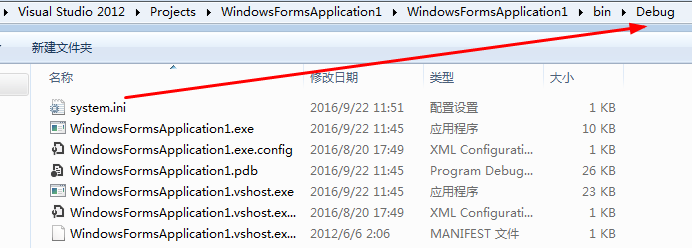
             //获得当前路径,当前是在Debug路径下

             string strPath = Environment.CurrentDirectory + "\\system.ini";

             WritePrivateProfileString(section, key, value, strPath);

         }

         public static string GetValue(string section, string key)

         {

             StringBuilder sb = new StringBuilder();

             string strPath = Environment.CurrentDirectory + "\\system.ini";

             //最好初始缺省值设置为非空,因为如果配置文件不存在,取不到值,程序也不会报错

             GetPrivateProfileString(section, key, "配置文件不存在,未取到参数", sb, , strPath);

             return sb.ToString();

         }
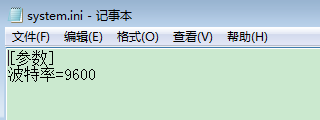
功能说明:程序加载时,创建配置文件并往里面写入波特率参数。(配置文件不需要事先存在,此Windows的API会自动创建)。点击button1,将取到的波特率显示到textBox1中。
完整代码如下:
 using System;

 using System.CodeDom;

 using System.Collections.Generic;

 using System.ComponentModel;

 using System.Data;

 using System.Drawing;

 using System.IO;

 using System.Linq;

 using System.Runtime.InteropServices;

 using System.Text;

 using System.Threading.Tasks;

 using System.Windows.Forms;

 namespace WindowsFormsApplication1

 {

     public partial class Form1 : Form

     {

         public Form1()

         {

             InitializeComponent();

         }

         [DllImport("kernel32")]

         //                        读配置文件方法的6个参数:所在的分区(section)、键值、     初始缺省值、     StringBuilder、   参数长度上限、配置文件路径

         private static extern int GetPrivateProfileString(string section, string key, string deVal, StringBuilder retVal,

             int size, string filePath);

         [DllImport("kernel32")]

         //                            写配置文件方法的4个参数:所在的分区(section)、  键值、     参数值、        配置文件路径

         private static extern long WritePrivateProfileString(string section, string key, string val, string filePath);

         public static void SetValue(string section, string key, string value)

         {

             //获得当前路径,当前是在Debug路径下

             string strPath = Environment.CurrentDirectory + "\\system.ini";

             WritePrivateProfileString(section, key, value, strPath);

         }

         public static string GetValue(string section, string key)

         {

             StringBuilder sb = new StringBuilder();

             string strPath = Environment.CurrentDirectory + "\\system.ini";

             //最好初始缺省值设置为非空,因为如果配置文件不存在,取不到值,程序也不会报错

             GetPrivateProfileString(section, key, "配置文件不存在,未取到参数", sb, , strPath);

             return sb.ToString();

         }

         private void Form1_Load(object sender, EventArgs e)

         {

             SetValue("参数","波特率","");

         }

         private void button1_Click(object sender, EventArgs e)

         {

             textBox1.Text = GetValue("参数", "波特率");

         }

     }

 }
程序界面:

C#中读写配置参数文件(利用Windows的API)的更多相关文章
- 读取xml文件中的配置参数实例_java - JAVA
文章来源:嗨学网 敏而好学论坛www.piaodoo.com 欢迎大家相互学习 paras.xml文件 <?xml version="1.0" encoding=" ...
- oracle中有关初始化参数文件的几个视图对比
涉及oracle中有关初始化参数文件的几个视图主要有:v$paraemter,v$parameter2,v$system_parameter,v$system_parameter2,v$spparam ...
- oracle中的初始化参数文件
oracle初始化参数文件管理 oracle实例是指运行状态下的oracle软件,是由内存结构跟一些进程结构组成的,主要实现数据库的访问跟控制功能,是oracle的核心. 初始化参数文件是oracle ...
- vue-cli脚手架中webpack配置基础文件详解
一.前言 原文:https://segmentfault.com/a/1190000014804826 vue-cli是构建vue单页应用的脚手架,输入一串指定的命令行从而自动生成vue.js+wep ...
- vue-cli 脚手架中 webpack 配置基础文件详解
一.前言 vue-cli是构建vue单页应用的脚手架,输入一串指定的命令行从而自动生成vue.js+wepack的项目模板.这其中webpack发挥了很大的作用,它使得我们的代码模块化,引入一些插件帮 ...
- struts2 笔记01 登录、常用配置参数、Action访问Servlet API 和设置Action中对象的值、命名空间和乱码处理、Action中包含多个方法如何调用
Struts2登录 1. 需要注意:Struts2需要运行在JRE1.5及以上版本 2. 在web.xml配置文件中,配置StrutsPrepareAndExecuteFilter或FilterDis ...
- MFC读写配置ini文件
https://blog.csdn.net/naibozhuan3744/article/details/78783446 https://blog.csdn.net/rayborn1105/arti ...
- 笔记01 登录、常用配置参数、Action访问Servlet API 和设置Action中对象的值、命名空间和乱码处理、Action中包含多个方法如何调用
Struts2登录 1. 需要注意:Struts2需要运行在JRE1.5及以上版本 2. 在web.xml配置文件中,配置StrutsPrepareAndExecuteFilter或FilterDis ...
- android的数据与访问(1)-我的app配置参数文件放在哪儿?
系统提供数据处理方式: 1.SharedPreferences 2.文件存储 3.轻量级的数据.如SQLLite 1.简单存储 是android提供的起来年纪的数据存储方式:SharedPerence ...
随机推荐
- EMguCV搭建第一个程序
这篇博客旨在教学Emgucv3.0的安装与配置. 环境:vs2013+Emgucv3.0 Emgu Cv简介: Emgu CV 是.NET平台下对OpenCV图像处理库的封装.也就是opencv的.N ...
- MongoDB入门实践
MongoDB入门实践 简单介绍MongoDB,包括MongoDB的使用场景.和MySQL的对比.安装部署.Java客户端访问及总结 MongoDB? 我们遵循需求驱动技术的原则,通过一个场景来引入M ...
- 让html标签显示在页面上
用 <xmp></xmp> 标签包起来,里面的所有文字会原样显示出来 <xmp><b>1</b><div>2</div&g ...
- eclipse安装freemarker插件【转】
今天在Eclipse上安装Freemarker的插件,一开始装官方网站上的推荐插件,装上后发现除了Freemarker代码高亮显示其他什么效果都没有,郁闷.在javaeye论坛上请教了下,据说官网上的 ...
- linux oracle服务器无密码登录dba
1.su - oracle 切换到oracle 2.sqlplus sys/manger as sysdba 3.新建用户: create user username identified by pa ...
- Python basic (from learn python the hard the way)
1. How to run the python file? python ...py 2. UTF-8 is a character encoding, just like ASCII. 3. ro ...
- 在ubuntu中添加新硬盘
在ubuntu中添加新硬盘 转载于 http://www.cnblogs.com/unipower/archive/2009/03/08/1406230.html 前言 安装新硬盘这种事情并不会经常 ...
- Flask之模板
2 了解Jinja2模板 知识点 模板使用 变量 过滤器 web表单 控制语句 宏.继承.包含 Flask中的特殊变量和方法 3.1 模板 在前面的示例中,视图函数的主要作用是生成请求的响应,这是最简 ...
- VUE 初步学习
Vue 简单的总结一 Vue 简单的总结二 Vue 简单的总结三 Vue 简单的总结四(项目流程) Vue 简单的总结五 Vue(6)- Vue-router进阶.单页面应用(SPA)带来的问题 Vu ...
- 高效率terminal和sublime 相互启动
在日常的工作中,我们经常使用到terminal和Sublime .今天给大家介绍下怎样高效率的实现terminal和sublime 相互启动 (这里说的是MAC环境,我用的是Sublime Text ...