
configParse模块
一、配置文件简介
在各种程序里面都有配置文件,为了对配置文件进行操作。 python中引入了configParse模块进行操作。
配置数值类型:
配置文件中,我们看到的bool型,整数型,在我们操作的时候,都是字符串类型。
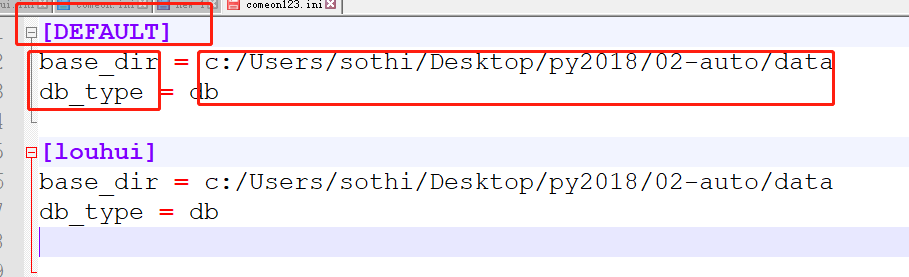
配置文件的三种定义:
section:章节。 章节需要注意,大写的DEFAULT的基类,下面所有新增加的章节,都会继承这个,后面章节不写option都会继承这个章节的。
option :选项,是每一个章节的定义。
value:选项的值
二、配置文件模块的使用
2.1 初步认识使用方法
import configparser

import os

conf = configparser.ConfigParser()  # 第一步:生成一个configParser对象,所有的操作都是根据这个对象来的,

conf['DEFAULT'] = {}           # 第二步:先生产一个章节,必需先定义一个字典 (空字典,或 有值的字典 或 k,v的方式)

conf['DEFAULT']['base_dir'] = 'c:/Users/sothi/Desktop/py2018/02-auto/data'

conf['DEFAULT']['db_type'] = 'db'

conf['DEFAULT']['db_path'] = 'data.db'

conf['DEFAULT']['max_items'] = ''

conf['DEFAULT']['auto_save'] = 'True'

conf['louhui'] = {}

conf['louhui']['auto_del'] = 'True'

                     # 第三步:写入到文件中

base_dir = r'C:\Users\LH\Desktop\data'

path = os.path.join(base_dir, 'comeon.ini')

with open(path, 'w') as f:

    conf.write(f)  # 使用conf对象进行io
2.2 配置文件的读写
2.2.1 写入到配置文件
base_dir = r'C:\Users\LH\Desktop\data'

path = os.path.join(base_dir, 'comeon.ini')

with open(path, 'w') as f:

    conf.write(f)  # 使用conf对象进行io。 conf就是上面的对象
2.2.2 读取配置文件到内存中
base_dir = r'C:\Users\LH\Desktop\data'

path = os.path.join(base_dir, 'comeon.ini')

# 读取配置文件

conf = configparser.ConfigParser()  # 定义一个对象接收

conf.read(path)
三、各种方法大全
配置文件的所有操作都是基于 configParse对象来操作。这点记住
3.1 增加
增加有两种方法:使用字典的形式来操作 或 使用内置方法
# 1.用前面写的方式追加

conf['diaosinan'] = {}

conf['diaosinan']['auto_add'] = ''

with open(path, 'w') as f:

    conf.write(f)

# 2.使用add_section进行追加,使用set使用set进行各种修改

conf.add_section('diaosinan')

conf.set('diaosinan','auto_dellll', '')   # set可以进行修改,也可以添加

conf.set('DEFAULT', 'auto_save', 'False')  # 修改父类的val

print(conf['louhui']['auto_save'])         # 子类直接改变
3.2 删除
- self.conf.remove_option()
- self.conf.remove_section()
def delete_option(self, section, option):

        '删除指定的section下的option'

        if self.conf.has_section(section) and self.conf.has_option(section, option):

            self.conf.remove_option(section, option)

        else:

            print('section or option is wrong!')
3.3 修改
直接使用3.1中的set可以进行修改。
3.4 查看
查看的各种方法
conf.has_section()      # 查看是否有该章节

conf.has_option()       # 查看是否有该option

conf.sections()         # 返回所有的章节.默认的大写的DEFAULT是不返回的,DEFAULT是默认的基类,类似继承,下面所有的都会继承这个属性

conf.options(section)   # 查看section下的所有章节

conf.items()            # 打印所有的项目
配置文件中获取的val是字符串,进行类型转换
# 获取指定的值

result = conf['louhui']['auto_save'] # 定义louhui这个章节的时候,没有auto_save,但是我们能打印出来,继承了DEFAULT

print(result, type(result))          # 返回的默认就是字符串. 我们可以用两种方式 进行 转换

print(conf.options('louhui'))

# 方式1

bool(result)

# 方式2

y = conf.getboolean('louhui','auto_save')

print(y, type(y))

## 或

louhui = conf['louhui']  # 定义一个变量名,存这个章节的对象

y = louhui.getboolean('auto_save')
s使用字典的方式进行操作
louhui = conf['louhui']

print(louhui['auto_save'])

print(louhui.get('auto_save'))
打印整个配置文件
# 打印整个配置文件

for k,v in conf.items():

    print(f'{[k]}')

    for key, val in conf.items(k):

        print(key, val)

    print('')
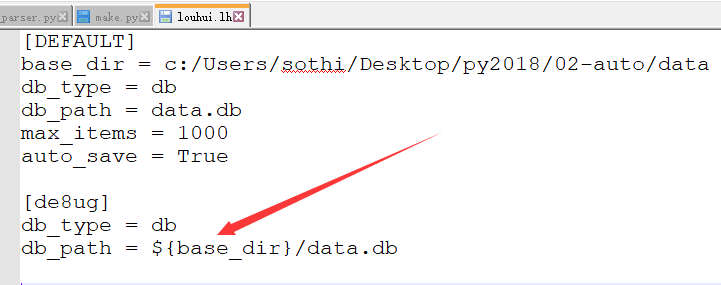
3.5 替换变量:
替换变量:
import configparser,os

base_dir = r'C:\Users\LH\Desktop\data'

path = os.path.join(base_dir, 'louhui.lh')

# conf = configparser.ConfigParser()

conf = configparser.ConfigParser(interpolation=configparser.ExtendedInterpolation())

conf.read(path)

print(conf['de8ug']['db_path'])
四、自己封装的一个config类:
 import configparser,os

 class MyConf:

     def __init__(self, path: str):

         '初始化的时候读取配置文件'

         self.path = path

         self.conf = configparser.ConfigParser()

         self.conf.read(self.path)  # 空文件也不会出错

     def add(self, section):

         '增加一个章节'

         if self.conf.has_section(section):

             print('改章节已经存在')

         else:

             self.conf.add_section(section)

     def write(self, dic: dict):

         '直接写入一个字典'

         for k, v in dic.items():

             self.conf[k] = v

     def del_section(self, section):

         '删除section'

         if self.conf.has_section(section):

             self.conf.remove_section(section)

         else:

             print('该章节不存在')

     def modify_val(self, section, option, val):

         if self.conf.has_section(section) and self.conf.has_option(section, option):

             self.conf.set(section, option, val)

             print('修改成功')

         else:

             print('修改失败')

     def delete_option(self, section, option):

         '删除指定的section下的option'

         if self.conf.has_section(section) and self.conf.has_option(section, option):

             self.conf.remove_option(section, option)

         else:

             print('section or option is wrong!')

     def save(self):

         '保存到配置文件中'

         with open(self.path, 'w') as f:

             self.conf.write(f)

     def check_all(self):

         '答应全部'

         for k, v in self.conf.items():

             print(f'[{k}]')

             for key, val in self.conf.items(k):

                 print(key, val)

         self.conf.remove_option()

         self.conf.remove_section()

     def test(self, li):

         print(self.conf.options(li))

         x = self.conf['louhui']

         print(type(x))

 def main():

     data = {

         'DEFAULT': {

             'base_dir': 'c:/Users/sothi/Desktop/py2018/02-auto/data',

             'db_type': 'db'

         },

         'de8ug': {

             'base_dir': 'c:/Users/sothi/Desktop/py2018/02-auto/data',

             'db_type': 'pkl'

         }

     }

     data.get('lh', False)

     base_dir = r'C:\Users\LH\Desktop\data'

     path = os.path.join(base_dir, 'comeon123.ini')

     myconf = MyConf(path)

     myconf.write(data)

 if __name__ == '__main__':

     main()
封装的config
configParse模块的更多相关文章
- python configparse模块&xml模块
configparse模块 用于生成和修改常见配置文档,当前模块的名称在 python 3.x 版本中变更为 configparser. [DEFAULT] serveraliveinterval = ...
- 【转】Python3 configparse模块(配置)
[转]Python3 configparse模块(配置) ConfigParser模块在python中是用来读取配置文件,配置文件的格式跟windows下的ini配置文件相似,可以包含一个或多个节(s ...
- python模块: hashlib模块, configparse模块, logging模块,collections模块
一. hashlib模块 Python的hashlib提供了常见的摘要算法,如MD5,SHA1等等. 摘要算法又称哈希算法.散列算法.它通过一个函数,把任意长度的数据转换为一个长度固定的数据串(通常用 ...
- 14 ConfigParse模块
1.ConfigParse模块的基本概念 此模块用于生成和修改常见配置文档. ConfigParser 是用来读取配置文件的包. 配置文件的格式如下:中括号“[ ]”内包含的为section.sect ...
- 0423 hashlib模块、logging模块、configparse模块、collections模块
一.hashlib模块补充 1,密文验证 import hashlib #引入模块 m =hashlib.md5() # 创建了一个md5算法的对象 m.update(b') print(m.hexd ...
- Python模块-configparse模块
configparse模块用来解析配置文件 配置文件 [DEFAULT] port = 3306 socket = /tmp/mysql.sock [mysqldump] max_allowed_pa ...
- Python进阶-XVV hashlib模块、configparse模块、logging模块
1.配置相关的configparse模块 配置文件如何组织?python中常见的是将配置文件写成py,然后引入该模块即可.优点是方便访问. 但是也有用类似windows中的ini文件的配置文件,了解即 ...
- python学习-58 configparse模块
configparse模块 1.生成文件 import configparser # 配置解析模块 config = configparser.ConfigParser() # config = { ...
- python基础--xml和configparse模块
1)XML模块 xml是实现不同语言或程序之间进行数据交换的协议,跟json差不多. 下面是xml的遍历查询删除修改和生成 # -*- coding:utf-8 -*- __author__ = 's ...
随机推荐
- BigInteger和Complex:NET 4新增数据类型
BigInteger和Complex是.NET 4中新增的两种值类型,他们位于System.Numeric命名空间下,需要单独添加引用. BigInteger BigInteger类型是不可变类型,代 ...
- 28UDP
UDP通信流程步骤: 服务端: 等待(被动)接收发送 1: 创建 socket: socket() 2: 绑定端口: bind() 3: 读取消息: read() 4: 发送消息 ...
- 性能调优之MySQL篇一:MySQL性能计数器
计数器 计数器分析 Threads_connected 表示当前有多少个客户连接该mysql服务器,连接数是否过多,网络是否存在问题,它是动态变化的,当达到最大连接数时,数据库系统就不能提供更多的连接 ...
- iOS 大批量弹幕小论(粒子弹幕)
一.现状 如今直播类.视频播放器等基本都有弹幕模式. 为了保持性能和内存可控,基本是在初始化的时候生成一个Pool(Pool的容量是设定好的), 也就是利用重用机制(可以想象一下UITableView ...
- Python面试题之Python中__repr__和__str__区别
看下面的例子就明白了 class Test(object): def __init__(self, value='hello, world!'): self.data = value >> ...
- Web安全学习笔记之Nmap扫描原理与用法
1 Nmap介绍 Nmap扫描原理与用法PDF:下载地址 Nmap是一款开源免费的网络发现(Network Discovery)和安全审计(Security Auditing)工具.软件名字N ...
- Swoole学习(六)Swoole之定时器的创建与清除
环境:Centos6.4,PHP环境:PHP7,Swoole2.1(在指定的时间后执行函数,需要1.7.7或更高版本) <?php //----------------------------- ...
- JS动态事件绑定问题
今天搞一个连环套的动态选项展示,需要给下拉框动态绑定事件,谁知绑定中出现问题,总是执行第一次绑定的时间而后续绑定的事件没有被触发. //重写增加行方法 function initMainItem(gr ...
- 20145307第一周JAVA实验报告
20145307 <Java程序设计>第一次实验实验报告 北京电子科技学院(BESTI)实验报告 课程:Java程序设计 班级:1453 指导教师:娄嘉鹏 实验日期:2016.04.08 ...
- spring MVC Action里面怎么设置UTF-8编码集
/* 编码转换,确保写数据库的时候不会出现乱码 */ public class CodingConvert{ public CodingConvert(){ // } public String to ...