
c#开发移动APP-Xamarin入门扩展
这节主要演示了如何通过添加第二个屏幕来跟踪应用程序的call历史来扩展Phoneword应用程序。最终如下:
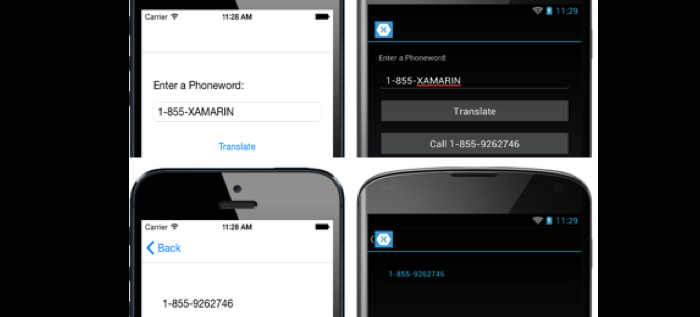
按如下步骤扩展Phoneword
在Phoneword项目右键新建Content Page,命名为CallHistoryPage
修改后CallHistoryPage.xaml如下:
<?xml version="1.0" encoding="UTF-8"?>

<ContentPage xmlns="http://xamarin.com/schemas/2014/forms"

                   xmlns:local="clr-namespace:Phoneword;assembly=Phoneword"

                   xmlns:x="http://schemas.microsoft.com/winfx/2009/xaml"

                   x:Class="Phoneword.CallHistoryPage"

                   Title="Call History">

    <ContentPage.Padding>

        <OnPlatform x:TypeArguments="Thickness">

            <On Platform="iOS" Value="20, 40, 20, 20" />

            <On Platform="Android, UWP" Value="20" />

        </OnPlatform>

    </ContentPage.Padding>

    <StackLayout>

      <ListView ItemsSource="{x:Static local:App.PhoneNumbers}" />

    </StackLayout>

</ContentPage>
双击Phoneword项目的App.xaml.cs文件
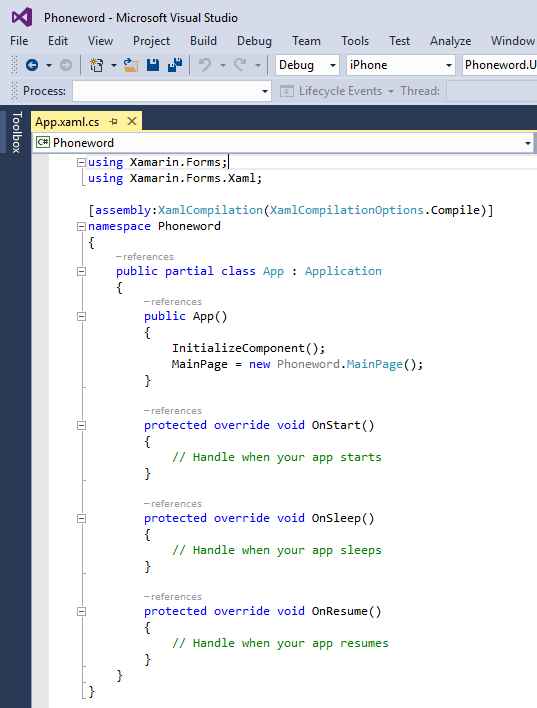
添加PhoneNumbers属性的声明,在App构造函数中初始化该属性,并将MainPage属性初始化为NavigationPage。PhoneNumbers被用于存储应用程序打的每个电话号码
using System.Collections.Generic;

using Xamarin.Forms;

using Xamarin.Forms.Xaml;

[assembly: XamlCompilation(XamlCompilationOptions.Compile)]

namespace Phoneword

{

    public partial class App : Application

    {

        public static IList<string> PhoneNumbers { get; set; }

        public App()

        {

            InitializeComponent();

            PhoneNumbers = new List<string>();

            MainPage = new NavigationPage(new MainPage());

        }

        ...

    }

}
双击Phoneword项目的MainPage.xaml文件
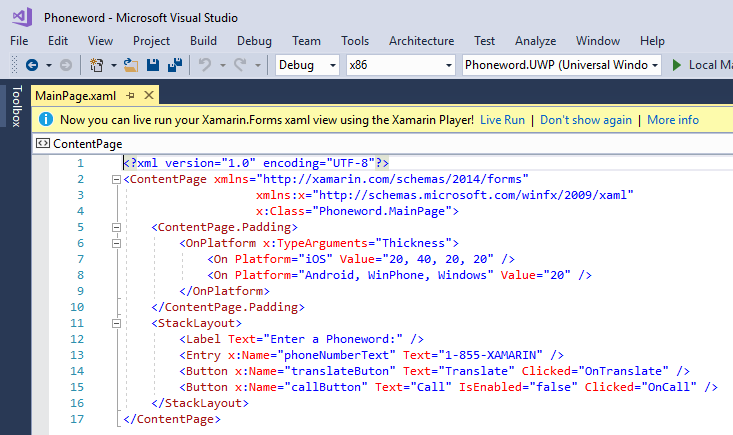
在StackLayout控件的末尾添加一个按钮控件,该按钮被用于导航到拨打历史页面
<StackLayout VerticalOptions="FillAndExpand"

             HorizontalOptions="FillAndExpand"

             Orientation="Vertical"

             Spacing="15">

  ...

<Button x:Name="callButton" Text="Call" IsEnabled="false" Clicked="OnCall" />

  <Button x:Name="callHistoryButton" Text="Call History" IsEnabled="false"

          Clicked="OnCallHistory" />

</StackLayout>
打开隐藏文件MainPage.xaml.cs,添加OnCallHistory事件处理程序方法,并修改OnCall事件处理程序方法,将转换后的电话号码添加到App.PhoneNumbers集合中,并且如果dialer变量不为null时使能callHistoryButton
using System;

using Xamarin.Forms;

namespace Phoneword

{

    public partial class MainPage : ContentPage

    {

        ...

        async void OnCall(object sender, EventArgs e)

        {

            ...

            if (dialer != null) {

                App.PhoneNumbers.Add (translatedNumber);

                callHistoryButton.IsEnabled = true;

                dialer.Dial (translatedNumber);

            }

            ...

        }

        async void OnCallHistory(object sender, EventArgs e)

        {

            await Navigation.PushAsync (new CallHistoryPage ());

        }

    }

}
下节剖析该扩展
c#开发移动APP-Xamarin入门扩展的更多相关文章
- c#开发移动APP-Xamarin入门扩展剖析
原文:c#开发移动APP-Xamarin入门扩展剖析 上节将Phoneword应用程序扩展到包含第二个屏幕,该屏幕可以跟踪应用程序的拨打历史 Navigation Xamarin.Form提供了一个内 ...
- 如何开发Office平台上的扩展应用(又称为Office 2013 App,Office 2013 Add-Ins,Apps for Office,Office 应用)
Office 扩展应用(Office Apps,Office 2013 AddIns,Apps for Office)开发 —— 中文文档 继 VBA 和 VSTO 之后, 微软为 Office 平台 ...
- 开发一个 app 有多难?
171 个回答 默认排序 道衍天机 有事情的加微信1293190838找我 1,150 人赞同了该回答 ----------------------------------------------- ...
- 跨平台移动APP开发进阶(二)HTML5+、mui开发移动app教程
前端开发APP,从HBuilder开始~ 序 通过 HTML5 开发移动App 时,会发现HTML5 很多能力不具备.为弥补HTML5 能力的不足,在W3C 中国的指导下成立了www.HTML5Plu ...
- Selenium自动化测试,接口自动化测试开发,性能测试从入门到精通
Selenium自动化测试,接口自动化测试开发,性能测试从入门到精通Selenium接口性能自动化测试基础部分:分层自动化思想Slenium介绍Selenium1.0/2.0/3.0Slenium R ...
- HBuilderX 5+APP MUI 入门
这一套东西是用来开发app的,可以用html.js什么的写app然后给你打包就能安装到手机上,也可以轻易跨端(需要使用vue,然而我还没有熟练). HBuilder:一个敲代码的软件,敲前端代码超级方 ...
- Flask开发系列之快速入门
Flask开发系列之快速入门 文档 一个最小的应用 调试模式 路由 变量规则 构造 URL HTTP 方法 静态文件 模板渲染 访问请求数据 环境局部变量 请求对象 文件上传 Cookies 重定向和 ...
- 【转载】用Ionic开发hybrid APP
使用phonegap开发APP的优劣在此不必细说,快速,简单,跨平台,以及随着iOS,Android本身对webview优化所带来的不错的性能,便是其独有的优势.而且私以为在目前激烈而又变化快速的移动 ...
- 在vs2012中用C#开发Android应用Xamarin环境搭建
Xamarin是Mono创始人Miguel de Icaza创建的公司,旨在让开发者可以用C#编写iOS, Android, Mac应用程序,也就是跨平台移动开发. 简介 Xamarin是基于Mono ...
随机推荐
- VC和MATLAB混合开发经验总结
作者:朱金灿 来源:http://blog.csdn.net/clever101 前期准备: 1.请确认机器中已经安装Matlab主程序或(MCR)MATLAB Compiler Runtime(具体 ...
- [Recompose] Transform Props using Recompose --mapProps
Learn how to use the 'mapProps' higher-order component to modify an existing component’s API (its pr ...
- 逐步把Nginx及Redis引入项目组之负载均衡技术调研初版总结
本篇以一个Nginx服务.两个Tomcat服务.一个Redis搭建一个负载均衡环境,由于就一台电脑暂以随机分配client请求策略开展,详细工作中推荐以IP地址来实现client请求的动态负载策略.省 ...
- php实现数组中的逆序对(归并排序实现:排序 辅助数组)
php实现数组中的逆序对(归并排序实现:排序 辅助数组) 一.总结 这题用归并排序 线段树 树状数组 等操作的复杂度应该都是小于n方的 二.php实现数组中的逆序对 题目描述 在数组中的两个数字 ...
- MethodInterceptor拦截器
http://blog.csdn.net/heirenheiren/article/details/39030767
- 基于 Android NDK 的学习之旅-----Java 调用C
随便谈谈为什么要Java调用C 吧: 我认为: 1. 有些公司开发Android项目的时候, 许多组件功能可能是C中已经实现了,所以我们没必要同样的功能又在java中实现一遍.例如我之前做的一个项目 ...
- 自旋锁解决StackOverflowError案例
本节笔者分享一个在实际工作中遇到的栈内存溢出(StackOverflowError)问题,以及其解决方案. 问题介绍:笔者负责的一个Java Web项目在启动的时候,需要有一些初始化操作,而接下来的代 ...
- 1069. The Black Hole of Numbers (20)【模拟】——PAT (Advanced Level) Practise
题目信息 1069. The Black Hole of Numbers (20) 时间限制100 ms 内存限制65536 kB 代码长度限制16000 B For any 4-digit inte ...
- [React] Use Jest's Snapshot Testing Feature
Often when testing, you use the actual result to create your assertion and have to manually update i ...
- 理解Erlang/OTP Supervisor
http://www.cnblogs.com/me-sa/archive/2012/01/10/erlang0030.html Supervisors are used to build an hie ...