
WEB笔记-3、盒子模型+定位+显示
.png)
一、 没有width的元素始终会将宽度扩展填满其父元素为止。添加水平边框、内外边距,会导致内容宽度减少,减少量等于边框+边距
.png)
二、 设定了宽度的盒子添加边框、边距,会导致盒子扩展得更宽,实际上盒子的width属性只是设置了盒子内容区的宽度,而非盒子要占据的水平宽度
.png)
.png)
- 为父元素应用 overflow:hidden
- 浮动父元素
- 在父元素的末尾添加非浮动元素,可以直接在标记中加,亦可以通过给父元素加clearfix类来加(需要一个clearfix的样式规则)
.png)
<!DOCTYPE html>

<html lang="en">

<head>

	<meta charset="UTF-8">

	<title>Document</title>

	<style type="text/css">

		*{ margin:0; padding:0;}

		div{background:#ccc;}

		.absolute-test{position:absolute; top:100px; left:100px;}

		.absolute-test h1{background:#333; color:orange;}

		body{margin-top: 30px  !important;}

	</style>

</head>

<body>

	<div>this is static position</div>

	<div class="absolute-test"><h1>I'm absulote</h1></div>

	<div>this is static position</div>

</body>

</html>
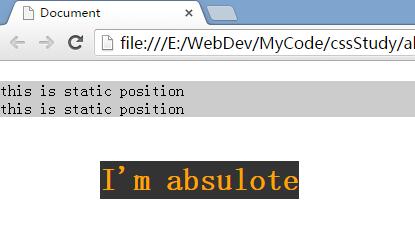 >>bottom=0就是页脚了 ^。^
<!DOCTYPE html>

<html lang="en">

<head>

	<meta charset="UTF-8">

	<title>Document</title>

	<style type="text/css">

		*{ margin:0; padding:0;}

		div{background:#ccc;}

		.absolute-test{position:fixed; top:0px; left:100px;}

		.absolute-test h1{background:#333; color:orange;}

		body{margin-top: 30px  !important;}

	</style>

</head>

<body>

	<div>this is static position</div>

	<div class="absolute-test"><h1>I'm absulote</h1></div>

	<div>this is static position</div>

	<div>this is static position</div>

	<div>this is static position</div>

	<div>this is static position</div>

	<div>this is static position</div>

	<div>this is static position</div>

	<div>this is static position</div>

	<div>this is static position</div>

	<div>this is static position</div>

	<div>this is static position</div>

	<div>this is static position</div>

	<div>this is static position</div>

	<div>this is static position</div>

	<div>this is static position</div>

	<div>this is static position</div>

	<div>this is static position</div>

	<div>this is static position</div>

	<div>this is static position</div>

	<div>this is static position</div>

	<div>this is static position</div>

	<div>this is static position</div>

	<div>this is static position</div>

	<div>this is static position</div>

	<div>this is static position</div>

	<div>this is static position</div>

	<div>this is static position</div>

	<div>this is static position</div>

	<div>this is static position</div>

	<div>this is static position</div>

	<div>this is static position</div>

	<div>this is static position</div>

	<div>this is static position</div>

	<div>this is static position</div>

	<div>this is static position</div>

	<div>this is static position</div>

	<div>this is static position</div>

	<div>this is static position</div>

	<div>this is static position</div>

	<div>this is static position</div>

	<div>this is static position</div>

	<div>this is static position</div>

	<div>this is static position</div>

	<div>this is static position</div>

	<div>this is static position</div>

	<div>this is static position</div>

	<div>this is static position</div>

	<div>this is static position</div>

	<div>this is static position</div>

	<div>this is static position</div>

	<div>this is static position</div>

</body>

</html>
 >>对了,这个东西拿来做导航很不错^。^...

WEB笔记-3、盒子模型+定位+显示的更多相关文章
- Python web前端 04 盒子模型
Python web前端 04 盒子模型 盒子模型是由内容(content).内边距(padding).外边距(margin).边框(border)组成的 一.边框 border #border 边框 ...
- CSS之选择符、链接、盒子模型、显示隐藏元素
<html> <head> <meta charset="utf-8"> <title>选择符.链接.盒子模型.显示隐藏元素< ...
- web前端学习笔记(CSS盒子的定位)
相对定位 使用相对定位的盒子的位置常以标准流的排版方式为基础,然后使盒子相对于它在原本的标准位置偏移指定的距离.相对定位的盒子仍在标准流中,它后面的盒子仍以标准流方式对待它. 使用relat ...
- WEB入门.六 盒子模型
学习内容 CSS盒子模型 盒子之间的关系 页面元素定位 能力目标 理解盒子模型 理解内容与表现分离的优点 理解并掌握盒子之间的关系 理解并掌握绝对定位与相对定位的用法 本章简介 上一章节中已经讲解了页 ...
- [Web 前端] CSS 盒子模型,绝对定位和相对定位
cp : https://blog.csdn.net/web_yh/article/details/53239372 一.盒子模型: 标准模式和混杂模式(IE).在标准模式下浏览器按照规范呈现页面:在 ...
- HTML&CSS精选笔记_盒子模型
盒子模型 认识盒子模型 所谓盒子模型就是把HTML页面中的元素看作是一个矩形的盒子,也就是一个盛装内容的容器.每个矩形都由元素的内容.内边距(padding).边框(border)和外边距(margi ...
- css标签样式 边框 盒子模型 定位 溢出 z-index 透明度
目录 一.CSS设置标签样式 1. 给标签设置长和宽 2.字体的颜色(3种表示方法) 3.文本样式 4. 语义 5. 背景样式 6. 边框 6.1 边框变圆 7.display 标签转换 二.盒子模型 ...
- CSS学习笔记:盒子模型
盒子模型(CSS basic box model):When laying out a document, the browser's rendering engine represents each ...
- CSS 小结笔记之盒子模型
网页标签可以看成是一个个盒子,页面设计就像垒积木一样,在网页中将盒子摆好显示出来.在浏览器中可以很清楚的去看到一个标签的盒子,具体方法如下: 打开浏览器的开发人员工具,在Elements中选中一个标签 ...
随机推荐
- OSI 7层模型和 TCP/IP 5层模型
网络协议通常分不同层次进行开发,每一层分别负责不同的通行功能. 两种参考模型 OSI 和 TCP/IP, OSI 先有模型后有协议,TCP/IP 则相反. OSI 7层模型 - 应用层 - 表示层 - ...
- 使用Python PIL库中的Image.thumbnail函数裁剪图片
今天,是我来到博客园的第五天,发现自己还没有头像,想着上传ubuntu系统中我很喜欢的一个背景图片来当头像,但是因为图片过大,上传失败了.那么,我们如何使用python中强大的PIL库来进行图片裁剪呢 ...
- zend studio【快捷键】
=================================[快捷键 zend studio]========== 1.调出查找面板[ctrl+f] 2.全文检索[ctrl+h] 3.关闭当前文 ...
- BZOJ 1232 USACO 2008 Nov. 安慰奶牛Cheer
[题解] 对于每一条边,我们通过它需要花费的代价是边权的两倍加上这条边两个端点的点权. 我们把每条边的边权设为上述的值,然后跑一边最小生成树,再把答案加上最小的点权就好了. #include<c ...
- 一个电商项目的Web服务化改造6:单元测试4步走,构造数据、执行操作、断言、回滚
最近一直在做一个电商项目,需要把原有单系统架构的项目,改造成基于服务的架构,SOA. 有点挑战,做完了,会有很大进步. 单元测试,在很早之前的文章已经介绍过. 可以在这里看到相关的 ...
- hdu2014 青年歌手大奖赛_评委会打分【C++】
青年歌手大奖赛_评委会打分 Time Limit: 2000/1000 MS (Java/Others) Memory Limit: 65536/32768 K (Java/Others)Tot ...
- noip模拟赛 楼
分析:题目可以转化为对于一个数,对它进行x次减法操作,n-x次加法操作,使他变成最小的非负整数.因为每减一次数就会减小,次数是一定的,所以可以二分x,就可以了. #include <cstdio ...
- [bzoj3694]最短路_树链剖分_线段树
最短路 bzoj-3694 题目大意:给你一个n个点m条边的无向图,源点为1,并且以点1为根给出最短路树.求对于2到n的每个点i,求最短路,要求不经过给出的最短路树上的1到i的路径上的最后一条边. 注 ...
- 阿伦 凯 Alan Kay 面向对象编程思想创始人
The best way to predict the future is to invent it. 预测未来最好的办法就是创造它.
- linux 获取经过N层Nginx转发的访问来源真实IP
linux 获取经过N层Nginx转发的访问来源真实IP 学习:http://blog.csdn.net/zhenzhendeblog/article/details/49702575 学习:http ...