
OpenCL编译环境配置(VS+Nvidia)
英伟达的显卡首先要下载安装CUDA开发包,可以参考这里的步骤: VS2015编译环境下CUDA安装配置
安装好CUDA之后,OpenCL的配置就已经完成了80%了,剩下的工作就是把OpenCL的路径添加到工程中。
1. 新建一个win32控制台应用程序,在工程的属性管理器Debug中添加一个属性页“OpenCL.props”,之后双击打开
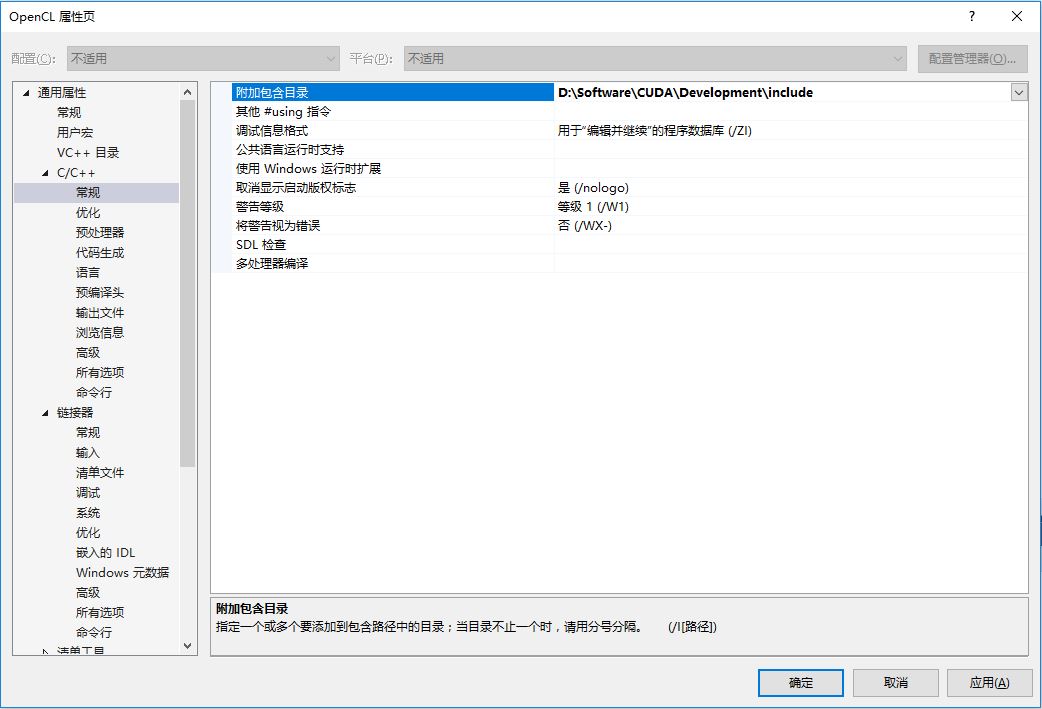
2. 在C/C++ ->常规->附加包含目录 中添加CUDA的include文件夹路径,我的路径是“D:\Software\CUDA\Development\include”
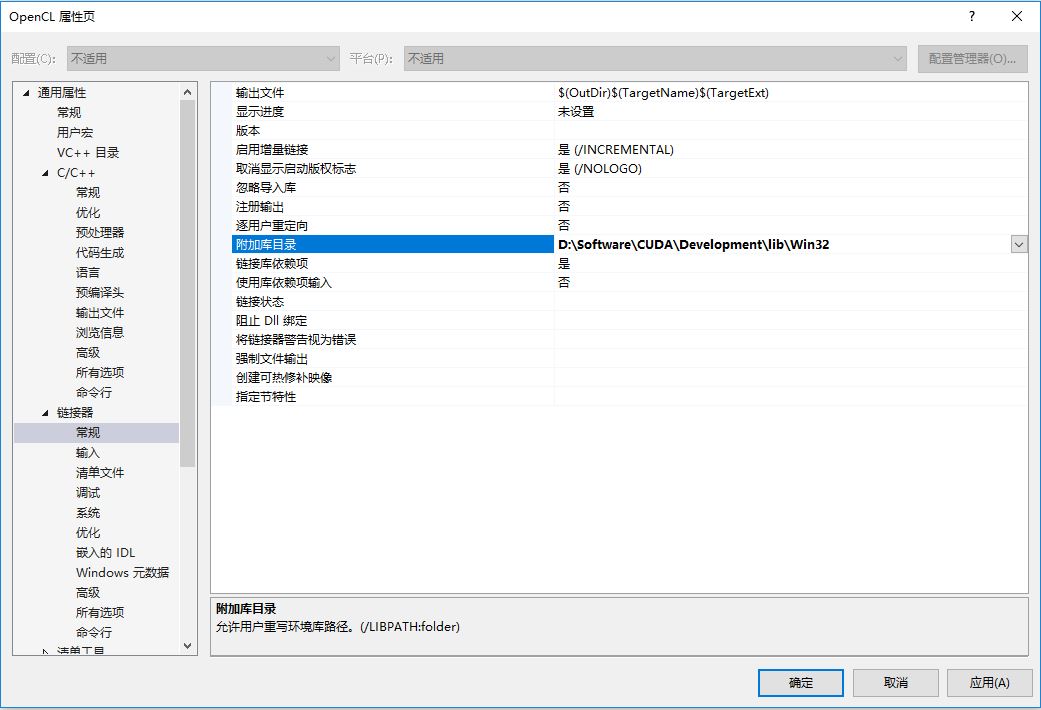
3. 在链接器->常规->附加库目录 中添加lib文件夹路径,我的路径是“D:\Software\CUDA\Development\lib\Win32”
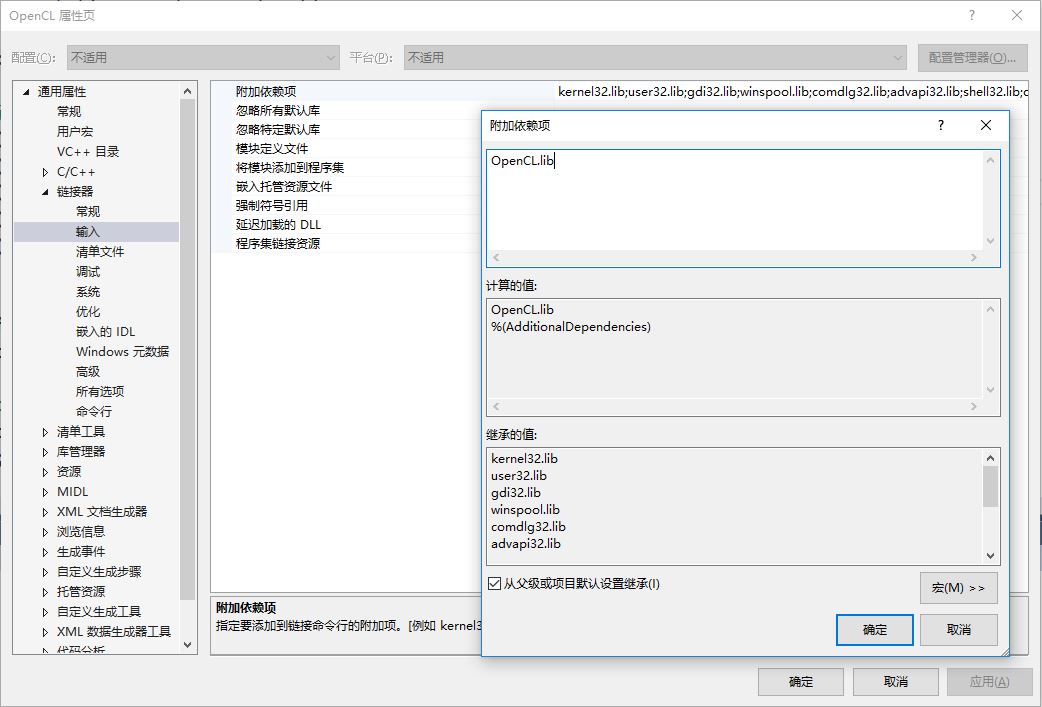
4. 在链接器->输入->附加依赖项 里添加lib文件 OpenCL.lib
经过以上4个步骤,OpenCL编译环境就已经配置好了,可以把属性页“OpenCL.props”保存起来,下次直接这个属性页就可以了,不用每次都重复配置。以下是测试程序:
#include <stdio.h>

#include <stdlib.h>

#include <iostream>

#include <CL/cl.h>

int main()

{

	//cl_platform 表示一个OpenCL的执行平台,关联到GPU硬件,如N卡,AMD卡

	cl_platform_id *platforms;

	//OpenCL中定义的跨平台的usigned int和int类型

	cl_uint num_platforms;

	cl_int i, err, platform_index = -1;

	char* ext_data;

	size_t ext_size;

	const char icd_ext[] = "cl_khr_icd";

	//要使platform工作,需要两个步骤。1 需要为cl_platform_id结构分配内存空间。2 需要调用clGetPlatformIDs初始化这些数据结构。一般还需要步骤0:询问主机上有多少platforms

	//查询计算机上有多少个支持OpenCL的设备

	err = clGetPlatformIDs(5, NULL, &num_platforms);

	if (err < 0)

	{

		perror("Couldn't find any platforms.");

		exit(1);

	}

	printf("本机上支持OpenCL的环境数量: %d\n", num_platforms);

	//为platforms分配空间

	platforms = (cl_platform_id*)

		malloc(sizeof(cl_platform_id) * num_platforms);

	clGetPlatformIDs(num_platforms, platforms, NULL);

	//获取GPU平台的详细信息

	for (i = 0; i < num_platforms; i++)

	{

		//获取缓存大小

		err = clGetPlatformInfo(platforms[i],

			CL_PLATFORM_EXTENSIONS, 0, NULL, &ext_size);

		if (err < 0)

		{

			perror("Couldn't read extension data.");

			exit(1);

		}

		printf("缓存大小: %d\n", ext_size);

		ext_data = (char*)malloc(ext_size);

		//获取支持的扩展功能

		clGetPlatformInfo(platforms[i], CL_PLATFORM_EXTENSIONS,

			ext_size, ext_data, NULL);

		printf("平台 %d 支持的扩展功能: %s\n", i, ext_data);

		//获取显卡的名称

		char *name = (char*)malloc(ext_size);

		clGetPlatformInfo(platforms[i], CL_PLATFORM_NAME,

			ext_size, name, NULL);

		printf("平台 %d 是: %s\n", i, name);

		//获取显卡的生产商名称

		char *vendor = (char*)malloc(ext_size);

		clGetPlatformInfo(platforms[i], CL_PLATFORM_VENDOR,

			ext_size, vendor, NULL);

		printf("平台 %d 的生产商是: %s\n", i, vendor);

		//获取平台版本

		char *version = (char*)malloc(ext_size);

		clGetPlatformInfo(platforms[i], CL_PLATFORM_VERSION,

			ext_size, version, NULL);

		printf("平台 %d 的版本信息: %s\n", i, version);

		//查询显卡是独立的还是嵌入的

		char *profile = (char*)malloc(ext_size);

		clGetPlatformInfo(platforms[i], CL_PLATFORM_PROFILE,

			ext_size, profile, NULL);

		printf("平台 %d 是独立的(full profile)还是嵌入式的(embeded profile)?: %s\n", i, profile);

		//查询是否支持ICD扩展

		if (strstr(ext_data, icd_ext) != NULL)

			platform_index = i;

		std::cout << "平台ID = " << platform_index << std::endl;

		/* Display whether ICD extension is supported */

		if (platform_index > -1)

			printf("平台 %d 支持ICD扩展: %s\n",

				platform_index, icd_ext);

		std::cout << std::endl;

		//释放空间

		free(ext_data);

		free(name);

		free(vendor);

		free(version);

		free(profile);

	}

	if (platform_index <= -1)

		printf("No platforms support the %s extension.\n", icd_ext);

	getchar();

	//释放资源

	free(platforms);

	return 0;

}
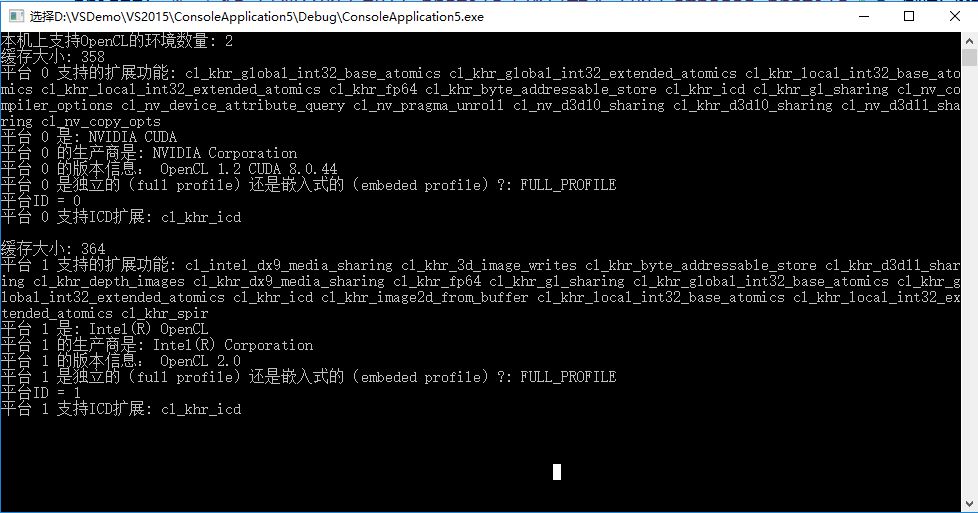
在本机上执行输出:
OpenCL编译环境配置(VS+Nvidia)的更多相关文章
- linux内核编译环境配置
linux内核编译环境配置 如果不是编译内核,只需要安装与内核相匹配的kernel-devel开发包即可.即是/lib/modules/`uname -r`/build -> /usr/src/ ...
- Syslinux编译环境配置简要步骤
由于毕业设计要做一个加密U盘的LINUX,需要修改一sysylinux引导程序,在网上很少有关于syslinux编译环境配置的文章,在此简要总结一下,发出来共享. 需要的软件: 1. vmware ...
- Android编译环境配置
Android编译环境配置 网上关于Android编译环境配置的整理资料有不少,经整理亲测后,希望能给需要的亲们提供帮助. 主要分为四步: 1.安装JDK(Java Standard Edition ...
- mac OS(OS X)的OI编译环境配置指南
编译环境:gdb+Atom 如何安装gdb: http://logic0.blog.163.com/blog/static/1889281462014183271283/ Atom下载地址: ht ...
- Android编译环境配置(Ubuntu 14.04)
常识:编译Android源代码需要在Linux系统环境下进行... 在Linux中,开发Android环境包括以下需求:Git.repo.JDK(现在一般使用OpenJDK)等:其中,Git用于下载源 ...
- Berkeley DB (VC6.0 编译环境配置)
操作系统:winxp VC环境:VC6.0 必需文件:Berkeley DB安装文件(db-.msi) 下载地址:http://www.oracle.com/technology/software/p ...
- Android代码编译环境配置 “Gerrit和Git环境配置”
Gerrit和Git环境配置可以参考<git&gerrit操作指导> 步骤1. 先在Gerrit中创建新的账户: 步骤2. 在新的客户端上生成密钥(可以使用的是生成的公钥): 步骤 ...
- 关于Sublime text 的PHP编译环境配置的问题
前一段时间终于装上了传说中的代码编辑神器====>Sublime Text ,一打开便爱不释手,于是在网上找PHP的配置方案和插件,所有的一切都搞定了,可就是编译的时候没有显示,也没有提示,熬了 ...
- 2016/01/10 C++ Primer 小记 —— 命令行编译环境配置
OK!第一篇博文!自贺一下! 今日看了此书的前几页.嗯,说得挺全,基础易懂. 之前学过c++,但没用过命令行编译. 本人用的VS里的编译器,文件名是cl.exe,在VC目录下. 虽然有了编译器,但并不 ...
随机推荐
- [Nuxt] Add CSS Libraries to Nuxt
You can easily add CSS libraries to Nuxt using yarn or npm to install them, then simply adding them ...
- [NodeJS] Use Now alias for custom sub-domains
Now is a great way to deploy your node application, but the generated URLs aren't memorable or easil ...
- thinkphp模型事件(钩子函数:模型中在增删改等操作前后自动执行的事件)
thinkphp模型事件(钩子函数:模型中在增删改等操作前后自动执行的事件) 一.总结 1.通过模型事件(钩子函数),可以在插入更新删除等前后执行一些特定的功能 2.模型事件是写在模型里面的,控制器中 ...
- [CSS] Control Image Aspect Ratio Using CSS
Resize images and videos to fill their parent and maintain their aspect ratio with pure CSS. The new ...
- 美国汪利宏的蒙特卡洛及卷积模拟程序,可以模拟top-hat光束和高斯光束在生物组织中的传输
链接:https://pan.baidu.com/s/1yaCsQ8TCVPSIZ4TVBZgfnw 密码:otzr
- 【solr专题之二】配置文件:solr.xml solrConfig.xml schema.xml 分类: H4_SOLR/LUCENCE 2014-07-23 21:30 1959人阅读 评论(0) 收藏
1.关于默认搜索域 If you are using the Lucene query parser, queries that don't specify a field name will use ...
- FAST特征点检测&&KeyPoint类
FAST特征点检测算法由E.Rosten和T.Drummond在2006年在其论文"Machine Learning for High-speed Corner Detection" ...
- Android多线程研究(5)——线程之间共享数据
一.如果是每个线程都执行相同的代码,则可以使用同一个Runnable来实现共享 public class MultiThreadShareData { public static void main( ...
- 【浅墨Unity3D Shader编程】之中的一个 夏威夷篇:游戏场景的创建 & 第一个Shader的书写
本系列文章由@浅墨_毛星云 出品.转载请注明出处. 文章链接:http://blog.csdn.net/poem_qianmo/article/details/40723789 作者:毛星云(浅墨) ...
- Passive DNS
http://blog.csdn.net/cnbird2008/article/details/17250707 http://netsecurity.51cto.com/art/201510/494 ...