
Caffe2:ubuntuKylin17.04使用Caffe2.LSTM
一早发现caffe2的较成熟的release版发布了(the first production-ready release),那么深度学习平台在之后一段时间也是会出现其与tensorflow相互竞争的局面。
从打开这个caffe2的官网就会发现,有了Facebook的支持,连界面也好看多了。不过再仔细看看,觉得又和tensorflow有一丝像,从内到外。
类似于TensorFlow的构建,Caffe2默认包含了LSTM单元,即可以基于Caffe构建RNN和LSTM网络,用于处理变长模式识别问题。
参考文章链接:caffe2 安装与介绍
文章:DNN结构演进History—LSTM_NNhttp://blog.csdn.net/wishchin/article/details/4242 5087
Caffe Vs. Caffe2
Caffe2 中基本计算单元之一是 Operators。每个 Operator 包含给定适当数量和类型的输入和参数来计算输出所需的逻辑。Caffe 和 Caffe2 功能的总体差异如下图所示:
One of basic units of computation in Caffe2 are the Operators. Each operator contains the logic necessary to compute the output given the appropriate number and types of inputs and parameters. The overall difference between operators’ functionality in Caffe
and Caffe2 is illustrated in the following graphic, respectively:
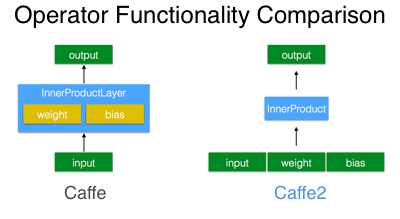
看到这段话,是不是更觉得像是tensorflow了?之前layer的概念被弱化,数据与操作完全分开,不就是tensorflow里面需要定义的tf.matmul和tf.Variable这类吗?
其次提出的workspace概念很像是tf中的Session:
# Create the input data

data = np.random.rand(16, 100).astype(np.float32)

# Create labels for the data as integers [0, 9].

label = (np.random.rand(16) * 10).astype(np.int32)

workspace.FeedBlob("data", data)

workspace.FeedBlob("label", label)

# Create model using a model helper

m = cnn.CNNModelHelper(name="my first net")

fc_1 = m.FC("data", "fc1", dim_in=100, dim_out=10)

pred = m.Sigmoid(fc_1, "pred")

[softmax, loss] = m.SoftmaxWithLoss([pred, "label"], ["softmax", "loss"])
网络的编写也向tf靠拢了(学了点tf还是有点用的)。
最后还要说一点就是对Python的支持大大增强了,当然这也是深度学习的趋势。
..........................................
安装测试:
安装测试成功.......................可以运行。
问题:
不能使用GPU
在Eclipse中运行测试用例
写个代码段:
#-*- coding:utf-8 -*-

from caffe2.python import workspace, model_helper,cnn

import numpy as np

def testFirst():

    data_dim = 1000

    label_dim = 10

    print("Build Net")

    # Create the input data

    data = np.random.rand(label_dim, data_dim).astype(np.float32)

    # Create labels for the data as integers [0, 9].

    label = (np.random.rand(label_dim) * 10).astype(np.int32)

    workspace.FeedBlob("data", data)

    workspace.FeedBlob("label", label)

    # Create model using a model helper

    m = cnn.CNNModelHelper(name="my first net")

    fc_1 = m.FC("data", "fc1", dim_in=data_dim, dim_out=10)

    pred = m.Sigmoid(fc_1, "pred")

    [softmax, loss] = m.SoftmaxWithLoss([pred, "label"], ["softmax", "loss"])

    m.AddGradientOperators([loss])

    workspace.RunNetOnce(m.param_init_net)

    workspace.CreateNet(m.net)

    # Run 100 x 10 iterations

    print("Start to Train........................................................")

    for j in range(0, 10):

        data = np.random.rand(label_dim, data_dim).astype(np.float32)

        label = (np.random.rand(label_dim) * 10).astype(np.int32)

        workspace.FeedBlob("data", data)

        workspace.FeedBlob("label", label)

        workspace.RunNet(m.name, 10)   # run for 10 times

        print("%d:%f"%(j, workspace.FetchBlob("loss")))

    print("End Training!!!!!!!!!")
运行结果:
import sys; print('%s %s' % (sys.executable or sys.platform, sys.version))

Python 2.7.13 (default, Jan 19 2017, 14:48:08)

Type "copyright", "credits" or "license" for more information.

IPython 5.4.1 -- An enhanced Interactive Python.

?         -> Introduction and overview of IPython's features.

%quickref -> Quick reference.

help      -> Python's own help system.

object?   -> Details about 'object', use 'object??' for extra details.

/usr/bin/python2.7 2.7.13 (default, Jan 19 2017, 14:48:08)

[GCC 6.3.0 20170118]

PyDev console: using IPython 5.4.1

>>import Caffe2First as cf

WARNING:root:This caffe2 python run does not have GPU support. Will run in CPU only mode.

WARNING:root:Debug message: No module named caffe2_pybind11_state_gpu

>>cf.testFirst()

Build Net

Start to Train........................................................

0:2.322352

1:2.244581

2:2.401595

3:2.267505

4:2.369389

5:2.369020

6:2.342272

7:2.354734

8:2.265224

9:2.275712

End Training!!!!!!!!!

>>
使用Caffe2的Model
Caffe2给出了三个Model:https://caffe2.ai/docs/tutorials。分别是RNN,使用内部LSTM实现;数据存储创建文件;resnet50训练器,是一个50层的残差网络,可以使用GPU进行并行训练。
There are example scripts that can be found in /caffe2/python/examples that are also great resources for starting off on a project using Caffe2.
- char_rnn.py: generate a recurrent convolution neural network that will sample text that you input and randomly generate text of a similar style.
The RNN and LSTM page has further info on this script’s usage. - lmdb_create_example.py: create an lmdb database of random image data and labels that can be used a skeleton to write your own data import
- resnet50_trainer.py: parallelized multi-GPU distributed trainer for Resnet 50. Can be used to train on imagenet data, for example. TheSynchronous
SGD page has further info on this script’s usage.
Caffe2:ubuntuKylin17.04使用Caffe2.LSTM的更多相关文章
- Caffe2:使用Caffe构建LSTM网络
前言: 一般所称的LSTM网络全叫全了应该是使用LSTM单元的RNN网络. 原文:(Caffe)LSTM层分析 入门篇:理解LSTM网络 LSTM的官方简介: http://deeplearning. ...
- ROS:使用ubuntuKylin17.04安装ROS赤xi龟
使用ubuntuKylin17.04安装 参考了此篇文章:SLAM: Ubuntu16.04安装ROS-kinetic 重复官方链接的步骤也没有成功. 此后发现4.10的内核,不能使用Kinetic. ...
- ubuntu 16.04 安装caffe2的方法及问题解决
工作需要安装caffe2,从用户体验上来讲,caffe2的安装绝对是体验比较差的那种,花费了我那么多时间去倒腾,这样的用户体验的产品,估计后面是比较危险的. 废话少说,直接上步骤: 官网上有安装目录, ...
- ubuntu16.04 安装caffe2
1.使用conda创建环境 conda create --name caffe2env python=3.6 ---------------------------------success----- ...
- Caffe2 用户手册概览(Caffe2 Tutorials Overview)[1]
在开始之前,我们很感激你对Caffe2感兴趣,希望Caffe2在你的机器学习作品中是一个高性能的框架.Caffe2致力于模块化,促进深度学习想法和原型的实现. 选择你的学习路线 1. 使用一个现成 ...
- Caffe2:python -m caffe2.python.operator_test.relu_op_test
1. 进行语句测试时候,出现问题, 设置环境变量CUDA_VISIBLE_DEVICES 参考: cuda设置指定可见方法 在/etc/profile文件或者-/.bashrc末尾添加以下行: exp ...
- ubuntuKylin17.04重装KDE
不小心安装了一个不知道什么的东西,把libROS的那一套都给卸载了,然后删除掉了KDE的很多库.然后KDM也丢失了.KDE界面启动之后,plasma-desktop界面也启动不了.选择重装. 然而出现 ...
- (译)综合指南:通过Ubuntu 16.04上从Source构建来安装支持GPU的Caffe2
(译)综合指南:通过Ubuntu 16.04上从Source构建来安装支持GPU的Caffe2 译者注: 原文来自:https://tech.amikelive.com/node-706/compre ...
- caffe2+cuda+Ubuntu16.04(u盘安装)
安装caffe2 预先准备.安装gflags及autoconf及GLOG https://github.com/caffe2/caffe2/issues/1810 一.下载源代码通过网盘 https: ...
随机推荐
- route 详解
语法: [root@test root]# route [-nee] [root@test root]# route add [-net|-host]目标主机或网域[netmask] [gw|dev] ...
- POJ 1416 Shredding Company 回溯搜索 DFS
Shredding Company Time Limit: 1000MS Memory Limit: 10000K Total Submissions: 6173 Accepted: 3361 ...
- Clojure:解决Selmer与AngularJS的 标签混淆问题
Selmer是Clojure的一个模板类库,下面是它的一个DEMO模板: <ul> {% for item in items %} <li>{{item}}</li> ...
- PHP array_intersect()
定义和用法 array_intersect() 函数返回两个或多个数组的交集数组. 结果数组包含了所有在被比较数组中,也同时出现在所有其他参数数组中的值,键名保留不变. 注释:仅有值用于比较. 语法 ...
- Android測试环境变量配置表
要改动的文件是~/bash_profile这个配置文件,内容例如以下: # Setting PATH for Java JAVA_HOME="/Library/Java/JavaVirtua ...
- 在imageView依次加入7个手势, 1.点击哪个button,往imageView上加入哪个手势.(保证视图上仅仅有一个手势). 2.轻拍:点击视图切换美女图片.(imageView上首先展示的美女
// // ControlView.h // HomeworkGestureRecognizer // // Created by lanouhn on 14-8-27. // Copyright ( ...
- 专业函数画图软件Origin
首先:Origin软件已经是科研院所等单位的必备工作软件之中的一个,之所以大家讨论得较少,有可能并非其上手难度低.而是这些使用人群的学习理解能力要相对高一点吧: 其次:Excel不垃圾,但在函数画图方 ...
- Cocos2d-x 开发神器cococreator使用介绍
Cocos2d-x 开发神器cococreator使用介绍 本篇博客小巫给大家推荐一个开发神器,你还在为搭建Cocos2d-x开发环境而头痛么.还在为平台移植问题而困扰么,我想大家都想更加高速得进行开 ...
- Android 线程 Looper.prepare()、Looper.loop() 使用
优化项目过程中发现了一个非常Low的问题,整理一下.备忘: 说问题之前先看下HandlerThread的定义 一个封装了looper的线程: Looper用于封装了android线程中的消息循环. ...
- 每日算法之二十六:Substring with Concatenation of All Words
变相的字符串匹配 给定一个字符串,然后再给定一组同样长度的单词列表,要求在字符串中查找满足下面条件的起始位置: 1)从这个位置開始包括单词列表中全部的单词.且每一个单词仅且必须出现一次. 2)在出现的 ...