
Caffe2:ubuntuKylin17.04使用Caffe2.LSTM
一早发现caffe2的较成熟的release版发布了(the first production-ready release),那么深度学习平台在之后一段时间也是会出现其与tensorflow相互竞争的局面。
从打开这个caffe2的官网就会发现,有了Facebook的支持,连界面也好看多了。不过再仔细看看,觉得又和tensorflow有一丝像,从内到外。
类似于TensorFlow的构建,Caffe2默认包含了LSTM单元,即可以基于Caffe构建RNN和LSTM网络,用于处理变长模式识别问题。
参考文章链接:caffe2 安装与介绍
文章:DNN结构演进History—LSTM_NNhttp://blog.csdn.net/wishchin/article/details/4242 5087
Caffe Vs. Caffe2
Caffe2 中基本计算单元之一是 Operators。每个 Operator 包含给定适当数量和类型的输入和参数来计算输出所需的逻辑。Caffe 和 Caffe2 功能的总体差异如下图所示:
One of basic units of computation in Caffe2 are the Operators. Each operator contains the logic necessary to compute the output given the appropriate number and types of inputs and parameters. The overall difference between operators’ functionality in Caffe
and Caffe2 is illustrated in the following graphic, respectively:
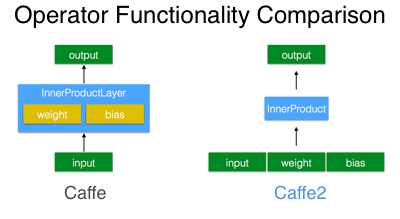
看到这段话,是不是更觉得像是tensorflow了?之前layer的概念被弱化,数据与操作完全分开,不就是tensorflow里面需要定义的tf.matmul和tf.Variable这类吗?
其次提出的workspace概念很像是tf中的Session:
# Create the input data

data = np.random.rand(16, 100).astype(np.float32)

# Create labels for the data as integers [0, 9].

label = (np.random.rand(16) * 10).astype(np.int32)

workspace.FeedBlob("data", data)

workspace.FeedBlob("label", label)

# Create model using a model helper

m = cnn.CNNModelHelper(name="my first net")

fc_1 = m.FC("data", "fc1", dim_in=100, dim_out=10)

pred = m.Sigmoid(fc_1, "pred")

[softmax, loss] = m.SoftmaxWithLoss([pred, "label"], ["softmax", "loss"])
网络的编写也向tf靠拢了(学了点tf还是有点用的)。
最后还要说一点就是对Python的支持大大增强了,当然这也是深度学习的趋势。
..........................................
安装测试:
安装测试成功.......................可以运行。
问题:
不能使用GPU
在Eclipse中运行测试用例
写个代码段:
#-*- coding:utf-8 -*-

from caffe2.python import workspace, model_helper,cnn

import numpy as np

def testFirst():

    data_dim = 1000

    label_dim = 10

    print("Build Net")

    # Create the input data

    data = np.random.rand(label_dim, data_dim).astype(np.float32)

    # Create labels for the data as integers [0, 9].

    label = (np.random.rand(label_dim) * 10).astype(np.int32)

    workspace.FeedBlob("data", data)

    workspace.FeedBlob("label", label)

    # Create model using a model helper

    m = cnn.CNNModelHelper(name="my first net")

    fc_1 = m.FC("data", "fc1", dim_in=data_dim, dim_out=10)

    pred = m.Sigmoid(fc_1, "pred")

    [softmax, loss] = m.SoftmaxWithLoss([pred, "label"], ["softmax", "loss"])

    m.AddGradientOperators([loss])

    workspace.RunNetOnce(m.param_init_net)

    workspace.CreateNet(m.net)

    # Run 100 x 10 iterations

    print("Start to Train........................................................")

    for j in range(0, 10):

        data = np.random.rand(label_dim, data_dim).astype(np.float32)

        label = (np.random.rand(label_dim) * 10).astype(np.int32)

        workspace.FeedBlob("data", data)

        workspace.FeedBlob("label", label)

        workspace.RunNet(m.name, 10)   # run for 10 times

        print("%d:%f"%(j, workspace.FetchBlob("loss")))

    print("End Training!!!!!!!!!")
运行结果:
import sys; print('%s %s' % (sys.executable or sys.platform, sys.version))

Python 2.7.13 (default, Jan 19 2017, 14:48:08)

Type "copyright", "credits" or "license" for more information.

IPython 5.4.1 -- An enhanced Interactive Python.

?         -> Introduction and overview of IPython's features.

%quickref -> Quick reference.

help      -> Python's own help system.

object?   -> Details about 'object', use 'object??' for extra details.

/usr/bin/python2.7 2.7.13 (default, Jan 19 2017, 14:48:08)

[GCC 6.3.0 20170118]

PyDev console: using IPython 5.4.1

>>import Caffe2First as cf

WARNING:root:This caffe2 python run does not have GPU support. Will run in CPU only mode.

WARNING:root:Debug message: No module named caffe2_pybind11_state_gpu

>>cf.testFirst()

Build Net

Start to Train........................................................

0:2.322352

1:2.244581

2:2.401595

3:2.267505

4:2.369389

5:2.369020

6:2.342272

7:2.354734

8:2.265224

9:2.275712

End Training!!!!!!!!!

>>
使用Caffe2的Model
Caffe2给出了三个Model:https://caffe2.ai/docs/tutorials。分别是RNN,使用内部LSTM实现;数据存储创建文件;resnet50训练器,是一个50层的残差网络,可以使用GPU进行并行训练。
There are example scripts that can be found in /caffe2/python/examples that are also great resources for starting off on a project using Caffe2.
- char_rnn.py: generate a recurrent convolution neural network that will sample text that you input and randomly generate text of a similar style.
The RNN and LSTM page has further info on this script’s usage. - lmdb_create_example.py: create an lmdb database of random image data and labels that can be used a skeleton to write your own data import
- resnet50_trainer.py: parallelized multi-GPU distributed trainer for Resnet 50. Can be used to train on imagenet data, for example. TheSynchronous
SGD page has further info on this script’s usage.
Caffe2:ubuntuKylin17.04使用Caffe2.LSTM的更多相关文章
- Caffe2:使用Caffe构建LSTM网络
前言: 一般所称的LSTM网络全叫全了应该是使用LSTM单元的RNN网络. 原文:(Caffe)LSTM层分析 入门篇:理解LSTM网络 LSTM的官方简介: http://deeplearning. ...
- ROS:使用ubuntuKylin17.04安装ROS赤xi龟
使用ubuntuKylin17.04安装 参考了此篇文章:SLAM: Ubuntu16.04安装ROS-kinetic 重复官方链接的步骤也没有成功. 此后发现4.10的内核,不能使用Kinetic. ...
- ubuntu 16.04 安装caffe2的方法及问题解决
工作需要安装caffe2,从用户体验上来讲,caffe2的安装绝对是体验比较差的那种,花费了我那么多时间去倒腾,这样的用户体验的产品,估计后面是比较危险的. 废话少说,直接上步骤: 官网上有安装目录, ...
- ubuntu16.04 安装caffe2
1.使用conda创建环境 conda create --name caffe2env python=3.6 ---------------------------------success----- ...
- Caffe2 用户手册概览(Caffe2 Tutorials Overview)[1]
在开始之前,我们很感激你对Caffe2感兴趣,希望Caffe2在你的机器学习作品中是一个高性能的框架.Caffe2致力于模块化,促进深度学习想法和原型的实现. 选择你的学习路线 1. 使用一个现成 ...
- Caffe2:python -m caffe2.python.operator_test.relu_op_test
1. 进行语句测试时候,出现问题, 设置环境变量CUDA_VISIBLE_DEVICES 参考: cuda设置指定可见方法 在/etc/profile文件或者-/.bashrc末尾添加以下行: exp ...
- ubuntuKylin17.04重装KDE
不小心安装了一个不知道什么的东西,把libROS的那一套都给卸载了,然后删除掉了KDE的很多库.然后KDM也丢失了.KDE界面启动之后,plasma-desktop界面也启动不了.选择重装. 然而出现 ...
- (译)综合指南:通过Ubuntu 16.04上从Source构建来安装支持GPU的Caffe2
(译)综合指南:通过Ubuntu 16.04上从Source构建来安装支持GPU的Caffe2 译者注: 原文来自:https://tech.amikelive.com/node-706/compre ...
- caffe2+cuda+Ubuntu16.04(u盘安装)
安装caffe2 预先准备.安装gflags及autoconf及GLOG https://github.com/caffe2/caffe2/issues/1810 一.下载源代码通过网盘 https: ...
随机推荐
- cocoa 运行apple脚本文件的方法
NSString* path = [[NSBundle mainBundle] pathForResource:@"ScriptName" ofType:@"scpt&q ...
- B - Oulipo
The French author Georges Perec (1936�C1982) once wrote a book, La disparition, without the letter ' ...
- N天学习一个linux命令之ssh
用途 通过加密连接,远程登录主机和在远程主机执行命令,也可以用于转发x11和tcp,也可用于搭建VPN.第一次连接时,会弹出远程主机公钥指纹确认信息,通过这个方式防止中间人攻击. 用法 ssh [op ...
- java package 命名空间
原文: http://www.studytonight.com/java/package-in-java.php 创建一个简单的maven 项目的命令是: mvn archetype:generat ...
- Android 中View的绘制机制源代码分析 一
尊重原创: http://blog.csdn.net/yuanzeyao/article/details/46765113 差点儿相同半年没有写博客了,一是由于工作比較忙,二是认为没有什么内容值得写, ...
- java读取中文分词工具(一)
import java.io.BufferedReader; import java.io.File; import java.io.FileInputStream; import java.io.I ...
- 逆波兰法求解数学表达示(C++)
主要是栈的应用,里面有两个函数deleteSpace(),stringToDouble()在我还有一篇博客其中:对string的一些扩展函数. 本程序仅仅是主要的功能实现,没有差错控制. #inclu ...
- hibernate4中oracle,sqlserver,mysql数据库的sql方言配置(SQL Dialects)
hibernate4中oracle,mysql,sqlserver数据库的sql方言配置(SQL Dialects) 数据库类型 Hibernate sql方言 DB2 org.hibernate.d ...
- cocos2d-x 3.1.1 学习笔记[16] Particle 粒子效果
//plist文件中面有粒子效果的各种參数 //textureFileName相应着使用粒子的图片 auto particle = ParticleSystemQuad::create("s ...
- 学习笔记——WCF
学了一下WCF,发现怎么跟Web Service这么像! 这个WCF究竟干嘛的? 一查,原来: "Windows Communication Foundation (WCF) 是由微软发展的 ...