
获取json数据后在 地图上打点,根据 json不断移动点的位置
<?php

echo <<<_END

<!doctype html>

<html>

<head>

    <meta charset="utf-8">

    <meta http-equiv="X-UA-Compatible" content="IE=edge">

    <meta name="viewport" content="initial-scale=1.0, user-scalable=no, width=device-width">

    <title>点标记</title>

    <link rel="stylesheet" href="http://cache.amap.com/lbs/static/main1119.css"/>

    <style>

        .marker {

            color: #ff6600;

            padding: 4px 10px;

            border: 1px solid #fff;

            white-space: nowrap;

            font-size: 12px;

            font-family: "";

            background-color: #0066ff;

        }

    </style>

    <script src="http://webapi.amap.com/maps?v=1.3&key=您申请的key值"></script>

    <script type="text/javascript" src="http://cache.amap.com/lbs/static/addToolbar.js"></script>

</head>

<body>

<div id="container"></div>

<script>

    var marker, map = new AMap.Map("container", {

        resizeEnable: true,

        center: [126.60580555556, 45.702363888889],

        zoom: 13

    });

    var getJSON = function(url) {

      return new Promise(function(resolve, reject) {

        var xhr = new XMLHttpRequest();

        xhr.open('get', url, true);

        xhr.responseType = 'json';

        xhr.onload = function() {

          var status = xhr.status;

          if (status == 200) {

            resolve(xhr.response);

          } else {

            reject(status);

          }

        };

        xhr.send();

      });

    };

    getJSON('http://web.cellpies.com/api/driving/getVehicleLocationPoints?vehicleDeviceId=0400000000030603&timeType=4&startTime=2017-03-17%2013:00:00&stopTime=2017-03-17%2014:00:00').then(function(jdata) {

        //alert('Your Json result is:  ' + jdata); //you can comment this, i used it to debug

        //alert(jdata.data[0].gpsx);

        //alert(jdata.data[0].gpsy);

        window.i=0;

        //addMarker(jdata.data[i].gpsx,jdata.data[i].gpsy);

        setInterval(function () { addMarker(jdata.data[window.i].gpsx,jdata.data[window.i].gpsy); },"1000");

    }, function(status) { //error detection....

      alert('Something went wrong.');

    });

    // 实例化点标记

 function addMarker(v1,v2) {

     window.i+=10;

        marker = new AMap.Marker({

            icon: "http://webapi.amap.com/theme/v1.3/markers/n/mark_b.png",

            position: [v1,v2]

        });

        marker.setMap(map);

    }

</script>

</body>

</html>

</script>

</body>

</html>

_END;

?>
效果图
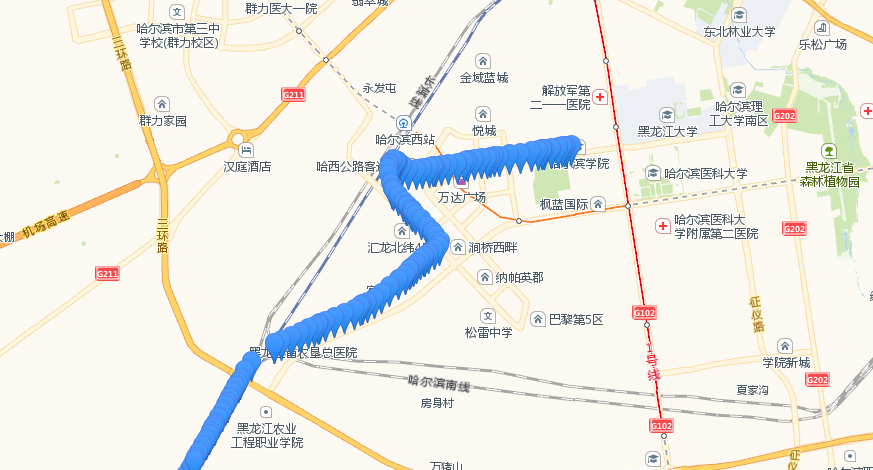
-----------------------------------------------------------------------更新---------------------------------------------------------
去掉连续显示多个点,每次只显示一个点
<?php

echo<<<_END

<!doctype html>

<html>

<head>

    <meta charset="utf-8">

    <meta http-equiv="X-UA-Compatible" content="IE=edge">

    <meta name="viewport" content="initial-scale=1.0, user-scalable=no, width=device-width">

    <title>点标记</title>

    <link rel="stylesheet" href="http://cache.amap.com/lbs/static/main1119.css"/>

    <style>

        .marker {

            color: #ff6600;

            padding: 4px 10px;

            border: 1px solid #fff;

            white-space: nowrap;

            font-size: 12px;

            font-family: "";

            background-color: #0066ff;

        }

    </style>

    <script src="http://webapi.amap.com/maps?v=1.3&key=您申请的key值"></script>

    <script type="text/javascript" src="http://cache.amap.com/lbs/static/addToolbar.js"></script>

</head>

<body>

<div id="container"></div>

<script>

    var marker, map = new AMap.Map("container", {

        resizeEnable: true,

        center: [126.60580555556, 45.702363888889],

        zoom: 13

    });

    var getJSON = function(url) {

      return new Promise(function(resolve, reject) {

        var xhr = new XMLHttpRequest();

        xhr.open('get', url, true);

        xhr.responseType = 'json';

        xhr.onload = function() {

          var status = xhr.status;

          if (status == 200) {

            resolve(xhr.response);

          } else {

            reject(status);

          }

        };

        xhr.send();

      });

    };

    getJSON('http://web.cellpies.com/api/driving/getVehicleLocationPoints?vehicleDeviceId=0400000000030603&timeType=4&startTime=2017-03-17%2013:00:00&stopTime=2017-03-17%2014:00:00').then(function(jdata) {

        addMarker(jdata.data[0].gpsx,jdata.data[0].gpsy);

        window.i=1;

        //updateMarker(jdata.data[1].gpsx,jdata.data[1].gpsy);

        setInterval(function () { updateMarker(jdata.data[window.i].gpsx,jdata.data[window.i].gpsy); },"1000");

    }, function(status) { //error detection....

      alert('Something went wrong.');

    });

    // 实例化点标记

 function addMarker(v1,v2) {

        marker = new AMap.Marker({

            icon: "http://webapi.amap.com/theme/v1.3/markers/n/mark_b.png",

            position: [v1,v2]

        });

        marker.setMap(map);

    }

      function updateMarker(v1,v2) {

        //在地图上更新标记

        // 自定义点标记内容

        window.i+=10;

        var markerContent = document.createElement("div");

        // 点标记中的图标

        var markerImg = document.createElement("img");

        markerImg.className = "markerlnglat";

        markerImg.src = "http://webapi.amap.com/theme/v1.3/markers/n/mark_r.png";

        markerContent.appendChild(markerImg);

        // 点标记中的文本

        var markerSpan = document.createElement("span");

        markerSpan.className = 'marker';

        markerSpan.innerHTML = "Hi,我换新装备啦!";

        markerContent.appendChild(markerSpan);

        marker.setContent(markerContent); //更新点标记内容

        marker.setPosition([v1,v2]); //更新点标记位置

    }

</script>

</body>

</html>

</script>

</body>

</html>

_END;

?>
涉及setInterval传参的问题。
发现用addMarker(jdata.data[i].gpsx,jdata.data[i].gpsy);时程序可正常运行,但是将该函数 放到setInterval中后却出现了问题,可通过闭包解决。
获取json数据后在 地图上打点,根据 json不断移动点的位置的更多相关文章
- jquery用ajax方式从后台获取json数据后如何将内容填充到下拉列表
对于问题从后台获取json数据,将内容填充到下拉列表,代码非常简单,具体过程请看下面代码. 需求:url:链接 par:ID sel:下拉列表选择器 function BuildS ...
- Ajax前台返回JSON数据后再Controller中直接转换成类型使用,后台接收json转成实体的方法
之前写过一篇记录文章,写的是将一个比较复杂的数据结构在前台组合起来后传递到后台. 当时并不太了解@RequestBody,也并没有使用js提供的JSON.stringify()方法 所有都是自己写的, ...
- Ajax(form表单文件上传、请求头之contentType、Ajax传递json数据、Ajax文件上传)
form表单文件上传 上菜 file_put.html <form action="" method="post" enctype="multi ...
- Python爬取房产数据,在地图上展现!
小伙伴,我又来了,这次我们写的是用python爬虫爬取乌鲁木齐的房产数据并展示在地图上,地图工具我用的是 BDP个人版-免费在线数据分析软件,数据可视化软件 ,这个可以导入csv或者excel数据. ...
- jquery ajax获取后台数据后无法输出
今天做ajax获取数据,再浏览器的debugger窗口也看到了数据 ajax代码 $('#userSearch').click(function(){ $.get("loadAllUsers ...
- 通过ajax获得json数据后格式的转换
在有些情况下获取到的json数据可能是string类型的,需要把其格式化为json对象才方便解析. a)原生js通过ajax获取到的json 此时返回的数据默认是string型的,所以需要用eval( ...
- bootstrap通过ajax请求JSON数据后填充到模态框
1. JSP页面中准备模态框 <!-- 详细信息模态框(Modal) --> <div> <div class="modal fade" id=& ...
- ajax 发送json数据时为什么需要设置contentType: "application/json”
1. ajax发送json数据时设置contentType: "application/json”和不设置时到底有什么区别? contentType: "application/j ...
- ajax发送json数据时为什么需要设置contentType: "application/json”
1. ajax发送json数据时设置contentType: "application/json”和不设置时到底有什么区别?contentType: "application/js ...
随机推荐
- android:QQ多种側滑菜单的实现
在这篇文章中写了 自己定义HorizontalScrollView实现qq側滑菜单 然而这个菜单效果仅仅是普通的側拉效果 我们还能够实现抽屉式側滑菜单 就像这样 第一种效果 另外一种效果 第三种效果 ...
- Unreal Engine 4 C++ 为编辑器中Actor创建自己定义图标
有时候我们创建场景的时候,特定的Actor我们想给它一个特定的图标,便于观察.比方这样: 实现起来也非常easy.须要编写C++代码: 我们创建一个Actor,叫AMyActor.它包括一个Sprit ...
- Swift - 获取应用名称、应用版本、设备型号、系统版本等信息
有时我们在 App 中提交一些统计信息或者用户反馈信息时,为了能更好地进行分析,通常会附带上当前应用程序的名称.版本号.设备型号.以及设备系统版本.下面演示如何获取这些信息. 1,效果图 程序启动后自 ...
- OzymanDNS 使用——perl 5.22没有成功。。。
最初官方的代码没有找到,但是发现github里貌似有: git clone https://github.com/splitbrain/dnstunnel.git 源码是perl写的,需要安装一些pe ...
- 1. Two Sum[E]两数之和
题目 Given an array of integers, return indices of the two numbers such that they add up to a specific ...
- 一个基于Vue.js+Mongodb+Node.js的博客内容管理系统
这个项目最初其实是fork别人的项目.当初想接触下mongodb数据库,找个例子学习下,后来改着改着就面目全非了.后台和数据库重构,前端增加了登录注册功能,仅保留了博客设置页面,但是也优化了. 一.功 ...
- hook的本质就是在本原可执行文件中加东西
hook的本质就是在本原可执行文件中加东西. 本质就是添加东西:
- addEventListener()与removeEventListener(),追加事件和删除追加事件
addEventListener()与removeEventListener()用于追加事件和删除追加.所有的DOM节点中都包含这两种方法,并且它们都接受3个参数:要处理的事件名.作为事件处理程序的函 ...
- day19-1 迭代器,三元表达式,列表推导式,字典生成式,
目录 迭代器 可迭代对象 迭代器对象 总结 三元表达式(三目表达式) 列表推导式 字典生成式 迭代器 可迭代对象 拥有iter方法的对象就是可迭代对象 # 以下都是可迭代的对象 st = '123'. ...
- 路飞学城Python-Day32
36-进程池线程池 开多线程实现并发的效率是高的,当用户没有那么多的时候,服务器是可以承受压力的 但是一定要以某种方式来设置并发数,让服务器能够实现稳定的运行,控制服务器的线程数 设置池,往里面放池的 ...