
将html转换为word文档的几种方式
1 基于wps直接将页面信息下载成word文档
  public void test()

         {

             WPS.Application wps = null;

             try

             {

                 wps = new WPS.Application();

             }

             catch (Exception ex)

             {

                 return;

             }

             var httpurl = "http://www.baidu.com";

             WPS.Document doc = wps.Documents.Open(httpurl, false, true);

             string filename = System.DateTime.Now.Year.ToString() + System.DateTime.Now.Month.ToString() + System.DateTime.Now.Day.ToString() +

             System.DateTime.Now.Hour.ToString() + System.DateTime.Now.Minute.ToString() + System.DateTime.Now.Second.ToString();

             string saveFileName = "D:\\1.doc";

             doc.SaveAs(saveFileName, WPS.WdSaveFormat.wdFormatDocument);

             doc.Close(WPS.WdSaveOptions.wdSaveChanges, WPS.WdOriginalFormat.wdWordDocument, WPS.WdRoutingSlipStatus.wdNotYetRouted);

             wps.Quit(WPS.WdSaveOptions.wdSaveChanges, WPS.WdOriginalFormat.wdWordDocument, WPS.WdRoutingSlipStatus.wdNotYetRouted);

         }
这种情况下载的word文档中,样式全乱了,当时参考资料为:http://lanhy2000.blog.163.com/blog/static/4367860820119198575552/
2 用数据流的形式将页面下载成word文档
1>首先获取webUrl页面输出内容
  /// <summary>

         /// 获取weburl输出内容

         /// </summary>

         /// <param name="url">weburl</param>

         /// <returns>输出内容</returns>

         public static string GetPage(string url)

         {

             WebResponse result = null;

             try

             {

                 WebRequest req = WebRequest.Create(new Uri(url));

                 result = req.GetResponse();

                 var receivedStream = result.GetResponseStream();

                 var sr = new System.IO.StreamReader(receivedStream, GetEncoding(GetContentType(result.ContentType).FirstOrDefault().Key));

                 return sr.ReadToEnd();

             }

             catch (Exception ex)

             {

                 return ex.Message;

             }

             finally

             {

                 //ensure that network resources are not wasted

                 if (result != null)

                     result.Close();

             }

         }
2>然后下载生成成word文档
  //数据流的方式

         public void test2()

         {

             var pageString = Linkin.Toolkit.Utility.Network.GetPage("http://www.baidu.com");

             System.Web.HttpContext.Current.Response.AppendHeader("Content-Disposition", "attachment;filename=result.doc");

             System.Web.HttpContext.Current.Response.ContentType = "application/ms-word";

             System.Web.HttpContext.Current.Response.Charset = "utf-8";

             System.Web.HttpContext.Current.Response.ContentEncoding = System.Text.Encoding.GetEncoding("gb2312");

             Response.Write(pageString);

             Response.End();

         }
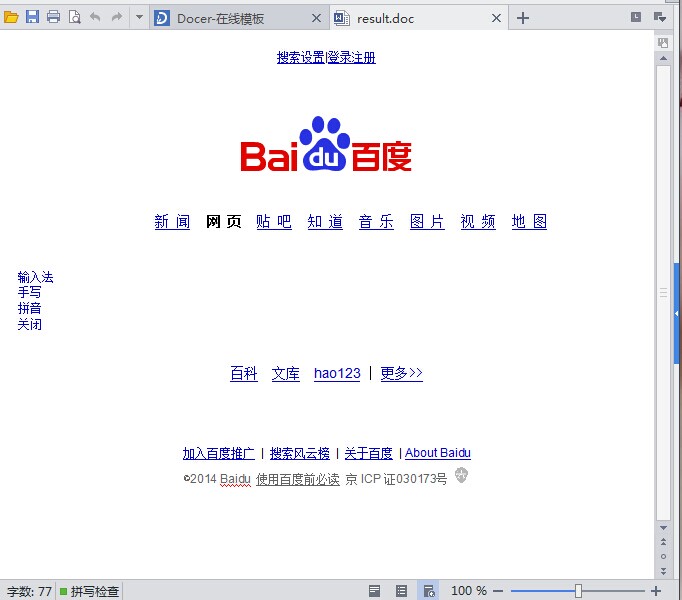
3>生成后的word文档因为没有样式,所有稍微丑了一些,有待优化,如图:
3 基于office com控件,在模板中添加书签的形式,将数据写入word模板中并保存
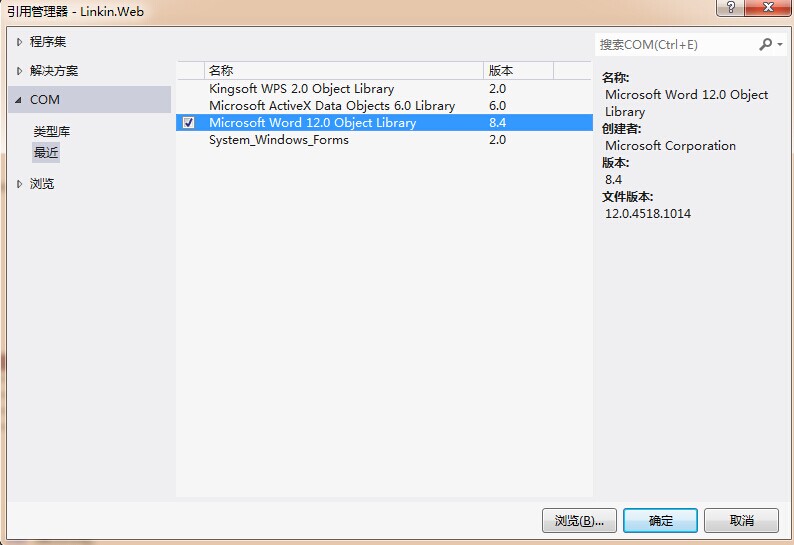
1>首先需要向工程中的“引用”加入Word类库的引用(如图)。我是Office 2007。其他版本可能略有不同。在COM里面。
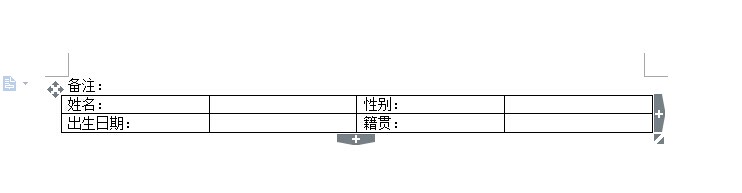
2>用Word设计一个模板文档(后缀名*.doc)。(如图)
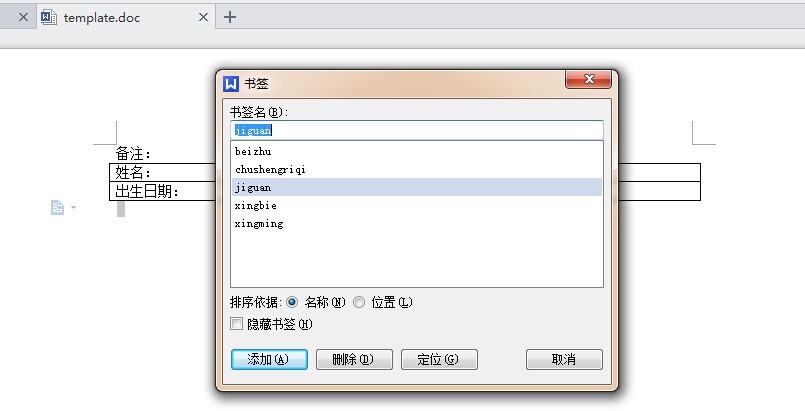
3>向模板中的需要显示动态内容的地方添加书签。具体方法是。光标落到欲插入内容的地方,选择菜单栏上的“插入”——〉“书签”。
在我的模板中添加完书签的样子如图
4>保存这个已完成的模板到任意路径,例如 D://template.doc
5>具体读取模板,添加数据,保存文件代码如下:
 public static void ExportToWord()

         {

             object oMissing = System.Reflection.Missing.Value;

             //创建一个Word应用程序实例

             Word._Application oWord = new Word.Application();

             //设置为不可见

             oWord.Visible = false;

             //模板文件地址,这里假设在X盘根目录

             object oTemplate = "D://template.doc";

             //以模板为基础生成文档

             Word._Document oDoc = oWord.Documents.Add(ref oTemplate, ref oMissing, ref oMissing, ref oMissing);

             //声明书签数组

             object[] oBookMark = new object[];

             //赋值书签名

             oBookMark[] = "beizhu";

             oBookMark[] = "xingming";

             oBookMark[] = "xingbie";

             oBookMark[] = "chushengriqi";

             oBookMark[] = "jiguan";

             //赋值任意数据到书签的位置

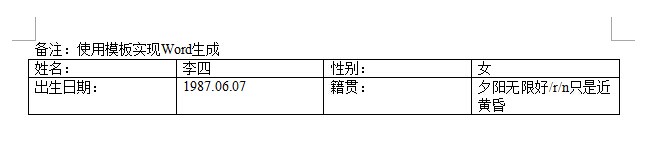
             oDoc.Bookmarks.get_Item(ref oBookMark[]).Range.Text = "使用模板实现Word生成";

             oDoc.Bookmarks.get_Item(ref oBookMark[]).Range.Text = "李四";

             oDoc.Bookmarks.get_Item(ref oBookMark[]).Range.Text = "女";

             oDoc.Bookmarks.get_Item(ref oBookMark[]).Range.Text = "1987.06.07";

             oDoc.Bookmarks.get_Item(ref oBookMark[]).Range.Text = "夕阳无限好/r/n只是近黄昏";

             string savePath = "D:\\1.doc";

             object filename = savePath;

             oDoc.SaveAs(ref filename, ref oMissing, ref oMissing, ref oMissing,

             ref oMissing, ref oMissing, ref oMissing, ref oMissing, ref oMissing,

             ref oMissing, ref oMissing, ref oMissing, ref oMissing, ref oMissing,

             ref oMissing, ref oMissing);

             oDoc.Close(ref oMissing, ref oMissing, ref oMissing);

             //关闭word

             oWord.Quit(ref oMissing, ref oMissing, ref oMissing);

         }
6>到此,保存word文件成功,如图
4 基于WPS com控件,模板表格标志导出word文档,此方式和方式3比较相似
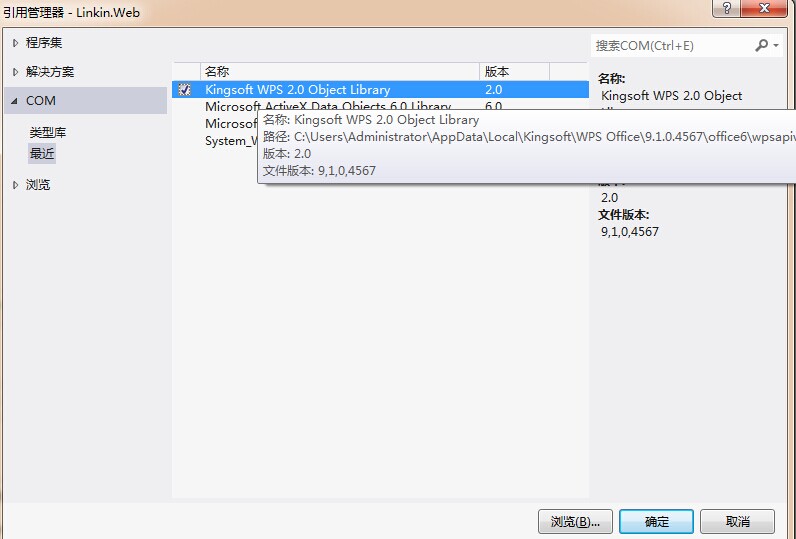
1>首先需要向工程中的“引用”加入wps类库的引用(如图)。
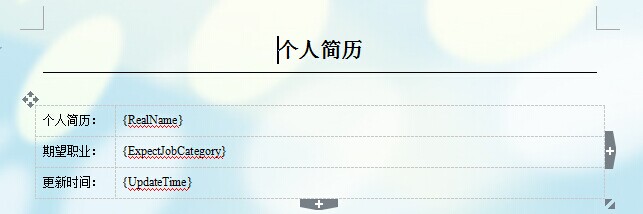
2>在本地任意路径下面创建模板,并在模板中需要添加数据的地方表明标签,例如:D:\\Resume.doc 如图
3>C#代码控制模板,并填充数据
 //基于 wps com控件 表格标志 导出word

         public void test4()

         {

             WPS.Application wps = null;

             try

             {

                 wps = new WPS.Application();

             }

             catch

             {

             }

             ////获取当前项目的路径

             //string path = AppDomain.CurrentDomain.BaseDirectory;

             //WPS.Document doc = wps.Documents.Open(path + "Templetes\\Resume.doc", false, true);

             WPS.Document doc = wps.Documents.Open("D:\\Resume.doc", false, true);

             #region 基本信息

             var titleTable = doc.Tables.Item();

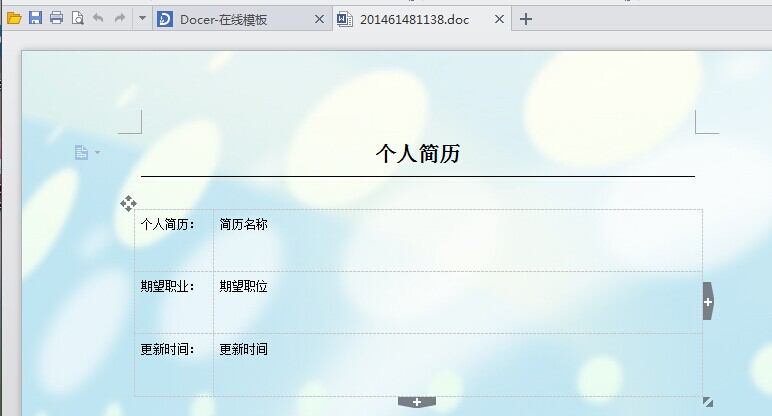
             titleTable.Cell(, ).Range.Text = titleTable.Cell(, ).Range.Text.Replace("{RealName}", "简历名称");

             titleTable.Cell(, ).Range.Text = titleTable.Cell(, ).Range.Text.Replace("{ExpectJobCategory}", "期望职位");

             titleTable.Cell(, ).Range.Text = titleTable.Cell(, ).Range.Text.Replace("{UpdateTime}", "更新时间");

             #endregion

             string filename = System.DateTime.Now.Year.ToString() + System.DateTime.Now.Month.ToString() + System.DateTime.Now.Day.ToString() +

        System.DateTime.Now.Hour.ToString() + System.DateTime.Now.Minute.ToString() + System.DateTime.Now.Second.ToString();

             string serverPath = @"D:\" + filename + ".doc";

             doc.SaveAs(serverPath, WPS.WdSaveFormat.wdFormatDocument);

             doc.Close(WPS.WdSaveOptions.wdSaveChanges, WPS.WdOriginalFormat.wdWordDocument, WPS.WdRoutingSlipStatus.wdNotYetRouted);

             wps.Quit(WPS.WdSaveOptions.wdSaveChanges, WPS.WdOriginalFormat.wdWordDocument, WPS.WdRoutingSlipStatus.wdNotYetRouted);

         }
4>生成后的word文件 如图
5 这种方法相对以上都比较复杂,先保存地址,以待研究
http://www.cnblogs.com/kingteach/archive/2011/11/22/2258801.html
将html转换为word文档的几种方式的更多相关文章
- pdf如何转换为word文档
我们经常会遇到需要将PDF转换为WORD文档,对于我来讲,有些PDF没有目录,看起来非常不方便,于是就特别想转成WORD,然后增加目录,想看某一节内容时,快速查找. 这里我总结了一些方法,后续也会不断 ...
- ASP.NET实现在线浏览Word文档另一种解决方案(Word转PDF)
ASP.NET实现在线浏览Word文档另一种解决方案(Word转PDF) 上述博文里提到的在线浏览pdf的方案不错,但word转pdf的那个dll只支持doc不支持docx,附上最新的下载链 ...
- 网页导出成word文档的默认视图方式问题
网页导出成word文档的默认视图方式问题 一般保存后的word文档默认是“Web版式视图”打开,这样会给客户的感觉不是真正的word文档,必须实现打开就是“页面视图” 1. 修改<html> ...
- c#中操作word文档-一、模板方式写入
转载自:http://blog.csdn.net/fujie724/article/details/5443322 适合模板写入 今天正好有人问我,怎么生成一个报表式的Word文档. 就是文字的样式和 ...
- PHP生成word文档的三种实现方式
PHP生成word原理 利用windows下面的 com组件 利用PHP将内容写入doc文件之中 具体实现: 利用windows下面的 com组件 原理:com作为PHP的一个扩展类,安装过offic ...
- 前端调用后台接口下载word文档的两种方法
1传统的ajax虽然能提交到后台,但是返回的数据被解析成json,html,text等字符串,无法响应浏览器下载.就算使用bob模拟下载,数据量大时也不方便 废话不多说:上代码(此处是Layui监听提 ...
- [置顶] stax解析xml文档的6种方式
原文链接:http://blog.csdn.net/u011593278/article/details/9745271 stax解析xml文档的方式: 基于光标的查询: 基于迭代模型的查找: 基于过 ...
- 第十二节:WebApi自动生成在线Api文档的两种方式
一. WebApi自带生成api文档 1. 说明 通过观察,发现WebApi项目中Area文件夹下有一个HelpPage文件夹,如下图,该文件夹就是WebApi自带的生成Api的方式,如果该文件夹没了 ...
- 使用ghpage(github服务)搭建文档网站几种方式
可以通过github提供的ghpage服务来搭建网站,有以下三种方式来实现: 1.文档放在master分支,作为一个子目录. 仓库:https://github.com/Ourpalm/ILRunti ...
随机推荐
- BZOJ 3210 花神的浇花集会 计算几何- -?
题目大意:给定平面上的n个点,求一个点到这n个点的切比雪夫距离之和最小 与3170不同的是这次选择的点无需是n个点中的一个 首先将每一个点(x,y)变为(x+y,x-y) 这样新点之间的曼哈顿距离的一 ...
- css3.0+html绘制六边形
<section class="ass_desc"> <section class="ass_descLeft posRe"> < ...
- Duboo入门示例(Idea开发环境)
在学习Dubbo分布式框架时的官方入门例子,很有代表性.简单清晰. 有关Dubbo的概念.概述和简单的配置文件,可以看官方文档的简述 会很快对Duboo有个整体的概念. 准备工作: 下载示例,点击这里 ...
- Android5.0L退出APP横竖屏切换导致的触摸屏输入(Touch Event)无效(冻屏)问题分析(Key Event仍然有效)
.Nexus4和Nexus5在相同的简单測试下没有重现此问题,因没有源代码所以无法Debug和打印log.兴许会尝试获取nexus的源代码以了解它的改动方案. 二.解决方案 通过初步分析.深入分析.对 ...
- OpenGL核心技术之混合技术
笔者介绍:姜雪伟,IT公司技术合伙人,IT高级讲师,CSDN社区专家,特邀编辑,畅销书作者.国家专利发明人;已出版书籍:<手把手教你架构3D游戏引擎>电子工业出版社和<Unity3D ...
- js35
<!DOCTYPE HTML PUBLIC "-//W3C//DTD HTML 4.01//EN" "http://www.w3.org/TR/html4/stri ...
- 8lession-基础类型转化
Python数据类型转换 有时候,我们需要对数据内置的类型进行转换,数据类型的转换,你只需要将数据类型作为函数名即可. 以下几个内置的函数可以执行数据类型之间的转换.这些函数返回一个新的对象,表示转换 ...
- 图片裁剪的js有哪些(整理)
图片裁剪的js有哪些(整理) 一.总结 一句话总结:如果用了amaze框架就去amaze框架的插件库里面找图片裁剪插件,如果没用,jcrop和cropper都不错. 1.amazeui的插件库中有很多 ...
- @JSONField 注解说明
转自:https://blog.csdn.net/suyimin2010/article/details/80617538 导入@JSONField 注解: import com.alibaba.fa ...
- 44.delete用法
声明+delete:函数禁止使用.可以使一个类禁止释放