
H5系列之地理位置(必知必会)
HTML5 Geolocation API 允许我们对喜欢的网站共享我们的位置。JavaScript 可以捕获到纬度和经度,还可以发送给后端服务器,然后做一些位置感知的事情,比如查找本地企业或者在地图上显示我们的位置。

地理定位 APIs 是作为全局 navigator 对象的一个新属性工作的。可以按照如下方式创建地理定位对象:
var geolocation = navigator.geolocation;
地理对象是一个允许组件检索设备地理位置相关信息的服务对象。
navigator.geolocation.getCurrentPosition()
navigator.geolocation.watchPosition()
navigator.geolocation.clearWatch()
navigator.geolocation.getCurrentPosition(function(pos) {

        var latitude = pos.coords.latitude;

        var longitude = pos.coords.longitude;

        alert("Your position: " + latitude + ", " + longitude);

});
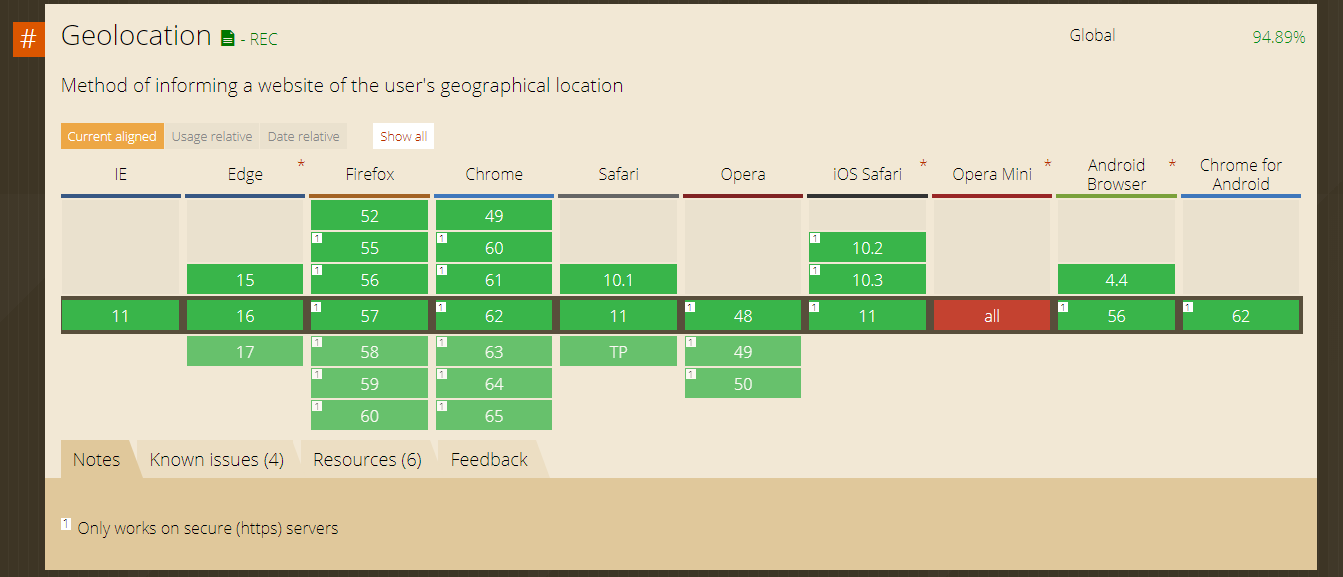
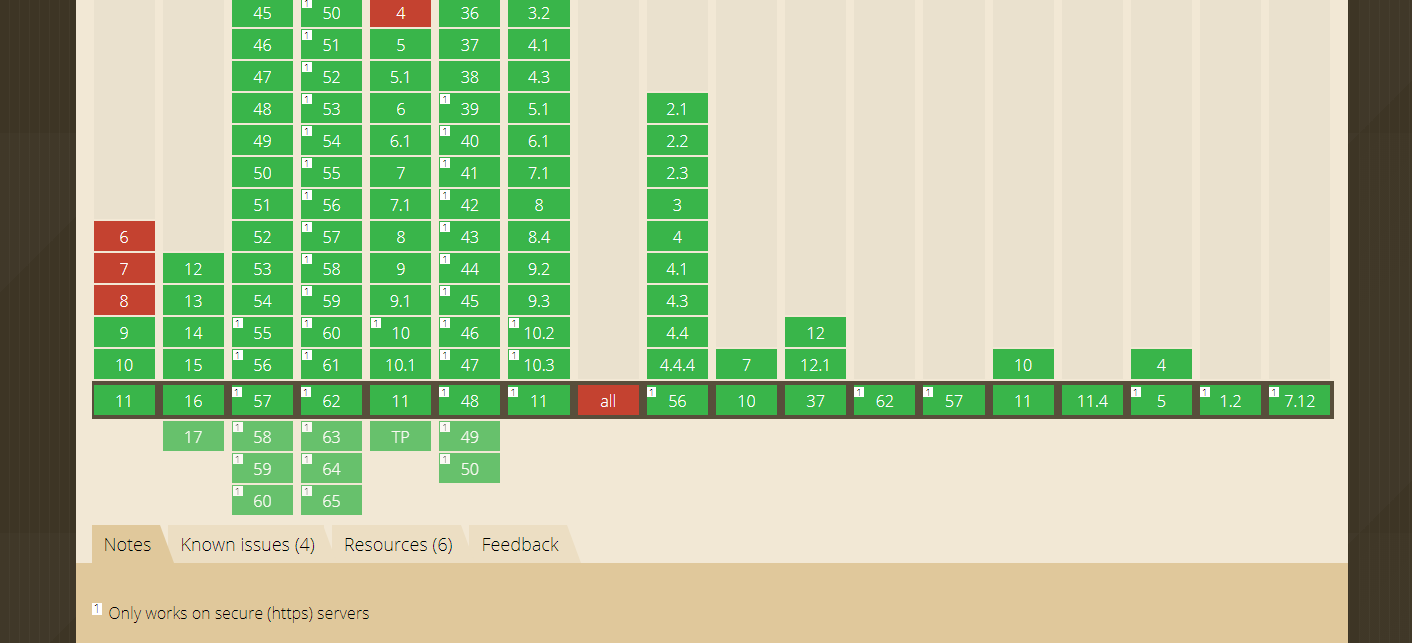
if(navigator.geolocation){

//你的浏览器支持Geolocation API

} else{

//你的浏览器不支持Geolocation API

}
| 方法 | 描述 |
|---|---|
| getCurrentPosition() |
这个方法用于检索用户的当前地理位置。 |
| watchPosition() |
这个方法用于检索设备当前地理位置定期更新信息。 |
| clearWatch() |
这个方法用于取消 watchPosition 方法调用。 |
示例
下面是一个使用上述方法的示例代码:
functiongetLocation(){

   var geolocation = navigator.geolocation;

   geolocation.getCurrentPosition(showLocation, errorHandler);

}
这里的 showLocation 和 errorHandler 分别是用来获取实际位置和处理错误的回调方法。
监视移动设备的位置变化
下面的例子展示 watchPosition() 方法。您需要一台精确的 GPS 设备来测试该例(比如 iPhone):
实例
<script>

var x=document.getElementById("demo");

function getLocation()

  {

  if (navigator.geolocation)

    {

    navigator.geolocation.watchPosition(showPosition);

    }

  else{x.innerHTML="Geolocation is not supported by this browser.";}

  }

function showPosition(position)

  {

  x.innerHTML="Latitude: " + position.coords.latitude +

  "<br />Longitude: " + position.coords.longitude;

  }

</script>
<!DOCTYPE html>

<html lang="zh-cn">

<head>

	<meta charset="utf-8">

	<title>moyu's demo</title>

</head>

<body>

<script type="text/javascript">

navigator.geolocation.getCurrentPosition(function(pos){

	console.log("当前地理位置的纬度: "+pos.coords.latitude);

	console.log("当前地理位置的经度: "+pos.coords.longitude);

	console.log("当前地理位置的精度: "+pos.coords.accuracy);

});

var watchID = navigator.geolocation.watchPosition(function(pos){

	console.log("当前位置变化的纬度: "+pos.coords.latitude);

	console.log("当前位置变化的经度: "+pos.coords.longitude);

	console.log("当前位置变化的精度: "+pos.coords.accuracy);

	navigator.geolocation.clearWatch(watchID);

},function(){});

</script>

</body>

</html>
**
Description
The getCurrentPosition method retrieves the current geographic location of the device. The location is expressed as a set of geographic coordinates together with information about heading and speed. The location information is returned in a Position object.
Syntax
Here is the syntax of this method −
getCurrentPosition(showLocation, ErrorHandler, options);
Parameters
Here is the detail of parameters −
showLocation − This specifies the callback method that retrieves the location information. This method is called asynchronously with an object corresponding to the Position object which stores the returned location information.
ErrorHandler − This optional parameter specifies the callback method that is invoked when an error occurs in processing the asynchronous call. This method is called with the PositionError object that stores the returned error information.
options − This optional parameter specifies a set of options for retrieving the location information. You can specify (a) Accuracy of the returned location information (b) Timeout for retrieving the location information and (c) Use of cached location information.
Return value
The getCurrentPosition method does not return a value.
<!DOCTYPE HTML>

<html>

   <head>

      <script type = "text/javascript">

         function showLocation(position) {

            var latitude = position.coords.latitude;

            var longitude = position.coords.longitude;

            alert("Latitude : " + latitude + " Longitude: " + longitude);

         }

         function errorHandler(err) {

            if(err.code == 1) {

               alert("Error: Access is denied!");

            } else if( err.code == 2) {

               alert("Error: Position is unavailable!");

            }

         }

         function getLocation() {

            if(navigator.geolocation) {

               // timeout at 60000 milliseconds (60 seconds)

               var options = {timeout:60000};

               navigator.geolocation.getCurrentPosition(showLocation, errorHandler, options);

            } else {

               alert("Sorry, browser does not support geolocation!");

            }

         }

      </script>

   </head>

   <body>

      <form>

         <input type = "button" onclick = "getLocation();" value = "Get Location"/>

      </form>

   </body>

</html>
**
如果你希望跟踪用户的位置,那么可以使用另一个方法watchPosition()。这个方法接收的参数与getCurrentPosition()方法完全相同。实际上,watchPosition()与定时调用getCurrentPosition()的效果相同。在第一次调用watchPosition()方法后,会取得当前位置,执行成功回调或者错误回调。
然后,watchPosition()就地等待系统发出位置已改变的信号(它不会自己轮询位置)。
调用watchPosition()会返回一个数值标识符,用于跟踪监控的操作。基于这个返回值可以取消监控操作,只要将其传递给clearWatch()方法即可(与使用setTimeout()和clearTimeout()类似)。
例如:
var watchId = navigator.geolocation.watchPosition(function(position){

    drawMapCenteredAt(position.coords.latitude, positions.coords.longitude);

}, function(error){

    console.log("Error code: " + error.code);

    console.log("Error message: " + error.message);

});

clearWatch(watchId);
以上例子调用了watchPosition()方法,将返回的标识符保存在了watchId中。然后,又将watchId传给了clearWatch(),取消了监控操作。
Description
The watchPosition method retrieves periodic updates about the current geographic location of the device. The location is expressed as a set of geographic coordinates together with information about heading and speed.
The location information is returned in a Position object. Each update returns a new Position object.
Syntax
Here is the syntax of this method −
watchPosition(showLocation, ErrorHandler, options);
Parameters
Here is the detail of parameters −
showLocation − This specifies the callback method that retrieves the location information. This method is called asynchronously with an object corresponding to the Position object which stores the returned location information.
ErrorHandler − This optional paramter specifies the callback method that is invoked when an error occurs in processing the asynchronous call. This method is called with the PositionError object that stores the returned error information.
options − This optional paramter specifies a set of options for retrieving the location information. You can specify (a) Accuracy of the returned location information (b) Timeout for retrieving the location information and (c) Use of cached location information .
Return value
The watchPosition method returns a unique transaction ID (number) associated with the asynchronous call. Use this ID to cancel the watchPosition call and to stop receiving location updates.
Example
<!DOCTYPE HTML><head><html><scripttype="text/javascript">var watchID;var geoLoc;functionshowLocation(position){var latitude = position.coords.latitude;var longitude = position.coords.longitude;

            alert("Latitude : "+ latitude +" Longitude: "+ longitude);}functionerrorHandler(err){if(err.code ==1){

               alert("Error: Access is denied!");}elseif( err.code ==2){

               alert("Error: Position is unavailable!");}}functiongetLocationUpdate(){if(navigator.geolocation){// timeout at 60000 milliseconds (60 seconds)var options ={timeout:60000};

               geoLoc = navigator.geolocation;

               watchID = geoLoc.watchPosition(showLocation, errorHandler, options);}else{

               alert("Sorry, browser does not support geolocation!");}}</script></head><body><form><inputtype="button"onclick="getLocationUpdate();"value="Watch Update"/></form></body></html>
**
Description
The clearWatch method cancels an ongoing watchPosition call. When cancelled, the watchPosition call stops retrieving updates about the current geographic location of the device.
Syntax
Here is the syntax of this method −
clearWatch(watchId);
Parameters
Here is the detail of parameters −
watchId − This specifies the unique ID of the watchPosition call to cancel. The ID is returned by the watchPosition call.
Return value
The clearWatch method does not return a value.
Example
<!DOCTYPE HTML><html><head><scripttype="text/javascript">var watchID;var geoLoc;functionshowLocation(position){var latitude = position.coords.latitude;var longitude = position.coords.longitude;

            alert("Latitude : "+ latitude +" Longitude: "+ longitude);}functionerrorHandler(err){if(err.code ==1){

               alert("Error: Access is denied!");}elseif( err.code ==2){

               alert("Error: Position is unavailable!");}}functiongetLocationUpdate(){if(navigator.geolocation){// timeout at 60000 milliseconds (60 seconds)var options ={timeout:60000};

               geoLoc = navigator.geolocation;

               watchID = geoLoc.watchPosition(showLocation, errorHandler, options);}else{

               alert("Sorry, browser does not support geolocation!");}}functionstopWatch(){

            geoLoc.clearWatch(watchID);}</script></head><body><form><inputtype="button"onclick="getLocationUpdate();"value="Watch Update"/><inputtype="button"onclick="stopWatch();"value="Stop Watch"/></form></body></html>
**
返回的位置对象的属性
地理定位方法 getCurrentPosition() 和 getPositionUsingMethodName() 指定了检索位置信息的回调方法。
这些方法使用一个存储完整位置信息的 Position 对象异步调用。
这个 Position 对象指定了设备的当前地理位置。这个位置以一组带有方向和速度信息的地理坐标表示。
下面的表格描述了 Position 对象的属性。对于可选属性,如果系统没有提供值,则该属性值为 null。
| 属性 | 类型 | 描述 |
|---|---|---|
| coords | objects |
表示设备的地理位置。位置以一组带有方向和速度信息的地理坐标表示。 |
| coords.latitude | Number |
十进制的纬度估值。值范围为 [-90.00, +90.00]。 |
| coords.longitude | Number |
十进制的经度固执。值范围为 [-180.00, +180.00]。 |
| coords.altitude | Number |
【可选】 WGS-84 球面以上的海拔高度固执,以米为单位计算。 如果没有相关数据则值为 |
| coords.accuracy | Number |
【可选】 以米为单位的纬度和经度精确估值。 |
| coords.altitudeAccuracy | Number |
【可选】 以米为单位的海拔高度精确估值。 数值越大越不精确。 |
| coords.heading | Number |
【可选】 相对正北方向设备以顺时针方向运动计算的当前方向。 指南针的方向,0°表示正北,值为 |
| coords.speed | Number |
【可选】 以米/每秒为单位的设备当前地面速度。 即每秒移动多少米,如果没有相关数据则值为 |
| timestamp | date |
检索位置信息和创建 Position 对象的日期时间。 |
处理错误
地理定位是复杂的。非常需要我们捕获任意错误并处理它。
地理定位方法 getCurrentPosition() 和 watchPosition() 可以使用一个提供 PositionError 对象的错误处理回调方法。
这个对象有下列两属性。
| 属性 | 类型 | 描述 |
|---|---|---|
| code | Number |
错误码。 |
| message | String |
错误描述信息。 |
下面这个表格描述了 PositionError 对象可能返回的错误码。
| 错误码 | 常量 | 描述 |
|---|---|---|
| 0 | UNKNOWN_ERROR |
由于未知错误,检索设备位置信息失败。 |
| 1 | PERMISSION_DENIED |
由于应用程序没有权限使用位置服务,检索设备位置信息失败。 用户拒绝了定位服务的请求。 |
| 2 | POSITION_UNAVAILABLE |
设备位置信息无法确定。没有获取正确的地理位置信息。 位置无效。 |
| 3 | TIMEOUT |
不能在给定的最大超时区间内检索位置信息。 获取位置的操作超时。 |
在error对象中,除"code"属性表示出错数字外,还可以通过"message"属性获取出错的详细文字信息。该属性是一个字符串,包含与"code"属性值相对应的错误说明信息。
实例
function showError(error)

  {

  switch(error.code)

    {

    case error.PERMISSION_DENIED:

      x.innerHTML="User denied the request for Geolocation."

      break;

    case error.POSITION_UNAVAILABLE:

      x.innerHTML="Location information is unavailable."

      break;

    case error.TIMEOUT:

      x.innerHTML="The request to get user location timed out."

      break;

    case error.UNKNOWN_ERROR:

      x.innerHTML="An unknown error occurred."

      break;

    }

  }
**
下面是 getCurrentPosition() 方法的实际语法:
getCurrentPosition(callback, ErrorCallback, options)
其中第三个参数是指定一组检索设备地理位置选项的 PositionOptions 对象。
下列选项可以指定为第三个参数:
| 属性 | 类型 | 描述 |
|---|---|---|
| enableHighAccuracy | Boolean |
布尔值,是否想要检索最精准的位置估值。默认值为 false。 属性是指定浏览器或移动设备尝试更精确地读取经度和纬度,默认值为false。当这个属性参数设置为true时,移动设备在定位计算上可能会花费更长时间,也容易导致消耗更多的移动设备电量。因此,如果无较高准确定位的需求,应该将参数设置为false或不设置。
|
| timeout | Number |
timeout 属性就是 Web 应用程序要等待定位的毫秒数。 默认不限时。 |
| maximumAge | Number |
用于缓存位置信息的过期时间毫秒数。 最长有效期,在重复获取地理位置时,此参数指定多久再次获取位置。
默认为0,表示浏览器需要立刻重新计算位置。
|
如:
navigator.geolocation.getCurrentPosition(function(position){

    drawMapCenteredAt(position.coords.latitude, positions.coords.longitude);

}, function(error){

    console.log("Error code: " + error.code);

    console.log("Error message: " + error.message);

}, {

    enableHighAccuracy: true,

    timeout: 5000,

    maximumAge: 25000

});
这三个选项都是可选的,可以单独设置,也可以与其他选项一起设置。
除非确实需要非常精确的信息,否则建议保持enableHighAccuracy的false值(默认值)。将这个选项设置为true需要更长的时候,而且在移动设备上还会导致消耗更多电量。类似地,如果不需要频繁更新用户的位置信息,那么可以将maximumAge设置为Infinity,从而始终都使用上一次的坐标信息。
navigator.geolocation.getCurrentPosition(function(pos){

	console.log("当前地理位置的纬度: "+pos.coords.latitude);

	console.log("当前地理位置的经度: "+pos.coords.longitude);

	console.log("当前地理位置的精度: "+pos.coords.accuracy);

},function(err){

	if (err.code == 1) {

		// access is denied

	}

}, {maximumAge: 75000});
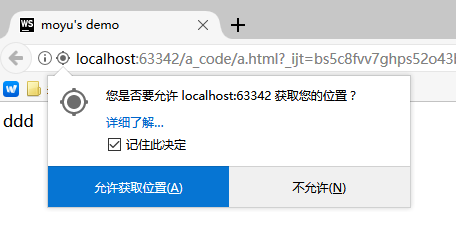
【】魔芋测试:(在浏览器中无效。)
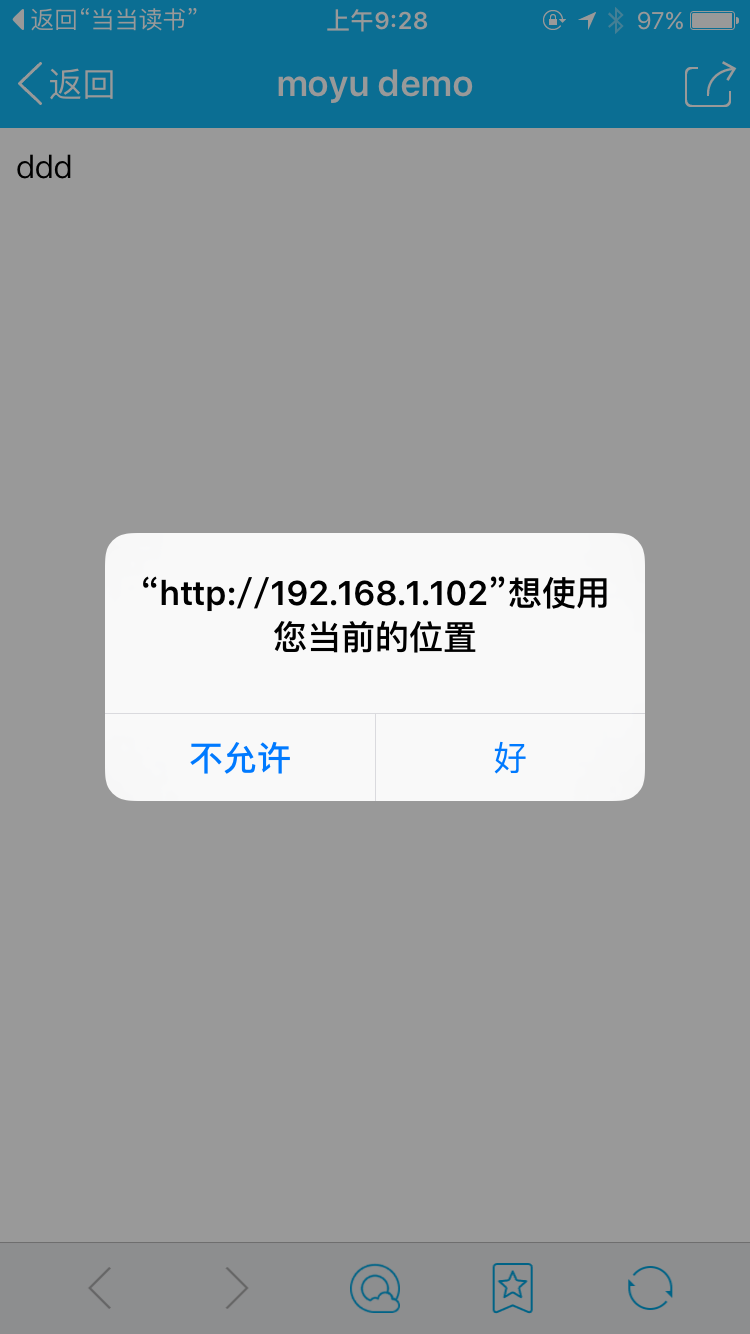
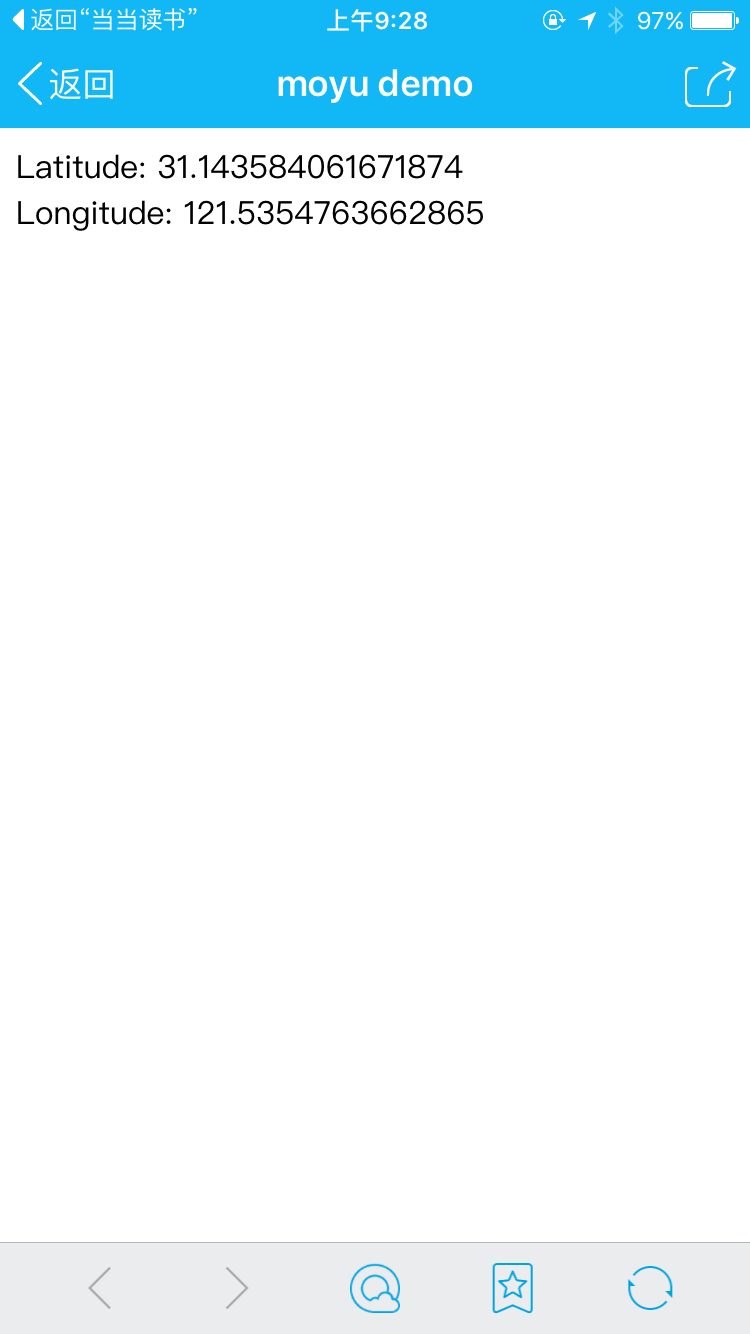
火狐截图:
**
**
H5系列之地理位置(必知必会)的更多相关文章
- H5系列之History(必知必会)
H5系列之History(必知必会) 目录 概念 兼容性 属性 方法 H5方法 概念 理解History Api的使用方式 目的是为了解决哪些问题 作用:ajax获取数据时 ...
- mysql必知必会系列(一)
mysql必知必会系列是本人在读<mysql必知必会>中的笔记,方便自己以后查看. MySQL. Oracle以及Microsoft SQL Server等数据库是基于客户机-服务器的数据 ...
- 读书笔记汇总 - SQL必知必会(第4版)
本系列记录并分享学习SQL的过程,主要内容为SQL的基础概念及练习过程. 书目信息 中文名:<SQL必知必会(第4版)> 英文名:<Sams Teach Yourself SQL i ...
- SQL 必知必会
本文介绍基本的 SQL 语句,包括查询.过滤.排序.分组.联结.视图.插入数据.创建操纵表等.入门系列,不足颇多,望诸君指点. 注意本文某些例子只能在特定的DBMS中实现(有的已标明,有的未标明),不 ...
- 《MySQL必知必会》[01] 基本查询
<MySQL必知必会>(点击查看详情) 1.写在前面的话 这本书是一本MySQL的经典入门书籍,小小的一本,也受到众多网友推荐.之前自己学习的时候是啃的清华大学出版社的计算机系列教材< ...
- Android程序员必知必会的网络通信传输层协议——UDP和TCP
1.点评 互联网发展至今已经高度发达,而对于互联网应用(尤其即时通讯技术这一块)的开发者来说,网络编程是基础中的基础,只有更好地理解相关基础知识,对于应用层的开发才能做到游刃有余. 对于Android ...
- 《MySQL必知必会》整理
目录 第1章 了解数据库 1.1 数据库基础 1.1.1 什么是数据库 1.1.2 表 1.1.3 列和数据类型 1.1.4 行 1.1.5 主键 1.2 什么是SQL 第2章 MySQL简介 2.1 ...
- 迈向高阶:优秀Android程序员必知必会的网络基础
1.前言 网络通信一直是Android项目里比较重要的一个模块,Android开源项目上出现过很多优秀的网络框架,从一开始只是一些对HttpClient和HttpUrlConnection简易封装使用 ...
- 脑残式网络编程入门(三):HTTP协议必知必会的一些知识
本文原作者:“竹千代”,原文由“玉刚说”写作平台提供写作赞助,原文版权归“玉刚说”微信公众号所有,即时通讯网收录时有改动. 1.前言 无论是即时通讯应用还是传统的信息系统,Http协议都是我们最常打交 ...
随机推荐
- E. The Best among Equals
http://codeforces.com/gym/101149/problem/E 这题的话,关键是注意到一定是要max score 然后就可以选出一个L最大优先,并且R最大的区间, 扫一次就能得到 ...
- Storm编程入门API系列之Storm的Topology默认Workers、默认executors和默认tasks数目
关于,storm的启动我这里不多说了. 见博客 storm的3节点集群详细启动步骤(非HA和HA)(图文详解) 建立stormDemo项目 Group Id : zhouls.bigdata Art ...
- C#oracle备份和还原
最近公司的oracle备份工具不好使了,原来是公司的人用VB写的,由于我是主攻C#的,所以想着自己来写一个C#版本的oracle备份和还原工具. 一开始,我按照原来的设计思路来进行编写,想在pluss ...
- Mongo学习
几种可能存在的实体类型 public class AAA{ public List<Common> CommonList{get;set;} } public class BBB{ pub ...
- jQuery属性和样式操作
回顾 1. jquery基本使用 <script src="jquery.min.js"></script><script> $(functio ...
- 打造自己的JavaScript武器库
自己打造一把趁手的武器,高效率完成前端业务代码. 前言 作为战斗在业务一线的前端,要想少加班,就要想办法提高工作效率.这里提一个小点,我们在业务开发过程中,经常会重复用到日期格式化.url参数转对象. ...
- 声明已被否决 VS C++
error C4996声明已被否决,不止一次碰到这个问题,在这里必须mark一下! 尝试这个1.Project Properties > Configuration Properties > ...
- Notepad++设计Tab制表符为4个空格
Notepad++中,常常需要将一个Tab制表符转换成4个空格.这种情况大多发生在对空白检查严格的情况下,比如Python程序. 设置 → 首选项 → 制表符设置 → 勾选“ 转换为空格 ”.
- js对象引用的注意
var p = {}; var arr = []; function a(param) { // var i = param.a; for (var i = 0; i < 3; i++) { p ...
- Android学习总结(十八) ———— SQLite数据库使用
一.基本概念 数据库最经典的四个操作 添加.删除.修改.查找,在处理大量数据的时候使用数据库可以帮我们迅速定位当前须要处理的数据,举个例子 好比现在要实现一个搜索功能 用数据库的话只须要其中一个搜索条 ...