
整合SpringMVC与Mybatis
第一步、导包

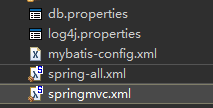
第二步、配置springmvc
springmvc.xml
<?xml version="1.0" encoding="UTF-8"?>

<beans xmlns="http://www.springframework.org/schema/beans"

	xmlns:xsi="http://www.w3.org/2001/XMLSchema-instance"

	xmlns:context="http://www.springframework.org/schema/context"

	xmlns:mvc="http://www.springframework.org/schema/mvc"

	xmlns:p="http://www.springframework.org/schema/p"

	xsi:schemaLocation="http://www.springframework.org/schema/mvc http://www.springframework.org/schema/mvc/spring-mvc-4.3.xsd

		http://www.springframework.org/schema/beans http://www.springframework.org/schema/beans/spring-beans.xsd

		http://www.springframework.org/schema/context http://www.springframework.org/schema/context/spring-context-4.3.xsd">

	<context:component-scan base-package="com.controller"></context:component-scan>

	<mvc:annotation-driven />

	<bean class="org.springframework.web.servlet.view.InternalResourceViewResolver" p:prefix="/" p:suffix=".jsp">

	</bean>

</beans>
spring-all.xml
<?xml version="1.0" encoding="UTF-8"?>

<beans xmlns="http://www.springframework.org/schema/beans"

	xmlns:xsi="http://www.w3.org/2001/XMLSchema-instance"

	xmlns:aop="http://www.springframework.org/schema/aop"

	xmlns:tx="http://www.springframework.org/schema/tx"

	xmlns:context="http://www.springframework.org/schema/context"

	xsi:schemaLocation="http://www.springframework.org/schema/beans http://www.springframework.org/schema/beans/spring-beans.xsd

		http://www.springframework.org/schema/context http://www.springframework.org/schema/context/spring-context-4.3.xsd

		http://www.springframework.org/schema/aop http://www.springframework.org/schema/aop/spring-aop-4.3.xsd

		http://www.springframework.org/schema/tx http://www.springframework.org/schema/tx/spring-tx-4.3.xsd">

	<!-- 引入外部属性文件 -->

	<context:property-placeholder location="classpath:db.properties"/>

	<!-- 配置扫描器 -->

	<context:component-scan base-package="com.util"></context:component-scan>

	<!-- 数据源 -->

	<bean id="dataSource" class="org.springframework.jdbc.datasource.DriverManagerDataSource">

		<property name="username" value="${aaaa}"></property>

		<property name="password" value="${jdbc.password}"></property>

		<property name="url" value="${jdbc.url}"></property>

		<property name="driverClassName" value="${jdbc.driver}"></property>

	</bean>

	<!-- 配置mybatis的核心,Sqlsession -->

	<bean id="sqlSessionFactory" class="org.mybatis.spring.SqlSessionFactoryBean">

		<property name="dataSource" ref="dataSource"></property>

		<property name="configLocation" value="classpath:mybatis-config.xml"></property>

		<property name="mapperLocations" value="classpath:com/mapper/*.xml"></property>

	</bean>

	<!-- 配置数据库操作接口 -->

	<bean class="org.mybatis.spring.mapper.MapperScannerConfigurer">

		<property name="basePackage" value="com.dao"></property>

		<property name="sqlSessionFactoryBeanName" value="sqlSessionFactory"></property>

	</bean>

	<!-- spring事务管理器 -->

	<bean id="transactionmanager" class="org.springframework.jdbc.datasource.DataSourceTransactionManager">

		<property name="dataSource" ref="dataSource"></property>

	</bean>

	<!-- 配置事务属性 -->

	<tx:advice id="txadvice" transaction-manager="transactionmanager">

		<tx:attributes>

			<tx:method name="*" read-only="false"/>

		</tx:attributes>

	</tx:advice>

	<!-- 配置切面 -->

	<aop:config>

		<aop:pointcut expression="execution(* com.dao.*.*(..))" id="pointcut"/>

		<aop:advisor advice-ref="txadvice" pointcut-ref="pointcut"/>

	</aop:config>

</beans>
db.properties
jdbc.driver=oracle.jdbc.OracleDriver

jdbc.url=jdbc:oracle:thin:@localhost:1521:orcl

aaaa=root

jdbc.password=123
第三步、配置mybatis
mybatis-config.xml
<?xml version="1.0" encoding="UTF-8" ?>

<!DOCTYPE configuration

  PUBLIC "-//mybatis.org//DTD Config 3.0//EN"

  "http://mybatis.org/dtd/mybatis-3-config.dtd">

  <configuration>

  	<typeAliases>

  		<package name="com.model"/>

  	</typeAliases>

  </configuration>
第四步、编写web.xml
<?xml version="1.0" encoding="UTF-8"?>

<web-app xmlns:xsi="http://www.w3.org/2001/XMLSchema-instance" xmlns="http://xmlns.jcp.org/xml/ns/javaee" xsi:schemaLocation="http://xmlns.jcp.org/xml/ns/javaee http://xmlns.jcp.org/xml/ns/javaee/web-app_3_1.xsd" id="WebApp_ID" version="3.1">

  <!-- 中文编码过滤器 -->

  <filter>

        <filter-name>characterEncodingFilter</filter-name>

        <filter-class>org.springframework.web.filter.CharacterEncodingFilter</filter-class>

        <init-param>

            <param-name>encoding</param-name>

            <param-value>UTF-8</param-value>

        </init-param>

        <init-param>

            <param-name>forceEncoding</param-name>

            <param-value>true</param-value>

        </init-param>

    </filter>

    <filter-mapping>

        <filter-name>characterEncodingFilter</filter-name>

        <url-pattern>/*</url-pattern>

    </filter-mapping>

  	<!-- SpringMVC配置 -->

	<servlet>

		<servlet-name>springDispatcherServlet</servlet-name>

		<servlet-class>org.springframework.web.servlet.DispatcherServlet</servlet-class>

		<init-param>

			<param-name>contextConfigLocation</param-name>

			<param-value>classpath:springmvc.xml</param-value>

		</init-param>

		<load-on-startup>1</load-on-startup>

	</servlet>

	<!-- Map all requests to the DispatcherServlet for handling -->

	<servlet-mapping>

		<servlet-name>springDispatcherServlet</servlet-name>

		<url-pattern>*.do</url-pattern>

	</servlet-mapping>

  	<!-- Spring配置 -->

	<context-param>

		<param-name>contextConfigLocation</param-name>

		<param-value>classpath:spring-all.xml</param-value>

	</context-param>

	<!-- Bootstraps the root web application context before servlet initialization -->

	<listener>

		<listener-class>org.springframework.web.context.ContextLoaderListener</listener-class>

	</listener>

</web-app>
接下来就参照mybatis的写法在配置文件中写sql语句以及控制实现的具体方法就可以啦。
整合SpringMVC与Mybatis的更多相关文章
- 【AngularJS】AngularJS整合Springmvc、Mybatis环境搭建
近期想学习AngularJS的使用,网上搜了一圈后,折腾了半天解决bug后,成功使用AngularJS整合Springmvc.Spring.Mybatis搭建了一个开发环境.(这里Spring使用的版 ...
- 手把手教你整合 SpringMvc+Spring+MyBatis+Maven
注:该教程是参考孙宇老师的<SpringMvc+Spring+Mybatis+Maven整合视频教程1>整理的,花了我六个多小时,边复习视频边调代码边写教程,保证该教程每一步都能正确执行, ...
- 003 SpringBoot整合SpringMVC、Mybatis 案例
1.不使用骨架创建一个maven工程 2.修改POM.xml文件 <?xml version="1.0" encoding="UTF-8"?> &l ...
- TZ_11_Spring-Boot的整合SpringMvc和MyBatis
1.整合SpringMVC 虽然默认配置已经可以使用SpringMVC了,不过我们有时候需要进行自定义配置. 1>修改方式 通过application.yaml 此名字不需要使用@Propert ...
- spring整合springMVC、mybatis、shiro
jar包: <properties> <project.build.sourceEncoding>UTF-8</project.build.sourceEncoding& ...
- 【Spring】整合SpringMVC、MyBatis
在使用xml配置方式的最佳整合方式: <?xml version="1.0" encoding="UTF-8"?> <beans xmlns= ...
- SpringMVC学习(三)整合SpringMVC和MyBatis
工程结构 导入jar包 配置文件 applicationContext-dao.xml---配置数据源.SqlSessionFactory.mapper扫描器 applicationContext-s ...
- SSM 框架 整合<SpringMVC+Spring+MyBatis>
一 框架的搭建1.建立一个maven项目 2.建立五个module(entity,dao,service,action,web-view) 3.给予它们之间的依赖关系 dao-->entity ...
- spring整合springMVC、mybatis、hibernate、mongodb框架
开发环境 eclipse Mars 4.5 JDK 1.7 框架 spring 4.0.5 mybatis 3.2.7 hibernate 4.3.6 mongodb 1.7 数据库 MySQL 5. ...
随机推荐
- Object.keys 函数 (JavaScript)
Object.keys 函数 (JavaScript) 返回对象的可枚举属性和方法的名称. 在实际开发中,我们有时需要知道对象的所有属性,原生js给我们提供了一个很好的方法:Object.keys() ...
- selenium跳过https的问题
背景: 周六产品给我反馈:支付成功页面后会提示这个,问自动化为什么没有发现这样的问题 第一反应:这个地址肯定被举报了,我也肯定没有设置过安全链接,因为都没有见过这样的网址,如果有问题,应该会直接出错, ...
- openlayers 初步认识(转)
OpenLayers是一个开源的js框架,用于在您的浏览器中实现地图浏览的效果和基本的zoom,pan等功能.OpenLayers支持的地图来源 包括了WMS,GoogleMap,KaMap,MSVi ...
- 【BZOJ1057】[ZJOI2007] 棋盘制作(单调栈的运用)
点此看题面 大致题意: 给你一个\(N*M\)的\(01\)矩阵,要求你分别求出最大的\(01\)相间的正方形和矩形(矩形也可以是正方形),并输出其面积. 题解 这题第一眼看去没什么思路,仔细想想,能 ...
- 用ComboBox控件制作浏览器网址输入框
实现效果: 知识运用: ComboBox控件的FindString public int FindString(string s) //查找数据项集合中指定数据项的索引 和Select方法 publi ...
- 转:Python 列表(list)、字典(dict)、字符串(string)常用基本操作小结
转自:http://blog.csdn.net/business122/article/details/7536991 创建列表 sample_list = ['a',1,('a','b')] Pyt ...
- solr dataimport
solrconfig.xml <requestHandler name="/dataimport" class="org.apache.solr.handler.d ...
- java 程序设计第三次作业内容
第一题:输出结果是什么? System.out.println("5+5="+5+5); 第二题:输出结果是什么? int a=3,b; b=a++; sop("a=&q ...
- mysql 删除 一天前 创建 的数据,计算时间差
DELETE from table_name WHERE TIMESTAMPDIFF(SECOND ,CREATE_TIME,now() ) > 24*60*60 https://www.cnb ...
- 通用后台管理系统源码,响应式布局,Java管理系统源码,零门槛安装部署
本项目是一个通用响应式管理后台,导入开发环境安装就能直接运行,界面也非诚漂亮,在PC端和移动端也是自适应的.非常适合企业或者个人搭建各种商城后台,博客后台,网站管理后台等. 源码启动后的截图 需要这套 ...