
UIButton 图片文字位置
在实际开发过程中经常在按钮上添加文字和图片,位置和图片的位置根据需求放置也是不一样的。下面实现了各种显示方式,如下图:
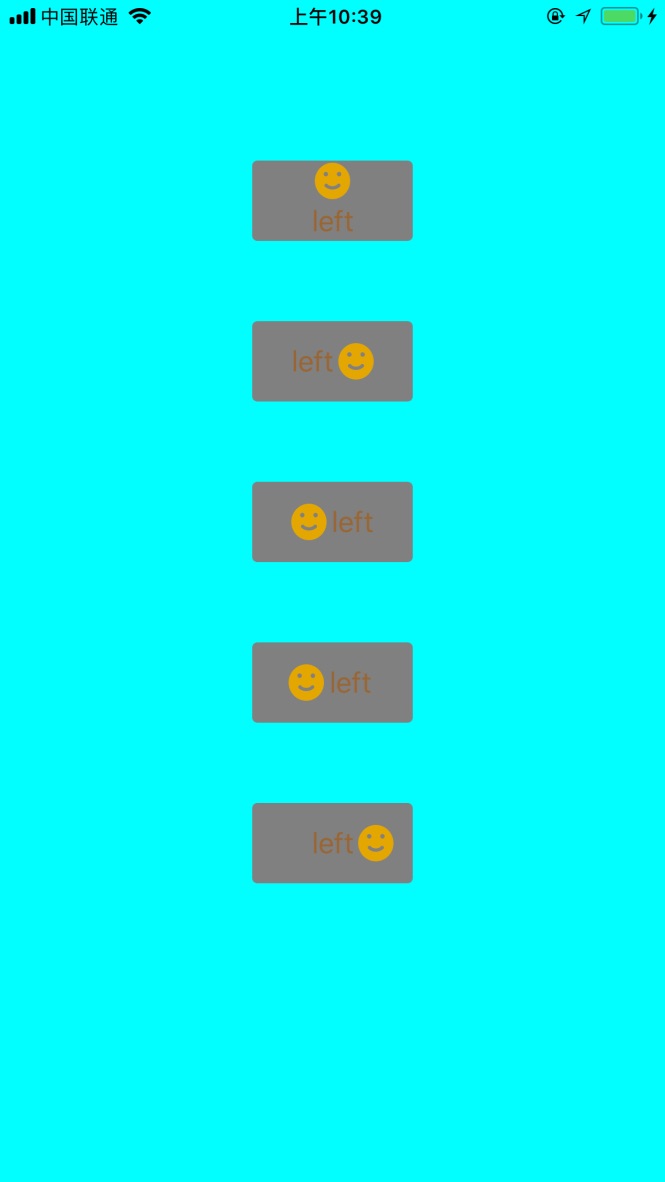
UIButton+LSAdditions.h
//

//  UIButton+LSAdditions.h

//  ZLBiPhone

//

//  Created by xujinzhong on 18/3/14.

//  Copyright (c) 2018年 xujinzhong. All rights reserved.

//

#import <UIKit/UIKit.h>

@interface UIButton (LSAdditions)

//设置背景颜色

- (void)setBackgroundColor:(UIColor *)backgroundColor forState:(UIControlState)state;

#pragma mark 按钮图片标题显示位置

//上下居中,图片在上,文字在下

- (void)verticalCenterImageAndTitle:(CGFloat)spacing;

- (void)verticalCenterImageAndTitle; //默认6.0

//左右居中,文字在左,图片在右

- (void)horizontalCenterTitleAndImage:(CGFloat)spacing;

- (void)horizontalCenterTitleAndImage; //默认6.0

//左右居中,图片在左,文字在右

- (void)horizontalCenterImageAndTitle:(CGFloat)spacing;

- (void)horizontalCenterImageAndTitle; //默认6.0

//文字居中,图片在左边

- (void)horizontalCenterTitleAndImageLeft:(CGFloat)spacing;

- (void)horizontalCenterTitleAndImageLeft; //默认6.0

//文字居中,图片在右边

- (void)horizontalCenterTitleAndImageRight:(CGFloat)spacing;

- (void)horizontalCenterTitleAndImageRight; //默认6.0

@end
UIButton+LSAdditions.m
//

//  UIButton+LSAdditions.m

//  ZLBiPhone

//

//  Created by xujinzhong on 18/6/14.

//  Copyright (c) 2018年 xujinzhong. All rights reserved.

//

#import "UIButton+LSAdditions.h"

@implementation UIButton (LSAddtions)

/**

 *  添加按钮的背景颜色

 *

 *  @return

 */

- (void)setBackgroundColor:(UIColor *)backgroundColor forState:(UIControlState)state {

    [self setBackgroundImage:[UIButton imageWithColor:backgroundColor] forState:state];

}

+ (UIImage *)imageWithColor:(UIColor *)color {

    CGRect rect = CGRectMake(0.0f, 0.0f, 1.0f, 1.0f);

    UIGraphicsBeginImageContext(rect.size);

    CGContextRef context = UIGraphicsGetCurrentContext();

    CGContextSetFillColorWithColor(context, [color CGColor]);

    CGContextFillRect(context, rect);

    UIImage *image = UIGraphicsGetImageFromCurrentImageContext();

    UIGraphicsEndImageContext();

    return image;

}

/**

 *  判断按钮是否按下

 *

 *  @return

 */

-(BOOL)isExclusiveTouch

{

    return YES;

}

#pragma mark 按钮图片标题显示位置

- (void)verticalCenterImageAndTitle:(CGFloat)spacing

{

    CGSize imageSize = self.imageView.frame.size;

    CGSize titleSize = self.titleLabel.frame.size;

    self.titleEdgeInsets = UIEdgeInsetsMake(0.0, - imageSize.width, - (imageSize.height + spacing/), 0.0);

    titleSize = self.titleLabel.frame.size;

    self.imageEdgeInsets = UIEdgeInsetsMake(- (titleSize.height + spacing/), 0.0, 0.0, - titleSize.width);

}

- (void)verticalCenterImageAndTitle

{

    const int DEFAULT_SPACING = 6.0f;

    [self verticalCenterImageAndTitle:DEFAULT_SPACING];

}

- (void)horizontalCenterTitleAndImage:(CGFloat)spacing

{

    CGSize imageSize = self.imageView.frame.size;

    CGSize titleSize = self.titleLabel.frame.size;

    self.titleEdgeInsets = UIEdgeInsetsMake(0.0, - imageSize.width, 0.0, imageSize.width + spacing/);

    titleSize = self.titleLabel.frame.size;

    self.imageEdgeInsets = UIEdgeInsetsMake(0.0, titleSize.width + spacing/, 0.0, - titleSize.width);

}

- (void)horizontalCenterTitleAndImage

{

    const int DEFAULT_SPACING = 6.0f;

    [self horizontalCenterTitleAndImage:DEFAULT_SPACING];

}

- (void)horizontalCenterImageAndTitle:(CGFloat)spacing;

{

    self.titleEdgeInsets = UIEdgeInsetsMake(0.0,  0.0, 0.0,  - spacing/);

    self.imageEdgeInsets = UIEdgeInsetsMake(0.0, - spacing/, 0.0, 0.0);

}

- (void)horizontalCenterImageAndTitle;

{

    const int DEFAULT_SPACING = 6.0f;

    [self horizontalCenterImageAndTitle:DEFAULT_SPACING];

}

- (void)horizontalCenterTitleAndImageLeft:(CGFloat)spacing

{

    self.imageEdgeInsets = UIEdgeInsetsMake(0.0, - spacing, 0.0, 0.0);

}

- (void)horizontalCenterTitleAndImageLeft

{

    const int DEFAULT_SPACING = 6.0f;

    [self horizontalCenterTitleAndImageLeft:DEFAULT_SPACING];

}

- (void)horizontalCenterTitleAndImageRight:(CGFloat)spacing

{

    CGSize imageSize = self.imageView.frame.size;

    CGSize titleSize = self.titleLabel.frame.size;

    self.titleEdgeInsets = UIEdgeInsetsMake(0.0, - imageSize.width, 0.0, 0.0);

    titleSize = self.titleLabel.frame.size;

    self.imageEdgeInsets = UIEdgeInsetsMake(0.0, titleSize.width + imageSize.width + spacing, 0.0, - titleSize.width);

}

- (void)horizontalCenterTitleAndImageRight

{

    const int DEFAULT_SPACING = 6.0f;

    [self horizontalCenterTitleAndImageRight:DEFAULT_SPACING];

}

@end
现在测试代码如下:
#define ktopDistance 50

#define kwidth  90

#define kheight 50
@interface ViewController ()

@property (nonatomic, strong) UIButton *btnOne;

@property (nonatomic, strong) UIButton *btnTwo;

@property (nonatomic, strong) UIButton *btnThree;

@property (nonatomic, strong) UIButton *btnFour;

@property (nonatomic, strong) UIButton *btnFive;

@end

@implementation ViewController

- (void)viewDidLoad {

    [super viewDidLoad];

    self.view.backgroundColor = [UIColor cyanColor];

    CGFloat spacing = .f;

    //上下居中,图片在上,文字在下

    [self.btnOne verticalCenterImageAndTitle:spacing];

    [self.btnOne verticalCenterImageAndTitle]; //默认6.0

    //左右居中,文字在左,图片在右

    [self.btnTwo horizontalCenterTitleAndImage:spacing];

    [self.btnTwo horizontalCenterTitleAndImage]; //默认6.0

    //左右居中,图片在左,文字在右

    [self.btnThree horizontalCenterImageAndTitle:spacing];

    [self.btnThree horizontalCenterImageAndTitle]; //默认6.0

    //文字居中,图片在左边

    [self.btnFour horizontalCenterTitleAndImageLeft:spacing];

    [self.btnFour horizontalCenterTitleAndImageLeft]; //默认6.0

    //文字居中,图片在右边

    [self.btnFive horizontalCenterTitleAndImageRight:spacing];

    [self.btnFive horizontalCenterTitleAndImageRight]; //默认6.0

}

-(UIButton *)btnOne{

    if (!_btnOne) {

        _btnOne = [UIButton new];

        _btnOne.backgroundColor = [UIColor grayColor];

        _btnOne.layer.cornerRadius = .f;

        _btnOne.layer.masksToBounds = YES;

        [_btnOne setTitle:@"left" forState:UIControlStateNormal];

        [_btnOne setImage:[UIImage imageNamed:@"success"] forState:UIControlStateNormal];

        [_btnOne setTitleColor:[UIColor brownColor] forState:UIControlStateNormal];

        [self.view addSubview:_btnOne];

        [_btnOne mas_makeConstraints:^(MASConstraintMaker *make) {

            make.top.offset();

            make.centerX.equalTo(self.view);

            make.width.offset(kwidth);

            make.height.offset(kheight);

        }];

    }

    return _btnOne;

}

-(UIButton *)btnTwo{

    if (!_btnTwo) {

        _btnTwo = [UIButton new];

        _btnTwo.backgroundColor = [UIColor grayColor];

        _btnTwo.layer.cornerRadius = .f;

        _btnTwo.layer.masksToBounds = YES;

        [_btnTwo setTitle:@"left" forState:UIControlStateNormal];

        [_btnTwo setImage:[UIImage imageNamed:@"success"] forState:UIControlStateNormal];

        [_btnTwo setTitleColor:[UIColor brownColor] forState:UIControlStateNormal];

        [self.view addSubview:_btnTwo];

        [_btnTwo mas_makeConstraints:^(MASConstraintMaker *make) {

            make.top.equalTo(self.btnOne.mas_bottom).offset(ktopDistance);

            make.centerX.equalTo(self.view);

            make.width.offset(kwidth);

            make.height.offset(kheight);

        }];

    }

    return _btnTwo;

}

-(UIButton *)btnThree{

    if (!_btnThree) {

        _btnThree = [UIButton new];

        _btnThree.backgroundColor = [UIColor grayColor];

        _btnThree.layer.cornerRadius = .f;

        _btnThree.layer.masksToBounds = YES;

        [_btnThree setTitle:@"left" forState:UIControlStateNormal];

        [_btnThree setImage:[UIImage imageNamed:@"success"] forState:UIControlStateNormal];

        [_btnThree setTitleColor:[UIColor brownColor] forState:UIControlStateNormal];

        [self.view addSubview:_btnThree];

        [_btnThree mas_makeConstraints:^(MASConstraintMaker *make) {

            make.top.equalTo(self.btnTwo.mas_bottom).offset(ktopDistance);

            make.centerX.equalTo(self.view);

            make.width.offset(kwidth);

            make.height.offset(kheight);

        }];

    }

    return _btnThree;

}

-(UIButton *)btnFour{

    if (!_btnFour) {

        _btnFour = [UIButton new];

        _btnFour.backgroundColor = [UIColor grayColor];

        _btnFour.layer.cornerRadius = .f;

        _btnFour.layer.masksToBounds = YES;

        [_btnFour setTitle:@"left" forState:UIControlStateNormal];

        [_btnFour setImage:[UIImage imageNamed:@"success"] forState:UIControlStateNormal];

        [_btnFour setTitleColor:[UIColor brownColor] forState:UIControlStateNormal];

        [self.view addSubview:_btnFour];

        [_btnFour mas_makeConstraints:^(MASConstraintMaker *make) {

            make.top.equalTo(self.btnThree.mas_bottom).offset(ktopDistance);

            make.centerX.equalTo(self.view);

            make.width.offset(kwidth);

            make.height.offset(kheight);

        }];

    }

    return _btnFour;

}

-(UIButton *)btnFive{

    if (!_btnFive) {

        _btnFive = [UIButton new];

        _btnFive.backgroundColor = [UIColor grayColor];

        _btnFive.layer.cornerRadius = .f;

        _btnFive.layer.masksToBounds = YES;

        [_btnFive setTitle:@"left" forState:UIControlStateNormal];

        [_btnFive setImage:[UIImage imageNamed:@"success"] forState:UIControlStateNormal];

        [_btnFive setTitleColor:[UIColor brownColor] forState:UIControlStateNormal];

        [self.view addSubview:_btnFive];

        [_btnFive mas_makeConstraints:^(MASConstraintMaker *make) {

            make.top.equalTo(self.btnFour.mas_bottom).offset(ktopDistance);

            make.centerX.equalTo(self.view);

            make.width.offset(kwidth);

            make.height.offset(kheight);

        }];

    }

    return _btnFive;

}

@end
UIButton 图片文字位置的更多相关文章
- UIButton图片文字位置的四种情况
我们在做项目的过程中经常会遇到各定制UIButton 1.左边图片,右边文字 2.左边文字,右边图片 3.上边图片,下边文字 4.上边文字,下边图片 针对这四种情况 使用UIButton的catego ...
- UIButton图片文字控件位置自定义(图片居右文字居左、图片居中文字居中、图片居左文字消失等)
在开发中经常会碰到需要对按钮中的图片文字位置做调整的需求.第一种方式是通过设置按钮中图片文字的偏移量.通过方法setTitleEdgeInsets和setImageEdgeInsets实现 代码如下: ...
- iOS UIButton 图片文字上下垂直布局 解决方案
实现如图所示效果: 这是一个UIButton,需要改变image和title相对位置. 解决如下: //设置文字偏移:向下偏移图片高度+向左偏移图片宽度 (偏移量是根据[图片]大小来的,这点是关键)b ...
- iOS UIButton 图片文字左右互移 位置对调 解决方案
实现类似效果: 代码实现: btnGrade.titleEdgeInsets = UIEdgeInsetsMake(, -(btnGrade.imageView?.bounds.width)!, , ...
- UIButton和UINavigationItem设置图片和文字位置
1.UIButton设置文字位置 有些时候我们想让UIButton的title居左对齐,我们设置 btn.textLabel.textAlignment = UITextAlignmentLeft 是 ...
- iOS·UIButton如何文字在下图片在上
创建子类继承自UIButton,在layoutSubviews方法中改变文字和图片的位置就可以了,同理,稍作改变,可以写出文字在上图片在下.本文只给出文字在下图片在上的代码 -(void)layout ...
- swift 第四课 随意 设置button 图片和文字 位置
项目中经常遇到按钮改变文字和图片位置的情况,所以尝试写一个 button 的分类: 参照连接 http://blog.csdn.net/dfqin/article/details/37813591 i ...
- UIButton的titleEdgeInsets属性和imageEdgeInsets属性实现图片文字按要求排列
button可以设置 titleEdgeInsets属性和 imageEdgeInsets属性来调整其image和label相对位置,具体参考http://stackoverflow.com/ques ...
- UIButton 设置图片文字垂直居中排列
#pragma mark 按钮图片文字垂直居中排列 -(void)setButtonContentCenter:(UIButton *)button { CGSize imgViewSize,titl ...
随机推荐
- makefile 使用【转载】
该篇文章为转载,是对原作者系列文章的总汇加上标注. 支持原创,请移步陈浩大神博客: http://blog.csdn.net/haoel/article/details/2886 makefile很重 ...
- lwip【6】LWIP使用经验
LWIP使用经验 一 LWIP内存管理 LWIP的内存管理使用了2种方式:内存池memp和内存堆mem,如图1所示. 内存池的特点是预先开辟多组固定大小的内存块组织成链表,实现简单,分配和回收速度快, ...
- sql web Admin 源码.net 升级
http://www.cnblogs.com/foundation/archive/2008/10/07/1305297.html
- java 原始类与封装类 的区别
int是java提供的8种原始数据类型之一.Java为每个原始类型提供了封装类,Integer是java为int提供的封装类.int的默认值为0,而Integer的默认值为null,即Integer可 ...
- excel批量提取网页标题
最近时间比较忙,有时候很多网页需要临时保存,以便空闲的时候查看.单纯的保存网页链接会让人很枯燥,所以需要自动批量提取标题. 为了这个小功能去写个小程序有点不划算,所以就利用excel实现了这个功能. ...
- dpdk学习笔记2
一 了解dpdk准备知识 1 NAT NAT技术是为了缓解IPV4地址枯竭得问题,通过使用NAT技术,一个机构如学校可以只用单一得公网IP来范文互联网,在外界看来只有一台接入公网得设备.NAT分为两种 ...
- C++ 定位构造
原创作品,允许转载,转载时请务必以超链接形式标明文章 原始出处 .作者信息和本声明.否则将追究法律责任.http://yiluohuanghun.blog.51cto.com/3407300/1258 ...
- [翻译]Nativescript 中 Web 视图与 Android/IOS 的双向通信
English document From http://shripalsoni.com/blog/nativescript-webview-native-bi-directional-communi ...
- 从网络架构方面简析循环神经网络RNN
一.前言 1.1 诞生原因 在普通的前馈神经网络(如多层感知机MLP,卷积神经网络CNN)中,每次的输入都是独立的,即网络的输出依赖且仅依赖于当前输入,与过去一段时间内网络的输出无关.但是在现实生活中 ...
- 《深度学习-改善深层神经网络》-第二周-优化算法-Andrew Ng
目录 1. Mini-batch gradient descent 1.1 算法原理 1.2 进一步理解Mini-batch gradient descent 1.3 TensorFlow中的梯度下降 ...