
UIButton 图片文字位置
在实际开发过程中经常在按钮上添加文字和图片,位置和图片的位置根据需求放置也是不一样的。下面实现了各种显示方式,如下图:
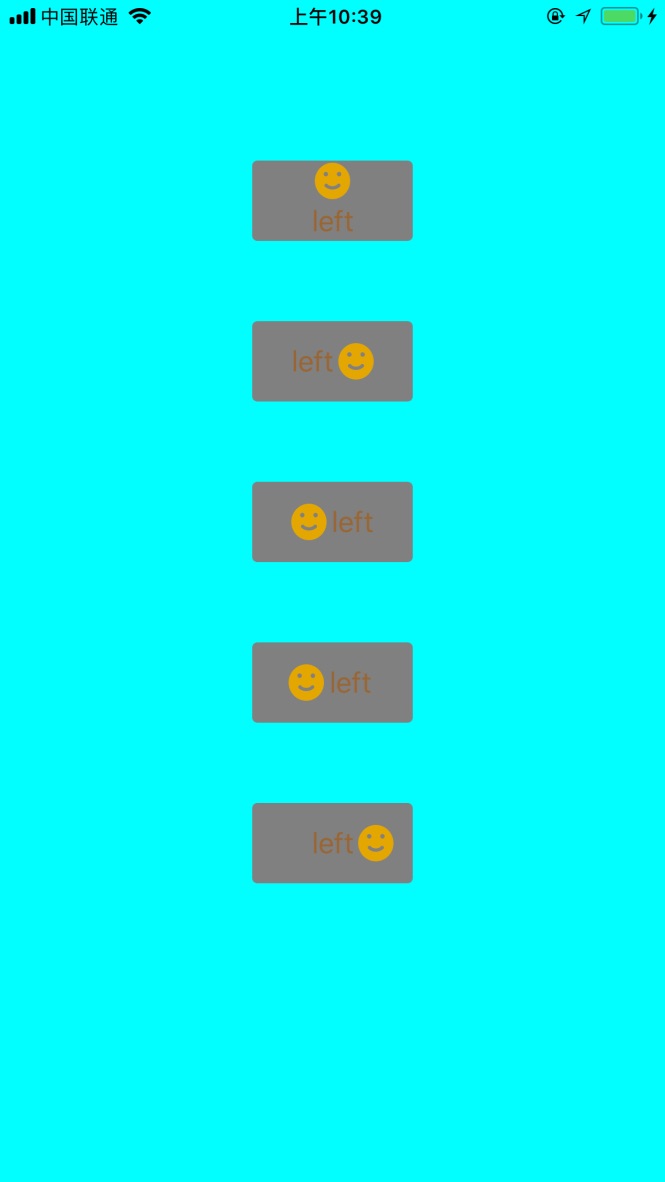
UIButton+LSAdditions.h
//

//  UIButton+LSAdditions.h

//  ZLBiPhone

//

//  Created by xujinzhong on 18/3/14.

//  Copyright (c) 2018年 xujinzhong. All rights reserved.

//

#import <UIKit/UIKit.h>

@interface UIButton (LSAdditions)

//设置背景颜色

- (void)setBackgroundColor:(UIColor *)backgroundColor forState:(UIControlState)state;

#pragma mark 按钮图片标题显示位置

//上下居中,图片在上,文字在下

- (void)verticalCenterImageAndTitle:(CGFloat)spacing;

- (void)verticalCenterImageAndTitle; //默认6.0

//左右居中,文字在左,图片在右

- (void)horizontalCenterTitleAndImage:(CGFloat)spacing;

- (void)horizontalCenterTitleAndImage; //默认6.0

//左右居中,图片在左,文字在右

- (void)horizontalCenterImageAndTitle:(CGFloat)spacing;

- (void)horizontalCenterImageAndTitle; //默认6.0

//文字居中,图片在左边

- (void)horizontalCenterTitleAndImageLeft:(CGFloat)spacing;

- (void)horizontalCenterTitleAndImageLeft; //默认6.0

//文字居中,图片在右边

- (void)horizontalCenterTitleAndImageRight:(CGFloat)spacing;

- (void)horizontalCenterTitleAndImageRight; //默认6.0

@end
UIButton+LSAdditions.m
//

//  UIButton+LSAdditions.m

//  ZLBiPhone

//

//  Created by xujinzhong on 18/6/14.

//  Copyright (c) 2018年 xujinzhong. All rights reserved.

//

#import "UIButton+LSAdditions.h"

@implementation UIButton (LSAddtions)

/**

 *  添加按钮的背景颜色

 *

 *  @return

 */

- (void)setBackgroundColor:(UIColor *)backgroundColor forState:(UIControlState)state {

    [self setBackgroundImage:[UIButton imageWithColor:backgroundColor] forState:state];

}

+ (UIImage *)imageWithColor:(UIColor *)color {

    CGRect rect = CGRectMake(0.0f, 0.0f, 1.0f, 1.0f);

    UIGraphicsBeginImageContext(rect.size);

    CGContextRef context = UIGraphicsGetCurrentContext();

    CGContextSetFillColorWithColor(context, [color CGColor]);

    CGContextFillRect(context, rect);

    UIImage *image = UIGraphicsGetImageFromCurrentImageContext();

    UIGraphicsEndImageContext();

    return image;

}

/**

 *  判断按钮是否按下

 *

 *  @return

 */

-(BOOL)isExclusiveTouch

{

    return YES;

}

#pragma mark 按钮图片标题显示位置

- (void)verticalCenterImageAndTitle:(CGFloat)spacing

{

    CGSize imageSize = self.imageView.frame.size;

    CGSize titleSize = self.titleLabel.frame.size;

    self.titleEdgeInsets = UIEdgeInsetsMake(0.0, - imageSize.width, - (imageSize.height + spacing/), 0.0);

    titleSize = self.titleLabel.frame.size;

    self.imageEdgeInsets = UIEdgeInsetsMake(- (titleSize.height + spacing/), 0.0, 0.0, - titleSize.width);

}

- (void)verticalCenterImageAndTitle

{

    const int DEFAULT_SPACING = 6.0f;

    [self verticalCenterImageAndTitle:DEFAULT_SPACING];

}

- (void)horizontalCenterTitleAndImage:(CGFloat)spacing

{

    CGSize imageSize = self.imageView.frame.size;

    CGSize titleSize = self.titleLabel.frame.size;

    self.titleEdgeInsets = UIEdgeInsetsMake(0.0, - imageSize.width, 0.0, imageSize.width + spacing/);

    titleSize = self.titleLabel.frame.size;

    self.imageEdgeInsets = UIEdgeInsetsMake(0.0, titleSize.width + spacing/, 0.0, - titleSize.width);

}

- (void)horizontalCenterTitleAndImage

{

    const int DEFAULT_SPACING = 6.0f;

    [self horizontalCenterTitleAndImage:DEFAULT_SPACING];

}

- (void)horizontalCenterImageAndTitle:(CGFloat)spacing;

{

    self.titleEdgeInsets = UIEdgeInsetsMake(0.0,  0.0, 0.0,  - spacing/);

    self.imageEdgeInsets = UIEdgeInsetsMake(0.0, - spacing/, 0.0, 0.0);

}

- (void)horizontalCenterImageAndTitle;

{

    const int DEFAULT_SPACING = 6.0f;

    [self horizontalCenterImageAndTitle:DEFAULT_SPACING];

}

- (void)horizontalCenterTitleAndImageLeft:(CGFloat)spacing

{

    self.imageEdgeInsets = UIEdgeInsetsMake(0.0, - spacing, 0.0, 0.0);

}

- (void)horizontalCenterTitleAndImageLeft

{

    const int DEFAULT_SPACING = 6.0f;

    [self horizontalCenterTitleAndImageLeft:DEFAULT_SPACING];

}

- (void)horizontalCenterTitleAndImageRight:(CGFloat)spacing

{

    CGSize imageSize = self.imageView.frame.size;

    CGSize titleSize = self.titleLabel.frame.size;

    self.titleEdgeInsets = UIEdgeInsetsMake(0.0, - imageSize.width, 0.0, 0.0);

    titleSize = self.titleLabel.frame.size;

    self.imageEdgeInsets = UIEdgeInsetsMake(0.0, titleSize.width + imageSize.width + spacing, 0.0, - titleSize.width);

}

- (void)horizontalCenterTitleAndImageRight

{

    const int DEFAULT_SPACING = 6.0f;

    [self horizontalCenterTitleAndImageRight:DEFAULT_SPACING];

}

@end
现在测试代码如下:
#define ktopDistance 50

#define kwidth  90

#define kheight 50
@interface ViewController ()

@property (nonatomic, strong) UIButton *btnOne;

@property (nonatomic, strong) UIButton *btnTwo;

@property (nonatomic, strong) UIButton *btnThree;

@property (nonatomic, strong) UIButton *btnFour;

@property (nonatomic, strong) UIButton *btnFive;

@end

@implementation ViewController

- (void)viewDidLoad {

    [super viewDidLoad];

    self.view.backgroundColor = [UIColor cyanColor];

    CGFloat spacing = .f;

    //上下居中,图片在上,文字在下

    [self.btnOne verticalCenterImageAndTitle:spacing];

    [self.btnOne verticalCenterImageAndTitle]; //默认6.0

    //左右居中,文字在左,图片在右

    [self.btnTwo horizontalCenterTitleAndImage:spacing];

    [self.btnTwo horizontalCenterTitleAndImage]; //默认6.0

    //左右居中,图片在左,文字在右

    [self.btnThree horizontalCenterImageAndTitle:spacing];

    [self.btnThree horizontalCenterImageAndTitle]; //默认6.0

    //文字居中,图片在左边

    [self.btnFour horizontalCenterTitleAndImageLeft:spacing];

    [self.btnFour horizontalCenterTitleAndImageLeft]; //默认6.0

    //文字居中,图片在右边

    [self.btnFive horizontalCenterTitleAndImageRight:spacing];

    [self.btnFive horizontalCenterTitleAndImageRight]; //默认6.0

}

-(UIButton *)btnOne{

    if (!_btnOne) {

        _btnOne = [UIButton new];

        _btnOne.backgroundColor = [UIColor grayColor];

        _btnOne.layer.cornerRadius = .f;

        _btnOne.layer.masksToBounds = YES;

        [_btnOne setTitle:@"left" forState:UIControlStateNormal];

        [_btnOne setImage:[UIImage imageNamed:@"success"] forState:UIControlStateNormal];

        [_btnOne setTitleColor:[UIColor brownColor] forState:UIControlStateNormal];

        [self.view addSubview:_btnOne];

        [_btnOne mas_makeConstraints:^(MASConstraintMaker *make) {

            make.top.offset();

            make.centerX.equalTo(self.view);

            make.width.offset(kwidth);

            make.height.offset(kheight);

        }];

    }

    return _btnOne;

}

-(UIButton *)btnTwo{

    if (!_btnTwo) {

        _btnTwo = [UIButton new];

        _btnTwo.backgroundColor = [UIColor grayColor];

        _btnTwo.layer.cornerRadius = .f;

        _btnTwo.layer.masksToBounds = YES;

        [_btnTwo setTitle:@"left" forState:UIControlStateNormal];

        [_btnTwo setImage:[UIImage imageNamed:@"success"] forState:UIControlStateNormal];

        [_btnTwo setTitleColor:[UIColor brownColor] forState:UIControlStateNormal];

        [self.view addSubview:_btnTwo];

        [_btnTwo mas_makeConstraints:^(MASConstraintMaker *make) {

            make.top.equalTo(self.btnOne.mas_bottom).offset(ktopDistance);

            make.centerX.equalTo(self.view);

            make.width.offset(kwidth);

            make.height.offset(kheight);

        }];

    }

    return _btnTwo;

}

-(UIButton *)btnThree{

    if (!_btnThree) {

        _btnThree = [UIButton new];

        _btnThree.backgroundColor = [UIColor grayColor];

        _btnThree.layer.cornerRadius = .f;

        _btnThree.layer.masksToBounds = YES;

        [_btnThree setTitle:@"left" forState:UIControlStateNormal];

        [_btnThree setImage:[UIImage imageNamed:@"success"] forState:UIControlStateNormal];

        [_btnThree setTitleColor:[UIColor brownColor] forState:UIControlStateNormal];

        [self.view addSubview:_btnThree];

        [_btnThree mas_makeConstraints:^(MASConstraintMaker *make) {

            make.top.equalTo(self.btnTwo.mas_bottom).offset(ktopDistance);

            make.centerX.equalTo(self.view);

            make.width.offset(kwidth);

            make.height.offset(kheight);

        }];

    }

    return _btnThree;

}

-(UIButton *)btnFour{

    if (!_btnFour) {

        _btnFour = [UIButton new];

        _btnFour.backgroundColor = [UIColor grayColor];

        _btnFour.layer.cornerRadius = .f;

        _btnFour.layer.masksToBounds = YES;

        [_btnFour setTitle:@"left" forState:UIControlStateNormal];

        [_btnFour setImage:[UIImage imageNamed:@"success"] forState:UIControlStateNormal];

        [_btnFour setTitleColor:[UIColor brownColor] forState:UIControlStateNormal];

        [self.view addSubview:_btnFour];

        [_btnFour mas_makeConstraints:^(MASConstraintMaker *make) {

            make.top.equalTo(self.btnThree.mas_bottom).offset(ktopDistance);

            make.centerX.equalTo(self.view);

            make.width.offset(kwidth);

            make.height.offset(kheight);

        }];

    }

    return _btnFour;

}

-(UIButton *)btnFive{

    if (!_btnFive) {

        _btnFive = [UIButton new];

        _btnFive.backgroundColor = [UIColor grayColor];

        _btnFive.layer.cornerRadius = .f;

        _btnFive.layer.masksToBounds = YES;

        [_btnFive setTitle:@"left" forState:UIControlStateNormal];

        [_btnFive setImage:[UIImage imageNamed:@"success"] forState:UIControlStateNormal];

        [_btnFive setTitleColor:[UIColor brownColor] forState:UIControlStateNormal];

        [self.view addSubview:_btnFive];

        [_btnFive mas_makeConstraints:^(MASConstraintMaker *make) {

            make.top.equalTo(self.btnFour.mas_bottom).offset(ktopDistance);

            make.centerX.equalTo(self.view);

            make.width.offset(kwidth);

            make.height.offset(kheight);

        }];

    }

    return _btnFive;

}

@end
UIButton 图片文字位置的更多相关文章
- UIButton图片文字位置的四种情况
我们在做项目的过程中经常会遇到各定制UIButton 1.左边图片,右边文字 2.左边文字,右边图片 3.上边图片,下边文字 4.上边文字,下边图片 针对这四种情况 使用UIButton的catego ...
- UIButton图片文字控件位置自定义(图片居右文字居左、图片居中文字居中、图片居左文字消失等)
在开发中经常会碰到需要对按钮中的图片文字位置做调整的需求.第一种方式是通过设置按钮中图片文字的偏移量.通过方法setTitleEdgeInsets和setImageEdgeInsets实现 代码如下: ...
- iOS UIButton 图片文字上下垂直布局 解决方案
实现如图所示效果: 这是一个UIButton,需要改变image和title相对位置. 解决如下: //设置文字偏移:向下偏移图片高度+向左偏移图片宽度 (偏移量是根据[图片]大小来的,这点是关键)b ...
- iOS UIButton 图片文字左右互移 位置对调 解决方案
实现类似效果: 代码实现: btnGrade.titleEdgeInsets = UIEdgeInsetsMake(, -(btnGrade.imageView?.bounds.width)!, , ...
- UIButton和UINavigationItem设置图片和文字位置
1.UIButton设置文字位置 有些时候我们想让UIButton的title居左对齐,我们设置 btn.textLabel.textAlignment = UITextAlignmentLeft 是 ...
- iOS·UIButton如何文字在下图片在上
创建子类继承自UIButton,在layoutSubviews方法中改变文字和图片的位置就可以了,同理,稍作改变,可以写出文字在上图片在下.本文只给出文字在下图片在上的代码 -(void)layout ...
- swift 第四课 随意 设置button 图片和文字 位置
项目中经常遇到按钮改变文字和图片位置的情况,所以尝试写一个 button 的分类: 参照连接 http://blog.csdn.net/dfqin/article/details/37813591 i ...
- UIButton的titleEdgeInsets属性和imageEdgeInsets属性实现图片文字按要求排列
button可以设置 titleEdgeInsets属性和 imageEdgeInsets属性来调整其image和label相对位置,具体参考http://stackoverflow.com/ques ...
- UIButton 设置图片文字垂直居中排列
#pragma mark 按钮图片文字垂直居中排列 -(void)setButtonContentCenter:(UIButton *)button { CGSize imgViewSize,titl ...
随机推荐
- Camera Vision - video surveillance on C#
转自:http://blog.csdn.net/xyz_lmn/article/details/6072897 http://www.codeproject.com/KB/audio-video/ca ...
- python的logging模块详细使用demo
import logging import os from logging import handlers from datetime import datetime class MyLog(): d ...
- [codeforces161D]Distance in Tree(点分治/树形dp)
题意:求树上距离为k的点对个数: 解题关键:练习一下点分治不用容斥 而直接做的做法.注意先查询,后更新. 不过这个方法有个缺陷,每次以一个新节点为根,必须memset mp数组,或许使用map会好些, ...
- VR虚拟现实眼镜那些事
今天是2014.3.20,笔者从oculus官网订了DK2(第二代开发版) 评测视频http://v.youku.com/v_show/id_XNjg3NTUzOTk2.html 想想从哪说起呢... ...
- 报错:在做往下拉选里面拼接数据的时候 3个下拉选显示一个值 原因 @scope(单例)或者没配默认单例
解决 @scope(多例) 这是因为造成线程并发访问不安全
- SpringBoot使用拦截器无效
附上代码: public class WendaWebConfiguration extends WebMvcConfigurerAdapter { @Autowired PassportInterc ...
- hdu 3037 费马小定理+逆元除法取模+Lucas定理
组合数学推推推最后,推得要求C(n+m,m)%p 其中n,m小于10^9,p小于1^5 用Lucas定理求(Lucas定理求nm较大时的组合数) 因为p数据较小可以直接阶乘打表求逆元 求逆元时,由费马 ...
- udp通信的消息处理方案
0.引言 大家都知道当使用udp通信时,最大的一个问题是会出现丢包的情况,那么如何可以既使用udp来传输,又同时能有效防止丢包呢? 本文提供一种简单有效的方法,可以显著避免udp丢包的问题.此外,如果 ...
- [Xcode 实际操作]六、媒体与动画-(5)使用CoreImage框架给图片添加马赛克效果
目录:[Swift]Xcode实际操作 本文将演示如何使用CoreImage图像处理框架,给图片添加像素化的滤镜效果. 在项目导航区,打开视图控制器的代码文件[ViewController.swift ...
- SpringBoot配置属性二
server配置 server.address指定server绑定的地址 server.compression.enabled是否开启压缩,默认为false. server.compression.e ...